
1. Introduction
The Huepar TLM60 Digital Laser Tape Measure 4-in-1 is a versatile measuring tool designed for precision and efficiency in various applications, including home improvement, construction, and DIY projects. This device integrates a digital tape measure, a laser distance meter, and a green cross-line laser, offering multiple measurement modes and features for accurate results.
2. Safety Information
WARNING: LASER RADIATION
This product emits Class 2 laser radiation. Avoid direct eye exposure. Do not stare directly into the laser beam. Do not aim the laser beam at people or animals. Use caution when operating the device to prevent accidental exposure. Always store the device out of reach of children.
Adhere to all local safety regulations and guidelines when using laser measuring equipment.
3. What's in the Box
- TLM60 Digital Laser Tape Measure 4-in-1
- 1 x Type-C Cable
- 1 x Lanyard
- 1 x Cloth Bag
- 1 x Instruction Manual
4. Product Overview

Figure 1: The Huepar TLM60 combines laser distance measurement, digital tape, and cross-line laser functions.

Figure 2: Dual backlit LCD screens provide clear readings from multiple angles. Users can switch between black and white display modes for optimal visibility.
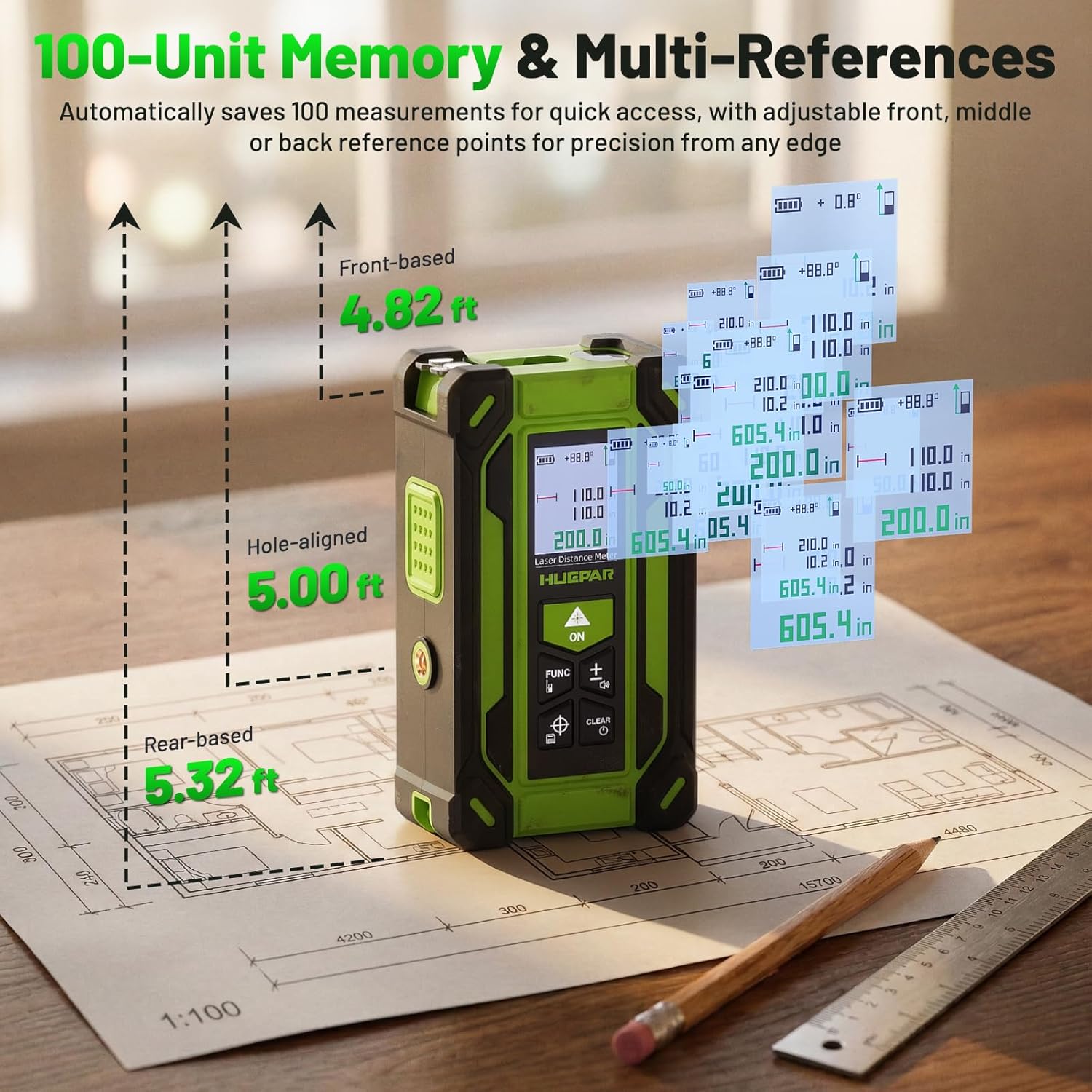
Figure 3: The device saves up to 100 measurements for quick recall and supports multiple reference points (front, rear, screw hole) for flexible measuring.

Figure 4: The self-locking tape automatically holds its position when extended, allowing for precise one-handed measurements. It retracts instantly with a single button.

Figure 5: Powered by a built-in 3.7V 600mAh rechargeable lithium battery, supporting over 5,000 measurements per charge and up to 2 hours of continuous cross-line laser use. Features convenient Type-C charging.

Figure 6: The highly visible green cross-line laser assists in seamless alignment for tasks like picture hanging and home DIYs.

Figure 7: The device offers 9 laser measurement modes, including distance, area, volume, and indirect height using Pythagorean calculations.
Video 1: An overview demonstrating the various functions and applications of the Huepar Digital Laser Tape Measure 4-in-1, including its digital tape, laser measure, and cross-line laser capabilities.
5. Setup
5.1 Charging the Device
Before first use, fully charge the device using the provided Type-C cable. Connect the cable to the Type-C port on the device and a compatible USB power source. The battery indicator on the display will show charging status.
5.2 Power On/Off
- To power on: Press the ON button.
- To power off: Press and hold the CLEAR button for a few seconds, or the device will auto shut-off after 120 seconds of inactivity to save battery.
5.3 Unit Selection
Press the FUNC button repeatedly to cycle through the available measurement units (ft, ft+in, in, m, cm, mm).
5.4 Reference Point Selection
The device supports 3 reference points: front, rear, and screw hole. Press the reference point button (often integrated with another function button, refer to on-screen icons) to select the desired measurement origin. This is crucial for accurate measurements from different edges.
6. Operating Instructions
6.1 Digital Tape Measure
- Pull out the physical tape measure from the side of the device.
- The self-locking mechanism will hold the tape in place.
- Read the measurement directly from the digital display on the device.
- To retract the tape, press the retraction button located on the side of the device.
6.2 Laser Distance Measurement
- Ensure the device is powered on.
- Point the laser at the target surface.
- Press the ON button once to activate the laser.
- Press the ON button again to take a single measurement. The result will appear on the display.
6.3 Advanced Laser Measurement Modes
Press the FUNC button to cycle through the 9 available measurement modes:
- Distance Measurement: Measures the linear distance between two points.
- Area Measurement: Measures the area of a rectangular space (length x width).
- Volume Measurement: Measures the volume of a space (length x width x height).
- Pythagorean Mode (Indirect Height): Calculates height indirectly using two or three measurements.
- Wall Area Measurement: Calculates the total area of multiple walls.
- Continuous Measurement (Min/Max): Tracks the minimum and maximum distances as you move the device, useful for finding shortest/longest distances or diagonals.
Follow the on-screen prompts for each mode to input the required measurements.
6.4 Green Cross-Line Laser
- Press the dedicated cross-line laser button (often indicated by a target icon) to activate the green cross-line laser.
- The laser projects horizontal and vertical lines for alignment tasks.
- The device also displays real-time angle measurements to assist with leveling.
- Press the cross-line laser button again to deactivate.
7. Maintenance
- Keep the device clean and dry. Use a soft, damp cloth to wipe the exterior.
- Do not use abrasive cleaners or solvents.
- Clean the laser lens with a soft, lint-free cloth to ensure accurate measurements.
- Store the device in the provided cloth bag when not in use to protect it from dust and damage.
- Regularly charge the battery to maintain its lifespan, even if not in frequent use.
8. Troubleshooting
| Problem | Possible Cause | Solution |
|---|---|---|
| Device does not power on | Low battery; Device malfunction | Charge the device fully. If problem persists, contact support. |
| Inaccurate measurements | Dirty laser lens; Incorrect reference point; Unstable surface; Environmental factors (e.g., strong light) | Clean the laser lens. Verify the selected reference point. Ensure a stable measurement surface. Avoid direct sunlight or highly reflective surfaces. |
| Laser beam not visible | Strong ambient light; Laser not activated | Use in lower light conditions. Ensure the laser is activated by pressing the appropriate button. |
| Tape measure does not retract | Mechanism jammed; Retraction button not fully pressed | Ensure the retraction button is fully pressed. Gently guide the tape back if it appears jammed. Do not force. |
9. Specifications
- Brand: Huepar
- Model Number: TLM60
- Color: Black
- Material: ABS Plastic
- Measuring Range (Laser): Up to 200ft (61 meters)
- Tape Measure Length: 10ft
- Laser Accuracy: ±1/16 inch
- Tape Accuracy: ±1/16 inch
- Angle Accuracy: ±1°
- Leveling Precision: ±1/9 inch
- Battery: Built-in 3.7V 600mAh rechargeable lithium battery
- Charging Port: Type-C
- Memory: Up to 100 measurements
- Measurement Units: ft, ft+in, in, m, cm, mm
- Weight: 0.49 Pounds
10. Warranty and Support
The Huepar TLM60 Digital Laser Tape Measure 4-in-1 comes with a 5-year warranty, which includes free repair or replacement for quality issues. For any inquiries or assistance, the 24/7 support team is available to respond within 24 hours and provide solutions within 48 hours. Lifetime technical support and global service centers are also available to ensure fast and hassle-free assistance.