
1. Introduction
Thank you for choosing the Audster Portable Karaoke Speaker AUD-S305. This compact and versatile device is designed to provide an enjoyable karaoke experience with its wireless microphone, vibrant RGB LED lights, Bluetooth connectivity, and long-lasting rechargeable battery. This manual will guide you through the features, setup, and operation of your new karaoke speaker.
2. Safety Information
- Read all instructions before using the product.
- Keep the speaker away from water, moisture, and extreme temperatures.
- Do not attempt to disassemble or repair the unit yourself. Refer all servicing to qualified personnel.
- Use only the provided charging cable or a certified Type-C cable for charging.
- Avoid prolonged exposure to loud volumes to prevent hearing damage.
- Keep out of reach of small children.
3. Package Contents
Please check the package for the following items:
- Audster Portable Karaoke Speaker (AUD-S305)
- Wireless Microphone
- USB Type-C Charging Cable
- User Manual
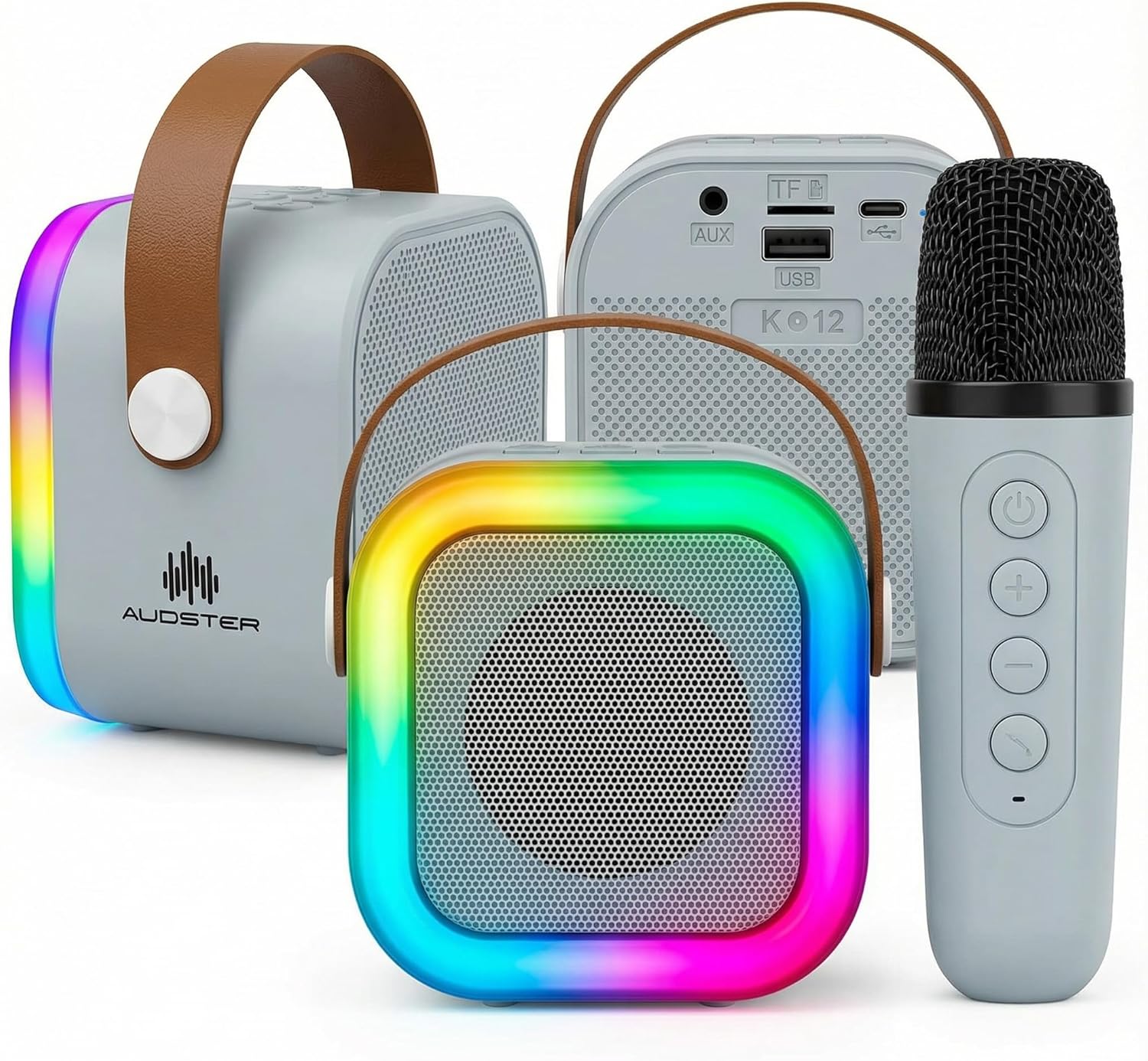
Image: The Audster Portable Karaoke Speaker (blue variant) shown with its accompanying wireless microphone.
4. Product Overview
4.1 Speaker Controls and Ports

Image: Diagram showing the controls on the top of the speaker and the ports on the back (AUX, TF Card, USB, Type-C Charging).
- MODE Button (M): Switches between Bluetooth, AUX, TF Card, and USB modes.
- VOL- / Previous Track Button: Short press for previous track, long press to decrease volume.
- VOL+ / Next Track Button: Short press for next track, long press to increase volume.
- LIGHT Button: Toggles RGB LED light effects.
- MICROPHONE Button: Activates/deactivates microphone input.
- POWER/PLAY/PAUSE Button: Long press to power on/off, short press to play/pause music.
- AUX Port: For wired audio input.
- TF Card Slot: For playing music from a MicroSD card.
- USB Port: For playing music from a USB flash drive.
- CHARGING (Type-C) Port: For charging the speaker.
4.2 Wireless Microphone Controls
- POWER/MUTE Button: Long press to power on/off, short press to mute/unmute the microphone.
- VOL+ Button: Increases microphone volume.
- VOL- Button: Decreases microphone volume.
- ECHO/REVERB Button: Adjusts the echo effect level.
5. Setup
5.1 Charging the Speaker
- Connect the provided USB Type-C charging cable to the speaker's CHARGING port.
- Connect the other end of the cable to a USB power adapter (not included) or a computer's USB port.
- The charging indicator light will illuminate. Once fully charged, the light will change or turn off (refer to specific product indicator behavior).
5.2 Charging the Wireless Microphone
The wireless microphone also has a built-in rechargeable battery. Connect it to a USB power source using its dedicated charging port (usually Micro-USB or Type-C, depending on the model) and cable (if provided).
5.3 Powering On/Off
- Speaker: Long press the POWER/PLAY/PAUSE button on the speaker.
- Microphone: Long press the POWER/MUTE button on the microphone.
5.4 Bluetooth Connection
- Ensure the speaker is powered on and in Bluetooth mode (press the MODE button if necessary). The speaker will indicate it's ready for pairing (e.g., a flashing LED or voice prompt).
- On your smartphone, tablet, or other Bluetooth device, go to the Bluetooth settings.
- Search for available devices and select "AUD-S305" (or similar name) from the list.
- Once connected, the speaker will provide an audible confirmation.
5.5 Microphone Pairing
The wireless microphone should automatically pair with the speaker when both are powered on. If not, ensure both devices are charged and within range. Some models may require a short press of the microphone button on the speaker to activate the microphone input.
6. Operating Instructions
6.1 Playing Music
- Bluetooth: After connecting via Bluetooth (Section 5.4), play music from your paired device. Use the speaker's VOL+/- buttons for volume or your device's controls.
- AUX Input: Connect an audio cable (not included) from your device's headphone jack to the speaker's AUX port. Press the MODE button to select AUX mode.
- TF Card/USB Drive: Insert a MicroSD card into the TF Card Slot or a USB flash drive into the USB Port. The speaker will automatically switch to the corresponding mode and begin playing music. If not, press the MODE button.
6.2 Using the Wireless Microphone
- Ensure the microphone is powered on and paired with the speaker.
- Adjust the microphone's volume using the VOL+/- buttons on the microphone.
- Press the ECHO/REVERB button on the microphone to cycle through different echo effects.
- To temporarily mute the microphone, short press the POWER/MUTE button on the microphone.
6.3 RGB LED Lights
Press the LIGHT button on the speaker to turn the RGB LED lights on/off or to cycle through different light modes and patterns.
7. Maintenance
- Clean the speaker and microphone with a soft, dry cloth. Do not use abrasive cleaners or solvents.
- Store the device in a cool, dry place when not in use.
- Avoid dropping the speaker or microphone, as this can cause internal damage.
- Charge the battery regularly, even if not in frequent use, to maintain battery health.
8. Troubleshooting
| Problem | Solution |
|---|---|
| Speaker does not power on. | Ensure the speaker is fully charged. Long press the power button. |
| No sound from the speaker. | Check volume levels on both the speaker and your connected device. Ensure the correct mode (Bluetooth, AUX, etc.) is selected. |
| Microphone not working. | Ensure the microphone is charged and powered on. Check microphone volume. Press the microphone button on the speaker to activate input. |
| Bluetooth connection fails. | Ensure the speaker is in Bluetooth pairing mode. Turn off and on Bluetooth on your device. Forget the device and try pairing again. Keep devices within range. |
| LED lights not working. | Press the LIGHT button to activate or cycle through modes. Ensure the speaker is powered on. |
9. Specifications
- Brand: Audster
- Model Name: AUD-S305
- Connectivity Technology: Auxiliary, Bluetooth, USB
- Connector Type: USB Type C (for charging)
- Power Source: Battery Powered
- Included Components: Microphone
- Special Features: Light Up Speaker, Lightweight, Portable, Rechargeable, SD Card Slot
- Item Weight: 16 ounces
- Item Dimensions (D x W x H): 2.76"D x 5.31"W x 4.92"H
- Compatible Devices: Smartphone, Tablet
10. Warranty and Support
Audster products are designed for quality and reliability. For warranty information, technical support, or any questions regarding your Audster Portable Karaoke Speaker AUD-S305, please refer to the contact information provided on the product packaging or visit the official Audster website. Please retain your proof of purchase for warranty claims.
Online Support: Visit the Audster Store on Amazon


