1. Introduction
Thank you for choosing the Generic Architect 36-in-1 Magic Change Building Blocks Set. This versatile construction toy is designed to inspire creativity and develop problem-solving skills through hands-on building. With this set, you can construct 36 different models, ranging from vehicles and robots to various creatures. This manual provides general guidance for setup, operation, maintenance, and troubleshooting. For detailed step-by-step instructions for each specific model, please refer to the dedicated instruction manual included in your product box.
2. Product Overview
The Architect 36-in-1 Magic Change Building Blocks Set offers a unique building experience, allowing transformation between numerous designs from a single collection of blocks. The set features high-quality, interlocking plastic bricks in a black, orange, and blue color scheme, designed for secure and stable construction. It encourages the development of fine motor skills, spatial awareness, and an understanding of basic engineering principles.
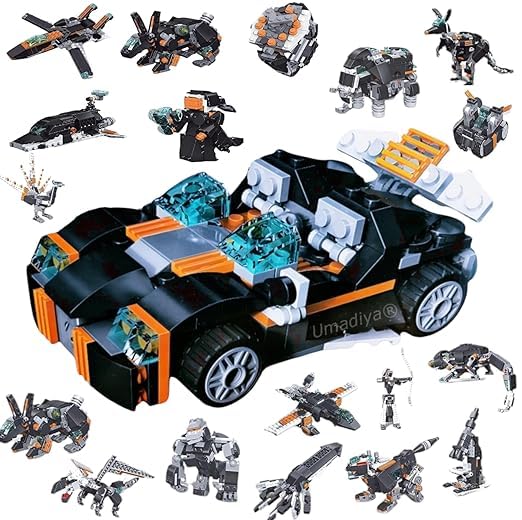
Image: The product box alongside several completed models, showcasing the variety of creations possible with the Architect 36-in-1 set.
3. What's in the Box
Carefully unpack the contents and verify that all components are present:
- Building Blocks (approximately 350 pieces)
- Instruction Manual (for specific model builds)
Note: The included instruction manual provides detailed steps for constructing each of the 36 models. This document serves as a general guide.
4. Setup
- Unpack Components: Remove all building blocks and the instruction manual from the packaging.
- Organize Blocks: For easier building, sort the blocks by color or shape. This step is optional but can significantly streamline the construction process.
- Prepare Workspace: Ensure a clean, flat, and well-lit surface for assembly. This prevents loss of small parts and provides a stable building area.
5. Operating Instructions (Building Models)
The core function of this set is to build various models. Follow these general steps:
- Select a Model: Choose one of the 36 available models you wish to build. Refer to the images below for examples of the diverse models possible.
- Consult the Included Manual: Locate the specific building instructions for your chosen model in the dedicated instruction manual provided with the set. This manual contains detailed, step-by-step diagrams.
- Follow Steps Carefully: Assemble the blocks according to the diagrams. Pay attention to the color and orientation of each piece.
- Secure Connections: Ensure all blocks are firmly pressed together to create a stable structure.
- Transforming Models: To build a different model, carefully disassemble the current creation and reuse the blocks for a new design. This "magic change" feature allows for continuous play and exploration.

Image: A comprehensive display of all 36 unique models that can be constructed from the building blocks set, including various robots, vehicles, and creatures.

Image: A child interacting with the product, demonstrating the engaging nature of the building set.
6. Maintenance
- Cleaning: To clean the blocks, wipe them with a damp cloth. Avoid using harsh chemicals or abrasive cleaners. Ensure blocks are completely dry before storage.
- Storage: Store the building blocks in a cool, dry place away from direct sunlight. Keep them in their original box or a designated storage container to prevent loss of pieces.
- Inspection: Periodically inspect blocks for any damage or wear. Discard any broken pieces to ensure safety.
7. Troubleshooting
- Missing Pieces: If you believe pieces are missing, double-check the packaging and your workspace. Small pieces can sometimes be overlooked.
- Difficulty Connecting Blocks: Ensure blocks are aligned correctly before applying pressure. If a block is particularly stiff, try wiggling it gently while pressing. Avoid excessive force to prevent damage.
- Model Instability: Review the building steps in the included instruction manual to ensure all connections are made correctly and securely. Loose connections can lead to unstable models.
8. Specifications
| Model Number | Arch-36in1-mc |
| Number of Pieces | Approximately 350 |
| Material Type | Plastic |
| Color | Multicolor (Black, Orange, Blue accents) |
| Product Dimensions | 26 x 6 x 31 cm |
| Item Weight | 650 g |
| Recommended Age | 18 months - 3 years (Manufacturer's recommendation) |
| Assembly Required | Yes |
9. Warranty Information
Warranty information for this product is not specified in the provided details. Please refer to your purchase receipt or contact the retailer for any applicable warranty terms.
10. Support Information
For further assistance or inquiries regarding the Architect 36-in-1 Magic Change Building Blocks Set, please contact your point of purchase or the manufacturer, Modi Traders.
- Manufacturer: Modi Traders
- Contact: Refer to packaging or retailer for current contact details.