
1. Introduction
The YINMIK YK-T4 is a versatile 4-in-1 water quality testing device designed for accurate measurement of pH, Electrical Conductivity (EC), Total Dissolved Solids (TDS), and Temperature. This meter is suitable for various applications, including hydroponics, aquariums, pools, and general water quality monitoring. This manual provides detailed instructions for the proper setup, calibration, operation, and maintenance of your YK-T4 meter to ensure optimal performance and longevity.
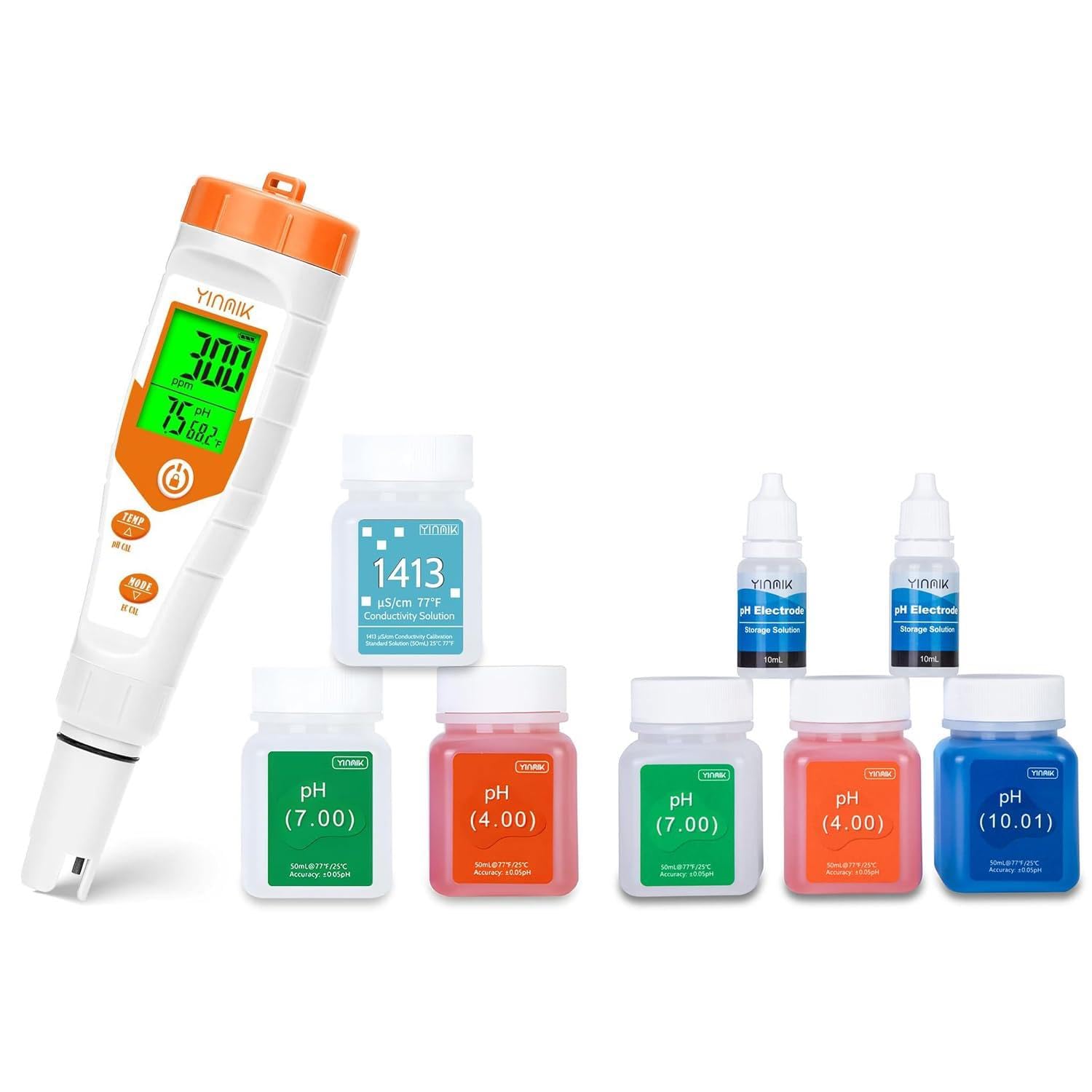
Figure 1: YINMIK YK-T4 4-in-1 pH Meter and included calibration solutions.
2. Product Overview
2.1 Included Components
- YINMIK YK-T4 4-in-1 pH/EC/TDS/Temperature Meter
- pH 4.00 Calibration Solution (50ml)
- pH 7.00 Calibration Solution (50ml)
- pH 10.01 Calibration Solution (50ml)
- 1413 µS/cm Conductivity Calibration Solution (50ml)
- pH Electrode Storage Solution (10ml, 2 bottles)
- User Manual
2.2 Key Features
- 4-in-1 Functionality: Measures pH, EC, TDS, and Temperature.
- Simultaneous Display: Shows multiple parameters (e.g., pH, EC, Temperature) on the screen without switching modes.
- Easy Calibration: Dedicated buttons for pH and EC calibration.
- Replaceable Electrode: Extends the lifespan of the meter.
- Automatic Temperature Compensation (ATC): Ensures accurate readings across varying temperatures.

Figure 2: Key features of the YINMIK YK-T4 meter.

Figure 3: The meter's simultaneous display capability.
3. Setup
3.1 Initial Preparation
- Unpack: Carefully remove the meter and all accessories from the packaging.
- Electrode Preparation: The electrode is shipped with a protective cap containing a small amount of storage solution. Before first use, remove the cap and rinse the electrode with distilled or deionized water.
- Electrode Soaking: If the electrode appears dry, soak it in the provided pH Electrode Storage Solution for at least 30 minutes before calibration or measurement. This helps to rehydrate the glass bulb and ensure accurate readings.

Figure 4: pH Electrode Storage Solution for electrode maintenance.
4. Calibration
Regular calibration is essential for maintaining the accuracy of your YK-T4 meter. Always use fresh calibration solutions and follow the steps carefully.
4.1 pH Calibration (3-Point)
- Prepare Solutions: Pour small amounts of pH 4.00, pH 7.00, and pH 10.01 buffer solutions into separate clean beakers.
- Rinse Electrode: Rinse the electrode with distilled water and gently blot dry with a clean tissue.
- Calibrate pH 7.00: Turn on the meter. Immerse the electrode into the pH 7.00 buffer solution. Press and hold the "TEMP / pH CAL" button until the display shows "CAL" or a flashing 7.00. The meter will automatically recognize the buffer and calibrate. Wait for the reading to stabilize and the calibration to complete (usually indicated by a stable reading or a confirmation message).
- Calibrate pH 4.00: Rinse the electrode again. Immerse it into the pH 4.00 buffer solution. Press the "TEMP / pH CAL" button briefly to enter calibration mode for the next point. Wait for the reading to stabilize and calibration to complete.
- Calibrate pH 10.01: Rinse the electrode. Immerse it into the pH 10.01 buffer solution. Press the "TEMP / pH CAL" button briefly. Wait for stabilization and completion.
- Finish: After all three points are calibrated, rinse the electrode and replace the protective cap.
4.2 EC Calibration (1-Point)
- Prepare Solution: Pour a small amount of 1413 µS/cm conductivity calibration solution into a clean beaker.
- Rinse Electrode: Rinse the electrode with distilled water and gently blot dry.
- Calibrate EC: Turn on the meter. Immerse the electrode into the 1413 µS/cm solution. Press and hold the "MODE / EC CAL" button until the display shows "CAL" or a flashing 1413. The meter will automatically recognize the buffer and calibrate. Wait for the reading to stabilize and the calibration to complete.
- Finish: Rinse the electrode and replace the protective cap.

Figure 5: Calibration buffer liquids are essential for accurate measurements.
5. Operating Instructions
5.1 Taking Measurements
- Turn On: Press the power button to turn on the meter.
- Rinse Electrode: Rinse the electrode with distilled water before each measurement.
- Immerse Electrode: Dip the electrode into the sample solution, ensuring the sensor is fully submerged. Stir gently to remove air bubbles.
- Read Display: Wait for the readings to stabilize. The meter will display pH, EC/TDS, and Temperature simultaneously.
- Switch Modes (if needed): Briefly press the "MODE / EC CAL" button to cycle through different display units for EC (µS/cm) or TDS (ppm).
- Record Data: Note down the stable readings.
- Rinse and Store: After measurement, rinse the electrode thoroughly with distilled water and replace the protective cap with storage solution.
5.2 Temperature Unit Conversion
To switch between Celsius (°C) and Fahrenheit (°F) temperature units, briefly press the "TEMP / pH CAL" button during normal operation.

Figure 6: The YK-T4 meter is ideal for monitoring hydroponic nutrient solutions.
6. Maintenance
6.1 Electrode Cleaning
Rinse the electrode with distilled water after each use. If the electrode becomes dirty or contaminated, soak it in a mild cleaning solution (e.g., a dilute acid or enzyme cleaner, depending on the contaminant) for a short period, then rinse thoroughly with distilled water.
6.2 Electrode Storage
Always store the electrode with its protective cap filled with pH Electrode Storage Solution. Never store the electrode dry or in distilled water, as this can damage the glass bulb and lead to inaccurate readings. If the storage solution in the cap evaporates, refill it with the provided solution.
6.3 Battery Replacement
If the display becomes dim or the meter does not turn on, replace the batteries. Refer to the battery compartment for the correct battery type and orientation.
7. Troubleshooting
- Inaccurate Readings:
- Ensure the meter is properly calibrated. Recalibrate if necessary.
- Check if the electrode is clean and properly hydrated (soaked in storage solution).
- Verify that the sample temperature is within the meter's operating range.
- Ensure calibration solutions are fresh and not expired.
- No Display/Meter Not Turning On:
- Check battery installation and replace batteries if they are low or depleted.
- Slow Response Time:
- The electrode may be dry or contaminated. Rehydrate the electrode in storage solution or clean it.
8. Specifications
| Parameter | Range | Accuracy |
|---|---|---|
| pH | 0.00 - 14.00 pH | ±0.05 pH |
| EC | 0 - 10000 µS/cm | ±2% F.S. |
| TDS | 0 - 10000 ppm | ±2% F.S. |
| Temperature | 0.1 - 60.0 °C / 32.0 - 140.0 °F | ±0.5 °C |
| Automatic Temperature Compensation (ATC) | 0.1 - 60.0 °C | |
| Power Supply | Not specified (typically button cells) | |
9. Warranty and Support
For warranty information or technical support, please refer to the product packaging or contact YINMIK customer service directly. Contact details can typically be found on the manufacturer's official website or through your purchase platform.


