1. Introduction
This manual provides instructions for the installation, operation, and maintenance of the replacement water temperature sensor, model THANHLIEM029449. This sensor is designed as a direct replacement part for various Carrier Vector refrigeration units, including models 8600MT, 1950MT, 1850MT, 1550, 1350, and 1800. It is manufactured using durable, heavy-duty materials to ensure reliable performance in demanding environments.
The sensor plays a critical role in monitoring the water temperature within the refrigeration system, providing essential data for optimal system operation and efficiency.
2. Safety Information
- Always disconnect power to the refrigeration unit before attempting any installation or maintenance.
- Wear appropriate personal protective equipment (PPE), such as gloves and eye protection.
- Ensure the system has cooled down sufficiently before handling components to avoid burns.
- Refer to the original equipment manufacturer's service manual for specific procedures and safety warnings related to your Carrier Vector unit.
- If you are unsure about any step, consult a qualified technician.
3. Installation (Setup)
This replacement sensor is precision-made to match original equipment standards, allowing for a direct replacement without the need for modifications. Follow these general steps for installation:
- Prepare the Unit: Ensure the refrigeration unit is powered off and locked out. Allow the system to cool down. Drain any coolant if necessary, following the manufacturer's guidelines.
- Locate the Old Sensor: Identify the existing water temperature sensor in your Carrier Vector unit. Its location may vary slightly by model.
- Disconnect Wiring: Carefully disconnect the electrical connector from the old sensor. Note the orientation if applicable.
- Remove Old Sensor: Using an appropriate wrench, unscrew and remove the old sensor from its housing. Be prepared for any residual coolant to escape.
- Inspect and Clean: Inspect the sensor port for any debris or corrosion. Clean the area thoroughly if needed.
- Install New Sensor: Apply a small amount of thread sealant (if recommended by the OEM) to the threads of the new sensor. Carefully screw the new sensor into the port by hand to avoid cross-threading, then tighten with a wrench to the manufacturer's specified torque. Do not overtighten.
- Reconnect Wiring: Reconnect the electrical connector to the new sensor, ensuring a secure connection.
- Refill Coolant (if drained): If coolant was drained, refill the system according to the Carrier Vector service manual. Bleed any air from the system as required.
- Test Operation: Restore power to the unit and monitor the temperature readings to ensure the new sensor is functioning correctly. Check for any leaks around the sensor.
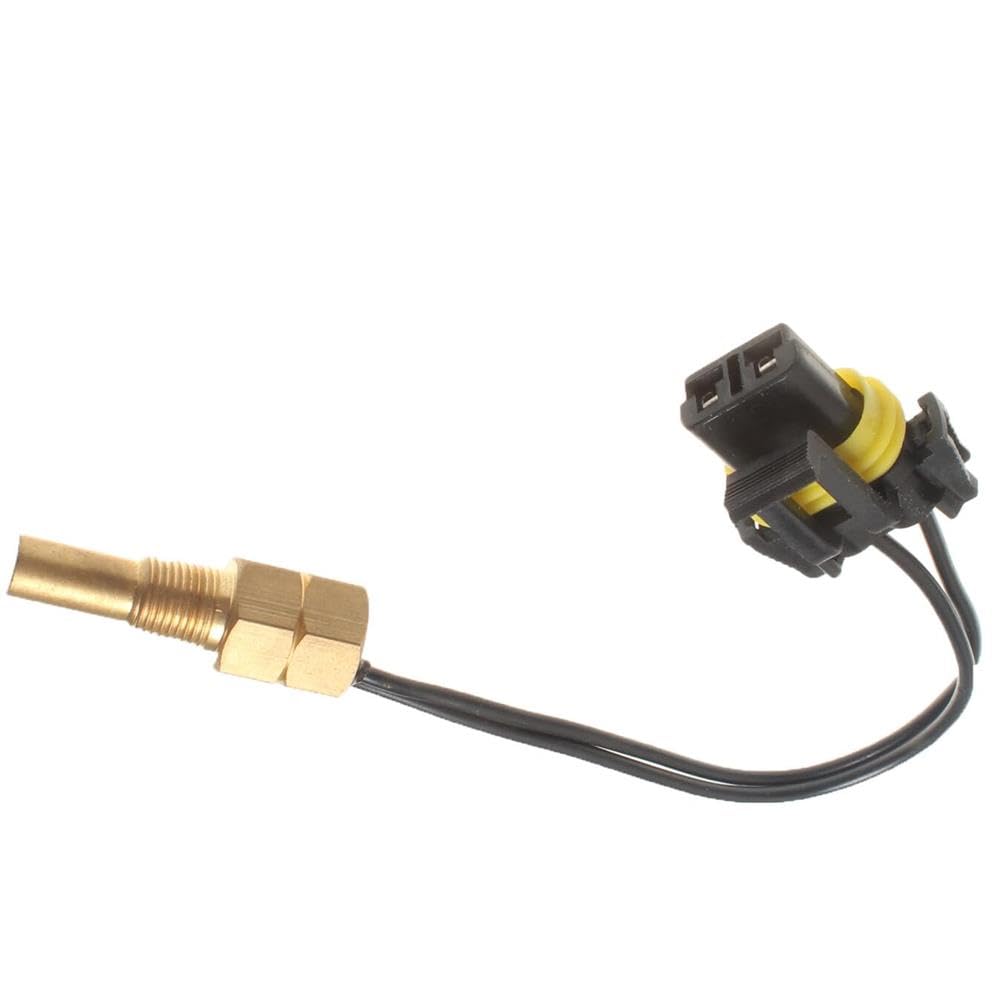
Figure 1: Example of a replacement water temperature sensor. This image shows the sensor body with its threaded end and electrical connector, ready for installation into a compatible refrigeration unit.
4. Operation
Once installed, the water temperature sensor operates passively by continuously monitoring the temperature of the coolant within the refrigeration system. It converts this temperature into an electrical signal, which is then transmitted to the unit's control module.
The control module uses this data to regulate various system functions, such as compressor operation, fan speeds, and defrost cycles, ensuring the refrigeration unit maintains optimal performance and desired temperature settings. No direct user interaction is required for the sensor's operation.
5. Maintenance
The water temperature sensor itself typically requires minimal maintenance. However, periodic checks of the surrounding system components can help ensure its longevity and accurate readings:
- Visual Inspection: During routine system checks, visually inspect the sensor and its wiring for any signs of damage, corrosion, or loose connections.
- Connection Integrity: Ensure the electrical connector remains securely attached to the sensor. Loose connections can lead to intermittent or inaccurate readings.
- Coolant Quality: Maintain proper coolant levels and quality as per the Carrier Vector manufacturer's recommendations. Contaminated or low coolant can affect sensor performance and system efficiency.
- Cleanliness: Keep the area around the sensor free from excessive dirt, grease, or debris that could potentially interfere with its operation or lead to corrosion.
6. Troubleshooting
If you suspect an issue with the water temperature sensor, consider the following troubleshooting steps:
- Incorrect Temperature Readings: If the unit displays erratic or consistently incorrect temperature readings, first check the electrical connection to the sensor for looseness or corrosion.
- Engine Overheating/Underheating: While many factors can cause these issues, a faulty temperature sensor can contribute. If other components (thermostat, coolant level, fan) are ruled out, the sensor may be at fault.
- Diagnostic Trouble Codes (DTCs): Many modern refrigeration units will log a diagnostic trouble code if the temperature sensor is malfunctioning. Consult your unit's service manual for specific DTCs related to the water temperature sensor.
- Sensor Testing: A qualified technician can test the sensor's resistance values at various temperatures using a multimeter to determine if it is within specifications.
If troubleshooting does not resolve the issue, it may indicate a need for sensor replacement or further diagnosis by a professional.
7. Specifications
| Feature | Detail |
|---|---|
| Model Number | THANHLIEM029449 |
| Compatibility | Carrier Vector 8600MT, 1950MT, 1850MT, 1550, 1350, 1800 |
| Product Dimensions (L x W x H) | 1 x 1 x 1 inches |
| Manufacturer | THANHLIEM25STE |
| Part Type | Water Temperature Sensor Replacement |
8. Warranty Information
No specific warranty information is provided with this product. Please refer to the seller's return policy or contact the seller directly for details regarding any applicable warranty or guarantee.
9. Support
For technical assistance, installation guidance, or troubleshooting beyond the scope of this manual, it is recommended to consult a qualified refrigeration technician or contact the seller directly. Always refer to the official service manual for your specific Carrier Vector unit for detailed system information.