
Introduction
Thank you for choosing the Rhevoy Power Lift Chair. This manual provides essential information for the safe assembly, operation, and maintenance of your new chair. Please read all instructions carefully before use and retain this manual for future reference.
Important Safety Instructions
Please read all safety instructions before use. Do not use if you have a pacemaker or any other medical device that may be affected by electromagnetic interference. Always keep hands and fingers away from moving parts when adjusting the chair's position. Do not use the massage or heat functions while sleeping or unattended. Always follow the weight capacity guidelines to ensure safe and proper use.
Setup Guide
Your Rhevoy Power Lift Chair is designed for easy assembly. You will receive two boxes; please ensure both packages have arrived before beginning the installation process. Assembly typically takes a few minutes.
Assembly Steps:
- Unpack Components: Carefully remove all parts from the packaging.
- Connect Wiring: Locate the various cables underneath the chair base. Connect the corresponding color-coded and shaped connectors for power, massage, and heat functions. Ensure all connections are secure.
- Attach Backrest: Slide the backrest onto the metal posts on the chair base until it clicks securely into place.
- Attach Armrests: Insert the armrests into their designated slots on the sides of the chair.
- Secure Base: If applicable, attach any stabilizing feet or brackets to the chair base using the provided hardware.
- Connect Power: Plug the power adapter into the chair and then into a wall outlet.
Video: Step-by-step assembly guide for the Power Lift Chair.

Image: Packaging indicating delivery in two boxes and easy assembly.
Operating Instructions
Your Rhevoy Power Lift Chair features multiple functions controlled by a wired remote. Familiarize yourself with the remote control buttons for optimal use.
Power Lift and Recline Functions:
- Lift Function: Press the 'Up' arrow button on the remote to gently lift the chair, assisting you to a standing position.
- Recline Function: Press the 'Down' arrow button to recline the chair. The chair offers infinite positions, allowing you to adjust the backrest and footrest separately for activities like napping (180° lay flat), watching TV (120° sleeping), or reading (90° reading).
- Adjustable Headrest: Use the dedicated headrest buttons on the remote to adjust the angle of the headrest for personalized neck support.
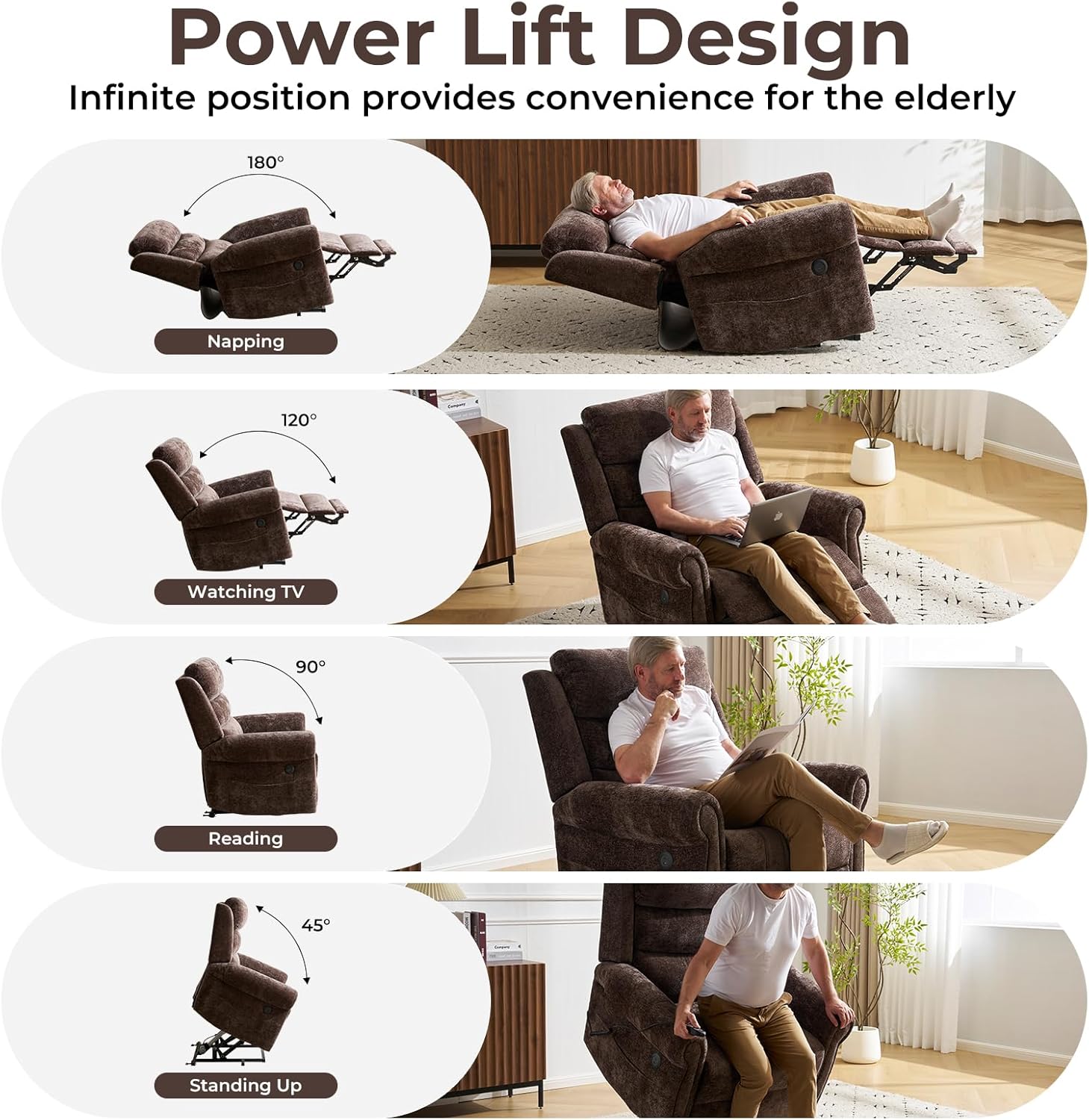
Image: Illustrations of the chair's power lift and recline capabilities, including positions for napping, watching TV, reading, and standing.

Image: Demonstrating the adjustable headrest feature for optimal comfort.
Massage and Heat Functions:
- Activate Massage: Use the massage buttons on the remote to select from 5 massage modes and 3 intensity levels. The chair features 8 vibration massage points.
- Activate Heat: Turn on the heating elements located at the waist and seat cushion for soothing warmth.
- Timer: Set the massage and heat functions for 15, 30, or 60 minutes using the timer options.

Image: Visual representation of the dual heating and 8-point vibration massage features.

Image: User enjoying the massage and heating functions of the chair.
USB Charging Ports and Side Pockets:
- USB Ports: Conveniently located USB ports allow you to charge your electronic devices while relaxing.
- Side Pockets: Utilize the integrated side pockets for storing the remote control, magazines, or other small items.
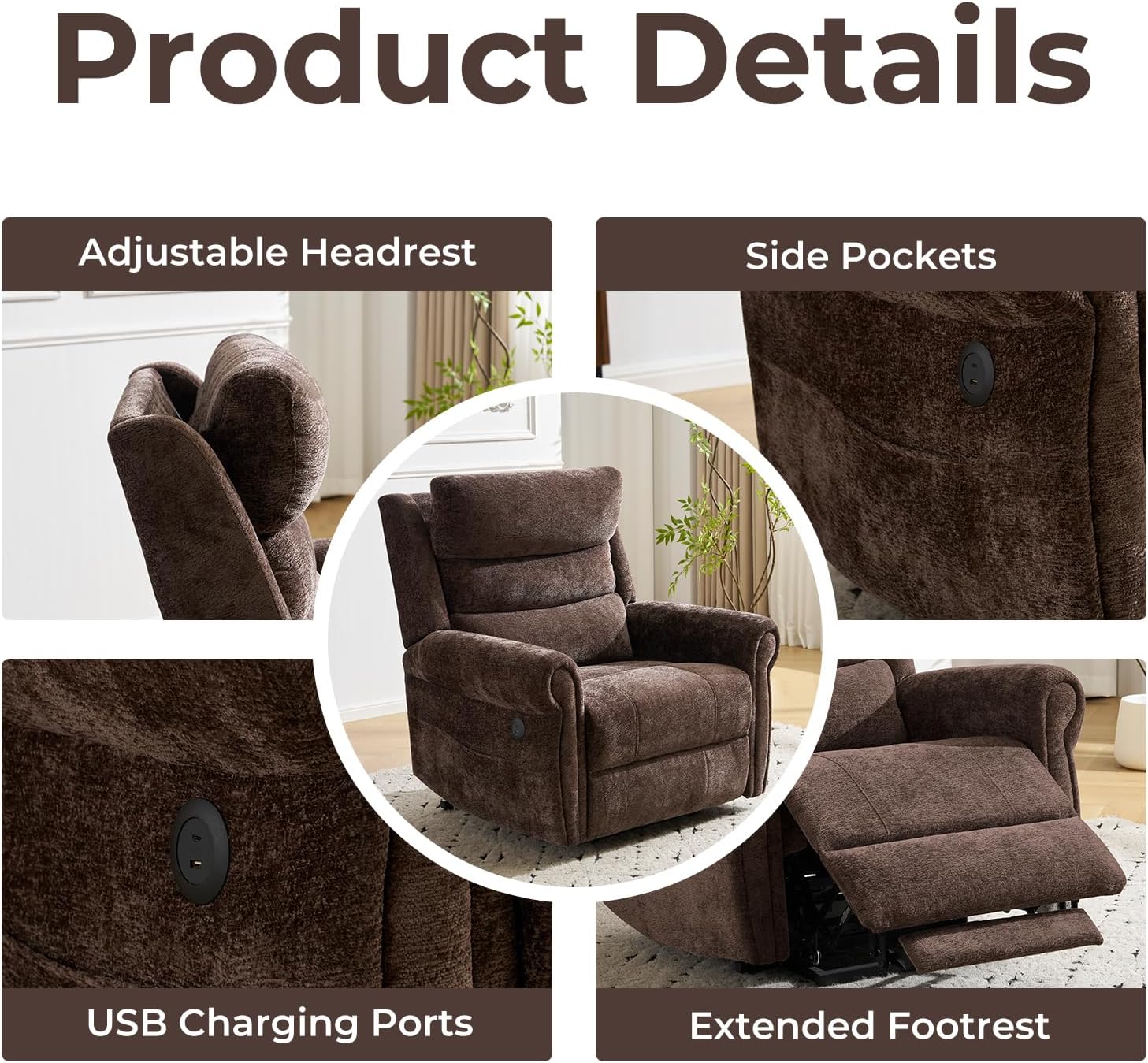
Image: Detailed view of the USB charging ports, side pockets, and extended footrest.
Video: Demonstration of the Power Lift Chair's various functions, including recline, massage, and USB charging.
Maintenance
Proper care will extend the life and appearance of your power lift chair.
- Cleaning: For the breathable leather/chenille material, gently wipe with a soft, damp cloth. Avoid harsh chemicals or abrasive cleaners.
- Spills: Blot spills immediately with a clean, dry cloth.
- Moving Parts: Periodically check all moving parts and connections to ensure they are secure. Do not lubricate internal mechanisms unless specified by the manufacturer.
- Power Cord: Inspect the power cord regularly for any damage. If damaged, discontinue use and contact customer support.

Image: Close-up view of the chair's soft and durable chenille fabric.
Troubleshooting
If you encounter any issues with your chair, please refer to the following common problems and solutions:
| Problem | Possible Cause | Solution |
|---|---|---|
| Chair does not respond to remote. | Power cord disconnected; loose wiring; remote malfunction. | Ensure power cord is securely plugged into the wall and chair. Check all internal wiring connections. If problem persists, contact support. |
| Massage/Heat not working. | Feature not activated; loose connection. | Ensure massage/heat buttons are pressed on the remote. Check connections for these specific functions. |
| Unusual noises during operation. | Loose hardware; obstruction in mechanism. | Inspect for any loose bolts or screws and tighten if necessary. Check for any objects obstructing the chair's movement. |
Specifications
- Brand: Rhevoy
- Model: B0GDX4266T
- Color: Coffee
- Material: Breathable Leather (exterior), Chenille (seat)
- Product Dimensions (D x W x H): 37"D x 40.9"W x 43.3"H
- Item Weight: 50 Pounds
- Seat Depth: 20.9 inches
- Maximum Weight Recommendation: 350 Pounds
- Reclining Position Count: Infinite (adjustable backrest and footrest)
- Additional Features: Adjustable Headrest, 8-point Vibration Massage, Dual Heating (waist and seat), USB Charging Ports, Side Pockets
- Assembly: Required (minimal)

Image: Diagram illustrating the precise dimensions of the Rhevoy Power Lift Chair.
Warranty and Support
Rhevoy offers a 2-year warranty for this product. This warranty covers manufacturing defects and faulty parts. We also offer a free replacement for any faulty, damaged, or missing parts upon delivery.
For any questions, concerns, or warranty claims, please contact our customer service team. Provide your model number (B0GDX4266T) and purchase details for efficient assistance.