
Product Overview
The HAUOMS Twin Over Twin Bunk Bed is designed to maximize space in smaller rooms, offering a versatile solution for sleeping, studying, and storage. This metal bunk bed features two twin-size sleeping areas, an integrated desk, built-in power outlets with USB ports, and customizable RGB LED lighting. Safety features include robust guardrails and an anti-tipping kit.
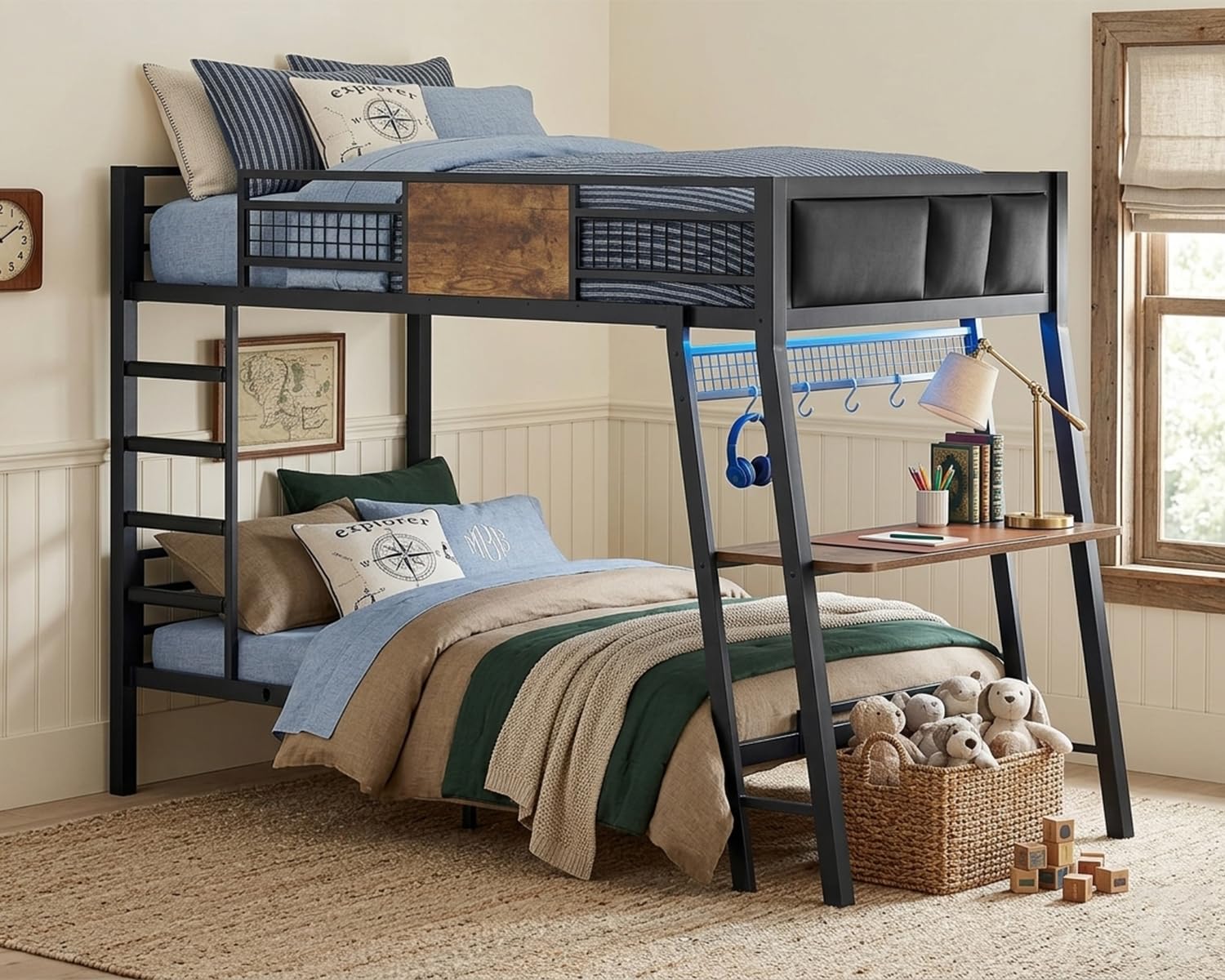
Image: The HAUOMS Twin Over Twin Bunk Bed in Rustic Brown, showcasing its compact design with an integrated desk, power outlets, and LED lights.
Video: An overview of the HAUOMS bunk bed, highlighting its integrated desk and storage solutions for efficient space utilization.
Safety Information
Please read and understand all safety warnings before assembly and use. Failure to follow these instructions can result in serious injury.
- Weight Limits: The top bunk supports up to 220 lbs. The bottom bunk supports up to 400 lbs. Do not exceed these limits.
- Guardrails: Ensure all guardrails are securely installed on the top bunk to prevent falls.
- Anti-Tipping Kit: Always install the provided anti-tipping kit to secure the bed to the wall and prevent accidental tipping.
- Ladder Safety: Use the ladder for climbing to and from the top bunk. Ensure the ladder is stable before use.
- Mattress Size: Use only mattresses that conform to the recommended dimensions (approximately 38"W x 75"L and 5-10" thick) to ensure proper guardrail height.
- No Jumping: Do not allow jumping on either bunk.
- Children: Children under 6 years of age should not use the top bunk.

Image: Diagram illustrating the full-edge guardrail dimensions (62.6" x 13.4") and anti-trap design (3.2" gaps) for enhanced safety on the top bunk.

Image: Close-up of the wall-anchored device, demonstrating the tip-proof security feature to prevent accidental falls.
Setup and Assembly
Assembly of the HAUOMS bunk bed requires careful attention to detail. All parts are clearly labeled, and a detailed instruction manual is included in the packaging. It is recommended to assemble the bed with at least two adults for optimal safety and efficiency.
Before You Begin:
- Unpack all components and verify against the parts list.
- Ensure you have all necessary tools (typically a screwdriver and Allen wrench, often included).
- Clear a spacious area for assembly.
Assembly Steps:
- Begin by assembling the base frames for both the upper and lower bunks, ensuring all slats are securely fitted.
- Attach the vertical support beams and connect the upper and lower frames.
- Install the safety guardrails on the top bunk.
- Assemble and attach the integrated desk and ladder.
- Secure the bed to the wall using the anti-tipping kit.
- Place mattresses on both bunks.

Image: A detailed diagram showing the overall dimensions of the twin-size bunk bed (L*W*H: 87.4" x 42" x 64.4") and individual weight capacities for each bunk.

Image: Illustration of the heavy-duty metal frame construction with mute buckles for stable and quiet use, along with the maximum weight capacity of 400 lbs.
Video: A demonstration of the bunk bed's features, including the desk and LED lights, providing a visual guide to its functionality and setup.
Operating Instructions
RGB LED Lights
The integrated RGB LED light strips offer customizable ambiance for the bunk bed area. They can be controlled via a dedicated mobile application or a remote control.
- App Control: Download the specified mobile application (refer to the LED light manual for app name) to access over 60,000 colors, music mode, mic mode, timing mode, brightness adjustment, and custom styles.
- Remote Control: Use the provided remote control for basic functions such as turning lights on/off, changing colors, and adjusting brightness.

Image: Visual representation of the RGB LED light features, including app control, remote control, over 60,000 colors, music mode, mic mode, timing mode, brightness adjustment, and custom styles.
Video: A demonstration of the white bunk bed with its desk and LED lights, showcasing the lighting effects and functionality.
Built-in Charging Station
The desk features a built-in charging station to keep your devices powered. It includes:
- 2 AC Outlets (125V/12A)
- 1 USB-A Port (5V/2A)
- 1 USB-C Port (5V/3A)
Simply plug the bed's power cord into a wall outlet to activate the charging station.

Image: Close-up of the built-in charging station on the desk, showing the two AC outlets, one USB-A port, and one USB-C port.
Maintenance
Regular maintenance ensures the longevity and safety of your bunk bed.
Cleaning
- Wipe metal surfaces with a soft, damp cloth.
- Avoid using abrasive cleaners or harsh chemicals, as these can damage the finish.
- For the wooden desk surface, use a wood-safe cleaner and wipe dry immediately.
Fastener Checks
- Periodically (e.g., every 3-6 months) check all bolts, screws, and connections to ensure they are securely tightened.
- Re-tighten any loose fasteners to maintain stability and prevent wobbling.
LED Lights and Charging Station
- Keep the LED light strips and charging station free from dust and debris.
- Ensure no liquids come into contact with the electrical components.

Image: The area under the bottom bunk, demonstrating how it can be used for organized storage with bins and baskets, helping to maintain a tidy room.
Troubleshooting
Refer to the following common issues and solutions before contacting customer support.
- Problem: The bed feels wobbly or unstable.
Solution: Re-check all assembly bolts and screws. Ensure they are tightened securely. Verify that the anti-tipping kit is correctly installed and anchored to the wall. - Problem: RGB LED lights are not turning on or responding.
Solution: Check if the LED light power adapter is securely plugged into a working electrical outlet. Ensure the connection between the LED strip and the controller is firm. If using a remote, replace the batteries. If using the app, ensure Bluetooth is enabled and the app is properly connected. - Problem: Charging ports (AC/USB) are not providing power.
Solution: Confirm the bed's main power cord is plugged into a functional wall outlet. Test the wall outlet with another device. Ensure devices are properly connected to the ports. - Problem: Ladder steps feel uncomfortable.
Solution: The ladder features foam-padded steps for comfort. Ensure these pads are correctly positioned.
Specifications
| Feature | Detail |
|---|---|
| Model Number | YW541T |
| Dimensions (L x W x H) | 77.9" x 42" x 64.4" |
| Size | Twin Over Twin |
| Frame Material | Metal (Iron) |
| Color | Rustic Brown |
| Top Bunk Weight Capacity | 220 lbs |
| Bottom Bunk Weight Capacity | 400 lbs |
| Special Features | Charging Station, RGB LED Lighting, Integrated Desk, Storage, Safety Guardrails, Foam-Padded Ladder, No Box Spring Needed |
| Included Components | Desk, Guardrails, Headboard, Installation Manual, Slats |
| Assembly Required | Yes |
Warranty Information
HAUOMS products are manufactured to high-quality standards. This product comes with a standard manufacturer's warranty covering defects in materials and workmanship under normal use. Please retain your proof of purchase for any warranty claims. For specific warranty terms and conditions, refer to the documentation included with your product or contact customer support.
Support
Should you encounter any issues or have questions regarding your HAUOMS Twin Over Twin Bunk Bed, our customer service team is available to assist you.
- Online Support: Visit the HAUOMS official website for FAQs and support resources.
- Customer Service: Contact our 24/7 customer service team for direct assistance. Refer to the contact information provided in your product packaging or on the HAUOMS brand store page.
