
HUO JI 10.5-inch Large Display Digital Alarm Clock User Manual
Model: PH03-RC
Introduction
Thank you for purchasing the HUO JI 10.5-inch Large Display Digital Alarm Clock. This manual provides detailed instructions for setting up, operating, and maintaining your new clock. Please read it thoroughly before use to ensure optimal performance and longevity of the product.
Package Contents
- Digital Clock Unit
- Remote Control
- USB Power Cable
- AC Adapter
- Wall Mounting Kit
- User Manual (this document)
Setup
Power Connection
Connect the provided USB power cable to the clock and plug the AC adapter into a standard wall outlet. The clock will power on automatically.
Placement Options
- Desktop Placement: The clock can be placed directly on any flat surface.
- Wall Mounting: Use the included wall mounting kit to securely attach the clock to a wall. Ensure the mounting location is stable and can support the clock's weight.
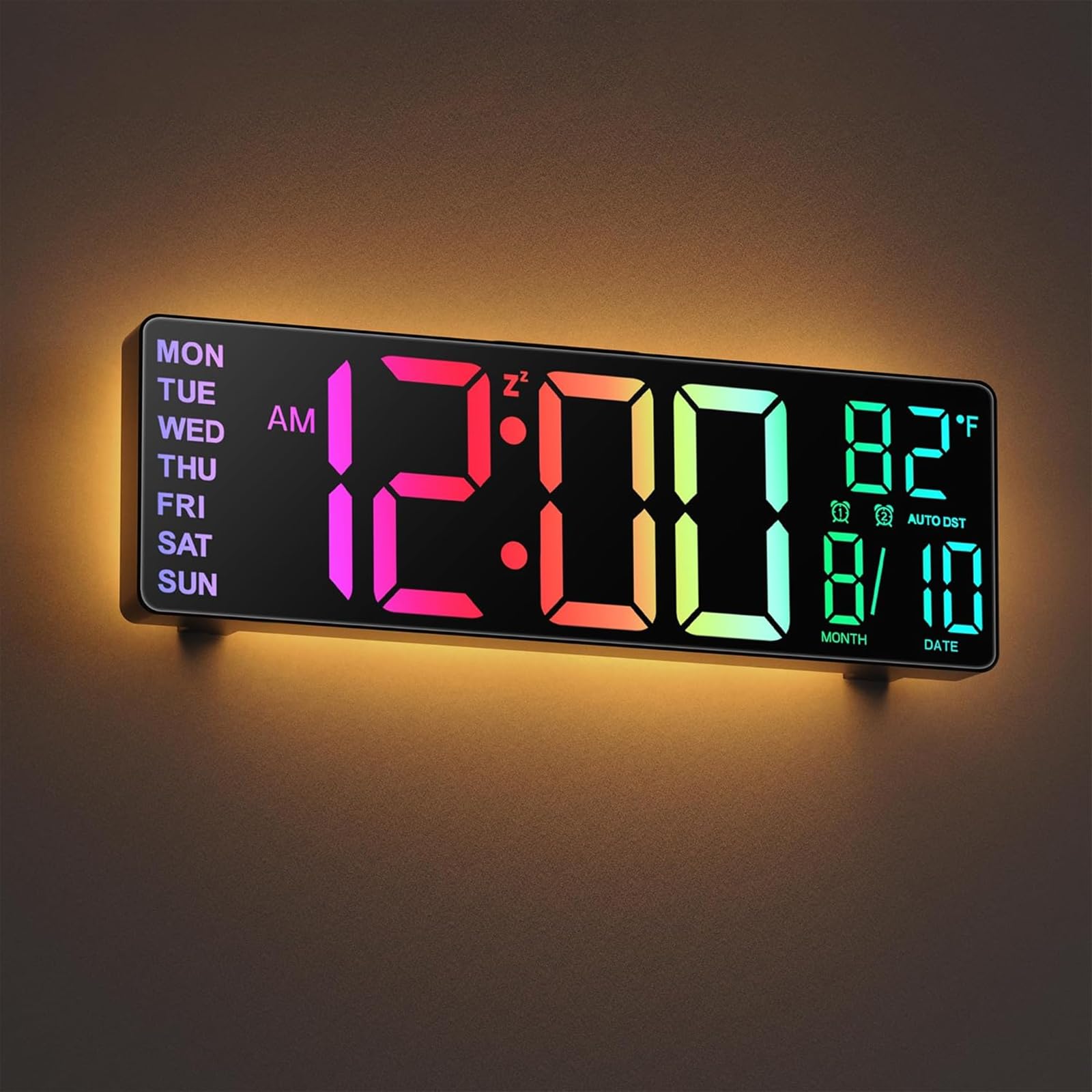
Image: The HUO JI 10.5-inch Digital Alarm Clock, displaying time, date, day, and temperature. This image illustrates the product's large display and overall design, suitable for both desktop and wall mounting.
Operating Instructions
Time and Date Setting
- Press the 'SET' button on the remote control or the side of the clock.
- Use the 'UP' and 'DOWN' arrows to adjust the hour, then press 'SET' to confirm.
- Repeat for minutes, year, month, and day.
- Select 12-hour or 24-hour format using the '12/24H' button.
Alarm Setting
The clock supports two independent alarms.
- Press the 'ALARM 1' or 'ALARM 2' button on the remote.
- Use the 'UP' and 'DOWN' arrows to set the desired alarm time.
- Press 'ALARM 1' or 'ALARM 2' again to confirm and activate the alarm. An alarm icon will appear on the display.
- To deactivate an alarm, press its respective 'ALARM' button until the icon disappears.
- When an alarm sounds, press any button to snooze (default 5 minutes) or press and hold any button to turn off the alarm for the day.
Brightness Adjustment
- Automatic Dimming: The built-in light sensor automatically adjusts display brightness based on ambient light conditions. This is the default mode.
- Manual Adjustment: Press the 'BRIGHTNESS' button on the remote to cycle through 5 levels of manual brightness.
Display Color Modes
The clock offers 8 display color modes (4 solid colors + 4 RGB colors).
- Press the 'COLOR' button on the remote to cycle through the available display colors.
Volume Adjustment
The alarm volume can be adjusted to 5 levels.
- During alarm setting or when an alarm is sounding, use the 'VOL+' or 'VOL-' buttons on the remote to adjust the volume.
Countdown Timer
The countdown timer can be set from 0 to 30 minutes.
- Press the 'TIMER' button on the remote.
- Use the 'UP' and 'DOWN' arrows to set the desired countdown duration.
- Press 'TIMER' again to start the countdown.
- To pause the timer, press 'TIMER' once. Press again to resume.
- To stop and reset the timer, press and hold 'TIMER'.
Rear Night Light
The clock features a warm, ambient night light on its rear panel.
- Press the 'LIGHT' button on the remote to turn the night light on or off.
- The night light provides soft, indirect illumination, ideal for bedrooms or as a subtle accent light.
Maintenance
- Clean the clock's surface with a soft, dry cloth. Do not use abrasive cleaners or solvents.
- Avoid exposing the clock to direct sunlight, extreme temperatures, or high humidity.
- Keep the clock away from water and dusty environments.
Troubleshooting
- Clock not powering on: Ensure the USB cable is securely connected and the AC adapter is plugged into a working power outlet.
- Remote control not working: Check the battery in the remote control and replace it if necessary. Ensure there are no obstructions between the remote and the clock.
- Settings lost after power outage: The clock has a built-in memory battery to retain time and alarm settings during power interruptions. If settings are lost, ensure the clock has been powered on for a sufficient period to charge the internal battery.
- Display too dim/bright: Check if the automatic dimming feature is active. Adjust manual brightness settings if preferred.
Specifications
| Feature | Specification |
|---|---|
| Brand | HUO JI |
| Model Number | PH03-RC |
| Display Size | 10.5 inches |
| Display Content | Time, Date, Day, Temperature, Humidity |
| Power Source | USB (AC adapter included) |
| Features | Light Sensor Auto-Dimming, Remote Control, 2 Alarms, Timer, Night Light, 8 Color Display Modes, Volume Adjustment, Memory Battery |
| Mounting Options | Wall Mount / Desktop |
| Product Dimensions (W x H) | 25.6 cm x 8.4 cm |
| Color | Black |
| Batteries Included | 1 Non-standard Battery (for memory function) |
Important Usage Precautions
- Avoid using the product in direct sunlight or environments with extremely high temperatures and humidity.
- Do not use the product in areas with excessive water or dust.
- Do not clean the unit with anything that may scratch its surface.
- If the remote control malfunctions, try replacing its battery.
- Specifications and design are subject to change without prior notice.
Warranty and Support
This product comes with a 12-month manufacturer's warranty from the date of purchase. Please retain your proof of purchase for warranty claims.
For technical support or warranty inquiries, please contact HUO JI customer service through the retailer where you purchased the product or visit the official HUO JI store on Amazon.