
1. Introduction
The VectorPoint VPTC001 is a compact, handheld infrared thermal camera designed for precise heat detection and temperature measurement. It features a 240 x 240 TSIR resolution, a wide temperature range, and smart alert functions, making it suitable for various applications including home inspections, HVAC troubleshooting, electrical diagnostics, and automotive inspections.
This manual provides essential information for the safe and effective use of your VPTC001 thermal camera. Please read it thoroughly before operation.
2. What's in the Box
Upon unpacking, verify that all items listed below are present and in good condition:
- VPTC001 Thermal Camera
- Wrist Strap
- USB-A to USB-C Cable
- Instruction Manual (this document)

Image: Contents of the VPTC001 package, including the thermal camera, wrist strap, USB-A to USB-C cable, and quick user guide.
3. Setup
3.1 Charging the Battery
The VPTC001 thermal camera includes a built-in Lithium-Ion battery. Before first use, fully charge the device. Connect the provided USB-A to USB-C cable to the camera's USB-C port and a compatible USB power adapter (not included) or computer USB port. The charging indicator will show the charging status. A full charge provides approximately 18 hours of continuous operation.

Image: Battery life and power management features of the VPTC001, including 18-hour battery life and auto power-off settings.
3.2 Attaching the Wrist Strap
For secure handling, attach the wrist strap to the designated loop on the camera body. This helps prevent accidental drops during use.
4. Operating Instructions
4.1 Powering On/Off
- To power on: Press and hold the power button (usually labeled 'MENU' or with a power icon) until the screen illuminates.
- To power off: Press and hold the power button again until the device shuts down.
4.2 Basic Operation and Display
The VPTC001 features a 2.8-inch screen with a 240x240 TSIR resolution and a 25 Hz refresh rate for smooth thermal imaging. The display shows real-time temperature readings, including maximum, minimum, and center-point temperatures.

Image: High image quality and refresh rate of the VPTC001 thermal camera.
4.3 TSIR Enhancement Technology
The camera utilizes TSIR Enhancement Technology to enlarge thermal image size to 240x240 in real-time, providing clearer and more detailed heat signatures compared to lower resolution devices.

Image: Comparison of thermal image clarity with TSIR Enhancement Technology.
4.4 Temperature Measurement and Spot Tracking
The VPTC001 accurately measures temperatures between -4°F to 1022°F (-20°C to 550°C) with an accuracy of ±3.6°F or ±2%. It automatically identifies and displays hot spots, cold spots, and the center-point reading on the screen.
- Center Spot: Displays the temperature at the center of the screen.
- Hot Spot: Indicates the highest temperature detected within the field of view.
- Cold Spot: Indicates the lowest temperature detected within the field of view.

Image: Precise and automatic temperature measurement features, showing hot, cold, and center spots.
4.5 Adjustable Emissivity
To ensure accurate readings for different materials, the VPTC001 allows for adjustable emissivity settings. Refer to the on-screen menu to modify this value based on the surface being inspected (e.g., wood, brick, metal).
4.6 Color Palettes
The camera offers multiple color palettes to adapt to various working conditions and inspection needs. You can switch between palettes such as Rainbow, Iron, Red Monochrome, Black Hot, and White Hot. Press the designated button (often a directional button or a specific 'Palette' button) to cycle through the options.
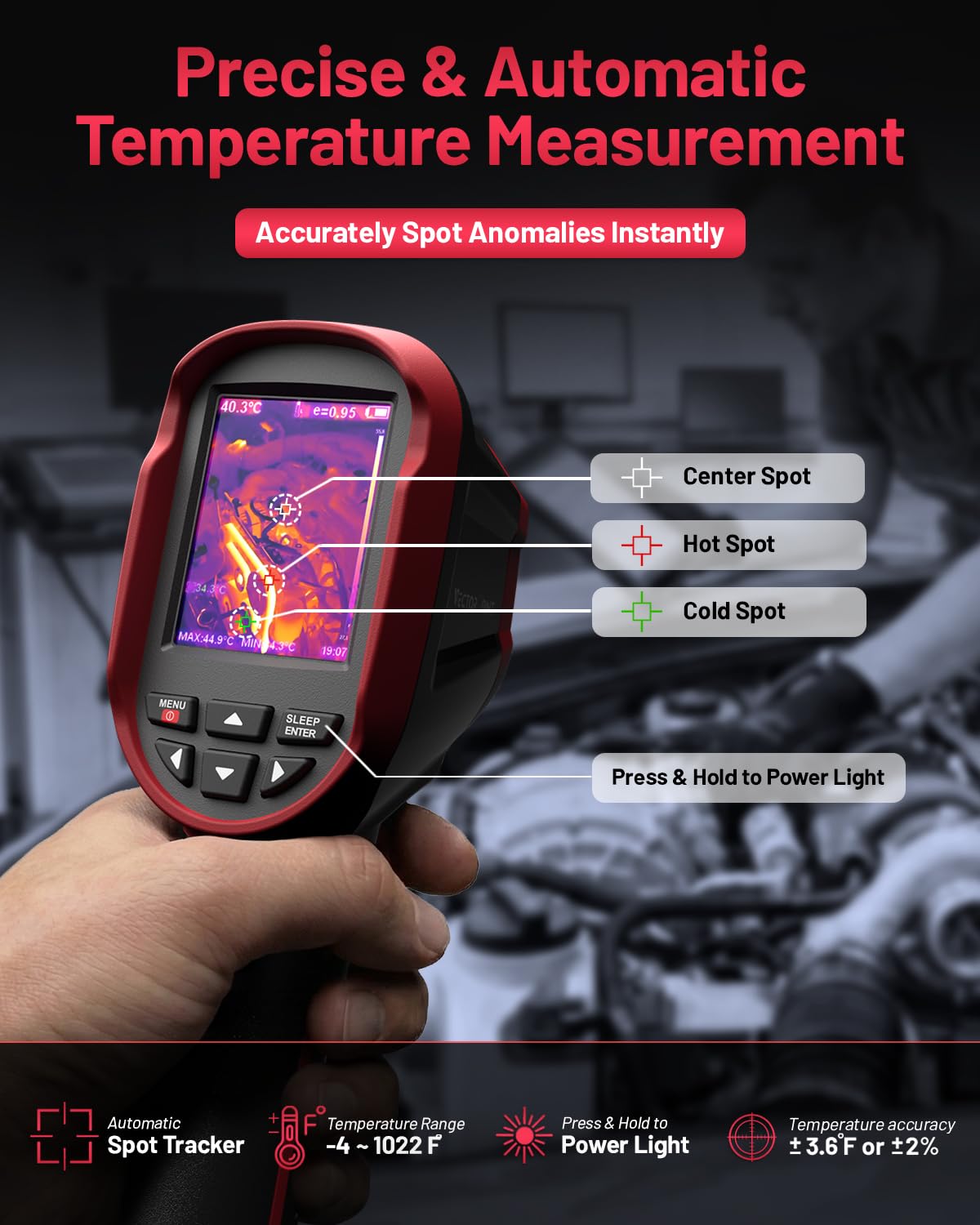
Image: Various color palettes available for thermal imaging.
4.7 Temperature Alerts and Photo Taking
The integrated temperature alarm provides real-time visibility of anomalies. The VPTC001 supports manual photo taking to record inspection findings. The built-in 16GB eMMC storage can store up to 10,000 photos.
4.8 Auto Shut-off
To conserve battery life, the device features adjustable auto shut-off timers (10 and 20 minutes). These can be configured in the camera's settings menu.
5. Maintenance
5.1 Cleaning the Camera
- Use a soft, dry cloth to clean the camera body.
- For the lens, use a lens cleaning cloth and solution specifically designed for optical surfaces. Avoid abrasive materials.
- Do not use strong detergents or solvents, as they may damage the device.
5.2 Storage
Store the camera in a cool, dry place away from direct sunlight and extreme temperatures. Ensure the battery is partially charged before long-term storage.
5.3 Durability and Protection
The VPTC001 is designed for field use with an IP54 protection rating, making it resistant to dust and splashes. It can withstand drops up to 6.5 feet (2 meters).

Image: Durability features of the VPTC001, including 6.5 ft drop-proof and IP54 protection rating.
6. Troubleshooting
6.1 Device Not Turning On
- Ensure the battery is sufficiently charged. Connect the camera to a power source using the USB-C cable and allow it to charge for at least 30 minutes before attempting to power on again.
- Press and hold the power button firmly for several seconds.
6.2 Inaccurate Temperature Readings
- Check and adjust the emissivity setting to match the material being measured.
- Ensure there are no obstructions between the camera lens and the target.
- Verify that the camera lens is clean and free from dust or smudges.
- Avoid measuring through glass or other reflective surfaces, as this can affect accuracy.
6.3 Screen Issues (Frozen, Flickering)
- Try restarting the device by powering it off and then on again.
- If the issue persists, ensure the battery is adequately charged.
If you encounter problems not listed here or if troubleshooting steps do not resolve the issue, please contact VectorPoint technical support.
7. Specifications
| Feature | Specification |
|---|---|
| Model Number | VPTC001 |
| Thermal Resolution | 240 x 240 TSIR |
| Temperature Range | -4°F to 1022°F (-20°C to 550°C) |
| Accuracy | ±3.6°F or ±2% |
| Thermal Sensitivity | 0.04°C |
| Refresh Rate | 25 Hz |
| Field of View (FOV) | 50° x 50° |
| Screen Size | 2.8 inches |
| Storage | 16 GB eMMC (up to 10,000 photos) |
| Battery Type | 1 Lithium Ion (included) |
| Battery Energy Content | 11.84 Watt Hours |
| Battery Life | Up to 18 hours |
| Auto Shut-off | 10 / 20 minutes (adjustable) |
| IP Rating | IP54 |
| Drop Resistance | 6.5 ft (2 meters) |
| Item Weight | 572 g |
| Dimensions (Package) | 26.19 x 13.89 x 11.1 cm |
8. Warranty and Support
8.1 Technical Support
VectorPoint offers lifetime technical support for the VPTC001 thermal camera. For assistance with setup, operation, troubleshooting, or any other inquiries, please contact our support team through the official VectorPoint website or contact information provided with your purchase.
8.2 Warranty Information
Please refer to the warranty card included with your product for specific details regarding the warranty period and terms of service. Keep your proof of purchase for warranty claims.
9. Applications
The VectorPoint VPTC001 thermal camera is a versatile tool suitable for a wide range of precision thermal inspections, including but not limited to:
- HVAC Troubleshooting: Identifying leaks, blockages, and inefficiencies in heating, ventilation, and air conditioning systems.
- Home Inspections: Detecting insulation issues, moisture intrusion, and electrical hot spots.
- Water Leak Detection: Locating hidden water damage and plumbing leaks.
- Electrical Inspection: Pinpointing overheating components, loose connections, and circuit overloads.
- Vehicle Inspection: Diagnosing engine, brake, and exhaust system issues.
- Industrial Inspection: Monitoring machinery, process control, and preventative maintenance.

Image: Wide range of applications for the VPTC001 thermal camera.