1. Introduction
Thank you for purchasing the Generic D9 4K Digital Camera. This manual provides essential information for setting up, operating, and maintaining your camera. The D9 camera is designed to capture ultra-clear 4K videos and high-resolution 64MP photos, featuring built-in Wi-Fi, a 28X digital zoom, and a 4800mAh battery for extended usage. Please read this manual thoroughly before using the camera to ensure optimal performance and longevity.
2. Safety Information
- Do not expose the camera to water or moisture.
- Avoid dropping the camera or subjecting it to strong impacts.
- Keep the camera away from direct sunlight and high temperatures.
- Use only approved accessories and power adapters.
- Do not attempt to disassemble or repair the camera yourself.
- Keep out of reach of children.
3. Package Contents
Please check the package for the following items:
- 1 x D9 4K Video Camera
- 1 x Type-C Cable
- 1 x Cleaning Cloth
- 1 x User Manual
Note: An HDMI Cable may also be included, as per product specifications.
4. Product Overview
The D9 4K Digital Camera features a compact design with advanced functionalities for capturing high-quality media.

Figure 4.1: Front view of the D9 4K Digital Camera, showcasing its lens and compact body.
4.1 Key Features
- 4K Video Recording: Capture stunning videos in ultra-high definition.
- 64MP Photo Resolution: Take incredibly detailed still images.
- Built-in Wi-Fi: Seamlessly connect to your smartphone or tablet for remote control and file transfer.
- 28X Digital Zoom: Magnify distant subjects with clarity.
- 3.0-inch 180° Rotatable Screen: Perfect for vlogging and self-recording.
- 4800mAh Built-in Battery: Provides approximately 6 hours of usage time.
- Webcam Functionality: Connect via USB for high-quality live streaming or video calls.
- Built-in & Bonus Fill Light: Enhance lighting for clearer shots in various conditions.

Figure 4.2: The 3.0-inch screen of the D9 camera, shown rotated 180 degrees for flexible viewing and self-recording.

Figure 4.3: The D9 camera demonstrating its built-in fill light feature, improving illumination for subjects.
4.2 Camera Dimensions
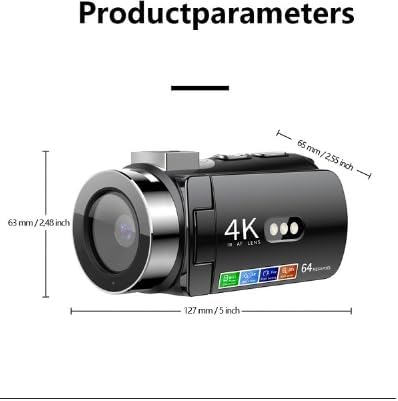
Figure 4.4: Dimensions of the D9 camera: approximately 127 mm (5 inches) in length, 63 mm (2.48 inches) in height, and 65 mm (2.55 inches) in width.
5. Setup
5.1 Charging the Battery
The D9 camera comes with a built-in 4800mAh battery.
- Connect the provided Type-C cable to the camera's charging port.
- Connect the other end of the Type-C cable to a compatible USB power adapter (not included) or a computer's USB port.
- The charging indicator light will illuminate. Once fully charged, the indicator light will change or turn off.
- A full charge provides approximately 6 hours of usage time.
5.2 Inserting a Memory Card
The camera supports memory cards from 8GB to 128GB. Ensure the memory card is formatted to FAT32.
- Locate the memory card slot on the camera.
- Insert the memory card with the contacts facing the correct direction until it clicks into place.
- To remove, gently press the card until it springs out.
Note: A memory card is required for recording videos and taking photos.
6. Operating Instructions
6.1 Powering On/Off
- To Power On: Press and hold the Power button until the screen illuminates.
- To Power Off: Press and hold the Power button until the screen turns off.
6.2 Basic Recording Modes
Use the mode button to switch between video recording and photo capture modes.
- Video Recording: In video mode, press the Record button to start recording. Press again to stop. Videos are saved in AVI format at 4K resolution.
- Photo Capture: In photo mode, press the Shutter button to take a picture. Photos are saved in JPG format at up to 64MP resolution.
6.3 Using Digital Zoom
The camera features a 28X digital zoom. Use the zoom controls (usually marked with 'W' for Wide and 'T' for Telephoto) to adjust the magnification.
6.4 Wi-Fi Connectivity
Connect your D9 camera to a smartphone or tablet (iOS and Android) via Wi-Fi for remote control, live preview, and file transfer.
- Enable Wi-Fi on your camera through the settings menu.
- Download the dedicated camera app (refer to the camera's screen or manual for app name, if available, otherwise search for "D9 Camera" app).
- On your smartphone/tablet, connect to the camera's Wi-Fi network (SSID will be displayed on the camera screen).
- Open the app to control the camera remotely, view live footage, and transfer files.
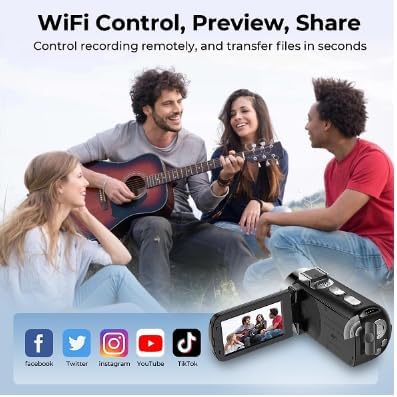
Figure 6.1: Illustration of the D9 camera's Wi-Fi capabilities, enabling remote control, preview, and sharing to platforms like Facebook, Twitter, Instagram, YouTube, and TikTok.
6.5 Webcam Functionality
The D9 camera can be used as a high-quality webcam for live streaming or video calls.
- Connect the camera to your computer using the provided Type-C USB cable.
- Select "Webcam Mode" or "PC Camera" on the camera's screen if prompted.
- Your computer should recognize the camera as a webcam. Select it as the video source in your preferred video conferencing or streaming software.
6.6 Using the Fill Light
The camera includes a built-in fill light to brighten scenes. Activate it through the camera's menu or a dedicated button (refer to camera interface for specific control).
7. Maintenance
- Cleaning: Use the provided cleaning cloth to gently wipe the lens and screen. For stubborn smudges, use a lens cleaning solution designed for optical surfaces.
- Storage: Store the camera in a cool, dry place away from direct sunlight and extreme temperatures. Remove the memory card if storing for extended periods.
- Battery Care: For long-term storage, charge the battery to about 50% every few months to maintain battery health.
8. Troubleshooting
| Problem | Possible Cause / Solution |
|---|---|
| Camera does not power on. | Battery may be depleted. Charge the camera using the Type-C cable. |
| Cannot record photos/videos. | Memory card may be full, not inserted correctly, or not formatted (FAT32). Check card status or replace. |
| Wi-Fi connection issues. | Ensure Wi-Fi is enabled on the camera and your mobile device. Check that you are connected to the correct camera network. Restart both devices. |
| Poor image/video quality. | Ensure the lens is clean. Check lighting conditions and use the fill light if necessary. Adjust camera settings if available. |
9. Specifications
| Feature | Detail |
|---|---|
| Model Number | GPCV6400 |
| Photo Resolution | 64M, 56M, 48M, 36M, 24M, 20M, 16M, 12M, 10M, 8M |
| Video Resolution | 4K |
| Image Sensor | 1.68 |
| Display Screen | 3.0 inch (480x854) LED |
| Digital Zoom | 28X |
| Battery Capacity | 4800mAh (17.76Wh, 3.7V) |
| Charging Interface | Type-C |
| Memory Card Support | 8GB to 128GB (FAT32 format) |
| Video Format | AVI |
| Picture Format | JPG |
| Audio Format | WAV |
| Music Format | MP3 |
| Light Source Frequency | 50Hz, 60Hz |
| Wi-Fi Master Model | GPCV6400 |
| Keys | 11 |
| Color | Black |
| Min Focal Length | 8.0 |
| Max Focal Length | 64.0 |
10. Warranty and Support
This Generic D9 4K Digital Camera comes with a manufacturer's warranty of 1 month from the date of purchase. Please retain your proof of purchase for warranty claims.
For technical support or warranty inquiries, please contact your retailer or the manufacturer directly. Refer to the product packaging or purchase documentation for contact information.