1. Introduction
This manual provides essential instructions for the safe and efficient use of the JIS LV20 X9 Plus G2 Agricultural Framework with a 20L Water Tank. This product is designed to integrate with agricultural drone systems for tasks such as irrigation and spraying. Please read this manual thoroughly before assembly, operation, or maintenance to ensure proper function and safety.
2. Safety Information
Always prioritize safety when handling and operating agricultural equipment. Failure to follow these guidelines may result in injury or damage to the product.
- Read the Entire Manual: Understand all instructions and warnings before use.
- Personal Protective Equipment (PPE): Wear appropriate PPE, including gloves and eye protection, especially when handling chemicals or during maintenance.
- Chemical Handling: If using the water tank for chemical spraying, follow all safety guidelines provided by the chemical manufacturer. Avoid skin and eye contact.
- Secure Connections: Ensure all components, especially the water tank, are securely attached to the framework before operation. Loose parts can cause instability and accidents.
- Weight Limits: Do not exceed the maximum recommended load capacity of the framework or the 20L capacity of the water tank. Overloading can lead to structural failure.
- Environmental Conditions: Operate the equipment in suitable weather conditions. Avoid strong winds, rain, or extreme temperatures that could affect stability or performance.
- Maintenance: Perform regular inspections and maintenance as described in this manual to ensure the product remains in safe operating condition.
3. Product Overview
The JIS LV20 X9 Plus G2 Agricultural Framework is designed for robust performance in agricultural applications. It features an exclusive fit design for the 20L water tank, ensuring a secure and stable connection. The framework is constructed from high-strength, wear-resistant engineering plastics, providing durability and weather resistance for long-term outdoor use.
Key Features:
- Exclusive Fit Design: Specifically designed for the LV20 X9 Plus G2 agricultural framework, the 20L water tank perfectly matches the framework in terms of size and connection methods.
- Practical Capacity Planning: The 20L capacity provides sufficient liquid reserve for agricultural operations, reducing the frequency of refilling.
- High-Quality Materials: Made of high-strength and wear-resistant engineering plastics for durability and weather resistance.
- Optimized Structure Design: Internal structure reduces liquid sloshing, ensuring stability during operation.
- Convenient Liquid-Level Check: Equipped with a clear observation window for real-time monitoring of liquid volume.
Components:
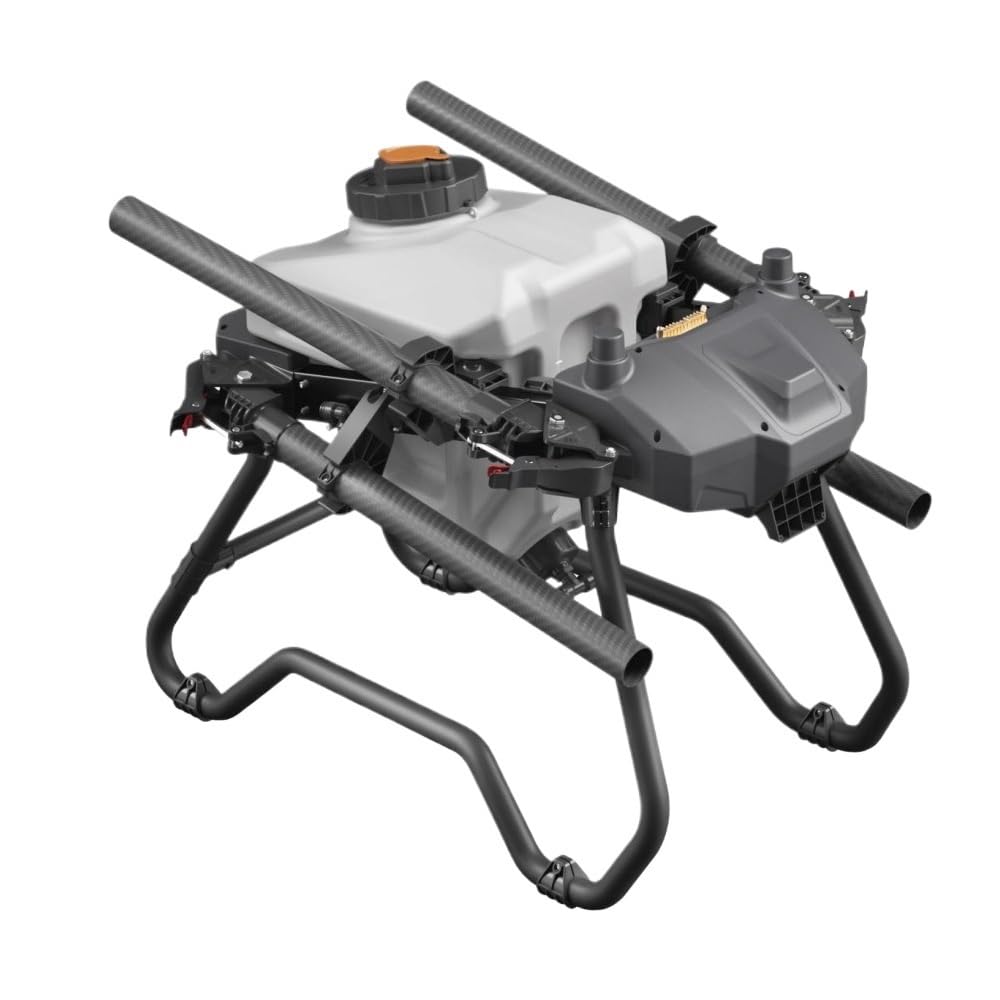
Figure 3.1: The complete JIS LV20 X9 Plus G2 Agricultural Framework with the 20L Water Tank attached. This image shows the overall structure and how the tank integrates with the framework.
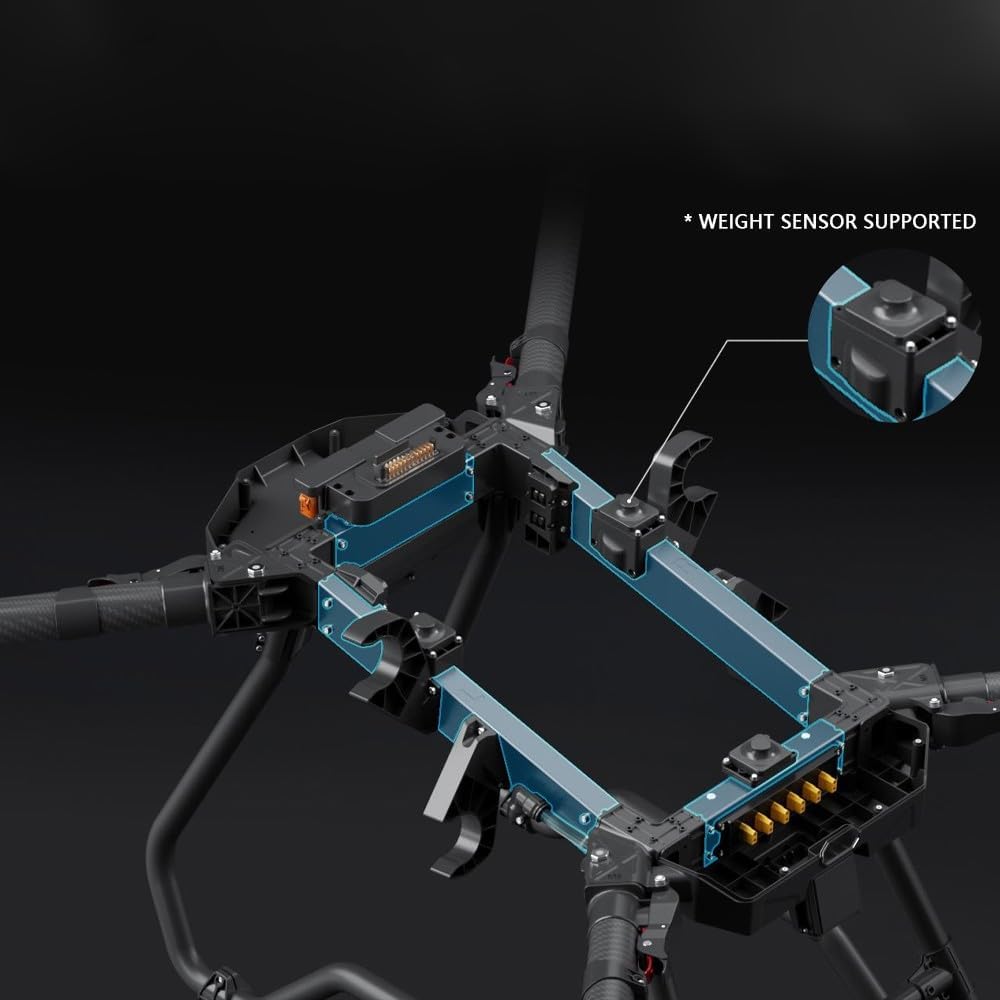
Figure 3.2: An internal view of the LV20 framework, highlighting the structural components and the integrated weight sensor. This illustrates the robust design and sensor placement.

Figure 3.3: A detailed view of the internal electronic components and a SIM card slot within the framework. This shows the integrated control systems.
4. Setup
Follow these steps to properly assemble and prepare your agricultural framework and water tank for use.
4.1 Unpacking and Inspection
- Carefully remove all components from the packaging.
- Inspect all parts for any signs of damage during transit. Contact customer support immediately if any damage is found.
- Ensure all listed components are present.
4.2 Framework Assembly
Assemble the main framework components according to the specific instructions provided with your drone system. Ensure all structural connections are tight and secure.
4.3 Water Tank Installation
- Align the 20L water tank with the designated mounting points on the LV20 framework. The tank is designed for an exclusive fit.
- Secure the water tank using the provided fasteners or locking mechanisms. Ensure it is firmly seated and does not wobble.
- Connect any necessary hoses or electrical connections from the water tank to the framework's system. Refer to your drone's specific connection diagram.

Figure 4.1: A close-up view illustrating a secure connection point on the carbon fiber arm of the framework. This highlights the method for attaching components.
5. Operating Instructions
Proper operation ensures efficient performance and extends the lifespan of your equipment.
5.1 Filling the Water Tank
- Ensure the framework is stable and level before filling.
- Open the tank's filler cap.
- Carefully pour the desired liquid (water, fertilizer, pesticide, etc.) into the tank.
- Monitor the liquid level using the clear observation window. Do not overfill the tank beyond its 20L capacity.
- Securely close the filler cap after filling to prevent spills during operation.
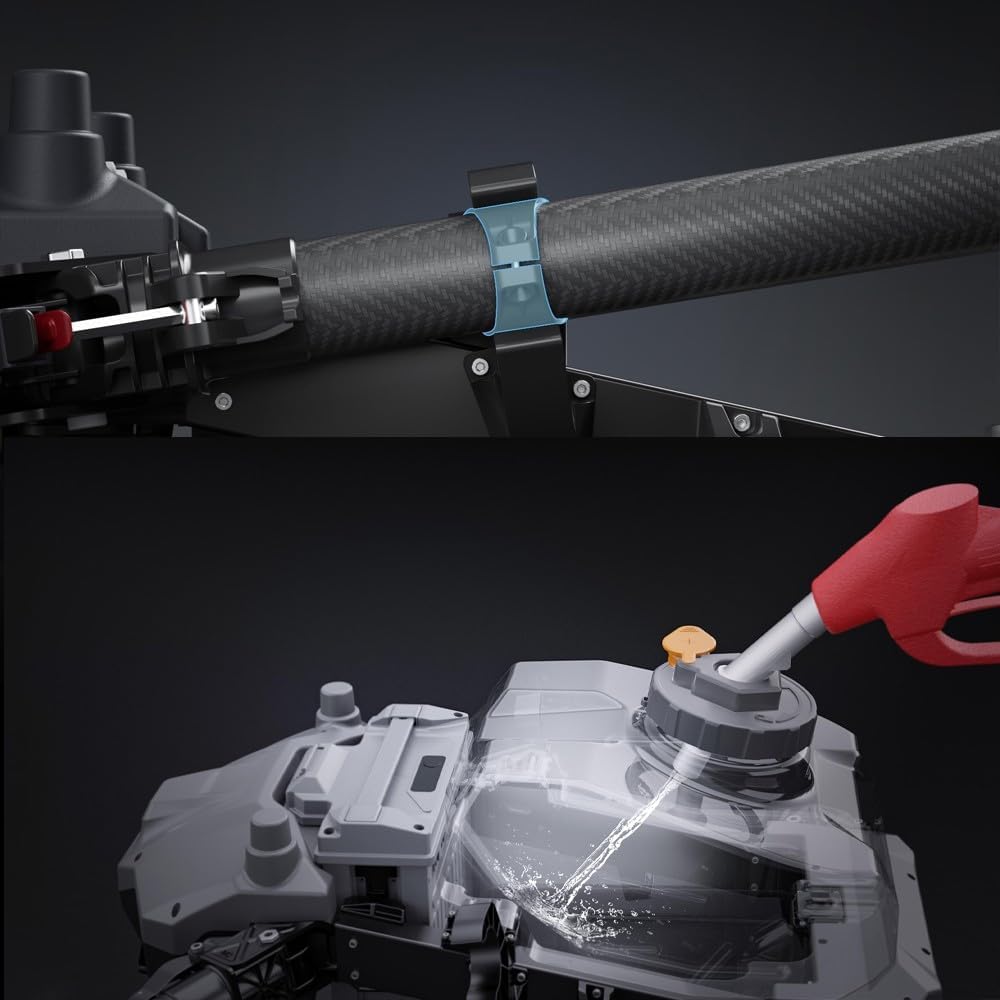
Figure 5.1: Illustration of the process for filling the 20L water tank. The image shows liquid being poured into the tank's opening.
5.2 Monitoring Liquid Level
The integrated liquid-level observation window allows for real-time monitoring. Regularly check the window to plan refills and avoid interruptions during agricultural tasks.
5.3 Operation with Drone System
Once the tank is filled and secured, integrate the framework with your agricultural drone system. Follow the drone manufacturer's instructions for flight, spraying, or irrigation operations. The optimized structure design of the tank helps reduce liquid sloshing, contributing to stable drone flight.
6. Maintenance
Regular maintenance is crucial for the longevity and optimal performance of your agricultural framework and water tank.
6.1 Cleaning
- After Each Use: Empty any remaining liquid from the tank. Rinse the tank thoroughly with clean water, especially if chemicals were used.
- Framework: Wipe down the framework with a damp cloth to remove dirt, dust, and chemical residues. Avoid using harsh abrasives or solvents that could damage the material.
- Connections: Ensure all hose and electrical connections are clean and free of debris.
6.2 Inspection
- Before Each Use: Check for any visible damage, cracks, or leaks on the water tank and framework.
- Fasteners: Verify that all screws, bolts, and locking mechanisms are tight and secure.
- Hoses and Seals: Inspect hoses for kinks, wear, or leaks. Check seals and gaskets for deterioration.
6.3 Storage
- Store the framework and water tank in a clean, dry, and cool environment, away from direct sunlight and extreme temperatures.
- Ensure the tank is completely empty and clean before long-term storage.
- If storing for extended periods, consider disassembling the tank from the framework to prevent stress on connection points.
7. Troubleshooting
This section addresses common issues you might encounter with the LV20 Framework and 20L Water Tank.
| Problem | Possible Cause | Solution |
|---|---|---|
| Liquid Leakage from Tank | Loose filler cap; Damaged seal/gasket; Crack in tank; Loose hose connection. | Ensure filler cap is tightly closed. Inspect and replace damaged seals/gaskets. Check tank for cracks and replace if necessary. Tighten hose connections. |
| Tank not securely attached to framework | Improper installation; Loose fasteners. | Re-align and re-install the tank, ensuring all mounting points are engaged. Tighten all fasteners securely. |
| Inaccurate Liquid Level Reading | Observation window obscured; Sensor malfunction (if applicable). | Clean the observation window. If a sensor is present and suspected of malfunction, consult your drone system's manual or contact support. |
| Unstable Drone Operation (related to tank) | Tank not securely mounted; Excessive liquid sloshing; Overfilling. | Ensure tank is firmly attached. The optimized design minimizes sloshing, but avoid sudden movements. Do not overfill the tank. |
8. Specifications
| Feature | Detail |
|---|---|
| Brand | Generic |
| Model Number | NNAADDCPF-LV20FRAMEWORK |
| Color | LV20 Framework |
| Product Dimensions | 3.94"L x 3.94"W x 3.94"H |
| Item Weight | 1.76 ounces (50 Grams) |
| Water Tank Capacity | 20 Liters |
| Material | Composite Material (High-strength engineering plastics) |
| Connectivity Technology | Bluetooth (as per manufacturer specifications) |
| Battery Capacity | 1 Amp Hours (as per manufacturer specifications) |
| Battery Cell Composition | Alkaline (as per manufacturer specifications) |
| Manufacturer | Generic |
| Date First Available | December 27, 2025 |
9. Warranty & Support
For warranty information and customer support, please refer to the documentation provided with your complete agricultural drone system or contact the seller directly. Keep your purchase receipt as proof of purchase.
For technical assistance or inquiries regarding the JIS LV20 X9 Plus G2 Agricultural Framework, please contact:
- Seller: baoxiaoheng
- Amazon Seller Page: Visit Seller Page


