
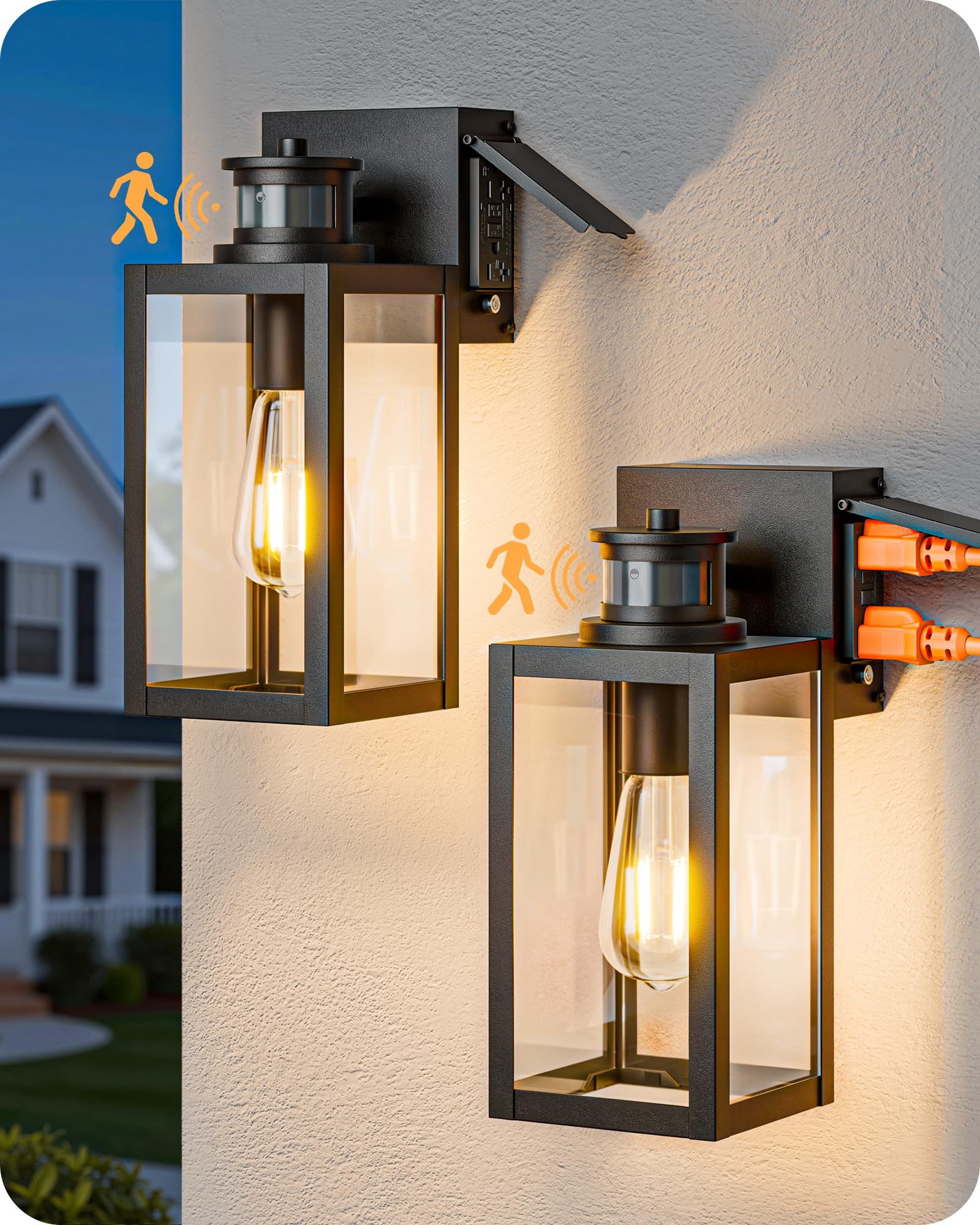
Figure 0.1: EDISHINE Outdoor Wall Light (Model B05103GPG-BK).
1. Important Safety Information
Please read and understand all instructions before installing or operating this product. Failure to follow these instructions may result in electric shock, fire, or other hazards that could cause property damage or personal injury.
- Always disconnect power at the circuit breaker before installation, servicing, or cleaning.
- Consult a qualified electrician if you are unsure about the installation process.
- Ensure all electrical connections comply with local codes and ordinances.
- Do not install near flammable materials or in areas with explosive atmospheres.
- This fixture is designed for outdoor use only.
- Use only E26 dimmable bulbs as specified. Non-dimmable bulbs may cause flickering or malfunction.
- The built-in GFCI outlets provide additional protection. Ensure the "RESET" button is pressed after installation for proper function.
2. Package Contents
Verify that all components are present before beginning installation.
- EDISHINE Outdoor Wall Light Fixture (2 units for 2-pack model)
- Mounting Hardware Kit
- Instruction Manual
Note: E26 bulbs are not included and must be purchased separately.
3. Specifications
| Brand | EDISHINE |
| Model Number | B05103GPG-BK |
| Product Dimensions | 40L x 33W x 18H Centimetres (12" H) |
| Item Weight | 3.4 kg |
| Material | Glass, Iron |
| Colour | Black |
| Power Source | AC (120 Volts) |
| Wattage | 60 watts (Max) |
| Bulb Base | E26 (Dimmable LED or Incandescent 100W MAX) |
| Special Features | Built-In GFCI Outlet, Motion Sensor, Dusk to Dawn |
| GFCI Outlet Max Load | 20A Current, 2500W Power |
| Indoor/Outdoor Usage | Outdoor use only |
| Weather Resistance | Waterproof, Snowproof, High Temp Resistant, Storm Resistant |

Figure 3.1: Product Dimensions and Bulb Compatibility. The fixture measures 12 inches in height, with a width of 4.72 inches. It is compatible with various E26 base bulbs, including incandescent (100W MAX) or dimmable LED (60W MAX) bulbs.

Figure 3.2: Weather Resistance Features. The light fixture is designed to withstand various outdoor conditions, including rain, snow, high temperatures, and storms, ensuring reliable performance.
4. Setup and Installation
Follow these steps for safe and proper installation of your EDISHINE outdoor wall light.
- Prepare for Installation: Turn off power at the circuit breaker before starting. Ensure the mounting surface is clean and secure.
- Mounting Plate Installation: Secure the provided mounting plate to your outdoor junction box using the included hardware.
- Wire Connections: Connect the fixture's wires to your household wiring:
- Connect the hot wire (usually black) from the fixture to the hot wire from the junction box.
- Connect the neutral wire (usually white) from the fixture to the neutral wire from the junction box.
- Connect the ground wire (usually green or bare copper) from the fixture to the ground wire from the junction box.
- Attach Fixture: Carefully tuck the wires into the junction box and attach the light fixture to the mounting plate using the provided screws. Ensure it is securely fastened.
- Install Bulb: Insert an E26 dimmable bulb (not included) into the socket. The open-bottom design allows for easy bulb replacement.
- Restore Power and Reset GFCI: Turn power back on at the circuit breaker. Press the "RESET" button on the GFCI outlet to activate it for use.

Figure 4.1: GFCI Outlet Reset. After installation, remember to press the "RESET" button on the GFCI outlet to enable its functionality and provide protection against electrical faults.
5. Operating Instructions
Your EDISHINE outdoor wall light features a motion sensor and three operating modes, along with convenient GFCI outlets.
5.1. Motion Sensor Modes
The light fixture offers three distinct modes, selectable by quickly toggling your wall switch "ON" and "OFF" within 2 seconds.
- AUTO+ Mode:
- From dusk to dawn, the light maintains a low brightness (default 40%, adjustable between 15%-50%).
- Upon detecting motion, the light brightens to 100% for approximately 2 minutes.
- After 2 minutes without motion, it returns to the low brightness setting.
- AUTO Mode:
- The light remains off at dusk.
- Upon detecting motion, the light turns on to 100% brightness.
- After approximately 2 minutes without motion, the light turns off.
- PC Mode (Photocell Mode):
- The light automatically turns off during the daytime.
- At dusk, the light turns on and stays at 100% brightness for 8 hours.

Figure 5.1: Auto+ Mode and Auto Mode Operation. These diagrams explain how the light behaves in response to ambient light and motion detection in both Auto+ and Auto modes.
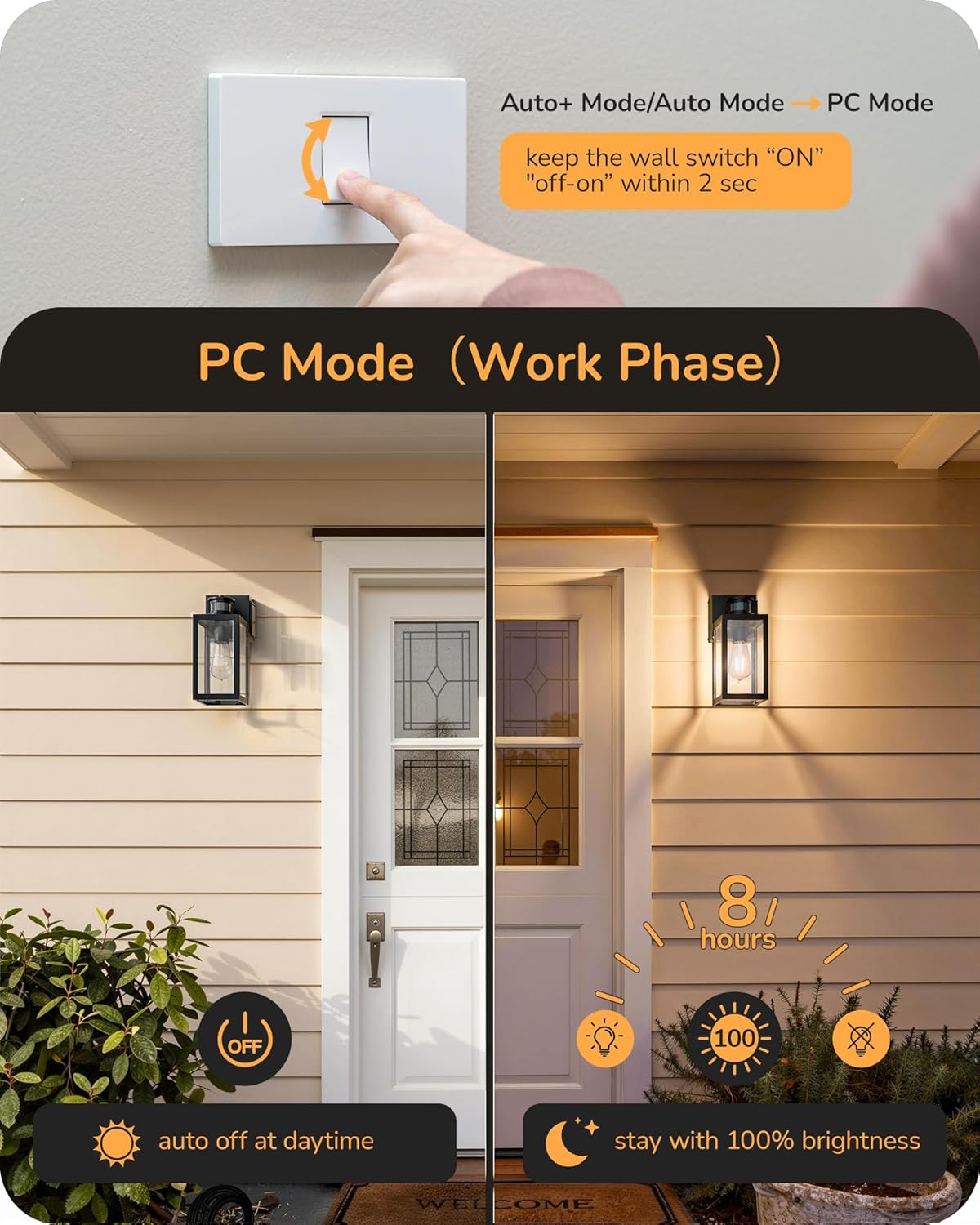
Figure 5.2: PC Mode Operation. This diagram shows the light turning off during the day and providing continuous 100% brightness for 8 hours after dusk.
5.2. GFCI Outlets
The built-in GFCI outlets provide convenient power for outdoor devices while offering protection against electrical faults. Each outlet supports 2-prong or 3-prong devices with a maximum combined load of 20A current and 2500W power.
- Ensure the "RESET" button is pressed after installation or if the outlet trips.
- Do not exceed the maximum load capacity of 2500W.
- These outlets are suitable for powering devices such as security cameras, garden tools, or temporary outdoor decorations.

Figure 5.3: GFCI Outlet Applications. The integrated GFCI outlets can power a variety of outdoor equipment and decorations, providing both convenience and safety.
6. Maintenance
Regular maintenance ensures optimal performance and longevity of your outdoor wall light.
- Cleaning: Disconnect power before cleaning. Wipe the fixture with a soft, damp cloth. Avoid abrasive cleaners or solvents that could damage the finish or glass. The open-bottom design allows for easy glass cleaning.
- Bulb Replacement: Disconnect power before replacing the bulb. Allow the bulb to cool completely. Unscrew the old E26 bulb and screw in a new E26 dimmable bulb (max 60W LED or 100W incandescent).
- GFCI Testing: Periodically test the GFCI outlets by pressing the "TEST" button. The "RESET" button should pop out. Press "RESET" to restore power. If it does not reset, consult a qualified electrician.
7. Troubleshooting
If you encounter issues with your EDISHINE outdoor wall light, refer to the following common solutions:
| Problem | Possible Cause & Solution |
|---|---|
| Light does not turn on. |
|
| Motion sensor not working or light stays on/off. |
|
| GFCI outlet not working. |
|
| Light flickers. |
|
8. Warranty Information
This EDISHINE product is covered by a 1-Year Manufacturer Warranty from the date of purchase. This warranty covers defects in materials and workmanship under normal use. It does not cover damage caused by improper installation, accident, misuse, abuse, or unauthorized modifications.
Please retain your proof of purchase for warranty claims.
9. Customer Support
For further assistance, technical support, or warranty inquiries, please contact EDISHINE customer service. Refer to the product packaging or the EDISHINE official website for current contact information.
Website: Visit the EDISHINE Store on Amazon