
1. Introduction
Thank you for choosing the Nasonet Nightstand with Charging Station. This manual provides detailed instructions for assembly, operation, maintenance, and troubleshooting to ensure safe and efficient use of your new furniture. Please read this guide thoroughly before assembly and retain it for future reference.
2. Product Features
The Nasonet Nightstand is designed for convenience and style, featuring a robust wooden construction and integrated functionalities.
- Built-in Charging Station: Equipped with 2 AC power outlets (125V/12A) and 2 USB ports (5V/2.1A) for convenient device charging.
- Rounded Corner Design: Features smooth, rounded corners to enhance safety and provide a modern aesthetic.
- Ample Storage Space: Includes an open shelf and a spacious drawer (15.5 x 11.8 x 3.9 inches) for organizing bedside essentials.
- Stable Structure: Supported by sturdy wooden legs with anti-slip pads for enhanced stability on various floor surfaces.
- Versatile Design: Suitable for use in bedrooms, living rooms, studies, and kids' rooms.
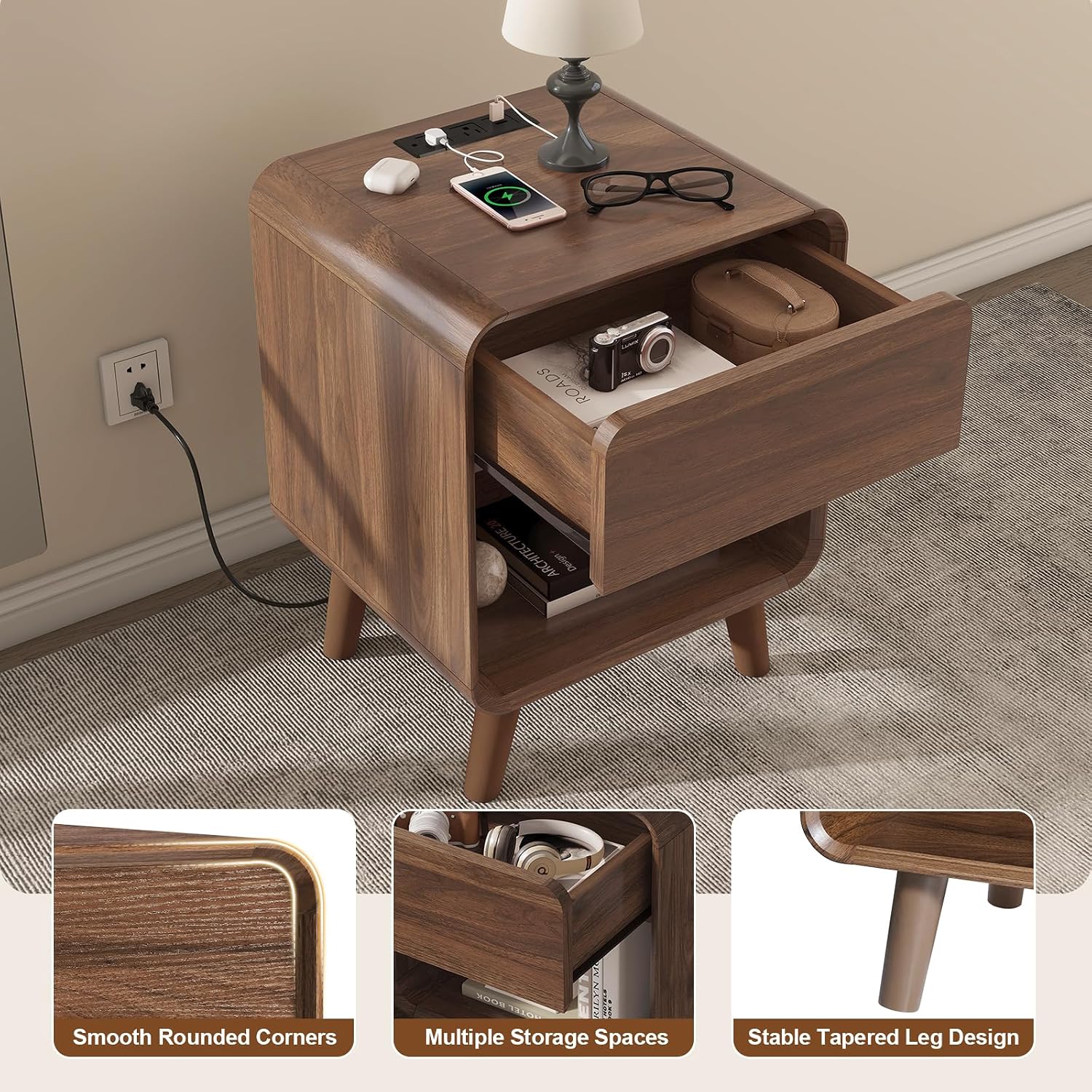
Image: The Nasonet Nightstand showcasing its open drawer, smooth rounded corners, and stable tapered leg design. The drawer provides ample storage, and the open shelf offers additional space.
3. Package Contents
Before beginning assembly, please verify that all components listed below are present and undamaged. If any parts are missing or damaged, please contact Nasonet customer support.
- All necessary furniture panels and hardware (labeled)
- Assembly Guide
- Charging Station unit
- Installation Tool (screwdriver and Allen wrench)
4. Assembly Instructions
Assembly is designed to be straightforward. Please follow the included Assembly Guide step-by-step. All parts are labeled for easy identification.
- Unpack all components and lay them out on a clean, soft surface to prevent scratches.
- Identify each part using the labels and cross-reference with the Assembly Guide.
- Follow the graphical instructions in the Assembly Guide to connect panels and install hardware.
- Attach the drawer rails to the designated panels as per the guide. Ensure proper alignment for smooth drawer operation.
- Install the charging station into the pre-drilled slot on the tabletop.
- Secure all screws and fasteners. While a manual screwdriver is provided, a cordless drill/driver with a Phillips bit may expedite the process, especially for pre-drilled holes that require more force. Avoid overtightening.
- Attach the wooden legs to the base of the nightstand.
- Once assembled, gently move the nightstand to its desired location.

Image: A detailed diagram of the Nasonet Nightstand showing its overall dimensions and the dimensions of the internal drawer and open shelf.
5. Operating Instructions (Charging Station)
The integrated charging station provides convenient power access for your electronic devices.
- Ensure the nightstand's power cord is securely plugged into a functional wall outlet.
- To charge devices, plug your AC adapters into the 2 AC power outlets (125V/12A) or connect your USB cables directly to the 2 USB ports (5V/2.1A) located on the top surface of the nightstand.
- The charging station is designed for standard electronic devices such as phones, tablets, and small lamps.

Image: A close-up view of the nightstand's top surface, illustrating the integrated charging station with two AC outlets and two USB ports in use, charging a smartphone and a tablet.
Video: This video demonstrates the functionality of the built-in charging station, showing how to plug in devices and utilize the AC outlets and USB ports for convenient power access.
6. Maintenance
To maintain the appearance and longevity of your Nasonet Nightstand, follow these simple care instructions:
- For general cleaning, wipe the surfaces with a soft, damp cloth.
- Immediately follow with a dry cloth to remove any moisture and prevent water marks.
- Avoid using harsh chemicals, abrasive cleaners, or polishes that may damage the wood finish.
- Keep the nightstand away from direct sunlight and extreme temperature changes to prevent warping or fading.
7. Troubleshooting
If you encounter any issues with your Nasonet Nightstand, please refer to the following common solutions:
- Wobbling: Ensure all screws and fasteners are tightened. Check that the nightstand is on a level surface; adjust anti-slip pads if necessary.
- Drawer not sliding smoothly: Verify that the drawer rails are correctly installed and aligned. Ensure no obstructions are in the drawer's path.
- Charging station not working: Confirm the nightstand's main power cord is securely plugged into a live wall outlet. Test the outlet with another device. Ensure devices are properly connected to the AC outlets or USB ports.
- Assembly difficulties: Double-check the Assembly Guide for any missed steps or incorrect part orientations. If guide holes are difficult, a power drill may be used carefully.
8. Specifications
| Feature | Detail |
|---|---|
| Brand | Nasonet |
| Model Number | AP042-48-49 |
| Product Dimensions (D x W x H) | 15.75" x 17.72" x 23.62" (40cm x 45cm x 60cm) |
| Item Weight | 10.95 kg (24.14 lbs) |
| Maximum Weight Recommendation | 17.5 kg (38.58 lbs) |
| Frame Material | Wood |
| Color | Walnut |
| Charging Station | 2 AC Power Outlets (125V/12A), 2 USB Ports (5V/2.1A) |
| Number of Drawers | 1 |
| Drawer Dimensions | 15.5" x 11.8" x 3.9" (approximate internal) |
| Care Instructions | Wipe with Damp Cloth, Wipe with Dry Cloth |
9. Warranty and Support
Nasonet stands behind the quality of its products. For warranty information, please refer to the warranty card included with your purchase. For any questions, missing parts, or support needs, please contact Nasonet customer service. Please have your model number (AP042-48-49) and purchase details ready.
Manufacturer: Nasonet