
1. Introduction
Thank you for choosing the RDINSCOS MT35 Pinless Moisture Meter. This device is designed for non-destructive moisture detection in various building materials and wood types. It provides relative moisture values to help identify damp or wet areas without causing damage to surfaces. Please read this manual thoroughly before use to ensure proper operation and to maximize the lifespan of your device.

Image: The RDINSCOS MT35 Pinless Moisture Meter being used to check moisture levels on a wall.
2. Safety Information
- Keep the device away from water and high humidity to prevent damage.
- Do not attempt to open or modify the device. Repairs should only be performed by qualified personnel.
- Avoid exposing the device to extreme temperatures or direct sunlight for prolonged periods.
- This device uses electromagnetic field (EMF) technology. While generally safe, keep it away from sensitive electronic equipment or medical implants if you have concerns.
- Ensure the device is fully charged before use for accurate readings.
3. Product Overview and Components
The RDINSCOS MT35 is a versatile pinless moisture meter featuring a large LCD display, audible alarm, and a rechargeable battery. It is designed for non-destructive measurement up to 19mm deep.
Included Components:
- 1 x RDINSCOS MT35 Moisture Meter
- 1 x User Manual
- 1 x Storage Bag
- 1 x USB Data Cable
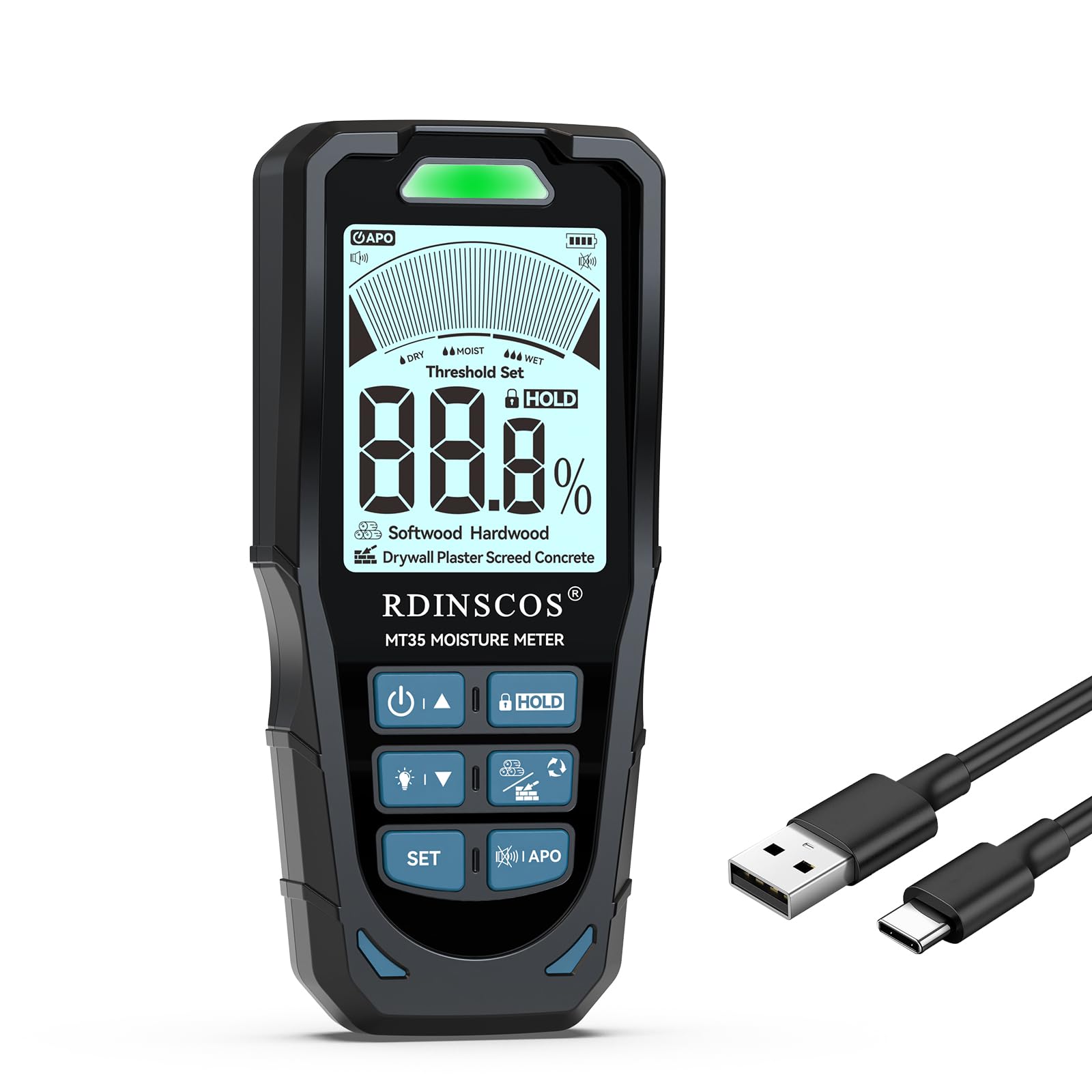
Image: The RDINSCOS MT35 Pinless Moisture Meter, its USB charging cable, and a storage bag.
4. Setup
Charging the Battery:
- Connect the provided USB data cable to the charging port on the MT35 meter.
- Plug the other end of the USB cable into a standard USB power adapter (not included) or a computer USB port.
- The battery indicator on the LCD display will show charging status. A full charge typically provides up to 8 hours of continuous use.
5. Operating Instructions
Powering On/Off:
- Press and hold the power button (U/A) to turn the device on or off.
- The device features an auto-shutdown function to conserve battery power after a period of inactivity.
Selecting Measurement Mode:
The MT35 offers 6 different measurement modes for various materials. Press the MODE button to cycle through the following options:
- Softwood: For low-density woods (e.g., Agba, Balsa, Cedar, Fir, Lauan).
- Hardwood: For higher-density woods (e.g., Alder, Bloodwood, Rosewood).
- Drywall: Specifically for gypsum board.
- Plaster: For medium-density materials with easy water absorption (density range 1.2-1.8g/cm³).
- Screed: For high-density and low water absorption materials (density range 1.8-2.4g/cm³).
- Concrete: For very high-density and low water absorption materials (density range 2.4-3.0g/cm³).


Image: Examples of material types for mode selection, including softwood and drywall.


Image: Examples of material types for mode selection, including screed and general wood applications.
Taking Measurements:
- Select the appropriate material mode for the surface you are testing.
- Place the sensor pad of the meter flat against the surface to be measured. Ensure full contact.
- The meter will display a relative moisture value on the LCD screen. The measurement depth is up to 19mm.
- Avoid placing the meter over metal or wires within the material, as this can interfere with readings.

Image: A user holding the MT35 meter against a wall surface to take a measurement.

Image: A diagram illustrating the effective measurement depth of 19mm and how metal or wires can influence readings.
Understanding Readings and Alarm Function:
The MT35 provides relative moisture values. The LCD display shows the percentage, and LED indicators (green, orange, red) along with an audible buzzer signal the moisture level:
- Green: Dry conditions.
- Orange: Damp conditions.
- Red: Wet or high-risk conditions, accompanied by an audible alarm.

Image: The MT35 display showing a 1.3% moisture reading on plaster, indicating dry conditions with a green LED.
Customizing Alarm Thresholds:
You can set custom low and high alarm thresholds for each material mode.
- After powering on, press the SET button.
- Use the up (U/A) and down (V/T) buttons to adjust the LOW and HIGH alarm thresholds.
- Press SET again to save your settings and return to the testing interface.

Image: A user adjusting the alarm threshold settings on the MT35 meter.

Image: A table detailing recommended moisture level ranges for Dry, Moist, and Wet conditions across various materials like Drywall, Plaster, Screed, Concrete, Softwood, and Hardwood.
6. Maintenance
- Cleaning: Wipe the device with a soft, dry cloth. Do not use abrasive cleaners or solvents.
- Storage: Store the meter in its protective bag in a cool, dry place when not in use. Avoid areas with high humidity or extreme temperatures.
- Battery Care: Recharge the battery regularly, even if the device is not used frequently, to maintain battery health. Avoid fully discharging the battery for extended periods.
7. Troubleshooting
| Problem | Possible Cause | Solution |
|---|---|---|
| Device does not power on. | Low or depleted battery. | Charge the device using the provided USB cable. |
| Inaccurate or inconsistent readings. | Incorrect material mode selected. Presence of metal/wires within the material. Sensor not making full contact. | Ensure the correct mode is selected. Reposition the meter to avoid metal. Ensure the sensor pad is flat against the surface. |
| Audible alarm sounds continuously. | Moisture level exceeds the set high threshold. | Check the moisture reading on the display. Adjust alarm thresholds if desired (refer to Section 5). |
| Display is dim or unreadable. | Backlight is off or battery is low. | Press the backlight button (if available) to activate. Charge the battery. |
8. Specifications
| Feature | Detail |
|---|---|
| Model Number | MT35 |
| Measurement Type | Pinless, Non-destructive |
| Measurement Depth | Up to 19 mm (0.75 inches) |
| Measurement Modes | 6 (Softwood, Hardwood, Drywall, Plaster, Screed, Concrete) |
| Display | 2.9-inch LCD with backlight |
| Battery | 1200mAh Lithium Polymer (rechargeable via USB) |
| Battery Life | Up to 8 hours of use |
| Alarm | Audible alarm with customizable thresholds, LED indicators (Green, Orange, Red) |
| Auto-Shutdown | Yes |
| Item Weight | 9.3 ounces |
| Package Dimensions | 6.93 x 3.31 x 1.57 inches |
| Manufacturer | SHENZHEN REDDRAGON INSTRUMENTS CO.,LTD |
9. Warranty and Support
RDINSCOS products are manufactured to high-quality standards. For warranty information, technical support, or service inquiries, please refer to the contact details provided with your purchase documentation or visit the official RDINSCOS website. Please retain your proof of purchase for warranty claims.