
1. Introduction
This instruction manual provides detailed guidance for the installation and operation of your LocoLee LED Light Kit, designed specifically for the LEGO 21365 Love Birds model. This kit enhances your LEGO model with integrated lighting, bringing it to life. Please note that this product includes only the light kit; the LEGO 21365 Love Birds model is not included and must be purchased separately or already owned.
For optimal results and to ensure the longevity of your light kit, please read these instructions carefully before beginning installation.
2. Safety Information
Please observe the following safety precautions:
- Small Parts: This kit contains small parts that may pose a choking hazard for young children. Keep out of reach of children under 3 years old.
- Electrical Components: Handle all electrical components and wires with care. Do not pull wires forcefully.
- Power Source: Use only a USB power source with a voltage less than 5V. Exceeding this voltage may damage the lights.
- Installation Environment: Ensure your workspace is clean and well-lit during installation.
- Disassembly: Only disassemble the necessary LEGO bricks as instructed to install the lights. Avoid excessive force.
3. Package Contents
Before beginning installation, please verify that all components listed below are present in your package. Refer to the image for visual identification of parts.
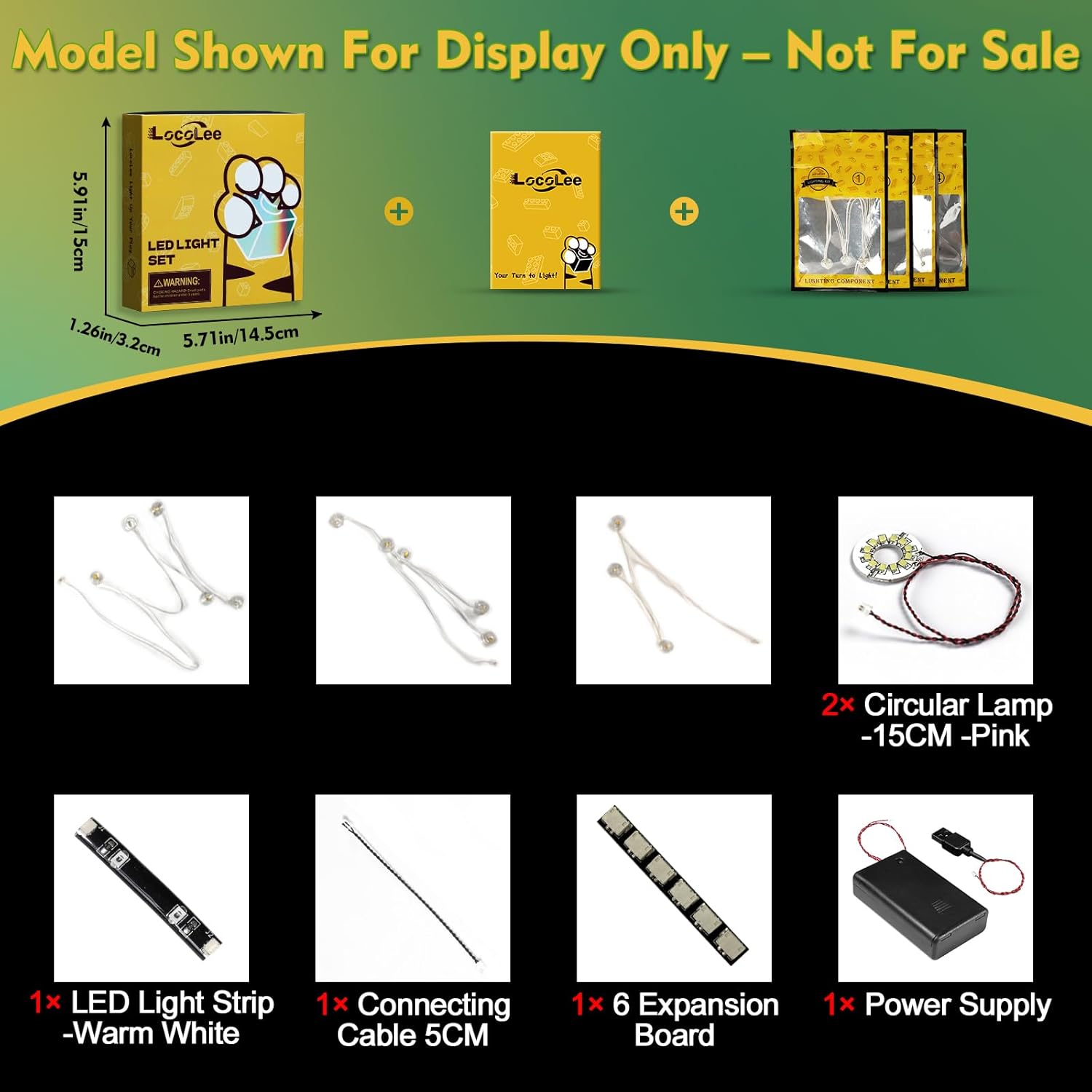
Image showing the various components included in the LocoLee Light Kit, such as LED light strips, connecting cables, expansion boards, circular lamps, and the power supply unit.
- LED Light Strip (Warm White)
- Connecting Cable (5CM)
- 6-Port Expansion Board
- Circular Lamp (Pink, 15CM) - 2 units
- Power Supply Unit
- Numbered light bags for step-by-step installation

Image displaying the retail packaging of the LocoLee LED Light Kit, indicating the brand and product type.
4. Setup & Installation
The installation process involves integrating the LED lights into your existing LEGO 21365 Love Birds model. Detailed video and PDF installation instructions are available online. These resources provide step-by-step guidance for each numbered light bag.
General Installation Steps:
- Prepare Your Model: Ensure your LEGO 21365 Love Birds model is fully assembled and stable.
- Access Online Instructions: Locate the detailed video/PDF installation guide provided by LocoLee. This guide will show you which bricks to disassemble.
- Test Components: Before integrating, test each light part by connecting it to the power supply to ensure it functions correctly.
- Install Lights: Follow the online instructions precisely. You will need to carefully disassemble specific sections of your LEGO model to route and secure the light wires and components.
- Connect Wires: Connect the light components to the expansion board, and then connect the expansion board to the power supply unit. Ensure all connections are secure but not forced.
- Reassemble Model: Carefully reassemble the LEGO bricks, ensuring that wires are neatly tucked away and not pinched. Avoid pulling wires too hard during reassembly.
- Final Check: Once reassembled, connect the power supply and test the entire lighting system.

Image showing the LocoLee Light Kit fully installed on the LEGO 21365 Love Birds model, illuminating the birds and the tree branches.
The lights are designed to be perfectly hidden and compatible with LEGO blocks, maintaining the aesthetic of your model.
5. Operation
To operate your LocoLee Light Kit:
- Connect Power: Connect the power supply unit to a compatible USB power source (less than 5V). This can be a USB wall adapter, power bank, or computer USB port.
- Power On: The lights will illuminate automatically once connected to a power source.
- Power Off: Disconnect the power supply unit from the USB source to turn off the lights.
Using a USB power source generally provides brighter illumination compared to other power options.
6. Maintenance
Proper maintenance ensures the longevity and performance of your light kit:
- Cleaning: Use a soft, dry cloth to gently wipe dust from the lights and wires. Do not use liquid cleaners.
- Storage: If storing the model, ensure wires are not kinked or crushed. Store in a cool, dry place away from direct sunlight.
- Handling: Avoid excessive bending or pulling of the wires, as this can cause internal damage.
- Power Source: Always use the recommended power source to prevent damage to the LED components.
7. Troubleshooting
If you encounter issues with your LocoLee Light Kit, refer to the following common problems and solutions:
| Problem | Possible Cause | Solution |
|---|---|---|
| Lights do not turn on. | No power, loose connection, or faulty component. | Ensure the USB power source is active. Check all wire connections to the expansion board and power supply. Re-test individual light components if possible. |
| Some lights are dim or flickering. | Insufficient power, loose connection, or damaged wire. | Try a different USB power source. Verify all connections are secure. Inspect wires for any visible damage. |
| Lights are not securely installed. | Improper routing or reassembly of LEGO bricks. | Refer to the online installation guide and carefully re-route wires and reassemble bricks to ensure components are snug. |
If the problem persists after attempting these solutions, please contact customer support.
8. Specifications
- Brand: LocoLee
- Model Number: 21365
- Material: Plastic (ABS) and Copper Lines
- Item Weight: Approximately 0.22 Pounds (0.1 kg)
- Power Source: USB (Voltage less than 5V)
- Batteries Included: No
- Included Components: LED Light Strip, Connecting Cable, Expansion Board, Circular Lamps, Power Supply Unit, Instruction Manual (online)
9. Warranty and Support
LocoLee is committed to providing high-quality products. This lighting set is made of high-quality copper lines and ABS plastic, undergoing quality checks to ensure compatibility and durability.
If you have any questions or encounter issues with your LocoLee Light Kit, please do not hesitate to contact us. Our customer support team is available to assist you with troubleshooting, installation guidance, or any product-related inquiries.
For assistance, please refer to the contact information provided with your purchase or visit the official LocoLee website.