
Introduction
The Pioneer DEQ-7000A Digital Sound Processor is designed to create an optimal acoustic environment tailored to your vehicle. This unit enhances your existing car audio system, whether factory-installed or aftermarket, by adding advanced sound adjustment capabilities. It allows for precise control over various audio parameters to deliver a superior listening experience.
Key features include a high-performance DSP, time alignment, a multi-band equalizer, and adjustable speaker output levels. Sound adjustments can be made intuitively using a smartphone or PC interface. The DEQ-7000A also supports high-resolution audio and various music sources, enabling the construction of diverse high-quality sound systems. Its compact design allows for flexible installation, even in confined spaces like under seats.
Safety Information
Please read all instructions carefully before installation and use. Failure to follow these instructions may result in injury or damage to the product or vehicle.
- Professional Installation Recommended: For optimal performance and safety, it is highly recommended that this product be installed by a qualified professional.
- Power Supply: Connect the unit only to a 12V DC negative ground power supply.
- Wiring: Ensure all wiring is correctly connected according to the wiring diagram provided in the full instruction manual. Incorrect wiring can cause fire, electric shock, or malfunction.
- Avoid Distractions: Do not operate the unit or adjust settings while driving. Always pull over to a safe location before making any adjustments.
- Ventilation: Ensure the unit is installed in a location with adequate ventilation to prevent overheating. Do not block ventilation openings.
- Moisture: Keep the unit away from water and excessive moisture.
Package Contents
Verify that all items listed below are included in the package:
- DEQ-7000A Digital Sound Processor Unit
- Cord Unit (Power Cable, Speaker Input Cable, Speaker Output Cable) x1 set
- Remote Control x1
- Mounting Kit (Mounting Brackets, Screws, Velcro) x1 set
- Bluetooth Antenna x1
- USB Cable (Type-B) x1
- Instruction Manual x1
- Warranty Card x1
Setup
The DEQ-7000A is designed for flexible installation due to its compact size, often fitting under seats or in other discreet locations. Follow these general steps for installation:
- Choose a Mounting Location: Select a secure, well-ventilated location away from heat sources and moisture. Ensure it does not interfere with vehicle operation or safety systems.
- Mount the Unit: Use the provided mounting kit to securely fasten the DEQ-7000A in the chosen location.
- Connect Power: Connect the power cable from the cord unit to the vehicle's 12V DC power supply, ensuring proper grounding.
- Connect Speaker Inputs/Outputs: Connect your existing car audio system's speaker outputs to the DEQ-7000A's speaker inputs. Then, connect the DEQ-7000A's speaker outputs to your vehicle's speakers.
- Connect Bluetooth Antenna: Attach the Bluetooth antenna to the designated port on the unit for wireless connectivity.
- Connect USB Cable: If using a PC for adjustments, connect the USB Type-B cable to the unit and your PC.
- Connect Remote Control: Plug in the wired remote control for convenient basic adjustments.
- Initial Power On: After all connections are secure, power on your vehicle's ignition and the audio system to verify basic functionality.
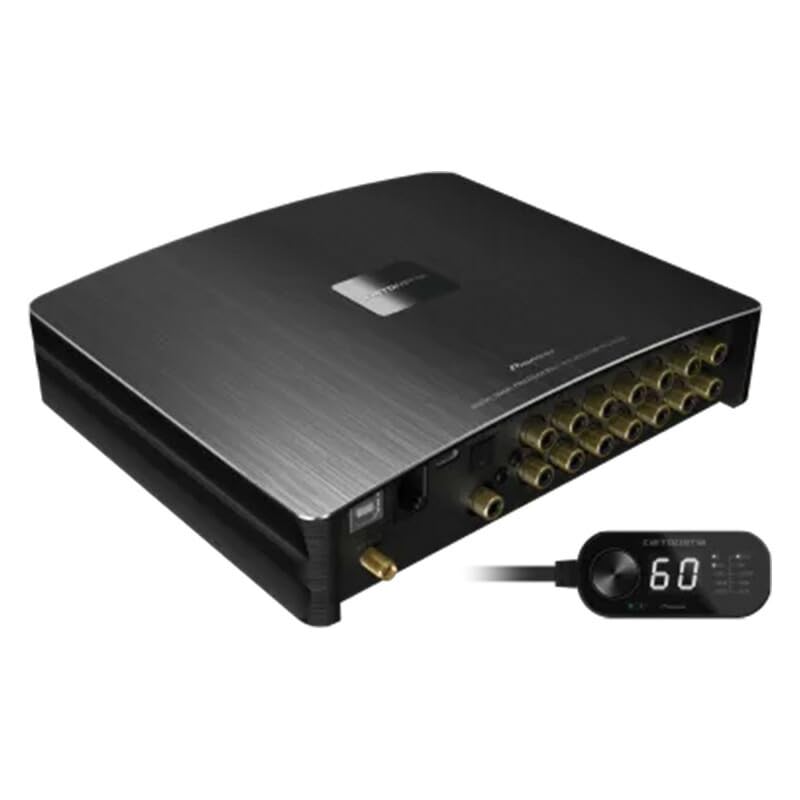
This image shows the compact design of the Pioneer DEQ-7000A Digital Sound Processor, suitable for discreet installation in various vehicle locations.
Operating Instructions
The DEQ-7000A offers comprehensive control over your audio system. Most advanced adjustments are performed via a dedicated application on a smartphone or PC.
- Smartphone/PC Control: Download the official Pioneer Carrozzeria Sound Tune app (for smartphones) or PC software. Connect your device via Bluetooth or USB to access the intuitive interface for detailed sound adjustments.
- Time Alignment: Use the application to precisely adjust the delay for each speaker, ensuring that sound from all speakers reaches the listener's ears simultaneously, creating a focused sound stage.
- Equalizer: Utilize the multi-band graphic equalizer to fine-tune the frequency response of your audio system, compensating for vehicle acoustics and personal preferences.
- Output Level Adjustment: Adjust the output levels for individual speakers or channels to balance the sound and optimize the system's dynamics.
- Crossover Settings: Configure crossover points and slopes for your speakers and subwoofers to ensure proper frequency distribution and prevent distortion.
- Wired Remote Control: The included wired remote control provides convenient access to basic functions such as volume control, source selection, and preset recall without needing to access the app.
Maintenance
Regular maintenance helps ensure the longevity and optimal performance of your DEQ-7000A unit.
- Cleaning: Use a soft, dry cloth to wipe the unit's exterior. Do not use abrasive cleaners, solvents, or chemical sprays, as they may damage the finish or internal components.
- Connection Check: Periodically check all wiring connections to ensure they are secure and free from corrosion. Loose connections can lead to poor sound quality or intermittent operation.
- Software Updates: Check the Pioneer website periodically for any available firmware or software updates for the DEQ-7000A. Keeping the software updated can improve performance and add new features.
- Environmental Conditions: Avoid exposing the unit to extreme temperatures, direct sunlight for prolonged periods, or high humidity.
Troubleshooting
If you encounter issues with your DEQ-7000A, refer to the following common troubleshooting steps:
- No Sound:
- Check all power and speaker connections.
- Ensure the vehicle's audio source is playing and not muted.
- Verify the DEQ-7000A's volume level and output settings via the app.
- Distorted Sound:
- Check speaker wiring for shorts or incorrect polarity.
- Reduce the volume level on both the source unit and the DEQ-7000A.
- Adjust equalizer settings to remove excessive bass or treble.
- Ensure input signals are not overdriving the unit.
- Remote Control Not Responding:
- Check the remote control cable connection to the DEQ-7000A.
- Ensure the unit is powered on.
- Bluetooth Connection Issues:
- Ensure the Bluetooth antenna is securely connected.
- Verify Bluetooth is enabled on your smartphone/PC and the DEQ-7000A.
- Try unpairing and re-pairing the device.
If problems persist after trying these steps, consult the full instruction manual or contact Pioneer customer support.
Specifications
| Feature | Specification |
|---|---|
| Brand | Pioneer |
| Model Number | DEQ-7000A |
| Manufacturer | Pioneer Corporation |
| Output Power | 120 Watts |
| Country of Origin | China |
| ASIN | B0GD8W1VKF |
Warranty and Support
The Pioneer DEQ-7000A Digital Sound Processor comes with a 1-year warranty from the date of purchase. This warranty covers defects in materials and workmanship under normal use.
For warranty claims, technical support, or service inquiries, please contact Pioneer customer service through their official website or the contact information provided in your warranty card. Please have your proof of purchase and the product's serial number ready when contacting support.
For additional resources, including the latest software updates and detailed FAQs, visit the official Pioneer Carrozzeria support page: https://www.pioneer-car.jp/