
1. Introduction
Welcome to the REDMAGIC 11 Pro Gaming Phone user manual. This guide provides essential information for setting up, operating, maintaining, and troubleshooting your device. The REDMAGIC 11 Pro is engineered for an unparalleled mobile gaming experience, combining cutting-edge hardware with advanced cooling and software optimizations.
2. Device Overview
Familiarize yourself with the physical components of your REDMAGIC 11 Pro.

Figure 2.1: Front view of the REDMAGIC 11 Pro, showcasing its full-screen display.

Figure 2.2: Back view of the REDMAGIC 11 Pro, highlighting the triple camera system and REDMAGIC branding.
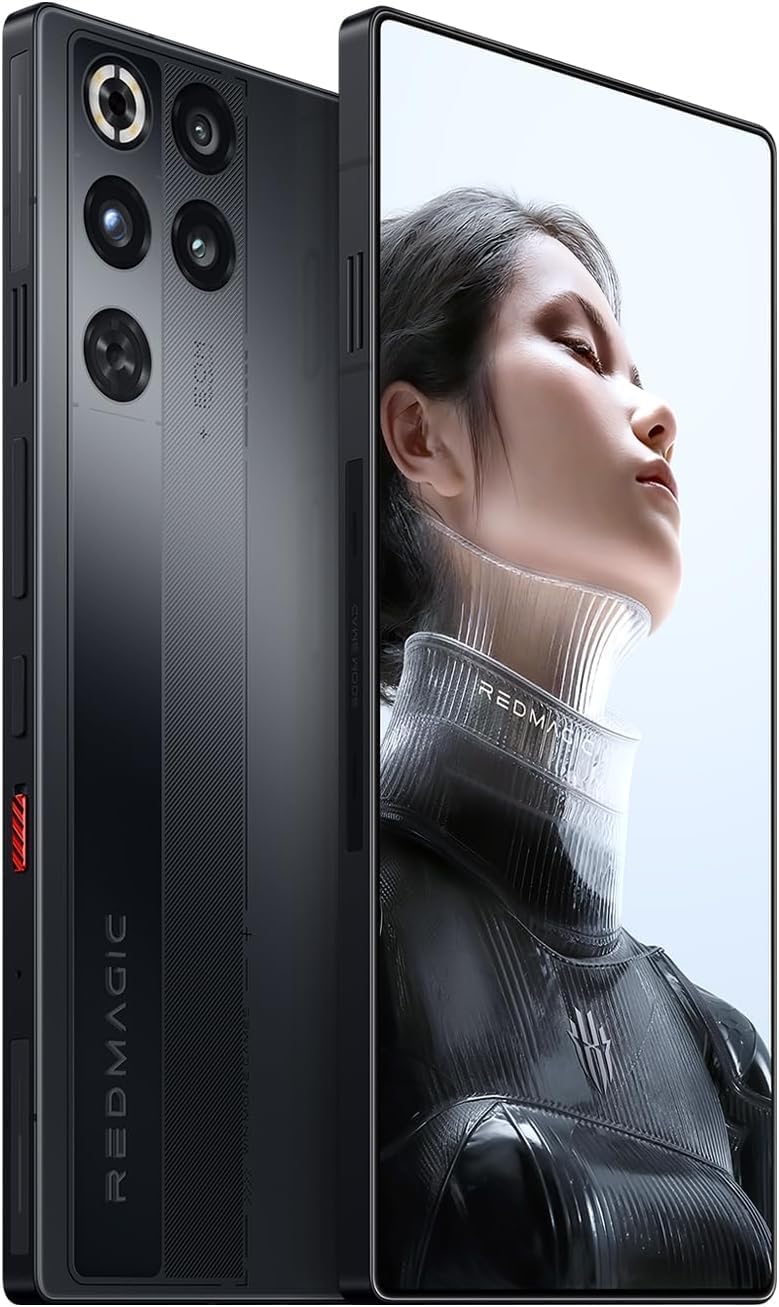
Figure 2.3: Side view of the REDMAGIC 11 Pro, showing the customizable shoulder triggers and power/volume buttons.
3. Setup Guide
3.1. Unboxing and Initial Inspection
Upon receiving your REDMAGIC 11 Pro, carefully unbox the device and check for all included accessories. The standard package includes the REDMAGIC 11 Pro smartphone and a USB Cable.
3.2. SIM Card Installation
The REDMAGIC 11 Pro supports dual nano-SIM cards.
- Locate the SIM card tray on the side of the device.
- Insert the SIM ejector tool into the small hole next to the tray and push gently until the tray pops out.
- Place your nano-SIM card(s) into the tray with the gold contacts facing down. Ensure they are correctly seated.
- Carefully reinsert the SIM tray into the phone.
3.3. Powering On and Initial Setup
- Press and hold the power button until the REDMAGIC logo appears.
- Follow the on-screen prompts to select your language, connect to a Wi-Fi network, and set up your Google account.
- Complete the setup process to access the home screen.
3.4. Charging Your Device
The REDMAGIC 11 Pro supports ultra-fast 80W wired and wireless charging. Use the provided USB cable and a compatible charger for optimal charging speeds.
- Connect the USB cable to the phone's USB Type-C port and to a power adapter.
- For wireless charging, place the device on a compatible wireless charging pad.
4. Operating Instructions
4.1. Display and Visuals
The device features a 6.85-inch BOE X10 AMOLED full-screen display with a 144Hz refresh rate and 2688x1216 resolution. This provides ultra-smooth visuals and vibrant colors for an immersive viewing experience. Adjust display settings in the system menu to customize refresh rate, color profiles, and eye-care options.
4.2. Gaming Performance
The REDMAGIC 11 Pro is powered by the Snapdragon 8 Elite Gen 5 chipset and the dedicated REDMAGIC RedCore R4 gaming chip. This combination ensures high performance for demanding games.
- GameSpace: Access GameSpace for performance optimizations, custom settings, and AI-powered enhancements like Personal AI Coach and Win Rate Predictor.
- Shoulder Triggers: Utilize the customizable 520Hz shoulder triggers for enhanced control in games. Configure their functions within GameSpace.
- RGB Lighting: Dynamic RGB lighting effects can be customized to personalize your gaming setup.
4.3. AquaCore Cooling System
The advanced AquaCore Cooling System is designed to maintain optimal device temperature during intense gaming sessions. It integrates Liquid Metal 3.0, a large vapor chamber, under-screen copper foil, high-thermal-conductivity gel, and a 24,000 RPM waterproof TurboFan to dissipate heat efficiently.
Video 4.1: An official video demonstrating the REDMAGIC 11 Pro's advanced cooling system and overall performance features.
4.4. Camera Features
The REDMAGIC 11 Pro is equipped with a versatile camera system:
- Rear Cameras: Triple camera setup including a 50MP main lens with OIS, a 50MP ultra-wide lens, and a 2MP auxiliary lens.
- Front Camera: A 16MP AI-enhanced front camera for high-quality selfies and video calls.
- AI Algorithms: Utilize AI algorithms for optimized image quality under various lighting conditions.
4.5. Connectivity
The device offers comprehensive connectivity options:
- Network: Dual nano-SIM 5G (SA & NSA) with extensive global 5G band support.
- Wireless: Wi-Fi 6E and Bluetooth 5.4 for fast and stable wireless connections.
- Navigation: Dual GPS (L1+L5) for precise location services.
- Payments: NFC with Google Pay support.
- Wired: USB 3.2 Gen 2 Type-C port for high-speed data transfer and charging.
4.6. Audio and Haptics
Experience immersive audio and tactile feedback:
- Speakers: Upgraded 1015a + 1115e stereo speakers deliver rich bass and clear sound.
- Haptics: 0815 X-axis linear motors provide precise and responsive haptic feedback.
- Headphone Jack: A 3.5 mm headphone jack is available for wired audio.
Video 4.2: An official lifestyle video showcasing the REDMAGIC 11 Pro Gaming Smartphone in various usage scenarios.
5. Maintenance
5.1. Cleaning Your Device
To maintain the appearance and functionality of your REDMAGIC 11 Pro:
- Use a soft, lint-free cloth to wipe the screen and body.
- Avoid using harsh chemicals or abrasive materials.
- For stubborn smudges, slightly dampen the cloth with water or a screen cleaner.
5.2. Software Updates
Keep your device's operating system (Android 16) and applications updated to ensure optimal performance, security, and access to new features. You can check for updates in the device's settings menu.
5.3. Battery Care
The REDMAGIC 11 Pro features a 7500mAh battery. To prolong battery life:
- Avoid extreme temperatures.
- Do not let the battery completely drain frequently.
- Use the original charger and cable for efficient charging.
5.4. Water and Dust Resistance
The device is IPX8 water-resistant and features dust-proof protection. While it can withstand immersion in water under specific conditions, it is not recommended for intentional submersion. Ensure all ports are dry before charging.
6. Troubleshooting
If you encounter issues with your REDMAGIC 11 Pro, refer to the following common solutions:
- Device Not Powering On: Ensure the battery is charged. Connect the device to a charger for at least 15 minutes, then try powering on again.
- Charging Issues: Check the USB cable and charger for damage. Try a different power outlet. Ensure the USB Type-C port is clean and free of debris.
- Network Connectivity Problems: Verify that your SIM card is correctly installed and activated. Check network settings and ensure airplane mode is off. Restart the device.
- App Freezing/Crashing: Close and reopen the app. Clear the app's cache and data in settings. If the issue persists, uninstall and reinstall the app.
- Overheating: While the AquaCore Cooling System is highly efficient, prolonged intense usage in high ambient temperatures can still cause warmth. Reduce background apps, lower screen brightness, or take a break from demanding tasks.
For more complex issues, please contact REDMAGIC customer support.
7. Specifications
Key technical specifications for the REDMAGIC 11 Pro Gaming Phone:
| Feature | Specification |
|---|---|
| Brand | REDMAGIC |
| Model Name | 11 Pro |
| Operating System | Android 16.0 |
| CPU Model | Snapdragon 8 Elite Gen 5 (up to 4.6 GHz) |
| RAM Memory Installed Size | 12 GB (up to 24 GB variants available) |
| Memory Storage Capacity | 256 GB (up to 1 TB variants available) |
| Screen Size | 6.85 Inches AMOLED |
| Resolution | 2688 x 1216 Pixels |
| Refresh Rate | 144 Hz |
| Rear Camera Resolution | 50MP (Main, OIS), 50MP (Ultra-wide), 2MP (Auxiliary) |
| Front Camera Resolution | 16 MP |
| Battery Power | 7500 mAh |
| Charging | 80W Wired & Wireless, Two-way Reverse Wireless |
| Connectivity Technology | 5G, Wi-Fi 6E, Bluetooth 5.4, NFC, USB 3.2 Gen 2 |
| SIM Card Slot Count | Dual SIM (Nano) |
| Water Resistance Level | IPX8 Waterproof |
| Item Weight | 0.61 Kilograms |
8. Warranty and Support
The REDMAGIC 11 Pro comes with a 1 Year Manufacturer Warranty. For warranty claims, technical support, or further assistance, please visit the official REDMAGIC support website or contact their customer service. Keep your proof of purchase for warranty validation.
For additional information and resources, you may visit the REDMAGIC Store on Amazon.


