
1. Introduction
The PYKFVTGL TOQ7e-125/4P Dual Power Automatic Transfer Switch (ATS) is designed to automatically switch between a main power source (grid) and a backup power source (generator) to ensure continuous and reliable operation of electrical loads. This device prioritizes the main power supply, transferring to the backup source only when the main power fails and returning once the main power is restored.
This ATS is built with high-quality flame-retardant plastic material, offering good insulation, high temperature resistance, and anti-aging properties for safe and reliable operation. It incorporates silver contacts to enhance conductivity and extend product lifespan.
2. Safety Information
WARNING: Installation and maintenance should only be performed by qualified electricians in accordance with all local and national electrical codes.
- Always disconnect all power sources before installing or servicing the ATS.
- Ensure proper grounding of the device.
- Verify correct voltage and current ratings before connection. This model is rated for 63A.
- Do not operate the ATS if it appears damaged.
- Keep children away from electrical equipment.
3. Product Overview
The TOQ7e-125/4P ATS is designed for ease of installation with a reasonable structure and compact size. It includes a protective cover for enhanced safety.
Components and Features:
- Main Power Input (Source A): Connection terminals for the primary power supply (e.g., utility grid).
- Backup Power Input (Source B): Connection terminals for the secondary power supply (e.g., generator).
- Load Output: Connection terminals for the electrical loads.
- Manual/Auto Selector: A switch to select between automatic transfer mode and manual operation.
- Indicator Lights: Visual indicators for power source status.
- Silver Contacts: Ensures high conductivity and durability.
- Flame-Retardant Casing: Provides safety and insulation.

Figure 3.1: Top view of the Automatic Transfer Switch, illustrating the main power (Source A), backup power (Source B), load connections, and the manual/auto selector switch. Note the 'City Power' and 'Generator' labels for Source A and Source B respectively.
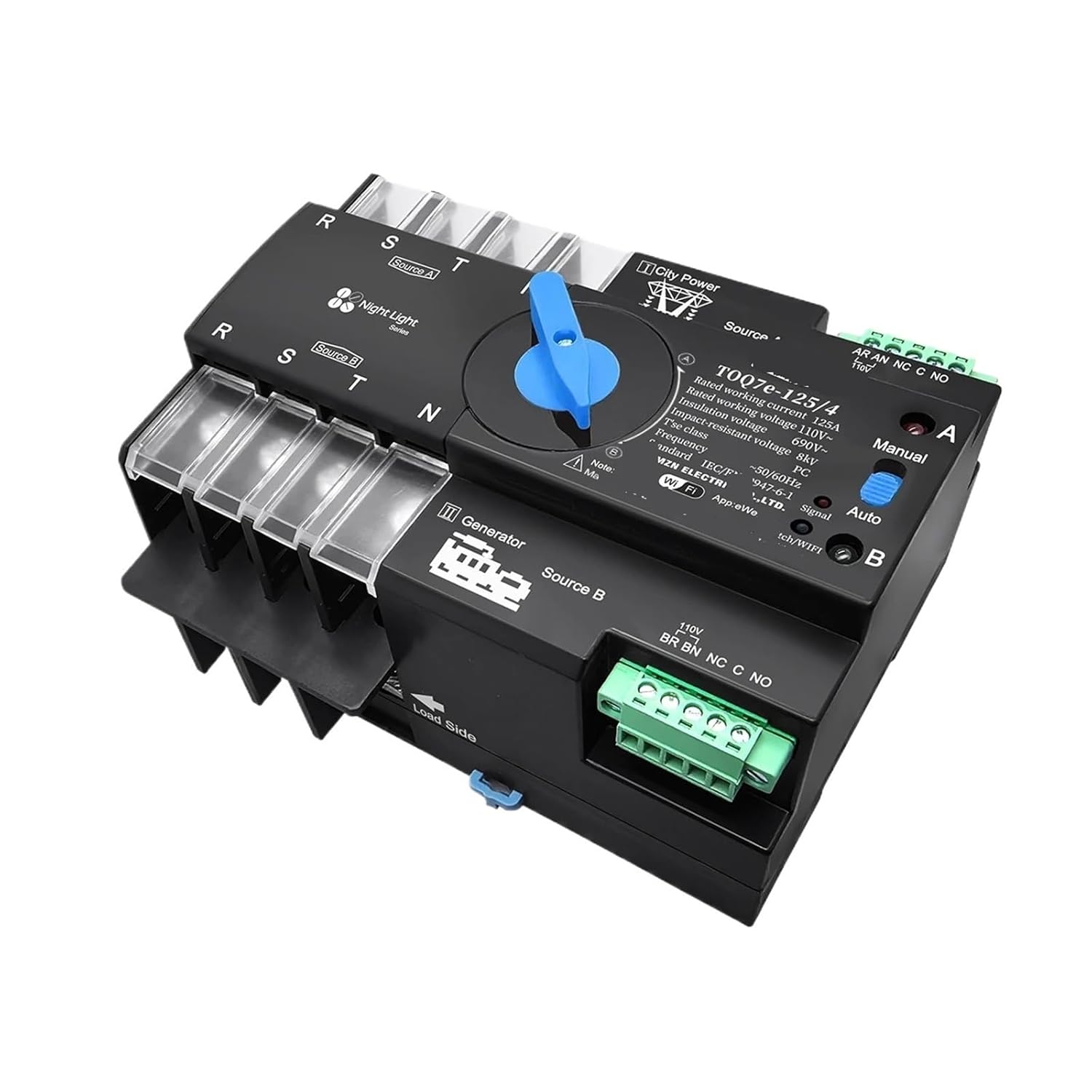
Figure 3.2: Side view of the Automatic Transfer Switch, highlighting the 'Load Side' terminals where the electrical loads are connected. This view also shows the robust terminal blocks for secure wiring.
4. Setup and Installation
The ATS is designed for easy installation. However, due to its electrical nature, professional installation is highly recommended.
Installation Steps:
- Power Disconnection: Ensure all power to the installation site is completely disconnected at the main breaker.
- Mounting: Securely mount the ATS in a suitable, dry, and well-ventilated location, away from direct sunlight or excessive heat.
- Wiring Main Power (Source A): Connect the main power supply (e.g., utility grid) to the terminals labeled 'Source A' or 'City Power' on the ATS. Ensure correct phase and neutral connections for a 4-pole system.
- Wiring Backup Power (Source B): Connect the backup power supply (e.g., generator) to the terminals labeled 'Source B' or 'Generator' on the ATS. Ensure correct phase and neutral connections. The generator must be capable of starting and running independently.
- Wiring Load: Connect the electrical loads to the terminals labeled 'Load Side' on the ATS.
- Control Wiring (if applicable): If the ATS has external control terminals (e.g., for generator start/stop), connect them according to the generator's manual.
- Verification: Double-check all wiring connections for tightness and correctness. Ensure no bare wires are exposed.
- Restore Power: Once all connections are verified, restore power to the main and backup sources.
5. Operating Instructions
The ATS operates based on the availability of the main power source (Source A).
Operating Modes:
- Automatic Mode: Set the selector switch to 'Auto'. In this mode, the ATS will automatically monitor the main power supply.
- Manual Mode: Set the selector switch to 'Manual'. This mode allows for manual switching between Source A and Source B using the physical switch on the unit. Use caution when operating in manual mode.
Automatic Transfer Sequence:
- Normal Operation: When main power (Source A) is present and stable, the ATS connects the loads to Source A.
- Main Power Failure: If the main power (Source A) fails or drops below acceptable levels, the ATS will detect this condition.
- Transfer to Backup: After a short delay (to confirm main power failure), the ATS will initiate the transfer. If connected to a generator, it may send a start signal to the generator. Once the backup power (Source B) is stable, the ATS switches the loads from Source A to Source B. Note: The generator must be running for the ATS to transfer to Source B.
- Main Power Restoration: When the main power (Source A) is restored and stable, the ATS will detect this.
- Transfer Back to Main: After a short delay, the ATS will switch the loads back from Source B to Source A, prioritizing the main power supply. The generator may then receive a shutdown signal.
6. Maintenance
The PYKFVTGL ATS is designed for minimal maintenance. Regular inspections are recommended to ensure optimal performance and safety.
- Visual Inspection: Periodically inspect the ATS for any signs of physical damage, loose connections, or overheating (discoloration).
- Cleaning: Keep the unit clean and free from dust and debris. Use a dry, soft cloth for cleaning. Do not use liquid cleaners.
- Connection Check: Annually, or as needed, verify that all electrical connections are tight and secure.
- Functionality Test: Periodically test the automatic transfer function by temporarily disconnecting the main power supply to ensure the ATS switches to the backup source as expected.
IMPORTANT: Always disconnect power before performing any maintenance or inspection.
7. Troubleshooting
If you encounter issues with your ATS, refer to the following common troubleshooting steps:
| Problem | Possible Cause | Solution |
|---|---|---|
| ATS does not transfer to backup power when main power fails. |
|
|
| ATS does not transfer back to main power when restored. |
|
|
| No power to loads from either source. |
|
|
If the problem persists after following these steps, contact a qualified electrician or PYKFVTGL customer support.
8. Specifications
| Specification | Value |
|---|---|
| Model Number | TOQ7e-125/4P 63A |
| Rated Current | 63A |
| Rated Voltage | 110V / 120V AC (Three-Phase) |
| Number of Poles | 4P |
| Material | Flame-retardant plastic, Silver Contacts |
| Item Weight | 2.2 pounds |
| Package Dimensions | 0.39 x 0.39 x 0.39 inches |
| Manufacturer | PYKFVTGL |
9. Warranty and Support
For warranty information, technical support, or service inquiries, please contact PYKFVTGL customer service through your point of purchase or the official PYKFVTGL website.
Please have your product model number (TOQ7e-125/4P 63A) and purchase details ready when contacting support.