
1. Introduction
This manual provides instructions for the CEYBO Remote Control, designed as a compatible replacement for Kodak, Thomson, and Blaupunkt Smart LED TVs. Please read this manual carefully before using the remote control to ensure proper operation and longevity.
2. Important Safety Information
- Keep batteries out of reach of children.
- Do not mix old and new batteries, or different types of batteries.
- Dispose of used batteries according to local regulations.
- Avoid exposing the remote control to direct sunlight, heat, or moisture.
- Do not attempt to disassemble or modify the remote control.
3. Package Contents
- 1 x CEYBO Remote Control (Model B0GD715ZRB)
4. Product Overview
The CEYBO remote control features a lightweight, fine-grade plastic body and a soft rubber keypad for comfortable use. It is designed for ease of grip and durability.
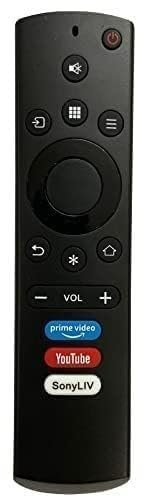
An image showing the front view of the CEYBO remote control, displaying its black casing and various function buttons.
The remote control includes standard buttons for power, volume, channel selection, navigation, and smart TV functions. Familiarize yourself with the button layout for optimal control of your television.
5. Setup
5.1 Battery Installation
- Locate the battery compartment cover on the back of the remote control.
- Slide the cover downwards or press the latch to open it.
- Insert two AAA batteries (not included), ensuring the positive (+) and negative (-) terminals match the indicators inside the compartment.
- Close the battery compartment cover securely.
5.2 Compatibility and Initial Use
This remote control is designed as a direct replacement. For proper functionality, the remote control must be exactly the same (function to function) as your television's original remote. If the button layout or functions differ from your original remote, this replacement may not work correctly with your TV. No programming is typically required if it is an exact match; simply insert batteries and begin use.
6. Operating Instructions
6.1 Basic Functions
- Power Button: Press to turn your TV on or off.
- Volume Up/Down: Adjust the sound level.
- Channel Up/Down: Change TV channels.
- Navigation Buttons (Up, Down, Left, Right, OK): Navigate menus and select options on your Smart TV interface.
- Smart TV/Home Button: Access your TV's smart features or home screen.
- Input/Source Button: Switch between different input sources (HDMI, AV, etc.).
7. Maintenance
7.1 Cleaning
To clean the remote control, gently wipe it with a soft, dry cloth. Do not use liquid cleaners, abrasive materials, or chemical solvents, as these can damage the remote's surface or internal components.
7.2 Battery Replacement
Replace batteries when the remote control becomes unresponsive or its range decreases. Always replace both batteries at the same time with new ones of the same type.
8. Troubleshooting
| Problem | Solution |
|---|---|
| Remote control is not working. | Check if the batteries are inserted correctly with the correct polarity. Replace old batteries with new ones. Ensure there are no obstructions between the remote control and the TV's infrared sensor. Point the remote directly at the TV. |
| Some buttons are not responding. | This remote is designed as an exact replacement. If specific buttons do not work, verify that this remote is an exact match to your original remote's functions. Clean the remote's surface and buttons to ensure no debris is interfering. If the issue persists, the remote may not be fully compatible with your specific TV model despite general brand compatibility. |
| Remote control range is poor. | Replace the batteries. Ensure the TV's infrared sensor is clean and unobstructed. Move closer to the TV. |
9. Specifications
| Feature | Value |
|---|---|
| Brand | CEYBO |
| Product Type | Remote Control |
| Special Feature | Universal |
| Color | Black |
| Maximum Number of Supported Devices | 1 |
| Compatible Devices | Kodak Smart TV, Thomson Smart TV, Blaupunkt Smart TV |
| Connectivity Technology | Infrared |
| Item Weight | 79 Grams |
| Item Dimensions L x W x H | 0.79"L x 1.57"W x 1.57"H |
| Manufacturer | CEYBO |
| ASIN | B0GD715ZRB |
10. Warranty and Support
This product is manufactured by CEYBO. For any support inquiries or warranty information, please refer to the retailer where the product was purchased or contact CEYBO customer service directly. Keep your purchase receipt as proof of purchase.