
1. Important Safety Instructions
Read all instructions before using this appliance to prevent injury or damage. Keep this manual for future reference.
- Electrical Safety: Ensure the power supply matches the appliance's requirements (110V-120V). Do not use damaged cords or plugs.
- Placement: Place the cooktop on a stable, level surface. Ensure adequate ventilation around the unit. Do not block air vents.
- Cookware Compatibility: Use only magnetic cookware (cast iron, stainless steel, enameled cast iron). Non-magnetic cookware will not heat.
- Hot Surface Warning: The glass surface will be hot after cooking. Do not touch it with bare hands until it has cooled down. The "H" indicator signifies a hot surface.
- Child Safety Lock: Utilize the child safety lock feature to prevent accidental operation by children.
- Overheat Protection: The cooktop is equipped with overheat protection. If the temperature exceeds safe limits, the unit will automatically shut off.
- Cleaning: Always unplug the cooktop before cleaning. Allow it to cool completely.
- Medical Implants: Individuals with pacemakers or similar medical implants should consult their doctor before using an induction cooktop.
2. Product Overview
The GTKZW 2300W Double Induction Cooktop features two independent heating zones, touch controls, and multiple safety features. It is designed for both built-in and countertop use.
2.1 Key Features
- Dual Heating Zones: 1200W + 1100W for simultaneous cooking.
- 9 Power Levels: Adjustable power settings for precise cooking control.
- 9 Temperature Levels: Temperature range from 176°F to 464°F (80°C-240°C).
- 120-Minute Timer: Programmable timer for convenient cooking.
- Child Safety Lock: Prevents accidental changes to settings.
- Overheat Protection: Automatic shutdown if internal temperature is too high.
- Hot Surface Indicator: "H" displayed when the surface is hot.
- Compatible with Magnetic Cookware: Works with cast iron, stainless steel, and enameled cast iron.
- Built-in and Countertop Design: Flexible installation options.
- Easy-to-Clean Ceramic Glass Surface: Durable and simple to maintain.
2.2 Product Components
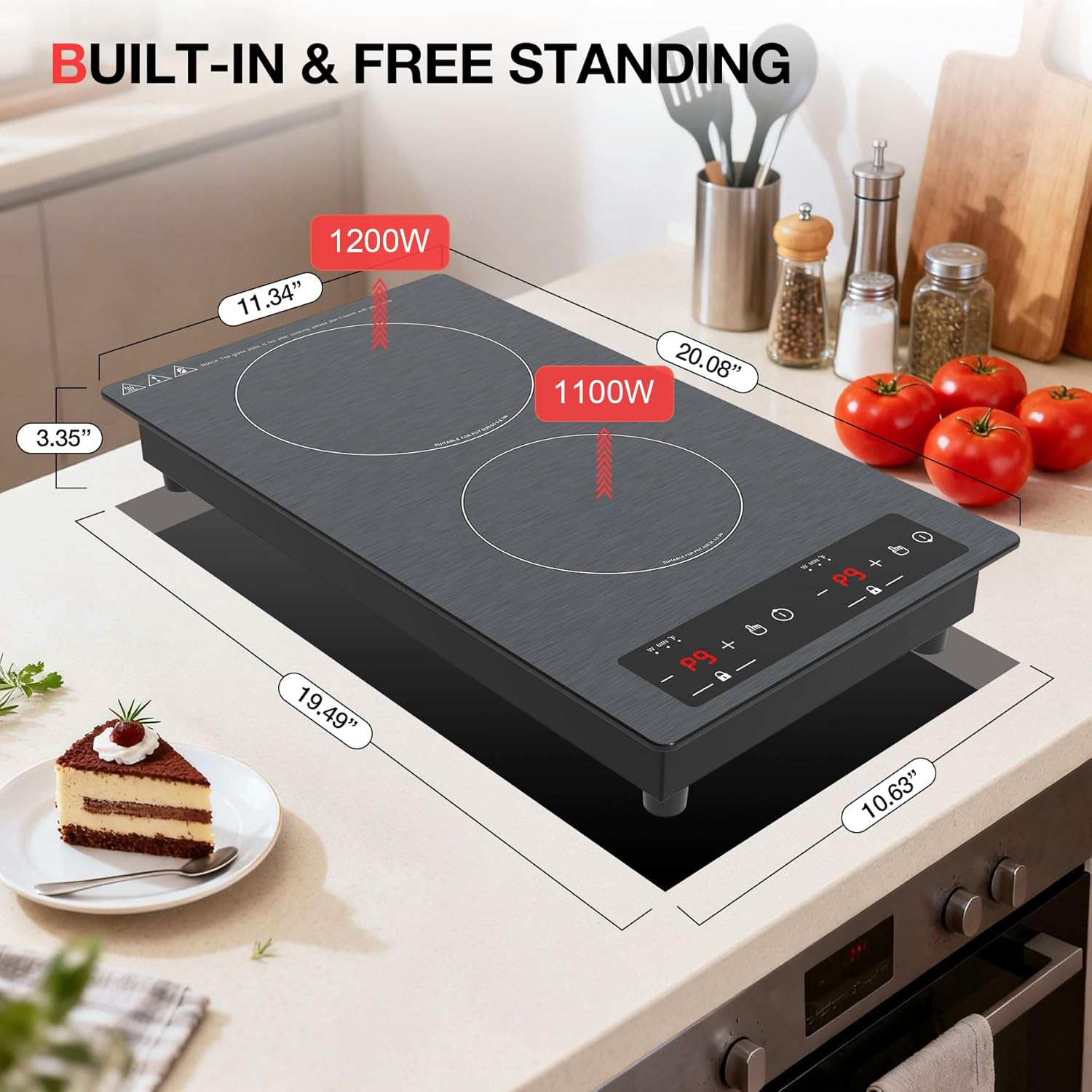
Image: The GTKZW Double Induction Cooktop showing its overall dimensions (20.08" L x 11.34" W x 3.35" H) and the two cooking zones with power ratings (1200W and 1100W). A slice of cake and tomatoes are visible on the counter, indicating kitchen use.
- Ceramic Glass Cooktop Surface
- Control Panel (Touch Sensitive)
- Left Heating Zone (1200W)
- Right Heating Zone (1100W)
- Power Cord with 110V-120V Plug
3. Setup and Installation
The GTKZW Double Induction Cooktop offers versatile installation options: built-in or countertop use.
3.1 Countertop Placement
For countertop use, simply place the cooktop on a stable, flat, and heat-resistant surface. Ensure there is sufficient space around the unit for proper ventilation.

Image: Two installation methods for the GTKZW Induction Cooktop. On the left, the cooktop is shown in a built-in configuration with a pot. On the right, it is shown as a countertop unit with a frying pan.
3.2 Built-in Installation
If installing as a built-in unit, ensure the cutout dimensions in your countertop match the cooktop's requirements. Refer to the diagram below for precise measurements.
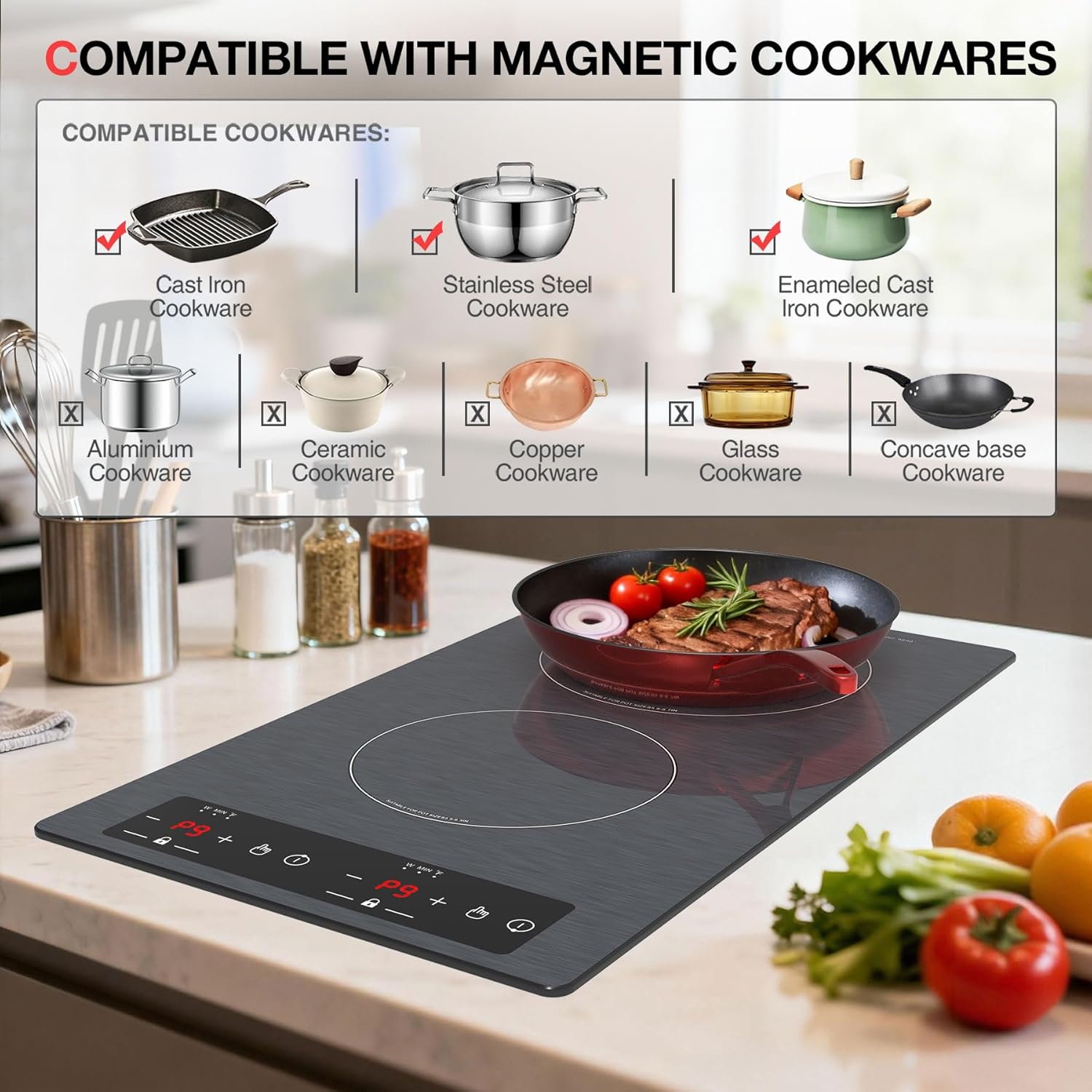
Image: The GTKZW Double Induction Cooktop being lowered into a countertop cutout. Dimensions for the cutout are shown as 28.8cm (width), 51cm (length), and 8cm (depth), with a required under-counter space of 48.5cm x 26.5cm.
- Cutout Dimensions: Approximately 28.8 cm (W) x 51 cm (L) x 8 cm (D).
- Under-counter Space: Ensure a minimum of 48.5 cm x 26.5 cm clearance below the cooktop for ventilation.
- Ventilation: Do not obstruct the ventilation openings on the bottom or sides of the cooktop.
3.3 Power Connection
Connect the cooktop to a standard 110V-120V electrical outlet. Ensure the outlet is properly grounded and can support the appliance's 2300W power requirement.
Video: An overview of the GTKZW 2300W Induction Cooktop, demonstrating its features including the 110V-120V plug, built-in and countertop installation, adjustable power levels (P1-P9), timer mode up to 120 minutes, temperature adjustment (176°F to 518°F), child lock function, hot surface indicator, and easy-to-clean panel. The video also shows cooking a steak and cleaning the cooktop.
4. Operating Instructions
The cooktop features a touch-sensitive control panel for easy operation.

Image: A close-up of the GTKZW Induction Cooktop's LED touch screen control panel, highlighting the display screen, power/temperature/time buttons, ON/OFF button, and child lock feature.
4.1 Powering On/Off
- To Power On: Press the ON/OFF button (usually indicated by a power symbol). The display will light up.
- To Power Off: Press the ON/OFF button again.
4.2 Adjusting Power Levels
The cooktop has 9 power levels (P1-P9) for each heating zone.
- After powering on, select the desired heating zone.
- Use the "+" and "-" buttons to adjust the power level from P1 (lowest) to P9 (highest).

Image: The GTKZW Induction Cooktop displaying various cooking methods achievable with its 9 power levels, including melt, steam, boil, simmer, fry, roast, stir-fry, and fast heat. A frying pan with chicken is shown on the cooktop.
4.3 Setting Temperature
The temperature can be adjusted from 176°F to 464°F (80°C-240°C).
- After selecting a heating zone, press the Temperature button (often combined with power/time).
- Use the "+" and "-" buttons to set the desired temperature.
4.4 Using the Timer
The timer can be set for up to 120 minutes.
- Select the desired heating zone.
- Press the Timer button (usually indicated by a clock symbol).
- Use the "+" and "-" buttons to set the cooking time.
- The cooktop will automatically turn off once the timer expires.
4.5 Child Safety Lock
To activate the child safety lock:
- Press and hold the Lock button (indicated by a padlock symbol) for a few seconds until "LOC" appears on the display.
- When locked, the control panel will not respond to touches.
- To deactivate, press and hold the Lock button again until "LOC" disappears.

Image: A hand activating the child safety lock on the GTKZW Induction Cooktop's control panel, with "LOC" displayed on the screen and a padlock icon highlighted.
5. Cookware Compatibility
This induction cooktop requires cookware with a magnetic bottom. To check if your cookware is compatible, place a magnet on the bottom of the pot or pan. If the magnet sticks, the cookware is suitable for induction cooking.

Image: A visual guide showing compatible and incompatible cookware types for the GTKZW Induction Cooktop. Compatible types include cast iron, stainless steel, and enameled steel. Incompatible types include aluminum, ceramic, copper, and glass.
Compatible Cookware:
- Cast Iron Cookware
- Stainless Steel Cookware (with magnetic base)
- Enameled Cast Iron Cookware
Incompatible Cookware:
- Aluminum Cookware
- Ceramic Cookware
- Copper Cookware
- Glass Cookware
- Cookware with a concave base
6. Maintenance and Cleaning
Regular cleaning ensures the longevity and optimal performance of your induction cooktop.
- Before Cleaning: Always unplug the cooktop from the power outlet and allow it to cool completely.
- Surface Cleaning: Wipe the ceramic glass surface with a soft, damp cloth and mild detergent. For stubborn stains, use a non-abrasive cooktop cleaner.
- Drying: Dry the surface thoroughly with a clean, soft cloth to prevent water spots.
- Avoid Abrasives: Do not use abrasive cleaners, scouring pads, or harsh chemicals, as these can scratch or damage the glass surface.
- Control Panel: Wipe the control panel gently with a damp cloth. Ensure no liquid enters the control area.

Image: A hand wiping the surface of the GTKZW Induction Cooktop with a pink cloth and cleaning solution, demonstrating how easy it is to clean.
7. Troubleshooting
If you encounter issues with your cooktop, refer to the following common problems and solutions:
| Problem | Possible Cause | Solution |
|---|---|---|
| Cooktop does not turn on. | No power supply; Power cord not plugged in; Circuit breaker tripped. | Check power connection; Ensure plug is fully inserted; Reset circuit breaker. |
| Cookware is not heating. | Cookware is not induction-compatible; Cookware is too small or too large for the zone. | Use magnetic cookware; Ensure cookware base covers at least 80% of the heating zone. |
| "H" displayed on the screen. | Hot surface indicator. | This is normal. The surface is hot. Do not touch until "H" disappears. |
| "LOC" displayed on the screen. | Child safety lock is activated. | Press and hold the Lock button to deactivate. |
| Unusual noise during operation. | Normal fan noise for cooling; Cookware material. | A slight humming sound from the fan is normal. Some cookware may produce a slight buzzing sound. |
If the problem persists after trying these solutions, please contact customer service.
8. Specifications
| Feature | Detail |
|---|---|
| Brand | GTKZW |
| Model Number | Induction Cooktop 2 Burners |
| Color | Black |
| Material | Ceramic Glass |
| Heating Elements | 2 |
| Wattage | 2300 watts (1200W + 1100W) |
| Power Source | Electric (110V-120V) |
| Controls Type | Touch |
| Product Dimensions (D x W x H) | 11.3" x 3.2" x 20.1" |
| Item Weight | 12.13 Pounds |
| Power Levels | 9 |
| Temperature Range | 176°F to 464°F (80°C-240°C) |
| Timer | Up to 120 minutes |
9. Warranty and Customer Support
For warranty information or technical assistance, please contact GTKZW customer service. Refer to your purchase documentation for specific warranty terms and contact details.
Customer Service: If you have any questions or require support, please feel free to contact us. We aim to resolve inquiries within 24 hours.