
1. Introduction
Thank you for choosing the SEDETA 59-inch Modern Office Desk. This desk is designed to provide a spacious and organized workspace with integrated features such as LED lighting, a built-in power strip, and ample storage. This manual provides essential information for safe assembly, operation, and maintenance of your new desk. Please read these instructions carefully before beginning assembly and retain them for future reference.

Image 1.1: The SEDETA 59-inch Modern Office Desk, showcasing its overall design and features.
2. Safety Information
Always assemble the desk according to the instructions provided. Ensure all screws are tightened securely, especially at the table top joints, to maintain stability. This desk is heavy and has a large surface area, so it may tip over if not assembled correctly or if heavy objects are placed on it. Always use caution when assembling, using, or moving the desk.
- Keep all small parts and packaging materials away from children and pets.
- Do not stand or sit on the desk.
- Distribute weight evenly across the desk surface and shelves.
- Ensure the power strip is connected to a grounded outlet. Do not overload the power strip.
- Avoid exposing the desk to excessive moisture or direct sunlight.
3. Package Contents
Before assembly, verify that all components listed in the included parts list are present and undamaged. If any parts are missing or damaged, please contact customer support.
Typical Components:
- Desktop panels
- Legs and support frames
- Drawer panels and slides
- Monitor stand components
- Built-in power strip unit
- LED light strip and controller
- Hardware pack (screws, dowels, cam locks, etc.)
- Assembly instructions manual
4. Assembly Instructions
Assembly is required for this product. All necessary hardware and a detailed instruction booklet are included in the package. Please follow the step-by-step instructions provided in the separate assembly guide for proper construction. It is recommended to have a second person assist with certain steps due to the size and weight of the components.
General Assembly Tips:
- Prepare Your Workspace: Clear a spacious area, preferably on a soft surface like a carpet, to prevent scratching the desk components.
- Identify All Parts: Lay out all components and hardware. Compare them with the parts list in your assembly guide to ensure everything is present.
- Follow Step-by-Step: Adhere strictly to the sequence of steps in the assembly manual. Do not skip steps.
- Hand-Tighten First: Initially hand-tighten screws and fasteners. Fully tighten all connections only after the entire section or unit is assembled, ensuring proper alignment.
- Secure Connections: Pay special attention to securing all leg and desktop connections to ensure stability.
- Drawer Assembly: Ensure drawer slides are correctly oriented and installed for smooth operation.
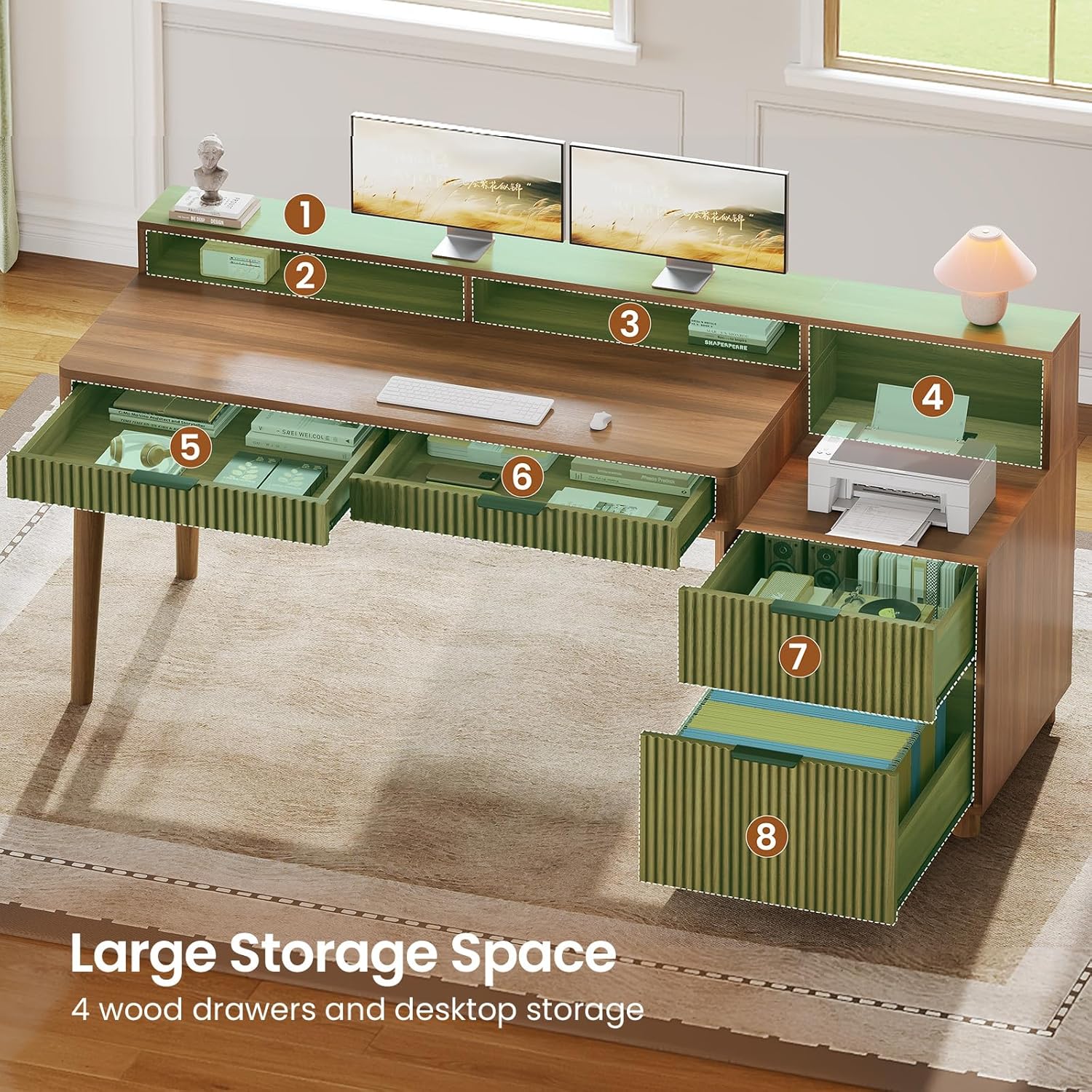
Image 4.1: An overview of the desk's large storage capacity, including drawers and open shelves, which will be assembled during setup.
5. Operating Instructions
5.1. LED Light Strips
The desk features an RGB LED light strip for customizable ambiance. The lights can be controlled via a dedicated mobile application.
- Power On/Off: Connect the LED light strip to the power source. Use the included controller or the mobile app to turn the lights on or off.
- APP Control: Download the specified mobile application (refer to the LED light instruction sheet for app name and QR code). Pair your device with the LED lights via Bluetooth.
- Color and Mode Selection: Through the app, you can choose from over 60,000 colors and 29 flashing modes, including music sync and timing modes.

Image 5.1: The desk illuminated by RGB LED lights, demonstrating app control and various lighting modes.
5.2. Built-in Power Outlet
The desk includes a recessed power strip for convenient charging and powering of your devices.
- Specifications: The power strip features four 120V/12A AC outlets and two 5V/2A USB ports.
- Usage: Plug the desk's main power cord into a wall outlet. Use the integrated power switch to turn the outlets on or off.
- Charging: Connect your electronic devices to the AC outlets or USB ports for power and charging.
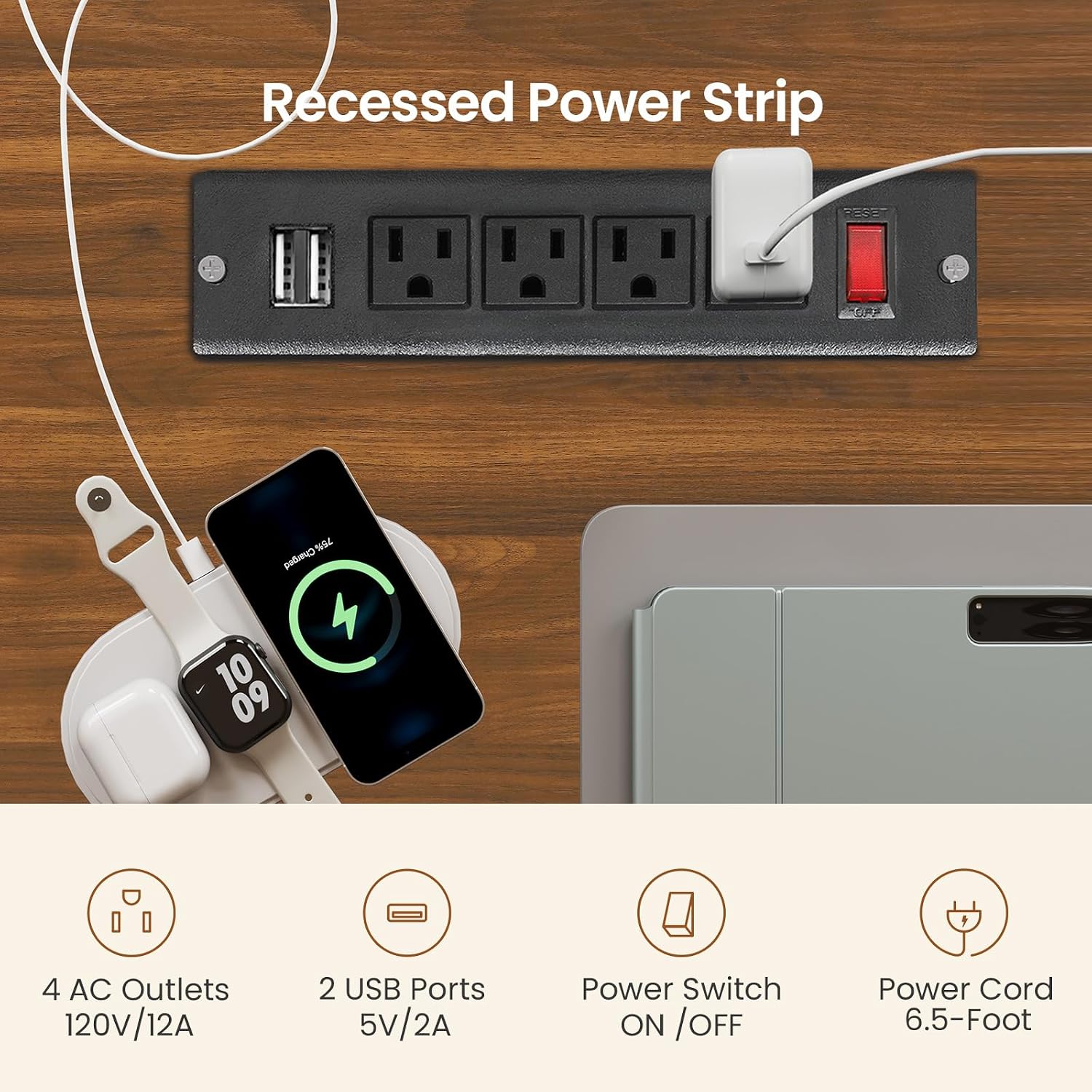
Image 5.2: Detail of the built-in power outlet, showing the AC sockets, USB ports, and power switch.
5.3. Drawers and Storage
The desk is equipped with four wood drawers and open storage shelves to help keep your workspace organized.
- File Drawer: One drawer is designed to hold Legal, Letter, or A4 size files.
- Box Drawers: Three additional box drawers provide storage for office supplies, gaming accessories, or personal items.
- Open Shelves: Utilize the open storage shelves for books, decorative items, or frequently accessed equipment.

Image 5.3: The multifunction wood file drawer, illustrating its capacity for various document sizes and general storage.
5.4. Full-size Monitor Stand
The integrated monitor stand helps improve ergonomics and provides additional storage.
- Ergonomic Benefits: Place your monitor(s) on the stand to raise them to an optimal viewing height, reducing neck and back strain.
- Additional Storage: The space beneath the monitor stand can be used for small items like sticky notes, pens, or other desk accessories.

Image 5.4: The full-size monitor stand in use, demonstrating how it helps maintain correct posture and reduces neck strain.
5.5. Product Video
Video 5.5: Official product video showcasing the SEDETA Fluted Office Desk with 4 Drawers, highlighting its features and functionality.
6. Maintenance
Proper care will extend the life and appearance of your SEDETA office desk.
- Cleaning: Wipe the desk surfaces with a damp cloth. Avoid using harsh chemicals or abrasive cleaners, which can damage the finish.
- Spills: Clean up spills immediately to prevent staining or damage to the engineered wood.
- Hardware Check: Periodically check all screws and fasteners to ensure they remain tight. Re-tighten if necessary to maintain stability.
- LED Lights: If the LED lights malfunction, check the power connection and the controller. Refer to the LED light instruction sheet for specific troubleshooting.
7. Troubleshooting
| Problem | Possible Cause | Solution |
|---|---|---|
| Desk is wobbly/unstable | Loose fasteners; uneven floor | Ensure all screws are fully tightened. Adjust floor levelers if present, or place shims under legs. |
| Drawers do not slide smoothly | Incorrect slide installation; obstruction | Verify drawer slides are installed correctly and aligned. Check for any objects obstructing the drawer path. |
| LED lights not working | Power connection issue; controller malfunction | Check if the LED strip is properly connected to power. Ensure the power switch on the power strip is on. Refer to the LED light manual for specific troubleshooting. |
| Power outlets not working | Power strip switch off; wall outlet issue; overload | Ensure the power strip's switch is ON. Check if the wall outlet is functional. Avoid overloading the power strip. |
8. Specifications
- Brand: SEDETA
- Model: computer desk
- Product Dimensions: 19.7"D x 59"W x 31.8"H
- Color: Brown
- Material: Engineered Wood (Particle Board with PVC Surface)
- Number of Drawers: 4 (1 file drawer, 3 box drawers)
- Number of Shelves: 1 (open storage)
- Item Weight: 84 Pounds
- Special Features: Built-in Power Outlet (4 AC, 2 USB), RGB LED Light Strip, Full-size Monitor Stand
- Assembly: Required (tools and instructions included)
- Care Instructions: Wipe with Damp Cloth

Image 8.1: Dimensional drawing of the SEDETA Office Desk, showing key measurements.
9. Warranty and Support
SEDETA is committed to providing quality products. If your item arrives damaged, scratched, or with missing parts, please do not hesitate to contact our customer support team. We aim to address your concerns within 24 hours.
For further assistance or warranty inquiries, please refer to the contact information provided in your purchase documentation or on the SEDETA official website.