
1. Product Overview
The Loomie 71-inch Triple Bookshelf with Doors (Model 275A1) is a versatile storage solution designed to enhance any living space or study. This unit combines open shelving for display with enclosed cabinets for discreet storage, offering both functionality and a sophisticated aesthetic. Its modern black finish and elegant arched design make it a distinctive addition to your home or office.
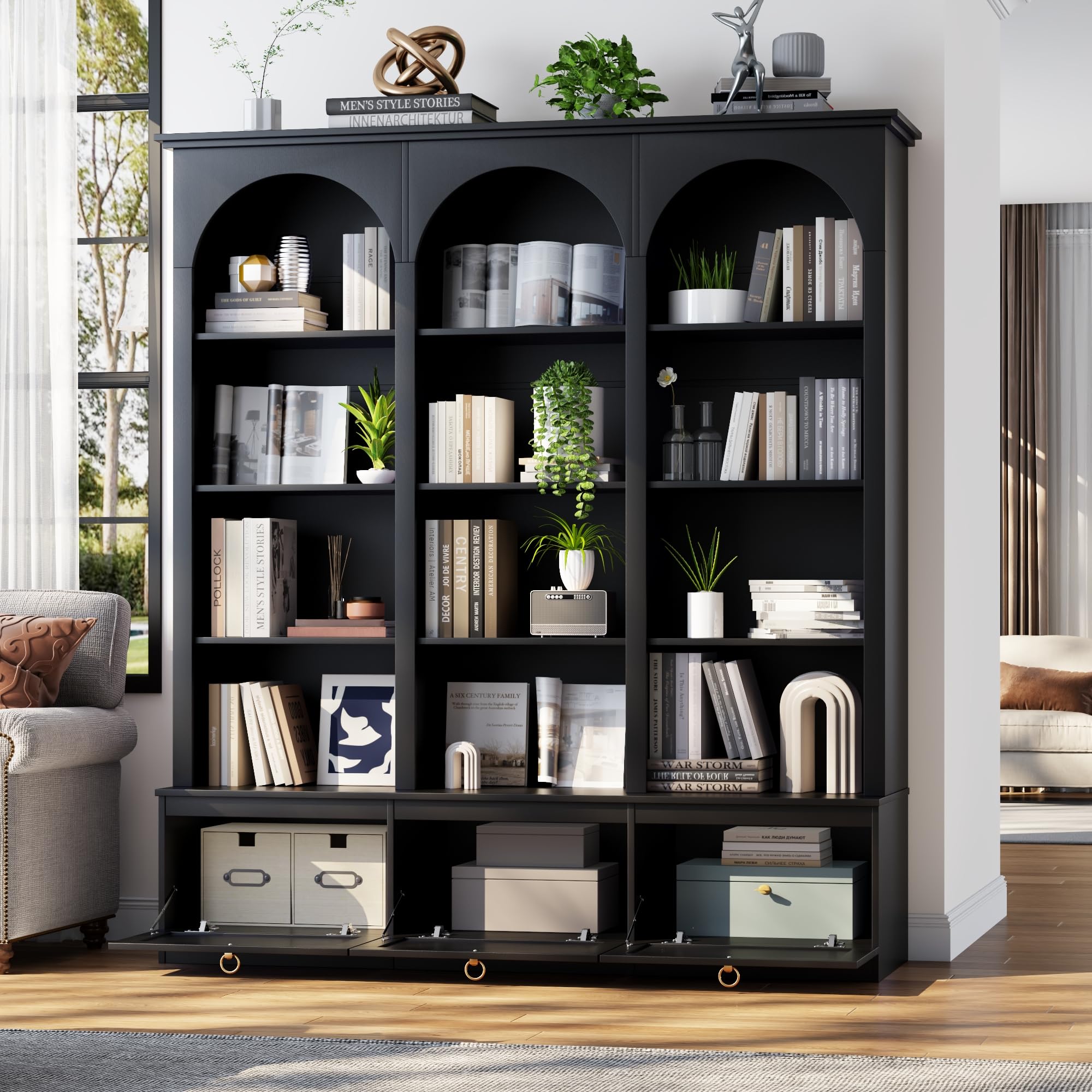
Figure 1: The Loomie 71-inch Triple Bookshelf with Doors, showcasing its overall design and storage capabilities.
Key Features:
- Triple Wide Design: Measuring 62.9"W x 13.39"D x 70.87"H, this bookshelf provides extensive storage capacity.
- 5-Tier Structure with 12 Open Shelves: Ample space for organizing and displaying books, decorative items, and more.
- Enclosed Cabinets with Flip-Top Doors: Ideal for concealing items and protecting them from dust. Features stylish metal ring handles for easy access.
- Adjustable & Removable Shelves: Customize shelf height to accommodate items of various sizes, or remove shelves for larger compartments.
- Sophisticated Arched Design: An elegant arched top adds a refined and eye-catching silhouette.
- Sturdy and Reliable Construction: Crafted from premium-grade engineered wood with a reinforced base for stability.
- Anti-Tipping Device: Includes a metal anti-tip device for enhanced safety and stability.
2. Important Safety Information
WARNING: Failure to follow these safety instructions may result in injury or damage to the product.
- Always follow the assembly instructions carefully.
- Use the anti-tip device to prevent tipping. This is crucial for stability, especially in households with children or pets.
- Keep the bookshelf away from heat sources and direct sunlight to prevent material degradation.
- Do not place heavy objects on the top shelves, as this can compromise stability. Distribute weight evenly.
- Ensure all fasteners are securely tightened during assembly and periodically check for tightness.
- Do not allow children to climb on the bookshelf.
3. Package Contents
Before beginning assembly, please verify that all parts and hardware are present and undamaged. Refer to the assembly diagram in the video for specific part identification.
Typical Components Include:
- Side panels (left, right, and middle sections)
- Top and bottom panels
- Adjustable shelves
- Cabinet doors
- Back panels
- Hardware kit (screws, dowels, cam locks, hinges, handles, anti-tip device)
If any parts are missing or damaged, please contact customer support before proceeding with assembly.
4. Setup and Assembly
Assembly of the Loomie Triple Bookshelf requires two people for optimal safety and ease. Please follow the steps outlined in the video and accompanying instructions carefully.
Assembly Video Guide:
Video 1: Step-by-step assembly guide for the Loomie 71-inch Triple Bookshelf with Doors.
General Assembly Steps:
- Prepare the Base Sections: Assemble the lower sections of the bookshelf first. Attach the side panels to the bottom panels using the provided hardware. Ensure all connections are secure.
- Construct the Upper Arched Sections: Build the three individual arched upper sections. Carefully attach the top and side panels, ensuring the arched pieces are correctly oriented.
- Join Upper and Lower Sections: With assistance, carefully lift and align the assembled upper sections onto the lower base. Secure them together using the designated hardware.
- Install Back Panels: Attach the back panels to the rear of the bookshelf. This adds stability and prevents items from falling out.
- Attach Cabinet Doors: Install the hinges onto the cabinet doors, then attach the doors to the lower sections of the bookshelf. Adjust hinges as needed for proper alignment.
- Install Door Handles: Secure the metal ring handles to the cabinet doors.
- Insert Adjustable Shelves: Place the adjustable shelves into the desired positions within the open compartments. Use the shelf pins to secure them.
- Install Anti-Tipping Device: Securely attach the anti-tipping device to the top rear of the bookshelf and to a wall stud. This is a critical safety step.


5. Operating Features
Adjustable Shelves:
The bookshelf features adjustable and removable shelves in its open compartments. To adjust a shelf, remove all items from it, then lift the shelf to disengage it from the support pins. Reinsert the support pins into the desired holes at a new height, ensuring they are level, and then place the shelf back onto the pins. For larger items or to create open compartments, shelves can be completely removed.
Cabinet Doors:
The lower section of the bookshelf includes three enclosed cabinets with flip-top doors. To open a cabinet, gently pull the metal ring handle. The door will flip down, providing access to the storage space. To close, lift the door back into its upright position until it securely latches.
6. Maintenance and Care
- Cleaning: Wipe the bookshelf surfaces with a soft, damp cloth. Avoid using harsh chemicals, abrasive cleaners, or excessive moisture, as these can damage the engineered wood finish.
- Dusting: Regularly dust the shelves and surfaces with a dry, soft cloth to prevent dust buildup.
- Spills: Immediately wipe up any spills to prevent staining or water damage to the wood.
- Hardware Check: Periodically check all screws, cam locks, and other fasteners to ensure they remain tight. Tighten any loose hardware to maintain structural integrity.
- Avoid Overloading: Do not exceed the weight capacity of the shelves. Distribute weight evenly across the unit.
- Environmental Conditions: Keep the bookshelf in a stable environment, away from extreme temperature changes or high humidity, which can cause warping or damage.
7. Troubleshooting
Common Issues and Solutions:
- Wobbling or Instability:
- Ensure all assembly hardware is fully tightened.
- Verify the bookshelf is placed on a level surface.
- Confirm the anti-tipping device is correctly installed and securely anchored to a wall stud.
- Misaligned Doors:
- Adjust the hinges on the cabinet doors. Most hinges allow for minor adjustments to align the doors properly.
- Ensure the door panels were installed in the correct orientation.
- Difficulty with Assembly:
- Review the assembly video and instructions carefully, paying close attention to part numbers and orientation.
- Ensure you have all necessary tools and that parts are not forced into place.
- If pre-drilled holes do not align, double-check that you are using the correct panels for each step.
- Missing or Damaged Parts:
- Immediately contact Loomie customer support with your purchase details and a description of the missing or damaged part. Do not attempt to assemble with incomplete or damaged components.
8. Product Specifications
| Attribute | Detail |
|---|---|
| Brand | Loomie |
| Model Number | 275A1 |
| Color | Black |
| Material | Engineered Wood |
| Product Dimensions (D x W x H) | 9.45"D x 62.9"W x 70.86"H |
| Item Weight | 52 Pounds |
| Number of Shelves | 12 (adjustable) |
| Storage Options | Open Shelves, Enclosed Cabinets |
| Mounting Type | Floor Mount (with anti-tip device) |
| Assembly Required | Yes |
9. Warranty and Support
Warranty Information:
Loomie products are manufactured with quality and care. For specific warranty details regarding your 71-inch Triple Bookshelf (Model 275A1), please refer to the warranty card included in your product packaging or visit the official Loomie website. The warranty typically covers manufacturing defects under normal use.
Customer Support:
If you have any questions regarding assembly, product quality, missing parts, or require further assistance, please do not hesitate to contact our dedicated customer support team. We are committed to providing prompt and effective assistance to ensure your complete satisfaction.
Contact Information:
Please refer to your purchase documentation or the official Loomie website for the most current customer support contact details (phone, email, or online chat).