Introduction
Thank you for choosing the Azkoeesy 360° Swivel Bar Table. This versatile furniture piece combines a bar table, storage buffet, and kitchen island, featuring a unique swivel mechanism, integrated LED lighting, and convenient storage solutions. This manual provides essential information for safe assembly, operation, and maintenance of your new table.
Safety Information
- Read all instructions carefully before assembly and use.
- Ensure all parts are securely fastened before placing items on the table or using the swivel function.
- Do not exceed the maximum load capacity of 50 kg (110 lbs) for the tabletop.
- Keep children away from the assembly area. Small parts can be a choking hazard.
- Use only the provided or recommended power adapter for the LED lighting system.
- Avoid exposing the table to excessive moisture or direct sunlight to prevent damage to the MDF and wood components.
Package Contents
Your Azkoeesy Swivel Bar Table is shipped in two packages. Before beginning assembly, please verify that all components and hardware are present and undamaged. Refer to the assembly diagram included in your package for a complete list of parts.
- MDF and PB panels for the main cabinet and side shelves
- Wooden tabletop
- 4 drawers with metal handles
- 2 glass doors with metal handles
- 360° swivel mechanism components
- LED light strip with USB power cable
- Assembly hardware kit (screws, dowels, cam locks, etc.)
- Assembly instructions manual

Image: Detailed diagram illustrating the dimensions and various parts of the bar table, including the main cabinet, side storage unit, and individual drawer measurements.
Setup and Assembly
Assembly requires two people and basic tools (not included). Follow the step-by-step instructions provided in the separate assembly manual. Ensure you have ample space and a clean, flat surface for assembly.
- Unpack and Identify: Carefully unpack both packages and identify all components against the parts list in the assembly manual.
- Assemble Main Cabinet: Begin by assembling the main cabinet structure using the designated panels and hardware.
- Install Drawers and Doors: Assemble the four drawers and install them into the cabinet. Attach the two glass doors to the central compartment.
- Attach Side Shelf Unit: Secure the side shelf unit to the main cabinet.
- Integrate Swivel Mechanism: Install the 360° swivel mechanism between the main cabinet and the side shelf unit as per instructions.
- Place Tabletop: Carefully place and secure the wooden tabletop onto the assembled base.
- Install LED Lighting: Adhere the LED light strip inside the glass-door compartment and connect the USB power cable.

Image: The Azkoeesy 360° Swivel Bar Table fully assembled and in use, highlighting its design and illuminated storage.
Operating Instructions
360° Swivel Function
The table features a robust 360° swivel mechanism, allowing you to adjust its configuration to suit your needs. Gently push or pull the side shelf unit to rotate the tabletop and main cabinet. This allows for various setups, from a compact unit to an extended bar or dining surface.

Image: Illustrates the table in various swivel positions, showcasing its adaptability as a compact unit or an extended bar.
LED Lighting Control
The integrated LED light strip illuminates the glass-door compartment. To operate the LED lights:
- Power Connection: Connect the USB cable from the LED strip to a standard USB power adapter (not included) or a USB port on another device.
- App Control: For full functionality, download the dedicated mobile application. Scan the QR code provided in the LED lighting instructions or search for the app in your device's app store.
- App Features: The app allows you to:
- Adjust multiple colors (RGB).
- Utilize a microphone function for sound-reactive lighting.
- Access music-responsive lighting modes.
- Set timer functions for automatic on/off.

Image: Mobile application interface for LED light control, demonstrating color selection, sound reactivity, music synchronization, and timer settings.
Storage Features
The table offers ample storage:
- Four Drawers: Two on the top and two on the bottom provide concealed storage for various items.
- Glass-Door Compartment: The central section with two glass doors and LED lighting is ideal for displaying glassware or decorative items.
- Side Shelves: The integrated side shelf unit offers open storage for bottles, spices, or other frequently accessed items.
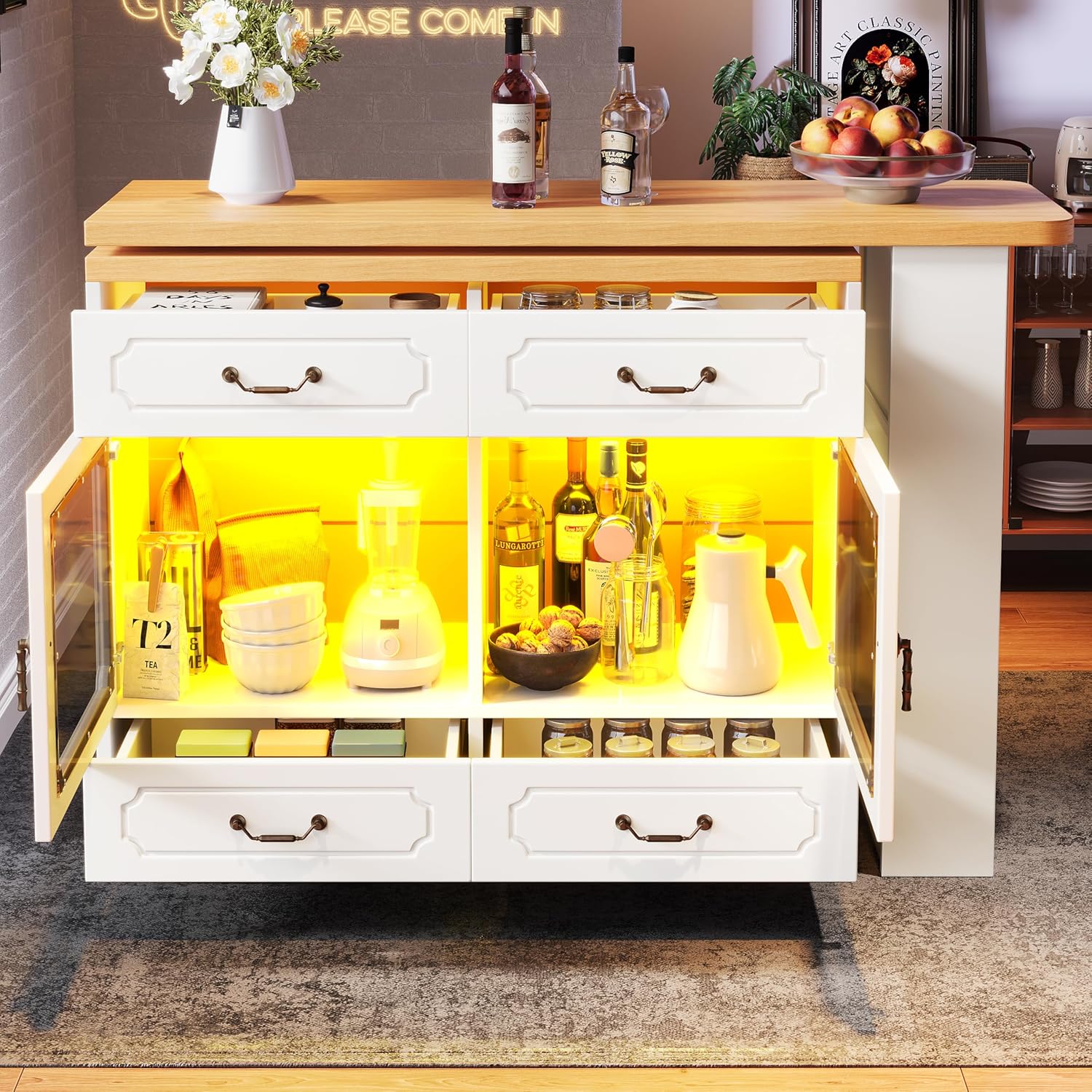
Image: The bar table with its storage compartments open, showing the four drawers, the illuminated glass-door section, and the side shelves.
USB Power Output
An integrated USB port is available to power small devices or charge your phone. Simply connect your device's USB cable to the port.
Maintenance and Care
- Cleaning: Wipe surfaces with a damp cloth and immediately dry with a clean, soft cloth. Avoid abrasive cleaners or harsh chemicals.
- Glass Care: Use a standard glass cleaner for the glass doors.
- LED Lights: Ensure the LED strip and USB connection remain dry. Do not attempt to repair or modify the LED system.
- Hardware: Periodically check all screws and fasteners to ensure they are tight. Retighten if necessary.
- Swivel Mechanism: Keep the swivel mechanism free of debris. Lubrication is generally not required, but if movement becomes stiff, consult the manufacturer.
Troubleshooting
- LED Lights Not Working:
- Check if the USB cable is securely connected to a working power source.
- Ensure the mobile app is correctly paired and the lights are turned on within the app.
- Swivel Mechanism Stiff:
- Ensure no objects are obstructing the rotation path.
- Verify that the table is on a level surface.
- Drawers Not Closing Smoothly:
- Check for any obstructions inside the drawer slides.
- Ensure the drawer slides are properly aligned and secured.
Specifications
| Feature | Detail |
|---|---|
| Brand | Azkoeesy |
| Model | N620BZ250806 |
| Color | White |
| Dimensions (Compact) | 39 cm (D) x 135 cm (W) x 92.8 cm (H) |
| Dimensions (Extended Length) | 135 cm - 203 cm |
| Product Weight | 42.9 kg |
| Maximum Load Capacity | 50 kg |
| Materials | MDF, PB, Wood, Metal, Tempered Glass |
| Special Features | 360° Swivel, LED Lighting (App Controlled RGB), USB Power Output, 4 Drawers, 2 Glass Doors, Side Shelves |
| Number of Packages | 2 |
Warranty and Support
This product comes with a standard manufacturer's warranty against defects in materials and workmanship. Please refer to your purchase documentation for specific warranty terms and duration. For technical support, missing parts, or warranty claims, please contact the retailer or manufacturer directly using the contact information provided at the time of purchase.