
1. Introduction
This manual provides essential instructions for the safe operation, setup, and maintenance of your KBBYT V198Max GPS Drone. Please read this manual thoroughly before operating the drone to ensure proper function and to avoid damage or injury.
Package Contents:
- 1 x V198Max GPS Quadcopter
- 1 x Remote Control
- 1 x Storage Bag
- 4 x Screws
- 1 x USB Charging Cable
- 1 x Screwdriver
- 2 x User Manuals (this document)
- 8 x Replacement Propellers
2. Safety Guidelines
Adhering to these safety guidelines is crucial for preventing accidents, injuries, and damage to the drone or property.
- Local Regulations: Always check and comply with local drone flight regulations and restrictions.
- Line of Sight: Maintain visual line of sight with the drone at all times during flight.
- Weather Conditions: Do not fly in strong winds, rain, snow, or other adverse weather conditions.
- Obstacles: Keep the drone away from people, animals, buildings, trees, power lines, and other obstacles.
- Battery Safety: Use only the provided charging cable and battery. Do not overcharge or puncture batteries.
- Propeller Safety: Keep hands, face, and loose clothing away from rotating propellers.
- Age Restriction: This product is not suitable for children under 14 years old without adult supervision.
- Interference: Avoid flying near strong electromagnetic sources to prevent signal interference.
3. Components Overview
Familiarize yourself with the main components of your V198Max GPS Drone and its remote control.
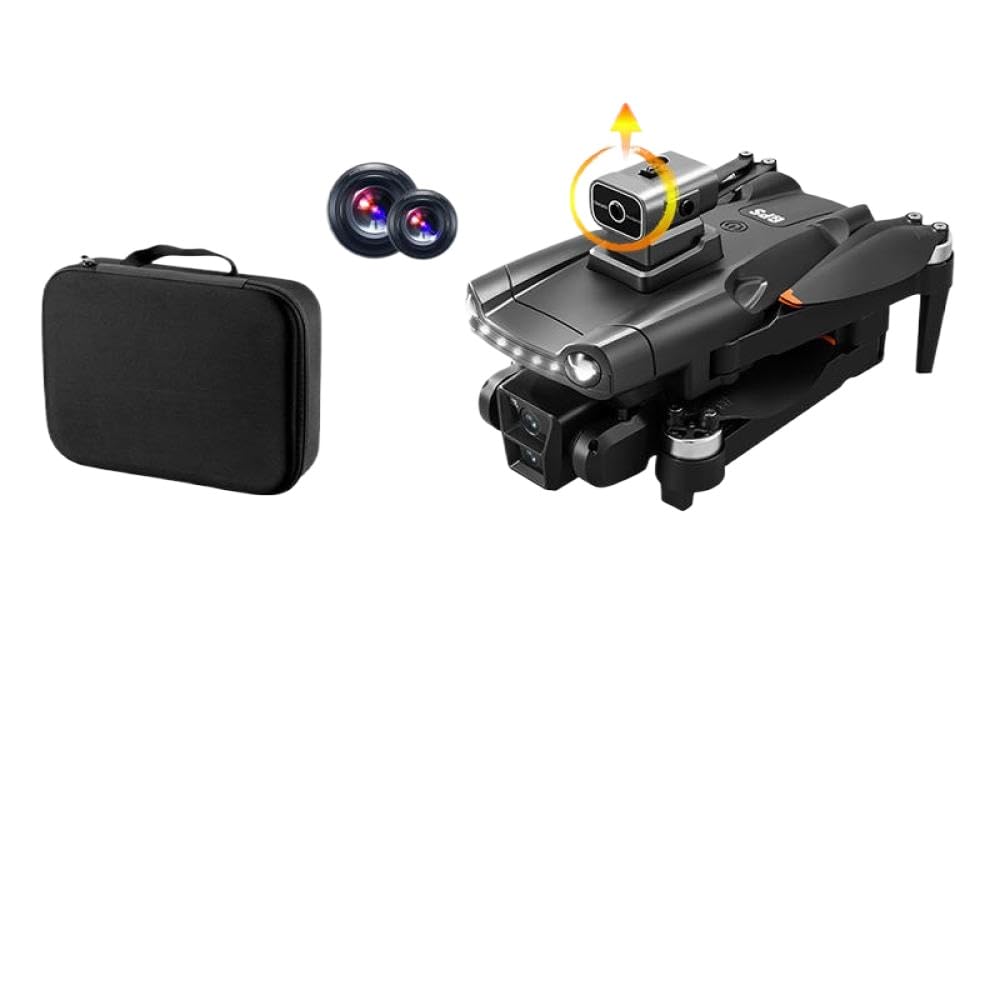
Image 3.1: The KBBYT V198Max GPS Drone in its folded state, accompanied by its remote control. This image illustrates the compact design of the drone and the general appearance of the controller.
Drone Components:
- Foldable Arms: For compact storage and transport.
- Brushless Motors: Provide efficient and powerful flight.
- Propellers: Generate lift for flight.
- Dual Cameras: Front-facing 4K/8K HD camera and a bottom camera for optical flow positioning.
- GPS Module: Enables precise positioning and intelligent flight modes.
- Battery Compartment: Houses the drone's flight battery.
- Obstacle Avoidance Sensors: For intelligent obstacle avoidance.
Remote Control Components:
- Control Sticks: For flight direction and altitude.
- Power Button: To turn the remote control on/off.
- One-Key Takeoff/Landing Button: Initiates automatic takeoff or landing.
- Return-to-Home Button: Commands the drone to return to its takeoff point.
- Speed Switch Button: Toggles between different flight speeds.
- Camera/Video Button: To capture photos or start/stop video recording.
- Phone Holder: To mount your smartphone for FPV viewing.
4. Setup
4.1 Charging the Batteries
- Drone Battery: Connect the drone battery (7.4V 3000MAH) to the provided USB charging cable. Connect the USB cable to a 5V/2A USB power adapter (not included). The charging indicator will show the charging status. A full charge takes approximately 90 minutes.
- Remote Control Battery: The remote control typically uses internal rechargeable batteries or standard AA batteries. Refer to the remote control's specific instructions for charging or battery installation.
4.2 Installing Drone Battery
- Ensure the drone is powered off.
- Locate the battery compartment on the drone.
- Insert the fully charged 7.4V 3000MAH battery into the compartment, ensuring it is securely seated.
- Close the battery compartment cover.
4.3 Propeller Installation
The V198Max uses specific propellers for each motor. Match the propellers with the corresponding motor arms as indicated by markings (e.g., A and B).
- Unfold the drone arms.
- Identify the 'A' and 'B' markings on the propellers and the drone motor mounts.
- Attach the 'A' propellers to the 'A' motor shafts and 'B' propellers to the 'B' motor shafts.
- Secure the propellers using the provided screws and screwdriver. Ensure they are firmly attached but not overtightened.
5. Operating Instructions
5.1 Remote Control Pairing
- Place the drone on a flat, level surface.
- Power on the drone. The indicator lights will flash.
- Power on the remote control.
- Push the left control stick up and then pull it down. The drone lights will stop flashing, indicating successful pairing.
5.2 Pre-Flight Checklist
- Ensure drone and remote control batteries are fully charged.
- Check that propellers are correctly installed and secure.
- Verify that the drone arms are fully unfolded.
- Perform compass calibration (refer to specific app instructions if applicable).
- Ensure GPS signal is acquired before outdoor flight (indicated by solid GPS light).
- Check for clear flight path and safe operating environment.
5.3 Takeoff and Landing
- One-Key Takeoff: After pairing and calibration, press the One-Key Takeoff button. The drone will automatically ascend to a safe altitude and hover.
- Manual Takeoff: Push both control sticks diagonally outwards and down to start the motors. Then gently push the left stick up to ascend.
- One-Key Landing: Press the One-Key Landing button. The drone will automatically descend and land gently.
- Manual Landing: Gently pull the left control stick down to descend. Once landed, pull both control sticks diagonally inwards and down to stop the motors.
5.4 Flight Modes and Features
- GPS Positioning Mode: Provides stable hovering and precise flight paths. Requires a strong GPS signal.
- Altitude Hold Mode: Maintains a consistent altitude, allowing easier control of horizontal movement.
- Headless Mode: Eliminates the need to adjust the drone's orientation before flight. The drone's front will always be the direction the remote control is facing.
- One-Key Return: Press the Return-to-Home button, and the drone will automatically fly back to its takeoff point. Ensure a clear return path.
- Orbital Flight Mode: (Requires app) The drone will fly in a circular path around a designated point.
- Waypoint Flight Mode: (Requires app) Draw a route on the app map, and the drone will follow the specified path.
- Three-Speed Flight Mode: Use the speed switch button on the remote to toggle between low, medium, and high speeds.
5.5 Camera Operation and FPV
- App Connection: Download the dedicated drone app to your smartphone. Connect your phone to the drone's 5G WiFi network.
- Real-time FPV: Once connected, the app will display a real-time video feed from the drone's camera.
- Photo/Video Capture: Use the dedicated buttons on the remote control or within the app to take photos or start/stop video recording.
- Camera Adjustment: The drone features dual cameras (4K/8K HD). Adjust the camera angle via the app if supported.
6. Maintenance
Regular maintenance ensures the longevity and optimal performance of your drone.
- Cleaning: After each flight, gently wipe the drone body with a soft, dry cloth. Remove any dust, dirt, or debris from the motors and propellers. Do not use water or solvents.
- Propeller Inspection: Regularly check propellers for cracks, bends, or damage. Replace any damaged propellers immediately using the provided spares.
- Battery Care: Store batteries in a cool, dry place. Do not store fully charged or completely depleted batteries for extended periods. Charge them to about 50-60% for long-term storage.
- Storage: When not in use, fold the drone arms and store it in the provided storage bag in a cool, dry place, away from direct sunlight and extreme temperatures.
7. Troubleshooting
| Problem | Possible Cause | Solution |
|---|---|---|
| Drone does not power on. | Battery is not charged or not properly installed. | Ensure battery is fully charged and correctly inserted. |
| Remote control does not pair with drone. | Incorrect pairing procedure or low remote battery. | Repeat pairing steps (Section 5.1). Replace/charge remote batteries. |
| Drone flies unstably or drifts. | Improper calibration or strong wind interference. | Perform compass and gyroscope calibration on a flat surface. Avoid flying in windy conditions. |
| No FPV video feed on smartphone. | Incorrect WiFi connection or app issue. | Ensure phone is connected to the drone's 5G WiFi. Restart the app and drone. |
| Drone does not respond to remote control. | Out of range, signal interference, or low remote battery. | Fly within specified range (3000 meters). Avoid areas with strong interference. Check remote battery. |
| One-Key Return does not work as expected. | Weak GPS signal or obstacles in return path. | Ensure strong GPS signal (solid GPS light). Clear the return path. |
8. Specifications
| Feature | Detail |
|---|---|
| Model Name | V198Max |
| Brand | KBBYT |
| Frequency | 5G |
| Motor Type | Brushless 7.4V GB1503 |
| Quadcopter Battery | 7.4V 3000MAH |
| Flight Duration | 22-30 Minutes |
| Charging Time | 90 Minutes |
| Remote Control Distance | 3000 Meters |
| Camera Options | 5G WiFi 4K HD / 5G WiFi 6K / 5G WiFi 8K Dual Cameras |
| Field of View | 120° Wide Angle |
| Folded Product Size | 18 x 12.5 x 7 CM |
| Unfolded Product Size | 36 x 34 x 7 CM |
| Connectivity Technology | Bluetooth, 5G WiFi (for FPV) |
| Model Number | KBBYT126 |
| ASIN | B0GCVFSFHN |
9. Warranty and Support
For warranty information, technical support, or service inquiries, please refer to the warranty card included in your product packaging or contact KBBYT customer service directly.
Please retain your proof of purchase for any warranty claims.