
1. Introduction
This manual provides essential instructions for the safe and effective installation, operation, and maintenance of your HEZHAOHZ 5J.JDP05.001 NSHA370W projector lamp with housing. This lamp is designed for compatibility with BenQ SU922, SW921, and SX922 projector models. Please read this guide thoroughly before proceeding with installation or use to ensure optimal performance and longevity of your projector lamp.
2. Safety Information
Always observe the following safety precautions to prevent injury or damage to the product and projector:
- Disconnect Power: Always unplug the projector from the power outlet and allow it to cool down completely (at least 30 minutes) before attempting any lamp replacement. High voltage and hot surfaces are present.
- Handle with Care: Projector lamps contain mercury and glass components. Handle the lamp housing carefully to avoid breakage. Do not touch the bare lamp bulb with your fingers, as oils can reduce lamp life.
- Proper Disposal: Dispose of old lamps according to local environmental regulations. Do not discard with regular household waste.
- Ventilation: Ensure the projector's ventilation system is clear and unobstructed to prevent overheating, which can shorten lamp life.
- Use Correct Replacement: Only use lamps specified for your projector model. Using an incorrect lamp can cause damage or safety hazards.
3. Package Contents
Verify that your package contains the following item:
- 1 x HEZHAOHZ 5J.JDP05.001 NSHA370W Projector Lamp with Housing
4. Setup and Installation
Follow these steps to safely replace the projector lamp:
- Power Off and Cool Down: Turn off your projector and unplug the power cord. Allow the projector to cool down for at least 30 minutes. The lamp operates at high temperatures and can cause severe burns if handled while hot.
- Locate Lamp Compartment: Refer to your projector's user manual to locate the lamp compartment cover. This is typically found on the top, bottom, or side of the projector.
- Remove Cover: Use a screwdriver (if necessary) to loosen the screw(s) securing the lamp compartment cover. Carefully remove the cover.
- Unscrew Old Lamp: The old lamp module will be secured by one or more screws. Loosen these screws and gently pull the handle on the lamp module to slide it out of the projector.
- Insert New Lamp: Carefully align the new HEZHAOHZ 5J.JDP05.001 lamp module with the slot in the projector. Push it firmly until it is fully seated. Do not force it.
- Secure New Lamp: Tighten the screw(s) to secure the new lamp module in place.
- Replace Cover: Reattach the lamp compartment cover and tighten its screw(s).
- Reset Lamp Timer: Plug the projector back in and turn it on. Navigate to the projector's menu settings and locate the 'Lamp Hour Reset' or similar option. Follow the on-screen instructions to reset the lamp timer. This is crucial for accurate lamp life tracking.
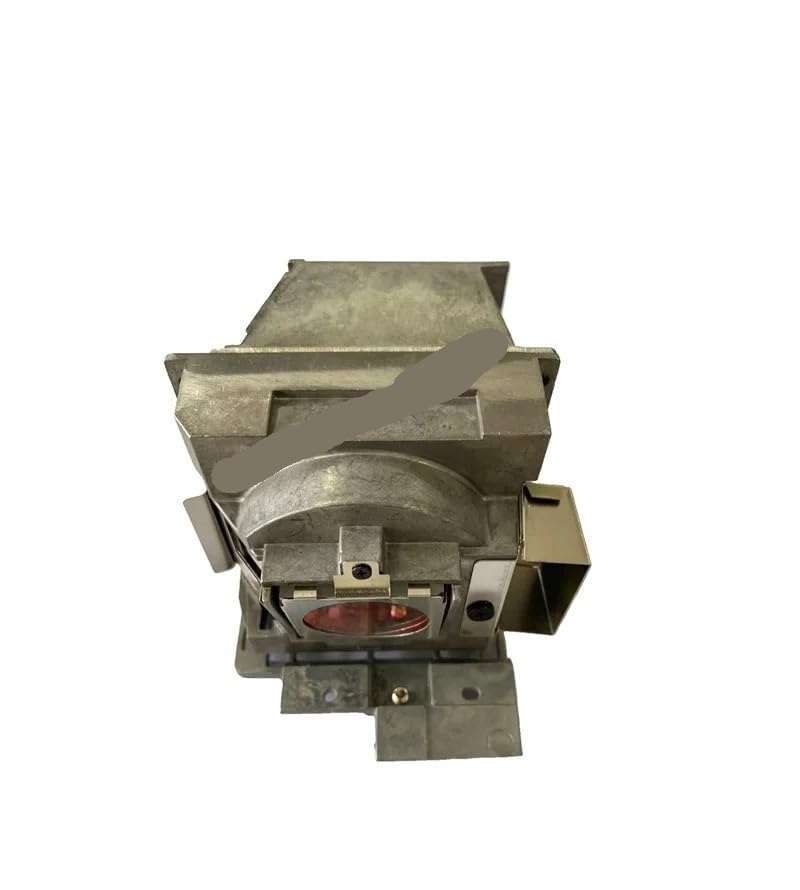
Figure 1: HEZHAOHZ 5J.JDP05.001 NSHA370W Projector Lamp with Housing. This image shows the complete lamp assembly, featuring a robust metal casing, electrical connector, and integrated mounting points, ready for direct installation into compatible BenQ projectors.
5. Operating Instructions
Once the lamp is correctly installed and the lamp timer reset, the projector is ready for normal operation. The lamp itself does not require specific operating instructions beyond being properly installed. Refer to your projector's user manual for detailed operating procedures, including power on/off, input selection, and picture adjustments.
6. Maintenance
Proper maintenance can extend the life of your projector and lamp:
- Clean Air Filters: Regularly clean or replace the projector's air filters to ensure proper airflow and prevent dust buildup, which can lead to overheating and reduced lamp life.
- Avoid Rapid On/Off Cycles: Frequent power cycling can stress the lamp. Allow the projector to cool down for a few minutes after turning it off before restarting.
- Optimal Environment: Operate the projector in a clean, well-ventilated area with stable temperature and humidity.
- Monitor Lamp Hours: Keep track of the lamp hours through your projector's menu. Replace the lamp when it approaches its estimated end-of-life or when image quality noticeably degrades.
7. Troubleshooting
If you encounter issues after lamp replacement, consider the following:
- Lamp Not Lighting Up:
- Ensure the projector is properly plugged in and receiving power.
- Verify the lamp module is fully seated and secured with its screws.
- Check that the lamp compartment cover is correctly closed and secured.
- Confirm the lamp timer was reset.
- Dim Image or Poor Quality:
- Check projector settings for brightness and contrast.
- Ensure the lens is clean.
- Verify the lamp is not nearing its end-of-life (check lamp hours).
- Lamp Warning Indicator:
- If a lamp warning light appears, it may indicate the lamp is faulty or nearing its end-of-life.
- Ensure the projector is not overheating; check for blocked vents.
If problems persist, consult your projector's user manual or contact customer support.
8. Specifications
| Model Number | 5J.JDP05.001 (HEZHAOHZ123) |
| Lamp Type | NSHA370W |
| Wattage | 370W |
| Average Life | 3000-5000 hours |
| Compatibility | BenQ SU922, SW921, SX922 Projectors |
| Dimensions (Parcel) | 1 x 1 x 1 cm |
| Weight (Parcel) | 50 g |
| Origin | Mainland China |
9. Warranty and Support
This HEZHAOHZ projector lamp comes with a 90-day warranty from the date of purchase, providing peace of mind against manufacturing defects. For warranty claims, technical assistance, or any questions regarding your product, please contact the seller or manufacturer directly through your purchase platform. Please have your order details and product model number ready when contacting support.