
1. Introduction
The BQHHWTZ BLE-C600 is a versatile 7-in-1 water quality testing pen designed for precise measurement of pH, Electrical Conductivity (EC), Total Dissolved Solids (TDS), Oxidation-Reduction Potential (ORP), Salinity (SALT), Specific Gravity (S.G), and Temperature. This device features intelligent control via a mobile application, allowing for data synchronization, customizable settings, and easy data management. It is suitable for various applications including drinking water analysis, aquaculture, hydroponics, and laboratory use.

Figure 1: BLE-C600 meter, mobile app interface, and pH buffer powders.
2. Product Features
- 7-in-1 Measurement: Measures pH, EC, TDS, ORP, Salt, S.G, and Temperature.
- Mobile App Intelligent Control: Connects to a mobile application for advanced control and data management.
- Data Synchronization Display: Real-time data synchronization to the mobile app for convenient viewing.
- Customizable Measurement Limits: Set maximum or minimum limits for pH, EC, or ORP; values exceeding the range are displayed in red.
- Automatic 5-Point pH Calibration: Supports both Asia standard (pH 4.00, 6.86, 9.18) and EU standard (pH 4.00, 7.00, 10.01) calibration points.
- Data Export: Export measurement data to Excel format for easy viewing and sharing.
- Waterproof Grade: IP67 rated for durability.
- Backlight: Equipped with a backlight for clear display in various lighting conditions.
3. Specifications
| Parameter | Range | Details |
|---|---|---|
| pH | 0.00 - 14.00 | |
| Temperature | 0.1 - 60.0°C; 32.1 - 140.0°F | |
| ORP | -999mV ~ +999mV | |
| S.G | 1.000 - 1.222 | |
| EC | 0-9999 us/cm; 10.01-19.99 ms/cm; 20.1-400.0 mS/cm | |
| SALT | 0.01 - 25.00%; 0-9999 ppm; 10.01-200.0 ppt | |
| TDS | 0-9999 ppm; 10.01-200.0 ppt | |
| pH Calibration Points | Asia standard: 4.00, 6.86, 9.18; EU standard: 4.00, 7.00, 10.01 | |
| ATC (Automatic Temperature Compensation) | 0 - 60.0°C; 32.0 - 140.0°F | |
| Work Environment | 0.1 - 80.0°C; RH: max 90% | |
| Waterproof Grade | IP67 | |
| Size | 187mm x 37mm x 37mm (7.36 x 1.46 x 1.46 inches) | |
| Power Supply | 3 x 1.5V batteries | |
| Weight | 95g (1.76 ounces) | |
4. Setup
4.1 Battery Installation
- Unscrew the battery compartment cover located at the top of the device.
- Insert three 1.5V batteries, ensuring correct polarity.
- Securely replace the battery compartment cover.
4.2 Mobile App Download and Connection
- Search for the compatible mobile application (refer to product packaging or manufacturer's website for app name) on your smartphone's app store (iOS or Android).
- Download and install the application.
- Enable Bluetooth on your smartphone.
- Turn on the BLE-C600 meter by pressing the 'ON/OFF' button.
- Open the mobile app and follow the on-screen instructions to pair with the BLE-C600 device.
5. Operating Instructions
5.1 Basic Measurement
- Ensure the probe is clean and dry before use.
- Press the 'ON/OFF' button to power on the meter.
- Immerse the electrode into the sample solution, ensuring the liquid level is above the electrode's sensing area.
- Gently stir the solution and wait for the reading to stabilize on the meter's display.
- Press the 'MODE' button to cycle through different measurement parameters (pH, EC, TDS, ORP, Salt, S.G, Temp).
- Press the 'HOLD/TEMP' button to freeze the current reading on the display. Press again to release.
- After measurement, rinse the electrode with distilled water and cap it.
5.2 Mobile App Control and Data Synchronization
Once connected via Bluetooth, the mobile app provides enhanced control and data visualization.

Figure 2: Data synchronization display between the BLE-C600 meter and the mobile app.
- Real-time Display: View all 7 measurement parameters simultaneously on the app interface.
- Backlight Control: Toggle the meter's backlight on or off directly from the app.
- Hold Reading: Activate or deactivate the hold function from the app.
- Save Reading: Manually save measurement data within the app, with options to add notes.
- Automatic Data Storage: Configure the app to automatically save data at set intervals.
- View Data: Access saved measurement values, timestamps, and notes.
- Export Data: Export saved data to an Excel file for analysis or sharing.

Figure 3: Mobile app intelligent control interface with full display, parameter view, and data storage options.
5.3 Setting Measurement Limits
The mobile app allows you to set custom maximum and minimum limits for pH, EC, or ORP measurements.
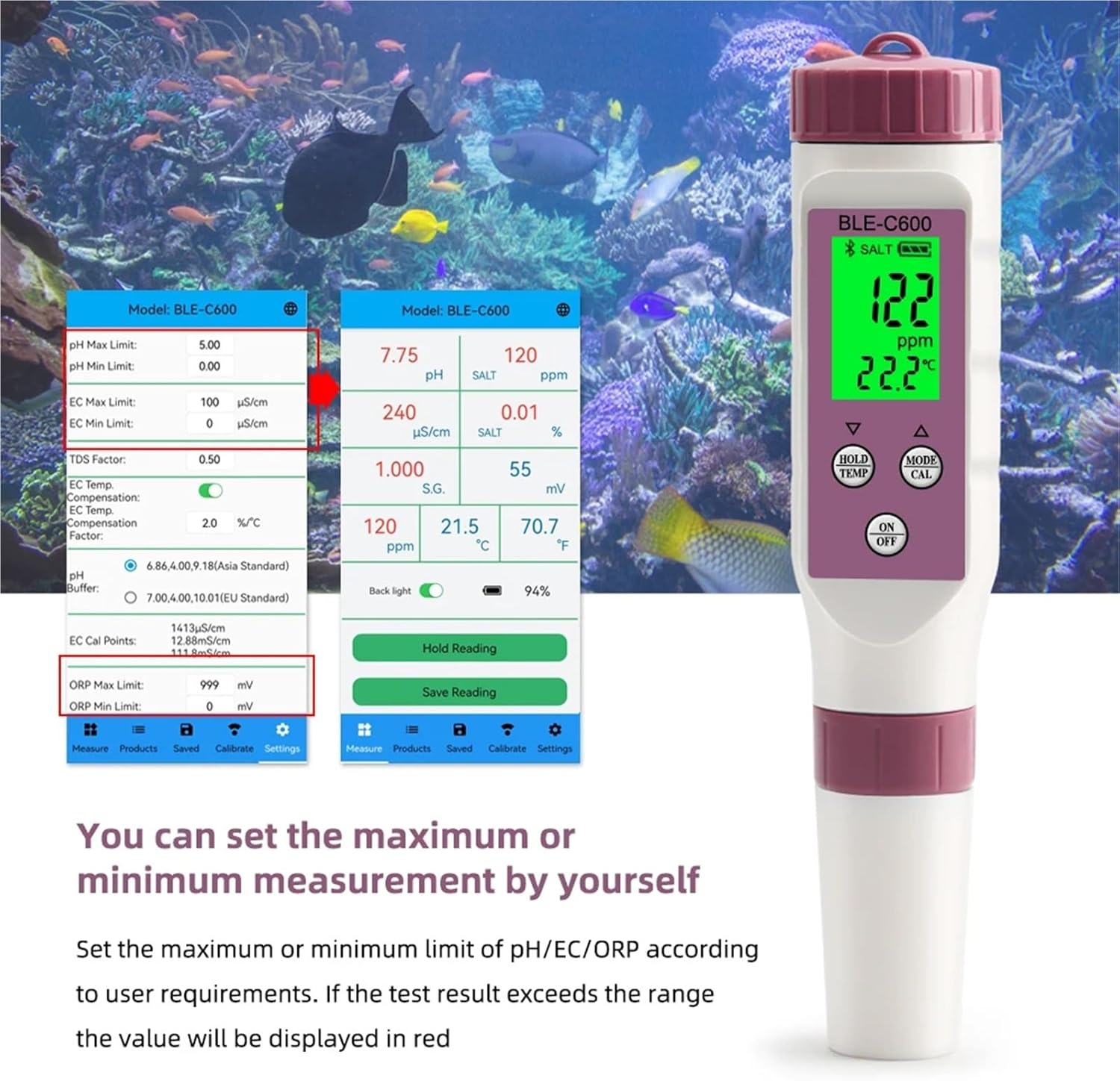
Figure 4: Setting maximum and minimum measurement limits in the mobile app.
- Navigate to the 'Settings' section within the mobile app.
- Locate the options for 'pH Max Limit', 'pH Min Limit', 'EC Max Limit', 'EC Min Limit', 'ORP Max Limit', and 'ORP Min Limit'.
- Enter your desired maximum and minimum values for each parameter.
- If a measurement result exceeds the set range, the corresponding value on the app display will be highlighted in red, providing a visual alert.
5.4 Calibration
Regular calibration ensures the accuracy of your meter. The BLE-C600 supports automatic 5-point pH calibration.
- Prepare the appropriate pH buffer solutions (e.g., 4.00, 6.86, 9.18 for Asia standard or 4.00, 7.00, 10.01 for EU standard).
- Clean the electrode thoroughly with distilled water and gently blot dry.
- Turn on the meter and open the mobile app.
- Navigate to the 'Calibration' section in the app or press the 'CAL' button on the meter.
- Immerse the electrode into the first buffer solution (e.g., pH 6.86 or 7.00). Wait for the reading to stabilize.
- Confirm the calibration point in the app or by pressing 'CAL' again on the meter.
- Rinse the electrode and repeat the process for the remaining buffer solutions in sequence.
- The app will indicate successful calibration.
6. Maintenance
6.1 Electrode Cleaning
After each use, rinse the electrode thoroughly with distilled or deionized water to remove any residue. Do not wipe the glass bulb, as this can cause static electricity and damage the sensor. For stubborn deposits, soak the electrode in a mild cleaning solution (e.g., pH electrode cleaning solution) for a short period, then rinse thoroughly.
6.2 Storage
Always store the electrode with its protective cap filled with a small amount of electrode storage solution or pH 4 buffer solution. Never store the electrode dry or in distilled water, as this can shorten its lifespan.
6.3 Battery Replacement
When the battery indicator on the display shows low power, replace all three 1.5V batteries as described in Section 4.1.
7. Troubleshooting
- Inaccurate Readings: Ensure the meter has been recently calibrated. Clean the electrode thoroughly. Check if the electrode is damaged.
- No Power: Check battery installation and ensure batteries are not depleted. Replace if necessary.
- App Connection Issues: Ensure Bluetooth is enabled on your smartphone and the meter is powered on. Try restarting both the app and the meter.
- Slow Response: The electrode may be dirty or nearing the end of its lifespan. Clean or consider replacing the probe.
If issues persist, please contact customer support for further assistance.
8. Applications
The BLE-C600 water quality meter is suitable for a wide range of applications, including but not limited to:

Figure 5: Common applications of the BLE-C600 water quality meter.
- Drinking water quality testing
- Sewage treatment monitoring
- Water purification systems
- Fish tanks and aquaculture
- Swimming pool water analysis
- Hydroponics and plant cultivation
- Medical treatment water quality
- Laboratory research and testing
9. Warranty and Support
For warranty information and technical support, please refer to the product packaging or contact the manufacturer directly. Keep your purchase receipt as proof of purchase for warranty claims.