
1. Introduction
Thank you for purchasing the ROMSHINE Glossy TV Stand with LED Lights and 4 Drawers. This manual provides detailed instructions for assembly, operation, maintenance, and troubleshooting to ensure safe and efficient use of your product. Please read all instructions carefully before beginning assembly and retain this manual for future reference.
Safety Information
- Always assemble the product on a soft, clean surface to prevent scratches.
- Ensure all parts are present and undamaged before assembly. Do not use if any parts are missing or damaged.
- Follow the assembly steps in the order provided.
- Do not overtighten screws, as this may damage the material.
- Keep small parts away from children during assembly.
- Place the TV stand on a level and stable surface to prevent tipping.
- Do not exceed the maximum weight capacity of the TV stand.
2. Package Contents
Before assembly, please verify that all components listed below are included in your package. If any parts are missing or damaged, please contact customer support.
- Top Panel
- Side Panels (Left & Right)
- Bottom Panel
- Drawer Panels (Front, Back, Sides, Bottom)
- Drawer Slides (Left & Right)
- LED Light Strip with Switch Control
- Hardware Pack (Screws, dowels, cam locks, etc.)
- Assembly Instructions Guide
3. Assembly Instructions
Assembly of this TV stand is designed to be straightforward. Please refer to the separate detailed assembly instructions included in your package for step-by-step diagrams and specific hardware usage. The following provides a general overview of the process.
General Assembly Steps:
- Unpack and Identify Parts: Lay out all components and hardware. Compare them with the parts list in the included assembly guide.
- Assemble the Main Frame: Attach the side panels to the bottom panel using the provided hardware. Secure the top panel to complete the main structure.
- Install Drawer Slides: Attach the drawer slides to the interior of the TV stand frame and to the drawer side panels as indicated in the instructions.
- Assemble Drawers: Construct each of the four drawers by attaching the front, back, and side panels to the drawer bottom.
- Insert Drawers: Carefully slide the assembled drawers onto the installed drawer slides.
- Attach LED Light Strip: Secure the LED light strip to the designated area, typically on the underside of the TV stand, following the specific instructions for wiring and placement.
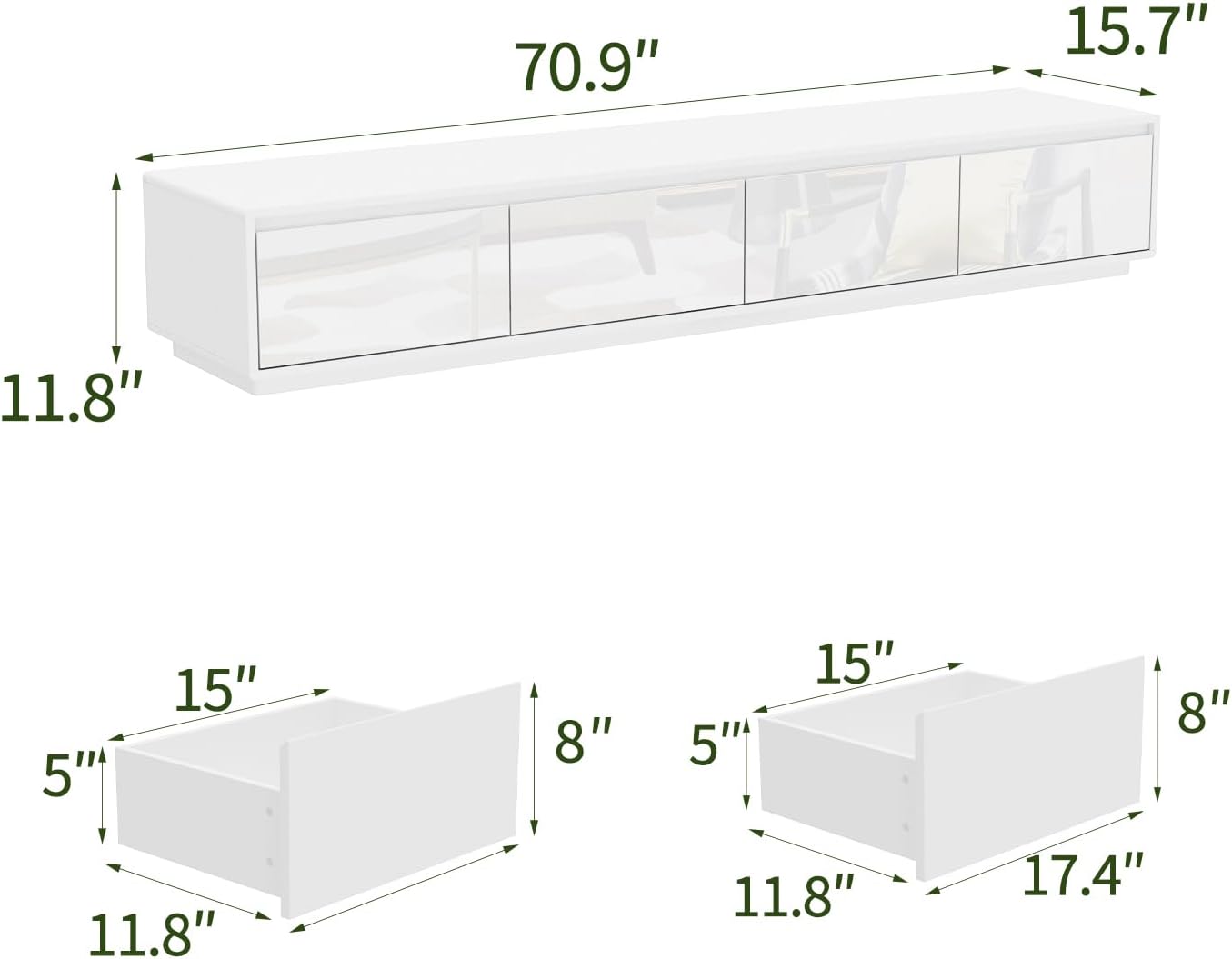
Image 3.1: Dimensional diagram of the TV stand, illustrating overall dimensions (70.9"W x 15.7"D x 11.8"H) and individual drawer dimensions (15"W x 11.8"D x 8"H for two drawers, and 17.4"W x 11.8"D x 8"H for the other two drawers).

Image 3.2: A fully assembled ROMSHINE TV stand, white with a glossy finish, positioned in a living room. The image provides a visual reference for the completed product.
4. Operating Instructions (LED Lights)
Your ROMSHINE TV stand features an integrated LED light strip to enhance your entertainment area. The LED strip offers three color options and is controlled by a simple switch.
Using the LED Lights:
- Connect Power: Ensure the LED light strip's power adapter is securely plugged into a standard electrical outlet.
- Activate Lights: Locate the control switch on the LED light strip cable. Press the switch to turn the lights ON.
- Change Color Mode: Each subsequent press of the control switch will cycle through the available light colors: Cold Light, Natural Light, and Warm Light.
- Turn Off Lights: Continue pressing the switch until the lights turn OFF, or unplug the power adapter.

Image 4.1: Illustration demonstrating the three adjustable light settings (Cold, Natural, Warm) provided by the LED strip, showing how each color illuminates the area beneath the TV stand.
5. Maintenance
Proper care and maintenance will help preserve the appearance and longevity of your TV stand.
Cleaning and Care:
- Surface Cleaning: For the glossy finish, wipe surfaces with a soft, damp cloth. Avoid abrasive cleaners or harsh chemicals, as these can damage the finish.
- Spills: Immediately wipe up any spills to prevent staining or damage to the engineered wood.
- Dusting: Regularly dust with a dry, soft cloth to prevent buildup.
- Avoid Direct Sunlight: Prolonged exposure to direct sunlight may cause fading or discoloration over time.
- Drawer Maintenance: If drawers become stiff, apply a small amount of silicone lubricant to the drawer slides.

Image 5.1: A detailed view of the TV stand's glossy white finish and rounded corner, highlighting the smooth, easy-to-clean surface.

Image 5.2: The TV stand with all four drawers extended, showcasing the internal storage capacity for organizing various items.
6. Troubleshooting
This section addresses common issues you might encounter with your TV stand.
Common Issues and Solutions:
- LED Lights Not Working:
- Ensure the power adapter is securely plugged into both the LED strip and a working electrical outlet.
- Check the control switch to ensure it is pressed to the ON position.
- Verify that the electrical outlet is functional by plugging in another device.
- Drawers Are Sticking or Not Sliding Smoothly:
- Ensure the drawer slides are correctly aligned and installed according to the assembly instructions.
- Check for any obstructions within the drawer slides.
- Apply a small amount of silicone-based lubricant to the drawer slides to improve movement.
- Stand Appears Unstable:
- Verify that the TV stand is placed on a completely level surface.
- Check all screws and fasteners to ensure they are tightened securely (do not overtighten).
7. Specifications
| Feature | Detail |
|---|---|
| Model Number | B0GCJQW5FV |
| Brand | ROMSHINE |
| Product Dimensions (D x W x H) | 15.7" x 70.9" x 11.8" (40 cm x 180 cm x 30 cm) |
| Material | Engineered Wood |
| Finish Type | High Gloss |
| Color | White |
| Number of Drawers | 4 |
| LED Lights | 3-color adjustable (Cold, Natural, Warm) with switch control |
| Mounting Type | Floor Mount |
| Assembly Required | Yes |
Image 7.1: Dimensional diagram of the TV stand, illustrating overall dimensions (70.9"W x 15.7"D x 11.8"H) and individual drawer dimensions (15"W x 11.8"D x 8"H for two drawers, and 17.4"W x 11.8"D x 8"H for the other two drawers).
8. Warranty and Support
ROMSHINE is committed to providing high-quality products. While specific warranty details are not provided in this manual, please retain your proof of purchase for any warranty claims.
If you encounter any issues with the product, require replacement parts, or have questions regarding assembly or operation, please contact ROMSHINE customer support. Our team is available to assist you.
For assistance, please refer to the contact information provided on your purchase receipt or the product packaging.