
1. Introduction
The GESKS O Kam Pro CS621FR is an advanced 8MP 4-lens security camera designed for comprehensive outdoor surveillance. It features a revolutionary quad-lens design, including one pan & tilt lens and three manually adjustable lenses, providing a complete 360° visual coverage.
Key features include:
- Quad-Lens Design: One pan & tilt lens with 270° horizontal and 90° vertical rotation, plus three manually adjustable lenses with 180° rotation each, ensuring 360° visual coverage.
- Active Deterrence System: Real-time sound and light alarms activate upon motion detection, featuring powerful white LED lights and an audible siren to deter intruders. Instant push notifications are sent via the O-KAM Pro app.
- High-Definition Recording: Captures 20MP screenshots and 2MP video with colorful night vision capability for clear footage day and night.
- Network Connectivity: Supports both 2.4GHz WiFi and RJ-45 Ethernet Cable for stable connection.
- Smart Tracking Features: Equipped with human and pet tracking technology and two-way audio communication for remote interaction.
2. Setup Guide
2.1 Package Contents
Verify that all components are present in the package:
- GESKS O Kam Pro CS621FR Camera
- Power Adapter
- Mounting Screws and Anchors
- User Manual
2.2 App Installation
- Download the O-KAM Pro app from your smartphone's app store (iOS App Store or Google Play Store).
- Register for an account and log in.
2.3 Camera Installation
- Choose a suitable outdoor location for mounting the camera, ensuring a clear view of the desired surveillance area and access to a power source.
- Use the provided mounting screws and anchors to securely attach the camera to a wall or ceiling.
- Connect the power adapter to the camera and plug it into an electrical outlet.
- For wired network connection, connect an RJ-45 Ethernet cable to the camera's network interface. For wireless connection, ensure your WiFi network is 2.4G.
2.4 Initial Configuration
- Open the O-KAM Pro app and follow the on-screen instructions to add your new device.
- Select the appropriate connection method (WiFi or wired) and complete the network setup.
- Manually adjust the three fixed lenses to cover your desired areas. Each fixed lens offers 180° horizontal/vertical rotation.

3. Operating Instructions
3.1 Live View and Multi-Screen Display
Access the live feed from your camera through the O-KAM Pro app. The app supports simultaneous display of all four camera views on a single screen, allowing for comprehensive monitoring.

3.2 Pan & Tilt Control
The bottom tracking lens can be remotely controlled via the app. Use the directional controls within the O-KAM Pro app to pan (270° horizontal) and tilt (90° vertical) the lens to adjust its viewing angle.
3.3 Digital Zoom
The app allows for 5X digital zoom on the live footage, enabling closer inspection of details within the monitored area.
3.4 Motion Detection and Alarms
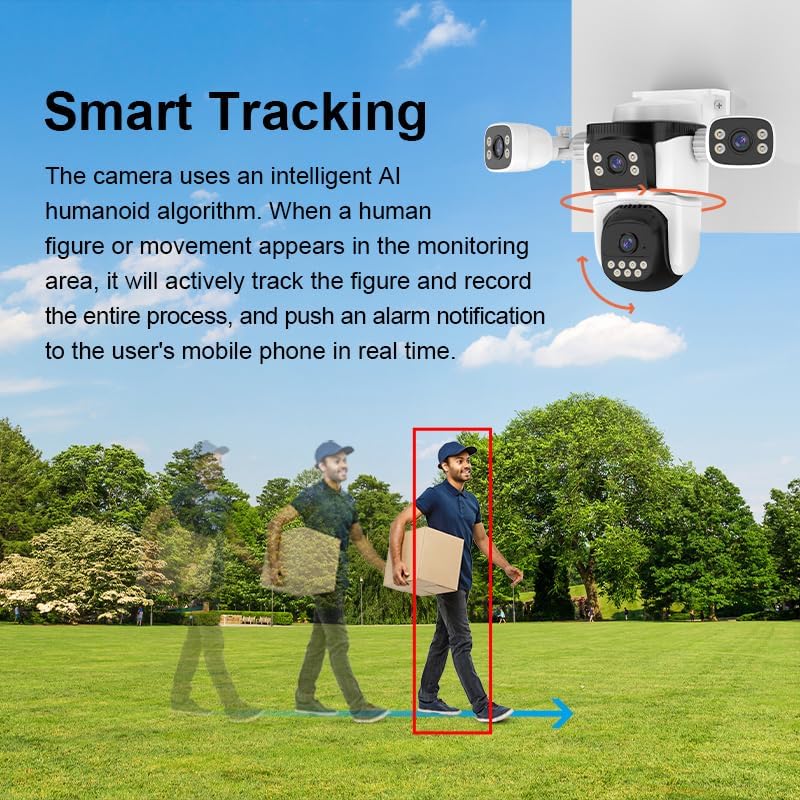
The camera utilizes intelligent AI algorithms for human and pet detection. You can customize specific detection zones within the app. When an alarm is triggered, the camera will activate its sound and light alarm system and send real-time push notifications to your mobile device.
3.5 Night Vision Modes
The CS621FR offers various night vision modes:
- Black and White Night Vision: Standard infrared night vision.
- Full-Color Night Vision: Utilizes white LED lights to provide color images even in low-light conditions.
- Intelligent Night Vision: Automatically switches between black and white and full-color modes based on detected motion or light conditions.
3.6 Two-Way Audio
The built-in microphone and speaker enable real-time two-way voice communication through the O-KAM Pro app. This allows you to interact with visitors or deter potential intruders remotely.
3.7 Storage Options
The camera supports local storage via a T-Flash card (up to 256GB) and cloud storage services (subscription may be required).
4. Maintenance
4.1 Cleaning
Regularly clean the camera lenses and housing with a soft, damp cloth to ensure optimal image clarity. Avoid using harsh chemicals or abrasive materials.
4.2 Weather Resistance
The camera is IP66 weatherproof, designed to withstand various outdoor conditions including wind and rain. However, avoid directing high-pressure water jets directly at the camera.
4.3 Firmware Updates
Periodically check the O-KAM Pro app for available firmware updates. Keeping the camera's firmware up-to-date ensures optimal performance, security, and access to new features.
5. Troubleshooting
5.1 No Live View / Offline Camera
- Ensure the camera is powered on and the power adapter is securely connected.
- Check your internet connection and ensure the 2.4G WiFi network is stable.
- Verify the camera is within range of your WiFi router.
- Restart the camera and your router.
5.2 Alarm Not Triggering
- Check the detection zone settings in the O-KAM Pro app to ensure they cover the desired area.
- Adjust motion sensitivity settings in the app.
- Ensure app notifications are enabled on your smartphone.
5.3 Poor Image Quality
- Clean the camera lenses to remove any dirt or smudges.
- Ensure there is adequate lighting in the monitored area, especially for color night vision.
- Check your network bandwidth; a poor connection can affect streaming quality.
6. Specifications
| Feature | Detail |
|---|---|
| Operating System | Linux |
| APP | O-KAM Pro |
| CPU | Ingenic |
| Memory | 512Mb |
| Lens Configuration | 4mm+4mm+4mm+4mm (4 lenses) |
| Image Sensor | 1/3" 1080p progressive scan CMOS sensor |
| Min. Illumination | 0.5Lux (color mode), 0.1Lux (b&w mode) |
| Night Vision | Black and white, full-color, intelligent night vision (20-50 meters) |
| Viewing Angle | 91° for each lens |
| Resolution | 1080P (1920x1080/12FPS) |
| Video Compression | H.264 main profile/Motion-JPEG/JPEG |
| Audio Input | Built-in -38dB microphone |
| Audio Output | Built-in 8Ω1W speaker |
| Pan/Tilt Rotation | Pan: 270°, Tilt: 90° |
| Network Interface | 10Mbps/100Mbps Ethernet |
| Wireless Network | IEEE802.11b/g/n (2.4G) |
| Storage | External TF card (up to 256GB), Cloud storage |
| Alarm Detection | Motion detection, human detection, human framing, human tracking, siren alarm, area set |
| Rated Voltage | DC12V±5% |
| Power Consumption | 8.64W (0.72A) / Max: 11.16W (0.93A) |
| Working Temperature | -10~55 ℃ |
| Working Humidity | <90% |
| Dimensions (L x W x H) | 9 x 7 x 5.8 inches |
| Weight | 1.4 Pounds |
| Color | White |
| Manufacturer | Shenzhen Vstarcam Technology Ltd |
7. Video Demonstration
This video provides a visual overview of the CS621FR 4-Lens PTZ Camera, demonstrating its features such as the quad-lens design, pan-tilt capabilities, smart tracking, and two-way audio communication. It showcases the camera's appearance and various functionalities in an outdoor setting.
8. Warranty and Support
For warranty information and technical support, please refer to the documentation provided with your purchase or visit the official GESKS website. Keep your purchase receipt as proof of purchase for warranty claims.