1. Introduction
The PUSOKEI 2K AI Window Camera is an innovative security solution designed for indoor installation to monitor outdoor areas. This camera offers advanced features such as AI anti-glare technology, 2K full-color night vision, and dual-band Wi-Fi connectivity, providing clear and reliable surveillance while protecting the device from external elements.

Image: The PUSOKEI 2K AI Window Camera, designed for window mounting, provides a clear view for outdoor monitoring from inside your home.
2. Package Contents
Please verify that all items listed below are included in your package. If any items are missing or damaged, please contact customer support.
- 1 x PUSOKEI 2K AI Window Camera
- 2 x Mounting Brackets
- 2 x Adhesive Stickers
- 4 x Accessories (specific type not detailed, typically screws/anchors or cable clips)
- 1 x Power Cord (approximately 6.5ft)
- 3 x Instruction Manuals (this document and possibly quick start guides)

Image: All components included in the PUSOKEI 2K AI Window Camera package, laid out for inspection.
3. Key Features
The PUSOKEI 2K AI Window Camera is equipped with several advanced features to enhance your surveillance experience:
- Enhanced Outdoor Security: Installed indoors, the camera monitors outdoor areas, protecting the device from rain, snow, vandalism, and theft.
- AI Anti-Glare Technology: Unique AI glare reduction technology eliminates reflections and hotspots, ensuring clear and bright images even through glass.
- AI 2K Full Color Clarity: Upgraded AI 2K full-color technology provides vivid, clear images at night or in low-light conditions, capturing essential details.
- Dual-Band Wi-Fi Connectivity: Supports both 2.4GHz and 5GHz Wi-Fi bands for stable and fast network connections.
- PIR Motion Detection: Passive Infrared (PIR) motion detection sends instant alerts to your smartphone upon detecting movement.
- Two-Way Audio: Built-in microphone and speaker allow for remote communication through the camera.
- Flexible Storage Options: Supports local storage via a small memory card (up to 128GB, not included) and cloud storage (3 days free cloud storage included).
- Easy No-Drill Installation: Innovative adhesive installation requires no tools or drilling, with quick Bluetooth pairing for setup.

Image: Visual representation of the camera's key functionalities, including full-color vision and two-way audio.
4. Setup Instructions
Follow these steps for a quick and easy installation of your PUSOKEI 2K AI Window Camera:
- Choose a Location: Select a clean, flat window surface indoors that provides the desired outdoor view. Ensure the area is free from dust and moisture.
- Attach Mounting Bracket: Peel the protective film from one of the adhesive stickers and firmly attach it to the chosen window surface. Then, attach one of the mounting brackets to the sticker.
- Mount the Camera: Securely place the PUSOKEI camera onto the mounting bracket. The camera is designed for tool-free attachment.
- Connect Power: Plug the provided power cord into the camera's power port and connect the other end to a standard power outlet.
- Download App: Download the official PUSOKEI camera application from your smartphone's app store (iOS or Android).
- Bluetooth Pairing: Open the app and follow the on-screen instructions to pair the camera via Bluetooth. This initiates the Wi-Fi setup process.
- Wi-Fi Connection: Select your preferred 2.4GHz or 5GHz Wi-Fi network and enter the password when prompted in the app.
- Adjust Angle: Use the adjustable bracket to fine-tune the camera's viewing angle for optimal coverage.
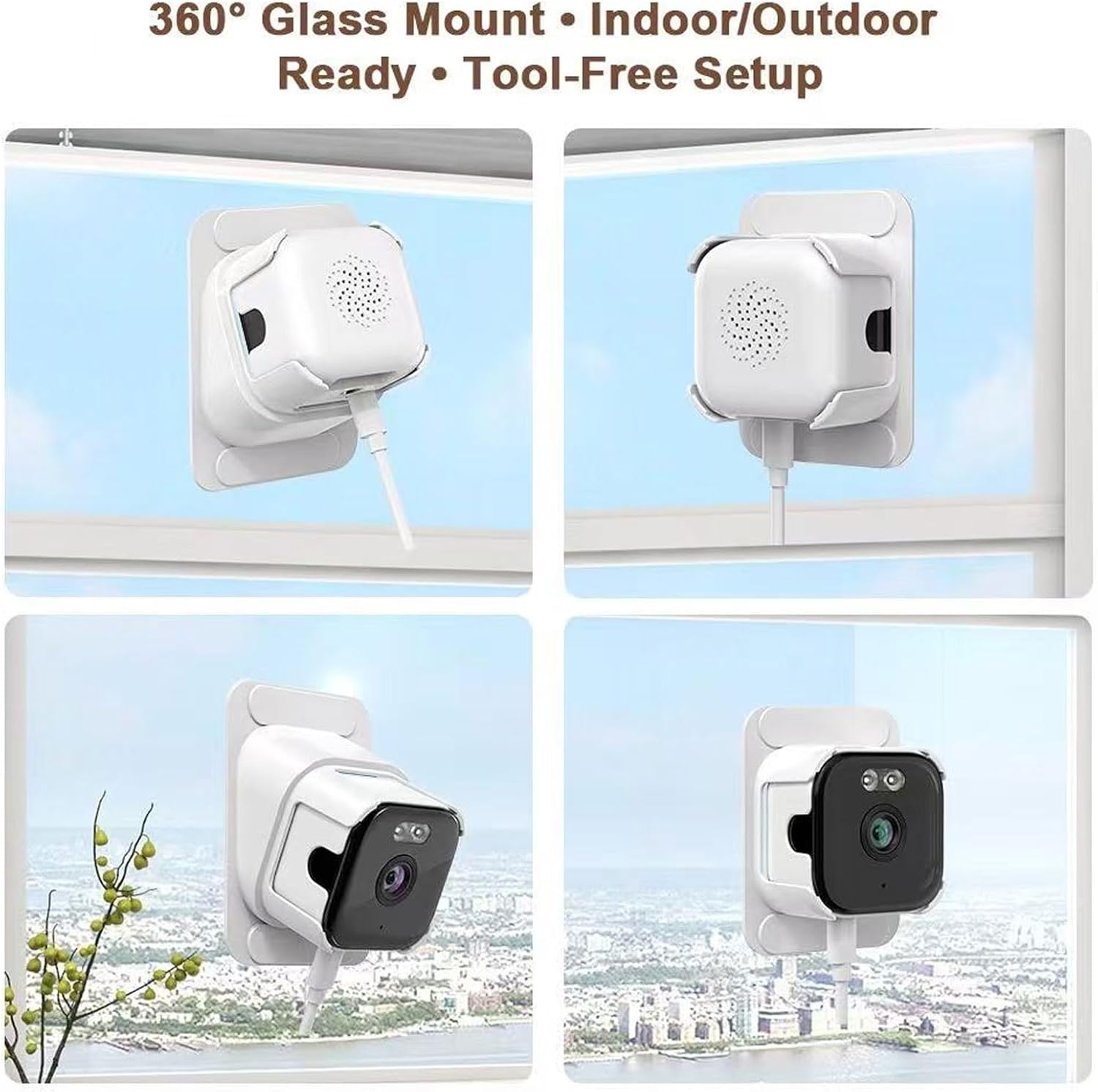
Image: Various mounting angles of the camera on a window, illustrating its flexible positioning.
5. Operating Instructions
Once your camera is set up and connected, you can begin using its features:
- Live View: Open the PUSOKEI app on your smartphone to access the live video feed from your camera.
- Two-Way Audio: In the live view, tap the microphone icon to speak through the camera's speaker, and listen through your phone's speaker.
- Motion Detection Alerts: Ensure PIR motion detection is enabled in the app settings. You will receive push notifications on your phone when motion is detected.
- Recording:
- Memory Card: Insert a small memory card (up to 128GB, not included) into the camera's slot for continuous 24/7 recording. Recordings can be accessed via the app.
- Cloud Storage: The camera includes 3 days of free cloud storage. Access recorded events directly from the cloud via the app.
- Video Sharing: The app allows you to share monitoring videos with family members or other authorized users.
- Settings: Explore the app's settings menu to customize motion sensitivity, notification preferences, recording schedules, and other camera parameters.
6. Maintenance
To ensure optimal performance and longevity of your PUSOKEI 2K AI Window Camera, follow these maintenance guidelines:
- Clean the Lens: Gently wipe the camera lens with a soft, lint-free cloth to remove dust or smudges. Avoid abrasive cleaners.
- Clean the Camera Body: Use a dry or slightly damp cloth to clean the camera's exterior. Do not use harsh chemicals or solvents.
- Check Power Connection: Periodically ensure the power cord is securely connected to both the camera and the power outlet.
- Software Updates: Check the PUSOKEI app regularly for firmware updates. Keeping your camera's software up-to-date ensures the latest features and security enhancements.
- Window Cleanliness: Since the camera monitors through a window, keep the window glass clean to maintain clear image quality.
7. Troubleshooting
If you encounter issues with your PUSOKEI 2K AI Window Camera, refer to the following common problems and solutions:
| Problem | Possible Solution |
|---|---|
| Camera not connecting to Wi-Fi |
|
| Poor image quality / Glare |
|
| No motion detection alerts |
|
| Two-way audio not working |
|
| Camera is unresponsive |
|
8. Specifications
Detailed technical specifications for the PUSOKEI 2K AI Window Camera:
| Feature | Specification |
|---|---|
| Model Name | PUSOKEIo38dgnvkbf |
| Connectivity Technology | Wi-Fi (2.4G & 5G Dual Band), Bluetooth, Hotspot |
| Video Capture Resolution | 2K (1080p compatible) |
| Indoor/Outdoor Usage | Indoor installation for outdoor monitoring |
| Storage Options | Small Memory Card (up to 128GB, not included), Cloud Storage (3 days free) |
| Special Features | AI Anti-Glare, AI Full Color Night Vision, PIR Motion Detection, Two-Way Audio, Adjustable Mount |
| Mount Type | Adhesive Wall Mount (No-Drill) |
| Power Source | AC/DC (Wired) |
| Item Dimensions | 5.11 x 3.54 x 3.54 inches (approx. 13 x 9 x 9 cm) |
| Manufacturer | PUSOKEI |

Image: Detailed dimensions of the PUSOKEI 2K AI Window Camera.
9. Warranty and Support
For warranty information, technical support, or any inquiries not covered in this manual, please refer to the contact information provided with your purchase or visit the official PUSOKEI website. Our customer service team is available to assist you with any product-related questions.