
1. Introduction
This manual provides essential information for the safe and efficient operation, installation, and maintenance of your Carrier 1.5 Ton 5 Star Wi-Fi Smart Flexicool Inverter Split AC. Please read this manual thoroughly before using your air conditioner and retain it for future reference.
2. Important Safety Instructions
WARNING: Failure to follow these instructions could result in electric shock, fire, or serious injury.
- Ensure the AC is installed by a qualified technician according to local electrical codes.
- Do not operate the AC with wet hands or when standing on a wet surface.
- Never insert objects into the air outlet or inlet.
- Keep children away from the unit and remote control.
- Turn off the power supply before cleaning or performing any maintenance.
- Do not attempt to repair the unit yourself. Contact authorized service personnel.
3. Product Overview
3.1 Key Features
- Flexicool Inverter Technology: Variable speed compressor with 6-in-1 convertible modes for adjustable cooling capacity and up to 50% energy savings.
- Capacity: 1.5 Ton, suitable for mid-sized rooms (111 sq ft to 150 sq ft).
- Energy Efficiency: 5 Star BEE rating with an ISEER value of 5.6, consuming 663.31 units annually.
- Durable Construction: 100% Copper Condenser Coil with Anti-Corrosion Blue Coating for enhanced durability and faster cooling.
- Smart Connectivity: Built-in Wi-Fi 2.0 (AI+) with Geo-Fencing and Voice Control (compatible with Google Assistant/Alexa) for remote operation.
- Air Quality: Dual Filtration with HD & PM 2.5 Filter for cleaner, healthier air.
- Advanced Cooling: Insta Cool mode for rapid cooling, Heavy Duty performance up to 52°C ambient temperature, and Stabilizer Free Operation within 135-280V.
- Convenience: Hidden Display, Dry, Auto, Follow Me Function, Auto On/Off Timer, Sleep mode, Auto Restart, Intelligent CRF Alert.
- Eco-Friendly: Uses R32 refrigerant, which has no ozone depletion potential.
3.2 Components Included
Upon unboxing your Carrier AC, you will find the following components:
- Indoor Unit
- Outdoor Unit
- Inter Connecting Copper Pipe (9.84 feet / 3 meters)
- Remote Control
- User Manual
- Warranty Card
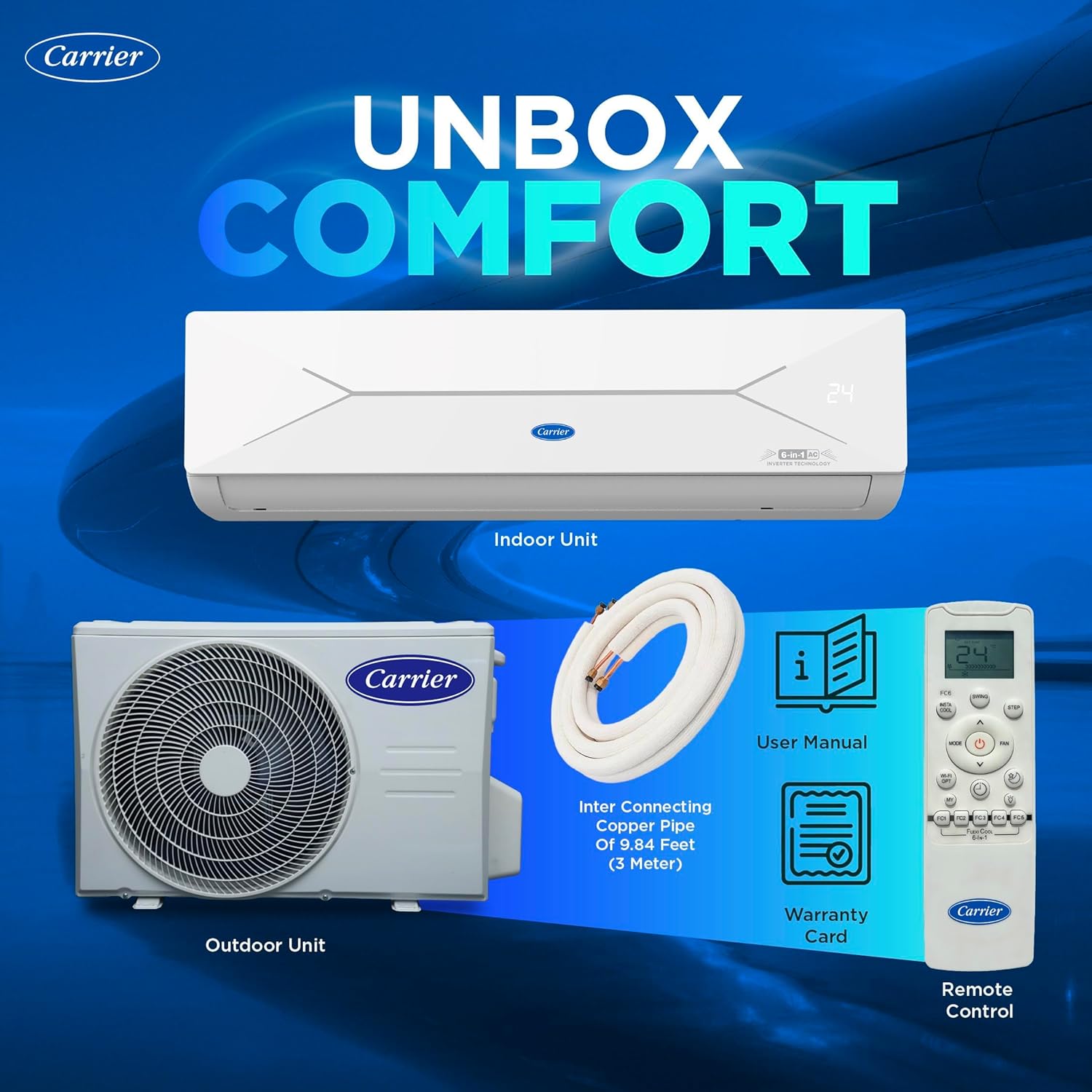
Image: Unboxing the Carrier AC, showing the indoor unit, outdoor unit, remote, copper pipe, user manual, and warranty card.
4. Setup and Installation
For optimal performance and safety, professional installation by a Carrier-authorized service technician is highly recommended. Incorrect installation can lead to reduced efficiency, damage to the unit, and void the warranty.
4.1 Pre-Installation Checks
- Ensure the power supply matches the unit's requirements (230 Volts).
- Verify the room size is appropriate for a 1.5 Ton AC (111-150 sq ft).
- Choose a suitable location for both indoor and outdoor units, ensuring proper airflow and drainage.
4.2 General Installation Steps (Professional Installation Recommended)
- Mount the indoor unit securely on the wall, ensuring it is level.
- Install the outdoor unit on a stable surface, away from direct sunlight and obstructions.
- Connect the refrigerant piping and electrical wiring between the indoor and outdoor units.
- Perform vacuuming of the refrigerant lines to remove air and moisture.
- Check for any refrigerant leaks.
- Connect the drainage pipe for condensate removal.
- Test the unit's operation across all modes.

Image: Detailed dimensions of the indoor and outdoor units for installation planning.
5. Operating Instructions
5.1 Remote Control Functions
The remote control allows you to manage all functions of your Carrier AC. Ensure clear line of sight to the indoor unit for effective communication.
- Power Button: Turns the AC On/Off.
- Mode Button: Cycles through operating modes: Cool, Dry, Fan, Auto.
- Temperature Buttons (▲/▼): Adjusts the desired temperature.
- Fan Speed: Selects fan speed (Low, Medium, High, Auto).
- Swing: Controls the horizontal and vertical airflow direction.
- Timer: Sets the auto On/Off time.
- Sleep Mode: Optimizes temperature and fan speed for comfortable sleep.
- Insta Cool: Provides rapid cooling for quick comfort.
- Follow Me: The remote senses the temperature around it and directs cooling to your location.
- Flexicool (FC1-FC6): Selects different convertible modes to adjust cooling capacity and save energy.

Image: Remote control highlighting the 6-in-1 convertible modes for flexible cooling.
5.2 Wi-Fi Smart Connect 2.0 App & Voice Control
Your Carrier AC features Wi-Fi connectivity for smart control via the Carrier Smart Connect 2.0 app and voice assistants.
- App Download: Download the Carrier Smart Connect 2.0 app from your smartphone's app store.
- Pairing: Follow the in-app instructions to pair your AC with your smartphone.
- Remote Control: Control your AC anytime, anywhere using the app.
- Geo-Fencing: Set up geo-fencing to automatically turn the AC on/off based on your proximity to home (works within 200m to 5km).
- Voice Control: Integrate with Google Assistant or Alexa for hands-free operation.
- Smart Energy Display: Monitor real-time power consumption and estimated bills through the app.
- OTA Updates: Receive seamless over-the-air updates for the latest features.
Video: Comprehensive overview of Carrier AC features, including smart connectivity, Flexicool modes, and heavy-duty performance.
6. Maintenance
Regular maintenance ensures the longevity and efficient operation of your air conditioner.
6.1 Filter Cleaning
- PM 2.5 Filter & HD Filter: These filters should be cleaned regularly (e.g., every 2-4 weeks, depending on usage and air quality).
- Open the front panel of the indoor unit.
- Remove the filters and gently clean them with a soft brush or vacuum cleaner. For heavy dirt, wash with lukewarm water and mild detergent, then air dry completely before reinserting.
6.2 Auto Cleaner (Defrost Clean)
The Auto Cleaner feature uses a 4-step defrost clean technology to keep the coil hygienic and microbe-free:
- Condensed Water: Mid-speed wind and cooling mode to condense water.
- Frosting: Rapid cooling to form frost (T ≤ 10°C).
- Washing: Dust and dirt removal with defrost into the water.
- Drying: Evaporator drying to stop mold growth.
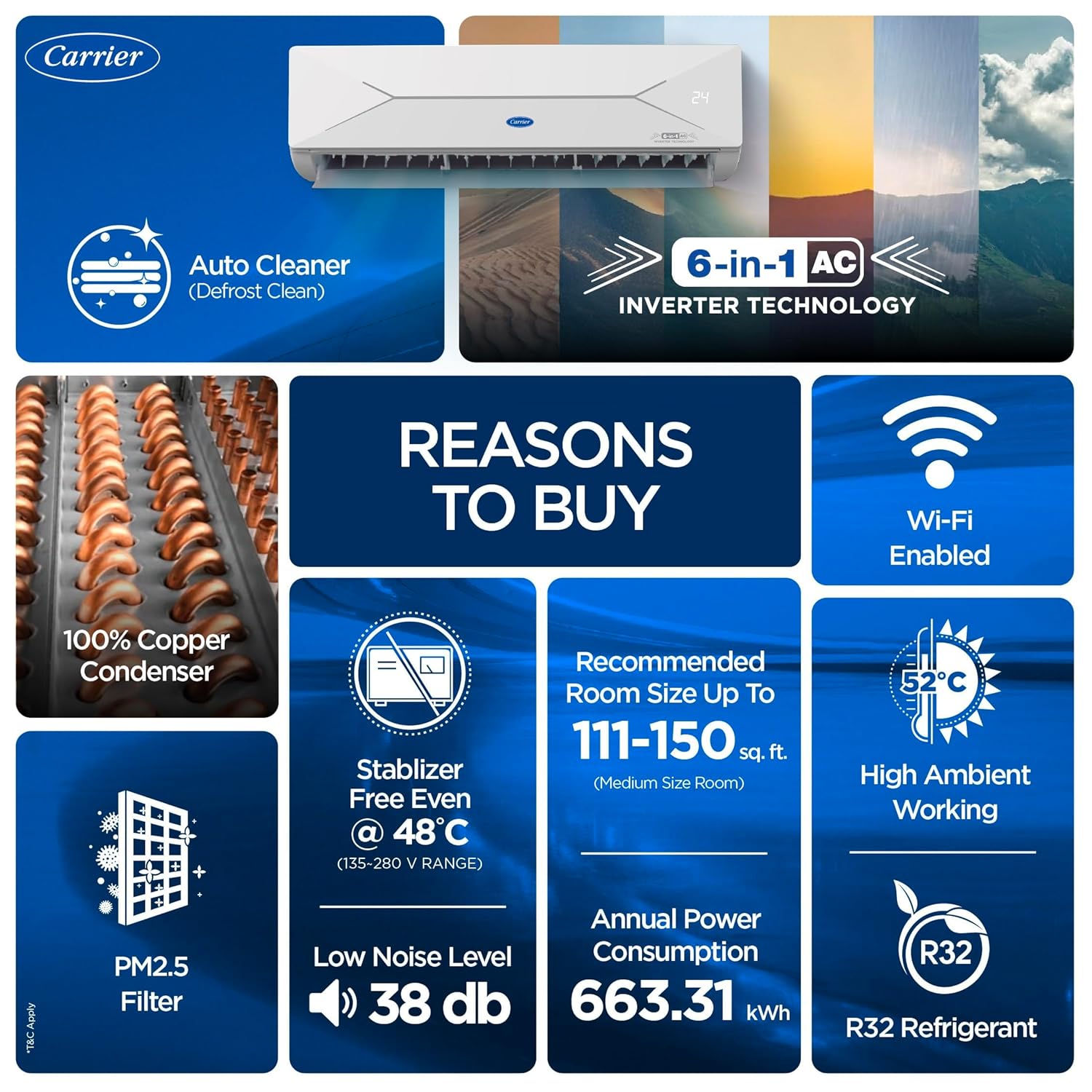
Image: Visual representation of Auto Cleaner and PM2.5 Filter features.
7. Troubleshooting Guide
Before contacting customer service, please check the following common issues:
- AC not turning on: Check power supply, circuit breaker, and remote control batteries.
- Insufficient cooling: Ensure filters are clean, doors/windows are closed, and temperature settings are correct.
- Unusual noises: Minor noises during operation are normal. If loud or persistent, contact service.
- Water leakage from indoor unit: Check if the drainage pipe is clogged or improperly installed.
- Remote not working: Replace batteries, ensure no obstructions between remote and AC.
If the problem persists after checking these points, please contact Carrier customer service.
8. Technical Specifications
| Feature | Value |
|---|---|
| Brand | Carrier |
| Model Number | CAI18EE5R36W0 |
| Capacity | 1.5 Tons |
| Cooling Power | 4800 Kilowatts |
| BEE Star Rating | 5 Star |
| Seasonal Energy Efficiency Ratio (SEER) | 5.6 |
| Annual Energy Consumption | 663.31 Watts |
| Refrigerant | R-32 |
| Noise Level | 38 Decibels |
| Product Dimensions (D x W x H) | 23.4D x 96.5W x 32.4H Centimeters |
| Item Weight | 43500 Grams |
| Voltage | 230 Volts |
| Control Method | App Control, Remote Control, Voice Control |
| Special Features | Auto Clean, Dehumidifier, Fast Cooling, Inverter Compressor, WiFi Enabled |

Image: Power Savings Guide (BEE Label) indicating the 5 Star energy rating and annual energy consumption.
9. Warranty and Support
9.1 Warranty Information
Your Carrier AC comes with the following warranty:
- Standard Warranty: 1 Year on the entire unit.
- PCB Warranty: 5 Years on the Printed Circuit Board.
- Compressor Warranty: 10 Years on the Compressor.
Extended Warranty (Optional): An additional 4 years post the 1-year standard warranty is available. Registration fees must be paid at the time of installation. Two paid maintenance services per year (from 2nd to 5th year) are mandatory to maintain extended warranty validity. Installation must be done through CMI authorized service centers/representatives only to avail warranty.
9.2 Customer Support
Carrier is committed to providing exceptional customer service. Our Pan India service network covers over 20,000 pincodes and is supported by more than 550 authorized service centers.
For any queries, service requests, or support, please contact:
Carrier Customer Care: 18001033333
Video: Overview of Carrier Midea India's HVAC Manufacturing Facility, highlighting commitment to quality and service.