
Delupet Dog Training Collar DT11OG User Manual
Model: DT11OG
Introduction
This manual provides detailed instructions for the safe and effective use of your Delupet Dog Training Collar, model DT11OG. Please read this manual thoroughly before operating the device to ensure proper function and the well-being of your dog.
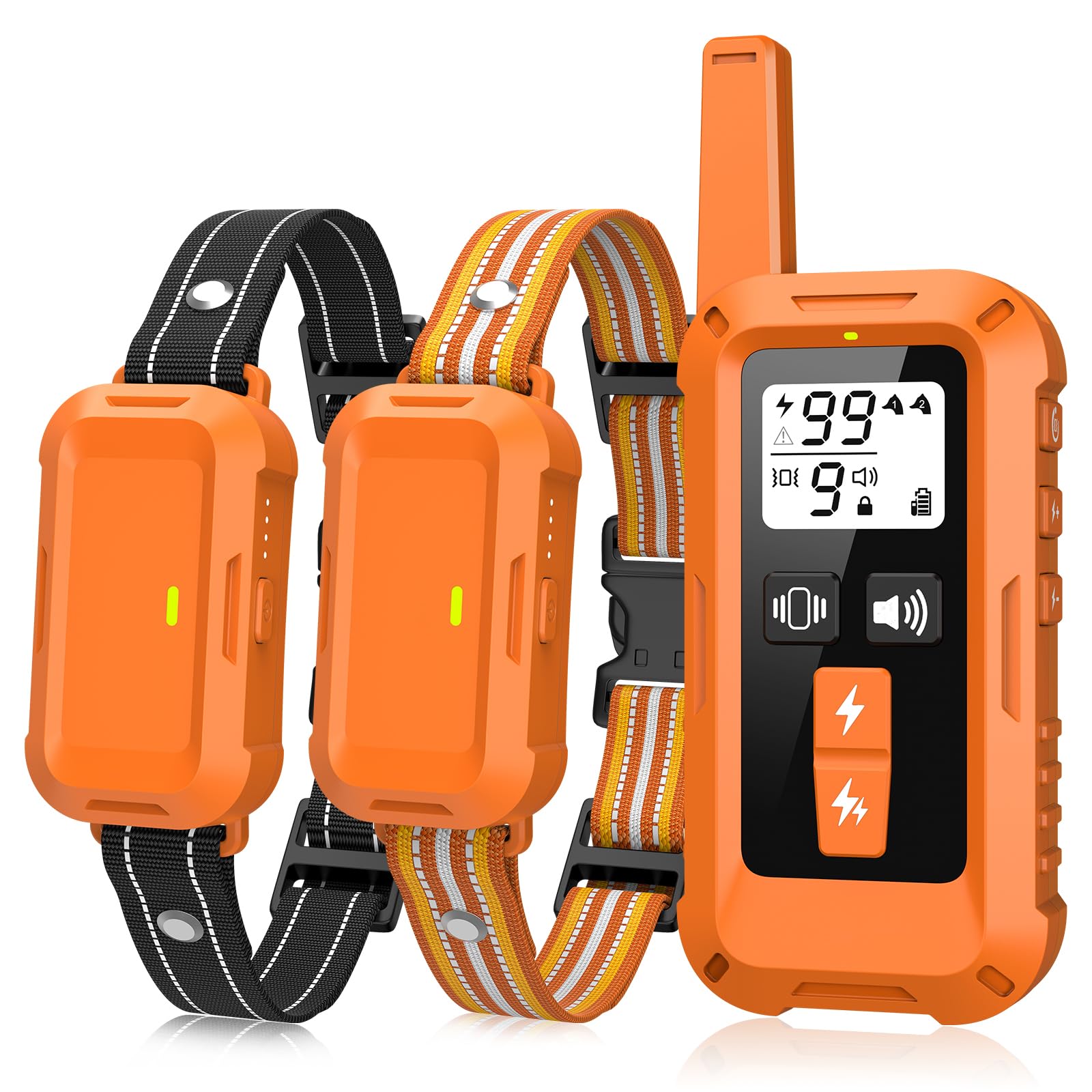
Image: Delupet Dog Training Collar with remote control and receiver collar.
Safety Information
Important Note:
Electronic collars should not be worn continuously for more than 12 hours. Prolonged wear can lead to skin irritation.- Ensure the collar fits properly, not too tight or too loose, to prevent discomfort or ineffective operation.
- This training collar is designed for dogs weighing between 10-120 lbs.
- The remote control is not waterproof; protect it from water exposure.
- Always supervise your dog during training sessions.
- The static correction feature should be used responsibly and only after other modes (beep, vibration) have been attempted.
Package Contents
- Remote Control
- Receiver Collar (with adjustable nylon strap)
- USB Charging Cable
- Test Light Tool
- Short and Long Contact Points
- Silicone Protective Covers
- User Manual (this document)
Product Features
- Training Modes: Beep, Vibration (1-9 levels), Static (0-99 levels), Boost Static (10% higher).
- Remote Range: Up to 4500 feet (approximately 1370 meters).
- Waterproof Receiver: IPX8 rated, suitable for rain, splashes, and swimming.
- Dual Channel: Capable of training two dogs simultaneously with one remote.
- Adjustable Collar: Fits neck sizes 7.8" to 24.4", suitable for dogs 10-120 lbs.
- Safety Lock: Prevents accidental activation of static correction.
- Long Battery Life: Up to 15 days of use on a 2-hour charge.

Image: Overview of the four effective training modes.

Image: Remote control range up to 4500 feet.

Image: IPX8 waterproof receiver collar in use during water activities.

Image: User-friendly and safe design features, including security lock and protective rubber covers.
Setup
1. Charging the Devices
Charge both the remote control and the receiver collar for approximately 2 hours before first use. The indicator lights will show charging status.

Image: Charging the remote and receiver collar.
2. Fitting the Receiver Collar
Place the receiver collar around your dog's neck. Ensure the contact points touch the skin. The collar should be snug enough for the contact points to make reliable contact, but loose enough to allow one finger to fit comfortably between the strap and your dog's neck. Trim excess strap if necessary.
For dogs with thick coats, use the longer contact points. For dogs with thin hair, use the shorter contact points. Always use the silicone protective covers to prevent skin abrasions.

Image: Proper fitting and adjustment of the receiver collar.
3. Pairing the Remote and Receiver
Turn on the Receiver: Press and hold the power button on the receiver collar for 3 seconds until the red light turns on. Release the button. Then, long press the power button again until the green light flashes.

Image: Steps to power on the receiver collar for pairing.
Select the Channel: On the remote control, press the "CH" button to select the desired channel (Channel 1 for the black strap collar, Channel 2 for the orange strap collar). The remote and receiver must be on matching channels.

Image: Selecting the correct channel on the remote control.
Confirm Pairing: While the receiver's green light is flashing, press any training mode button (Beep, Vibration, or Static) on the remote control. A "beep" sound from the receiver indicates successful pairing.

Image: Confirming successful pairing between remote and receiver.
4. Testing the Static Function
To ensure the static function is working correctly, use the provided test light tool.
- Place the test tool over the contact points of the receiver collar.
- Press the static button on the remote control.
- If the test light flashes, the static function is operating normally.

Image: Using the test light tool to verify static function.
Operating Instructions
The Delupet Dog Training Collar offers three primary training modes: Beep, Vibration, and Static. Always start with the lowest effective setting and progress gradually.
1. Beep Mode
- Press the Beep button on the remote control to emit an audible tone from the receiver collar. This mode is useful for attracting your dog's attention or as a warning signal.
2. Vibration Mode
- Press the Vibration button to activate the vibration.
- Adjust the vibration intensity from level 1 to 9 using the remote's adjustment buttons. Start with a low level and increase only if necessary.
3. Static Mode
- Press the Static button to deliver a static correction.
- Adjust the static intensity from level 0 to 99 using the remote's adjustment buttons.
- The "Boost Static" option provides a 10% higher static level for situations requiring a stronger correction.
- Safety Lock: The remote features a safety lock to prevent accidental static activation. Ensure the lock is disengaged before use and re-engaged when not actively training.
4. Dual Channel Operation
If training two dogs, ensure each receiver collar is paired to its respective channel (Channel 1 or Channel 2) on the remote. Use the "CH" button to switch between channels to control each dog individually.
Maintenance
- Cleaning: Wipe the receiver collar and remote control with a damp cloth. Do not use harsh chemicals.
- Battery Care: Recharge the devices when the battery indicator is low. Avoid overcharging. For long-term storage, charge the devices fully every 3 months.
- Contact Points: Regularly check the contact points for cleanliness and ensure they are free of debris.
- Collar Strap: Inspect the nylon strap for wear and tear. Replace if damaged.
Troubleshooting
| Problem | Possible Cause | Solution |
|---|---|---|
| Collar not responding to remote. | Low battery on remote or receiver; devices not paired; incorrect channel selected. | Charge both devices; re-pair the remote and receiver; ensure the correct channel is selected. |
| Static correction is not felt. | Contact points not touching skin; static level too low; test light not used correctly. | Adjust collar fit; increase static level; use the test light tool to verify function. |
| Collar causes skin irritation. | Collar worn too long; improper fit; contact points too harsh. | Do not wear for more than 12 hours; adjust fit; use silicone protective covers; consult a vet if irritation persists. |
| Remote screen is blank. | Low battery on remote. | Recharge the remote control. |
Specifications
| Feature | Detail |
|---|---|
| Model Number | DT11OG |
| Brand | Delupet |
| Remote Range | Up to 4500 feet |
| Waterproof Rating (Receiver) | IPX8 |
| Battery Type | Rechargeable (1 AAA battery included for remote, internal for receiver) |
| Charging Time | Approximately 2 hours |
| Battery Life | Up to 15 days of use |
| Collar Neck Size | 7.8" - 24.4" |
| Dog Weight Range | 10 - 120 lbs |
| Included Components | Remote Control, Receiver Collar, USB Charging Cable, Test Light Tool, Contact Points, Silicone Covers |
| Package Dimensions | 2.56 x 2.56 x 1.97 inches |
| Item Weight | 9.88 ounces |
Warranty & Support
Delupet offers a 30-day money-back guarantee. For any questions, concerns, or technical assistance, please contact Delupet customer service. Support channels may include email, phone, and live chat, as detailed in the original product packaging or on the official Delupet website.

Image: Delupet after-sales service information.