
1. Introduction
This manual provides comprehensive instructions for the installation, operation, and maintenance of your aosu 4K T2 Ultra Wireless Outdoor Security Camera System with aosuBase 2.0. Please read this manual carefully before using the product to ensure proper functionality and safety. Keep this manual for future reference.
2. Product Overview
2.1 Package Contents
- 2 x aosu 4K T2 Ultra Wireless Outdoor Security Cameras with integrated solar panels
- 1 x aosuBase 2.0
- 1 x Power Adapter for aosuBase 2.0
- 1 x Ethernet Cable
- Mounting Screws and Wall Plugs
- USB-C Extension Cable (for solar panel detachment)
- User Manual (this document)
2.2 Key Features
- 4K Ultra HD 8MP Resolution: Provides clear and detailed video footage.
- TrueColor Night Vision: Delivers full-color video even in low-light conditions without additional spotlights.
- 360° Panoramic AI Tracking: Automatically tracks movement across a full 360-degree field of view, eliminating blind spots.
- Triple Detection System: Utilizes radar, PIR sensor, and AI for precise motion detection and reduced false alerts.
- Local Storage: aosuBase 2.0 includes 32GB built-in storage, expandable up to 1TB (microSD card/HDD/SSD not included). No monthly fees required.
- Solar Powered: Integrated 3W solar panel for continuous power, with detachable option for flexible placement.
- Two-Way Audio: Communicate with visitors or deter intruders using the built-in microphone and speaker.
- Inter-Camera Tracking: Cameras work together to provide seamless surveillance coverage.
- Wi-Fi Connectivity: Supports 2.4GHz and 5GHz Wi-Fi for stable connection.
- Weatherproof Design: Suitable for outdoor use in various weather conditions.
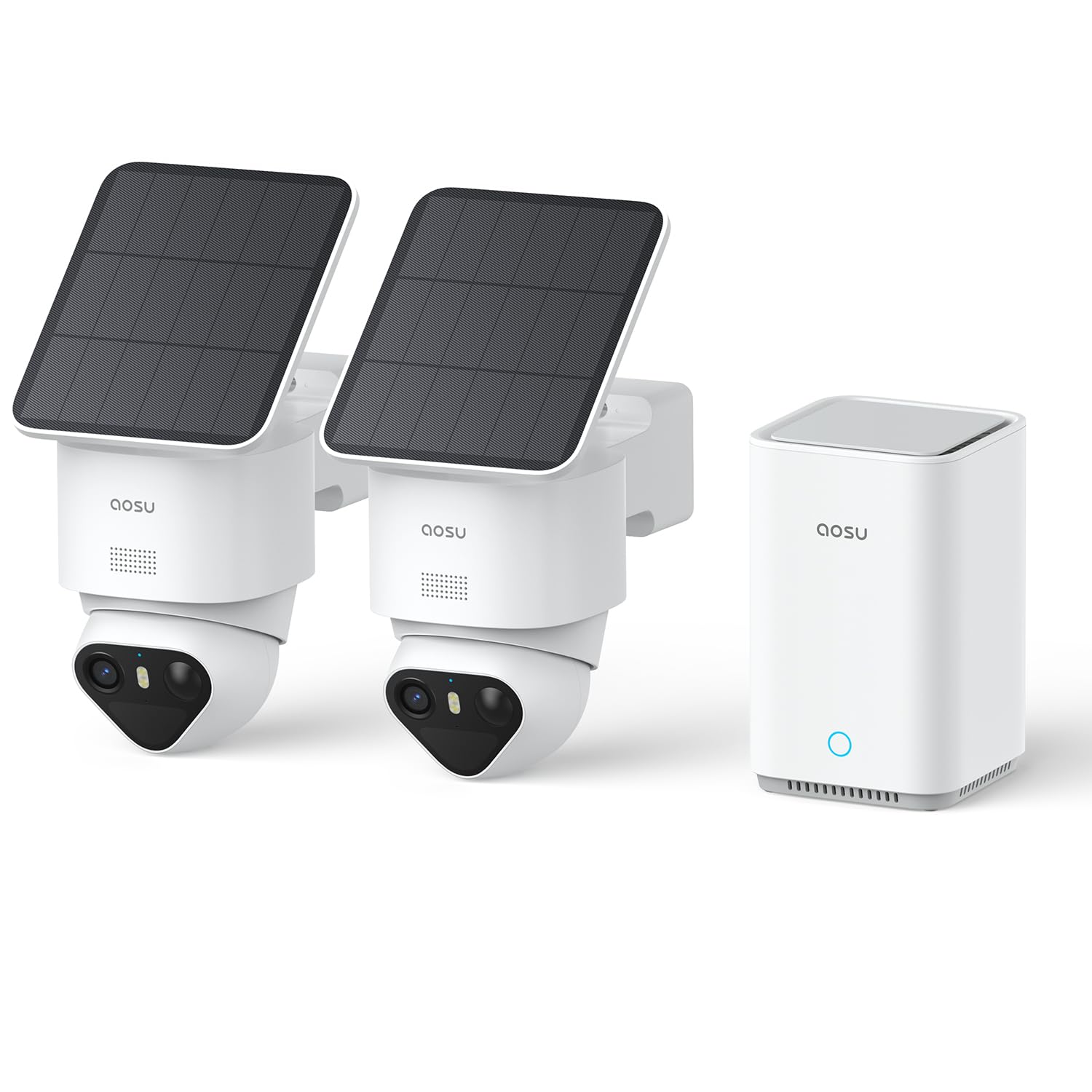
Image 1: aosu 4K T2 Ultra Camera and aosuBase 2.0 Kit components.

Image 2: Close-up of the aosu 4K T2 Ultra Camera with its integrated solar panel.

Image 3: The aosuBase 2.0 central hub for local storage and connectivity.
3. Setup Instructions
3.1 Before Installation
- Ensure all package contents are present.
- Charge the cameras fully before installation for optimal initial performance.
- Download the 'aosu' app from your smartphone's app store (iOS or Android).
- Ensure your Wi-Fi network is 2.4GHz or 5GHz compatible and has a strong signal at the intended camera locations.
3.2 aosuBase 2.0 Setup
- Place the aosuBase 2.0 near your Wi-Fi router.
- Connect the aosuBase 2.0 to power using the provided adapter.
- Connect the aosuBase 2.0 to your router using the provided Ethernet cable.
- Wait for the indicator light on the aosuBase 2.0 to show a stable status (refer to app for specific light indications).
3.3 Camera Installation
The cameras are designed for easy, wire-free installation. The solar panel can be attached directly to the camera or detached and mounted separately for optimal sun exposure.
- Choose a Location: Select a location that provides the desired viewing angle and receives adequate sunlight for the solar panel. Consider areas with high traffic for surveillance.
- Mounting the Camera: Use the provided screws and wall plugs to securely mount the camera to a wall or other stable surface. Ensure the camera is within Wi-Fi range of the aosuBase 2.0.
- Solar Panel Positioning: If detaching the solar panel, use the extension cable to connect it to the camera and mount the panel in a location that receives maximum direct sunlight throughout the day.
- Power On: Once mounted, ensure the camera is powered on. The solar panel will begin charging the internal battery.

Image 4: Illustration of quick and easy camera installation.

Image 5: Flexible mounting options for the solar panel to optimize sun exposure.
3.4 App Pairing
- Open the 'aosu' app on your smartphone.
- Follow the in-app instructions to add your aosuBase 2.0 and then each camera. The app will guide you through the pairing process, often using Bluetooth for initial connection.
- Ensure a stable connection between the cameras and the aosuBase 2.0.

Image 6: Screenshot of the aosu app showing quick connectivity steps.
4. Operating Instructions
4.1 Live View and Recording
- Open the aosu app to view live feeds from your cameras.
- The system automatically records events triggered by motion detection. You can also manually initiate recordings from the app.
- Access recorded footage via the app. Footage is stored locally on the aosuBase 2.0.

Image 7: View multiple camera feeds simultaneously on your smartphone.
4.2 Motion Detection and Alerts
- The camera system uses a combination of radar, PIR, and AI to detect motion accurately.
- Configure detection zones and sensitivity settings within the app to minimize false alerts.
- Receive instant notifications on your smartphone when motion is detected.
- The AI tracking feature allows the camera to follow detected subjects across its 360° field of view.

Image 8: Visual representation of the 3-in-1 precision detection system.

Image 9: The system identifies people by analyzing unique gait, posture, clothing, and behavioral habits.
4.3 Night Vision
- The cameras feature TrueColor 4K night vision, providing clear, vivid color images in low light.
- No additional spotlights are required for color night vision.

Image 10: Example of TrueColor night vision capturing details in the dark.
4.4 Two-Way Communication
- Use the two-way audio feature in the app to speak through the camera and listen to audio from the camera's location.
- A voice change function is included for added security.

Image 11: Illustration of two-way communication via the camera.
5. Maintenance
5.1 Cleaning
- Regularly clean the camera lens and solar panel with a soft, damp cloth to ensure optimal performance.
- Do not use harsh chemicals or abrasive materials.
5.2 Battery and Solar Panel
- The integrated solar panel charges the camera's battery. Ensure the solar panel is free from obstructions and receives direct sunlight for several hours daily.
- If the camera's battery level is consistently low, consider repositioning the solar panel or camera for better sun exposure.

Image 12: The 3W solar panel provides efficient charging for continuous operation.
5.3 Storage Management
- The aosuBase 2.0 comes with 32GB of internal storage. This can be expanded up to 1TB using a compatible microSD card, HDD, or SSD (sold separately).
- Manage recorded videos through the aosu app. You can view, download, and delete footage.
- Note: Deleting recordings one by one is standard. Bulk deletion may require specific app features or a paid subscription if offered by aosu.

Image 13: aosuBase 2.0 offers 32GB integrated storage, expandable up to 1TB, with no subscription fees.
6. Troubleshooting
| Problem | Possible Cause | Solution |
|---|---|---|
| Camera not connecting to aosuBase 2.0 | Weak Wi-Fi signal; Camera too far from aosuBase; aosuBase not connected to network. | Ensure aosuBase is connected to your router via Ethernet. Move camera closer to aosuBase or install a Wi-Fi extender. Check app for connection status. |
| aosuBase 2.0 disconnects frequently | Unstable network connection; Router issues. | Ensure the Ethernet cable is securely connected. Restart your router and aosuBase. Check your internet service provider for network stability. |
| Poor image quality | Dirty lens; Low light conditions; Network bandwidth issues. | Clean the camera lens. Ensure adequate lighting (TrueColor night vision should handle low light). Check your network speed. |
| Solar panel not charging battery | Insufficient sunlight; Panel obstructed; Dirty panel. | Ensure the solar panel receives direct sunlight for several hours daily. Clear any obstructions. Clean the solar panel surface. |
| False motion alerts | High sensitivity settings; Environmental factors (e.g., moving branches, shadows). | Adjust motion detection sensitivity in the app. Define specific activity zones to exclude irrelevant areas. |
| Cannot install aosu app | Device incompatibility; App store issues. | Ensure your smartphone meets the app's minimum system requirements. Try restarting your phone or clearing the app store cache. |
7. Specifications
| Feature | Detail |
|---|---|
| Model Name | C9X11 |
| Brand | aosu |
| Connectivity Technology | Wireless (Wi-Fi 2.4G/5G) |
| Recommended Use | Outdoor Security |
| Video Recording Resolution | 4K (8MP) |
| Night Vision | TrueColor Night Vision |
| Night Vision Range | 10 Millimeters (effective range for color details) |
| Viewing Angle | 360° (Pan/Tilt) |
| Local Storage (aosuBase 2.0) | 32GB (installed), expandable up to 1TB (via microSD/HDD/SSD) |
| Power Source | Solar powered (with integrated 3W panel) / Battery |
| Water Resistance Level | Waterproof |
| Control Method | Application (aosu App) |
| Mounting Type | Wall Mount (Screw-in) |
| Dimensions (Item) | 27 x 16 x 30 centimeters |
| GTIN / UPC | 696168663180 |
8. Warranty and Support
For warranty information and technical support, please refer to the official aosu website or contact aosu customer service directly. Details can typically be found in the 'About Us' or 'Support' section of the aosu app or website.
Manufacturer: aosu


