
1. Introduction
This manual provides essential information for the safe operation, assembly, maintenance, and troubleshooting of your AZHAR Foldable Electric Bike G26. Please read this manual thoroughly before using the product to ensure proper function and safety.
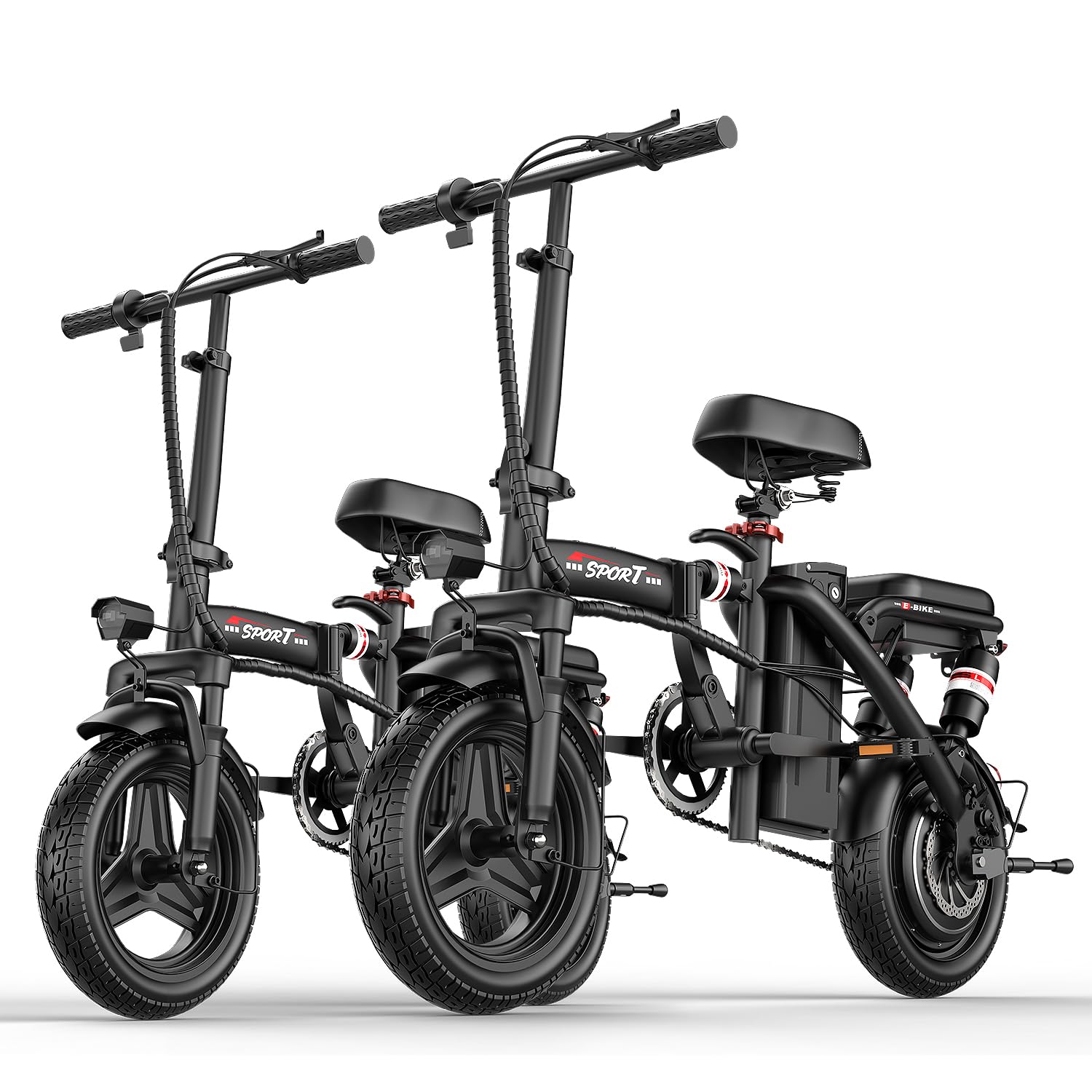
Figure 1: AZHAR Foldable Electric Bike G26 in use.
2. Safety Information
Always prioritize safety when operating your electric bike. Failure to follow safety guidelines can result in serious injury or property damage.
- Wear a helmet and appropriate safety gear at all times.
- Familiarize yourself with local traffic laws and regulations for electric bikes.
- Perform a pre-ride inspection before each use, checking brakes, tires, battery, and lights.
- Do not operate the bike under the influence of alcohol or drugs.
- Avoid riding in adverse weather conditions or on slippery surfaces.
- Ensure all quick-release mechanisms are securely fastened before riding.
- Do not exceed the maximum weight recommendation of 300 lbs.

Figure 2: Rear LED brake and warning lights for safety.
3. Package Contents
Verify that all items are present in the package:
- Electric Bike (x2)
- Removable Battery (x2)
- Charger (x2)
- Tool Kit (x2)
- Bell (x2)
- Rear Reflector (x2)
- User Manual (x2)
4. Assembly
The AZHAR G26 electric bike requires some assembly. Follow these steps carefully. A tool kit is included for your convenience.
4.1 Unboxing and Initial Setup
Video 1: Unboxing and initial setup of the electric bike, showing removal from packaging and basic unfolding.
4.2 Front Wheel Installation
Attach the front wheel to the fork using the provided axle and nuts. Ensure the brake rotor aligns correctly with the caliper.
Video 2: Detailed instructions for installing the front wheel and securing it.
4.3 Handlebar and Seatpost Adjustment
Adjust the handlebar and seatpost to a comfortable riding height. Secure all quick-release levers firmly.

Figure 3: Adjusting the seat height for optimal comfort.
4.4 Pedal Installation
Install the pedals onto the crank arms. Note that pedals are typically marked 'L' for left and 'R' for right. Ensure they are tightened securely.
Video 4: Guide for installing the rear pedals on the electric bike.
5. Operating Instructions
5.1 Powering On/Off and Display Functions
The liquid crystal display provides real-time information about your ride. Press the power button to turn the bike on or off. The display shows speed, battery charge, gear adjustment, and current status.

Figure 5: Liquid Crystal Display (LCD) overview.
- Power ON/OFF: Press and hold the power button.
- Lights ON/OFF: Click the menu button once.
- Switch Gears: Press the menu button twice continuously to cycle through speed modes (S mode offers the highest speed).
- Switch Speed Units: Click the menu button three times consecutively to switch between kilometers and miles.
5.2 Riding Modes
Your AZHAR G26 electric bike offers three riding modes:
- Throttle Mode: Engage the throttle control for electric-only propulsion.
- Pedal Assist Mode (PAS): The motor provides assistance as you pedal. There are 3-speed modes available.
- Walk Assist Mode: Provides low-speed assistance for walking the bike.

Figure 6: Three available riding modes.
Video 5: Demonstration of how to use the throttle function.
5.3 Folding and Portability
The bike features a quick-fold design for easy storage and transport. Follow the instructions to fold the frame, handlebars, and pedals.

Figure 7: Demonstrating the three-step quick fold mechanism.
6. Maintenance
Regular maintenance ensures the longevity and safe operation of your electric bike.
- Tires: Check tire pressure regularly. The 14-inch pneumatic tires require proper inflation for optimal performance and safety.
- Brakes: Inspect brake pads and discs for wear. Ensure brake levers are responsive.
- Battery: Charge the battery fully before the first use. Store the battery in a cool, dry place and charge it every 1-3 months if not in use.
- Chain: Keep the chain clean and lubricated.
- Frame: Periodically check all bolts and fasteners for tightness.
- Cleaning: Use a damp cloth to clean the bike. Avoid high-pressure washing directly on electrical components.
7. Troubleshooting
If you encounter issues with your AZHAR G26, refer to the following common problems and solutions:
| Problem | Possible Cause | Solution |
|---|---|---|
| Bike does not power on | Battery not charged or improperly installed; loose connections. | Ensure battery is fully charged and securely seated. Check all electrical connections. |
| Motor not assisting | PAS level set to zero; throttle not engaged; sensor issue. | Increase PAS level on the display. Engage throttle. Check for error codes on the display. |
| Brakes feel weak | Worn brake pads; loose brake cable; air in hydraulic system (if applicable). | Inspect and replace brake pads if worn. Adjust brake cable tension. Consult a professional for hydraulic brake issues. |
For further assistance, please contact customer support.
8. Specifications
| Feature | Detail |
|---|---|
| Brand | AZHAR |
| Model Name | G26 |
| Bike Type | City Bike, Commuting Bike, Electric Bike, Folding Bike |
| Age Range | Adult, Youth |
| Motor Peak Power | 1200W |
| Rated Motor Wattage | 500 watts |
| Max Speed | Up to 25 MPH |
| Battery | 48V 10Ah Lithium Battery |
| PAS Range | Up to 45 Miles |
| Charging Time | 3-5 Hours |
| Wheel Size | 14 Inches |
| Frame Material | Alloy Steel |
| Suspension Type | Dual (Front & Rear) |
| Brake Style | Disc |
| Maximum Weight Recommendation | 300 Pounds |
| Special Features | Adjustable Handlebars, Adjustable Seat, Digital Display, Dual Suspension, Fenders, Foldable, Headlight, Lightweight, Multi-Speed, Odometer, Portable, Quick Release Seat, Rechargeable, Taillight |
9. Warranty and Support
AZHAR offers a 1-Year Warranty on the electric bike and its components. Additionally, a 30-Day Easy Returns and Exchanges policy is in place. For any issues or support, please contact AZHAR customer service. When returning a product, please retain the original ebike box for 1 month to avoid lost packages.
If you encounter a problem, please describe it clearly and attach relevant pictures when contacting support for a quicker resolution within 24 hours.
