
Introduction
This manual provides essential information for the safe assembly, operation, and maintenance of your KEIKI Full Loft Bed with Storage Stairs. Please read all instructions carefully before beginning assembly and retain this manual for future reference.
The KEIKI Full Loft Bed is designed to maximize vertical space and organize items efficiently. It features integrated storage stairs, open shelves, a built-in wardrobe, USB charging ports, and LED lighting for added convenience.
Important Safety Information
Failure to follow these safety instructions could result in serious injury or property damage. Always prioritize safety during assembly and use.
- Assembly: Always assemble the bed frame strictly according to the provided instructions to ensure stability and safety. Do not modify the product.
- Weight Capacity: Do not exceed the maximum weight capacity of 350 lbs for the bed frame. Overloading can lead to structural failure.
- Guardrails: Ensure all full-length guardrails are securely installed on the top bunk before use. Guardrails are crucial for preventing falls.
- Mattress Thickness: Use a mattress with a maximum thickness of 6 inches to ensure the guardrails remain effective.
- Storage: Be cautious when using the built-in wardrobe and shelves to prevent items from falling. Distribute weight evenly.
- USB Ports & LED Lights: Keep USB ports and LED lights out of reach of young children to prevent injury or damage. Ensure all electrical connections are secure and dry.
- Children: This loft bed is not recommended for children under 6 years of age.
- Ventilation: Ensure adequate ventilation around the bed, especially if using the integrated wardrobe.
- Regular Checks: Periodically check all bolts, screws, and connections to ensure they remain tight. Retighten as necessary.
Package Contents
Before beginning assembly, verify that all parts and hardware are present. Refer to the detailed parts list in the separate assembly manual included with your product. If any parts are missing or damaged, do not proceed with assembly and contact customer service immediately.
Typical components include:
- Metal bed frame components (beams, posts, slats)
- Storage stairs components
- Wardrobe and shelf panels
- Guardrails
- USB charging module
- LED light strip
- Hardware pack (screws, bolts, nuts, Allen wrench)
- Assembly manual
Setup and Assembly
Full assembly is required for this loft bed. Please follow the step-by-step instructions provided in the dedicated assembly manual included in your package. Ensure you have sufficient space and assistance for assembly.
- Preparation: Clear the assembly area. Lay out all components and hardware.
- Frame Assembly: Begin by assembling the main metal bed frame according to the manual. Ensure all connections are finger-tight before final tightening.
- Stairs and Storage: Attach the storage stairs, shelves, and wardrobe sections as instructed. These components provide structural support.
- Guardrails: Securely attach all guardrails to the top bunk. Verify they are firmly in place.
- Electrical Components: Install the USB charging module and LED light strip as directed. Ensure proper cable management.
- Final Tightening: Once all components are in place, systematically tighten all bolts and screws using the provided tools. Do not overtighten.
- Inspection: Before first use, thoroughly inspect the assembled bed to ensure all parts are correctly installed and secure.

Image: Overview of the KEIKI Full Loft Bed frame, showcasing the integrated storage stairs and wardrobe structure.
Operating Instructions
Using the Loft Bed
- Accessing the Top Bunk: Use the integrated storage stairs to safely access the top bunk. Always face the stairs when climbing up or down.
- Mattress Placement: Place a full-size mattress (maximum 6 inches thick) on the bed slats. Ensure it fits snugly within the frame.
- Storage Areas: Utilize the open shelves and wardrobe for organizing clothes, books, and personal items. Distribute weight evenly across shelves.
USB Charging Ports
- Power Connection: Ensure the bed's power cord (if applicable, for USB/LED) is securely plugged into a functional wall outlet.
- Device Charging: Connect your USB-compatible devices (e.g., smartphones, tablets) to the integrated USB ports for convenient charging.
- Safety: Avoid spilling liquids near the USB ports. Do not force connectors into the ports.
LED Light Strip
- Activation: The LED light strip is typically controlled by a switch or remote. Refer to the specific instructions for the LED component.
- Usage: Use the LED lighting for ambient light, reading, or as a night light.
- Care: Do not attempt to remove or replace the LED strip unless specifically instructed.
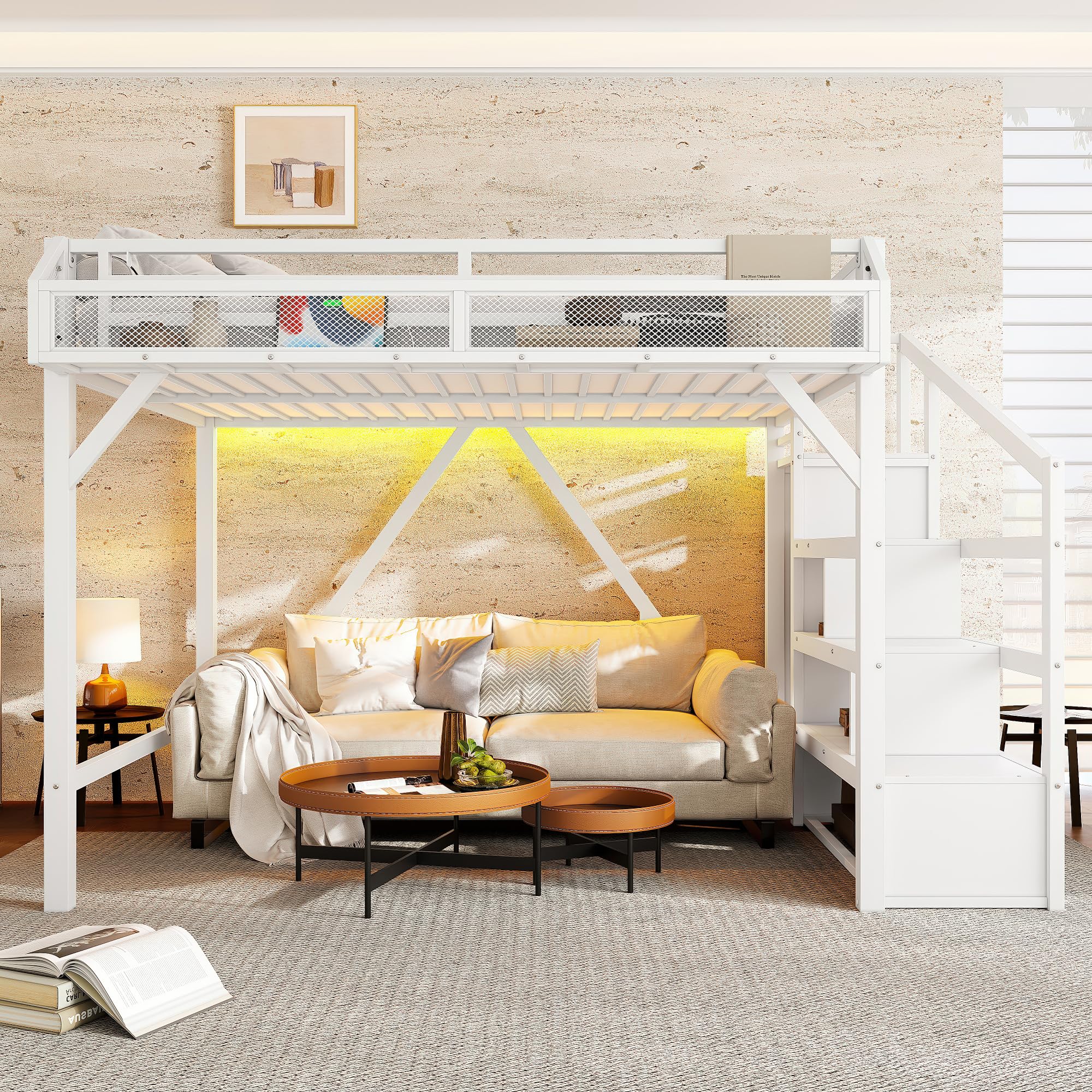
Image: The KEIKI Full Loft Bed in a room setting, illustrating its use with a sofa placed underneath and showing the integrated storage stairs.
Maintenance
- Cleaning: Wipe the metal frame and MDF surfaces with a soft, damp cloth. Avoid abrasive cleaners or harsh chemicals that could damage the finish.
- Hardware Check: Periodically (e.g., every 3-6 months) inspect all bolts, screws, and connections. Tighten any that have become loose to maintain stability and prevent squeaking.
- Electrical Components: Keep USB ports and LED lights clean and dry. If any electrical component malfunctions, discontinue use and contact customer service.
- Weight Distribution: Ensure weight is distributed evenly on the bed and storage areas to prevent stress on the frame.
Troubleshooting
| Problem | Possible Cause | Solution |
|---|---|---|
| Bed feels unstable or wobbly. | Loose hardware connections. | Check and tighten all bolts and screws. Ensure the bed is on a level surface. |
| Squeaking noises. | Loose connections or friction between metal parts. | Tighten all hardware. Apply a small amount of lubricant (e.g., silicone spray) to contact points if necessary, avoiding areas that will contact bedding. |
| USB ports not charging. | Power cord not connected; faulty device cable; USB module issue. | Ensure the bed's power cord is plugged in. Try a different USB cable or device. If the issue persists, contact customer service. |
| LED light strip not working. | Power connection issue; faulty switch/remote; damaged strip. | Check power connection. Ensure the switch/remote has working batteries (if applicable). Contact customer service if the strip remains unresponsive. |
Product Specifications
- Product Type: Metal Loft Bed
- Model Number: HT03062
- Size: Full
- Color: White
- Material: Metal + MDF
- Overall Dimensions (L x W x H): 90.94" x 56.7" x 63.4" (approx. 231cm x 144cm x 161cm)
- Weight Capacity: 350 lbs (approx. 158 kg)
- Recommended Mattress Thickness: 6 inches (maximum)
- Included Components: Guardrails, Storage Stairs, Shelves, Wardrobe, USB Ports, LED Lights
- Assembly Required: Yes, full assembly
- Country of Origin: China

Image: Detailed dimensional diagram of the KEIKI Full Loft Bed, showing length, width, height, and internal measurements of the bed and storage components.
Warranty and Support
Warranty Information
This product is covered by the manufacturer's limited warranty. Please refer to the warranty card included in your package or visit the official KEIKI website for detailed terms and conditions. The warranty typically covers manufacturing defects under normal use.
Customer Support
For any questions, missing parts, assembly assistance, or warranty claims, please contact KEIKI customer service. Have your model number (HT03062) and purchase information ready when contacting support.
Contact Information: Please refer to the contact details provided in your product packaging or on the official KEIKI website.