
Introduction
Thank you for purchasing the AHAWILL 22.8-inch Outdoor Hanging Ceiling Fan with Light. This manual provides essential information for the safe and efficient operation of your fan. Please read these instructions thoroughly before installation and use, and retain them for future reference.
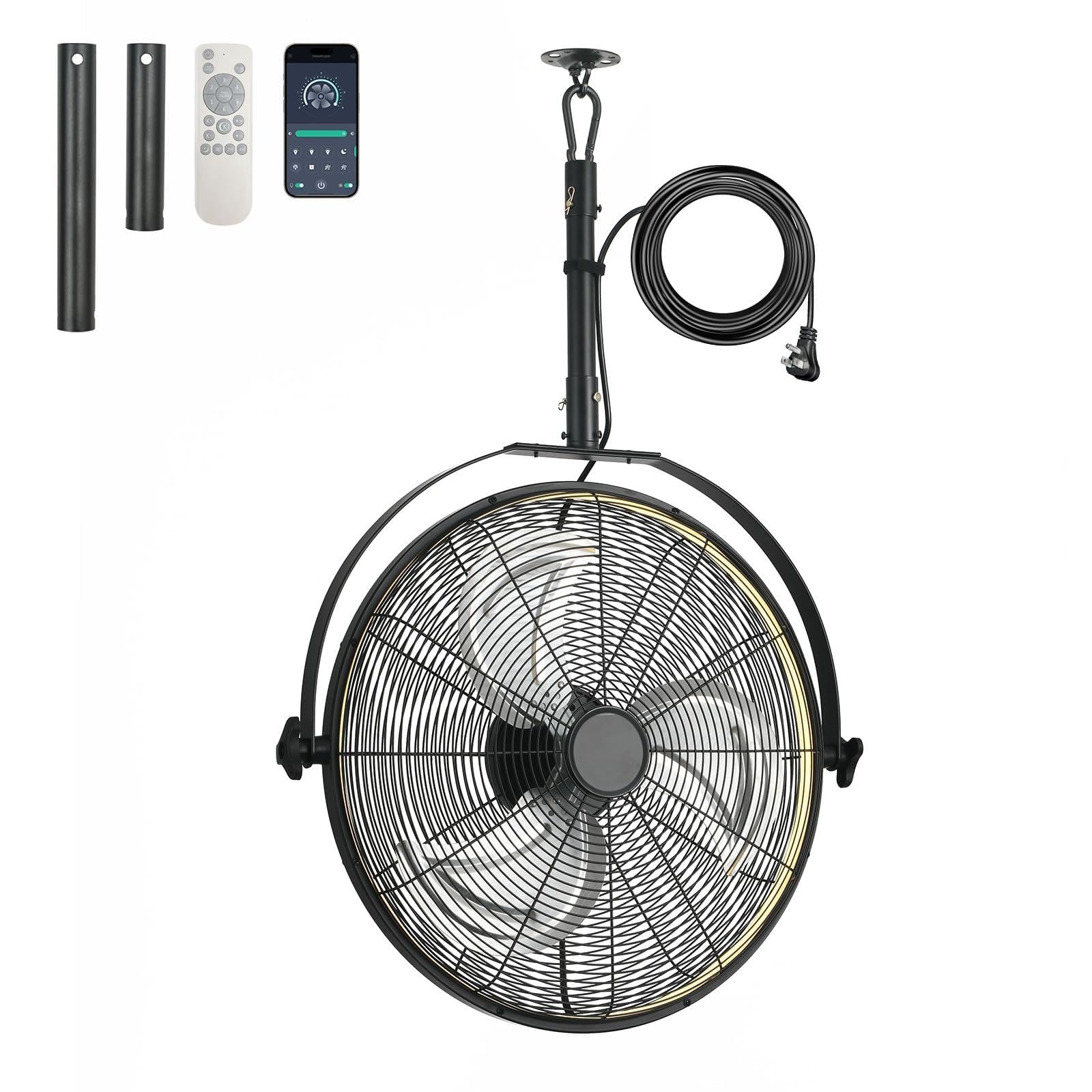
The AHAWILL 22.8-inch outdoor hanging ceiling fan with integrated light, shown in its hanging configuration.
Safety Instructions
- Always disconnect the power supply before cleaning, servicing, or moving the fan.
- Ensure the fan is securely mounted or placed on a stable surface to prevent tipping.
- Do not insert fingers or any objects into the fan blades or motor housing.
- Keep children and pets away from the fan during operation.
- This fan is designed for outdoor use but should be protected from direct heavy rain or extreme weather conditions.
- Use only the provided power cord and remote control.
- Do not operate the fan with a damaged cord or plug.
- Avoid using the fan near open flames or combustible materials.
Package Contents
Verify that all components are present in the package:
- AHAWILL 22.8-inch Outdoor Hanging Ceiling Fan with Light
- Remote Control
- Power Cord
- Mounting Hook (for hanging installation)
Product Features
360° Rotatable Head & Wide Air Supply
The fan features a large-diameter blade for extensive wind coverage. Its head can rotate 360 degrees horizontally and vertically, allowing you to precisely direct the airflow. This is ideal for cooling specific areas in outdoor settings like gazebos or patios.

The fan head can be freely adjusted 360 degrees both horizontally and vertically, allowing precise direction of airflow.
2-in-1 Hanging & Standing Design
This versatile fan can be used in two configurations: hanging or standing. Use the included hook to hang it from ceilings or tent poles, or remove the top pole to place it directly on the ground as a floor fan. The plug-in design ensures easy setup without complex wiring.
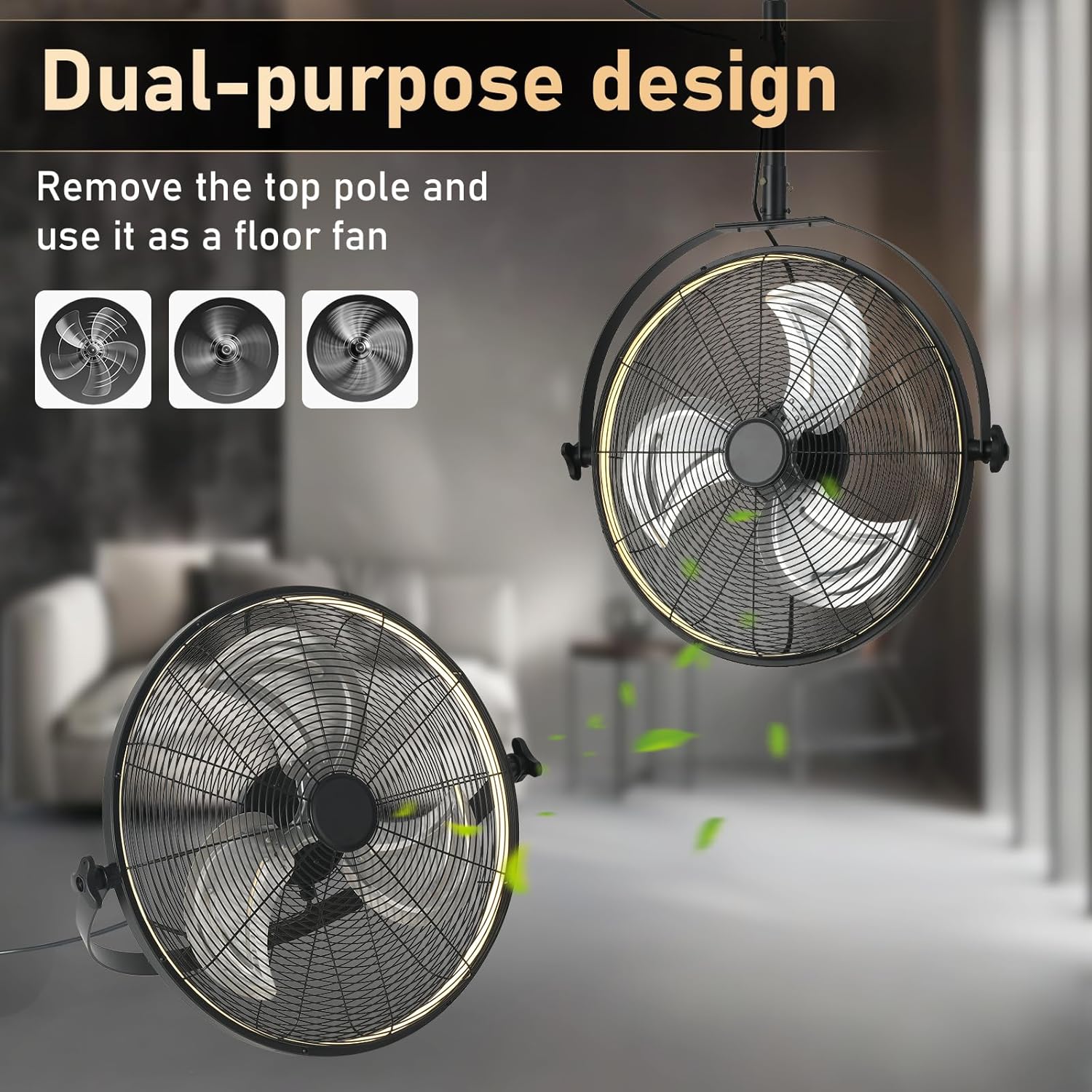
This fan features a 2-in-1 design, allowing it to be used as a hanging ceiling fan or converted into a floor fan by detaching the upper pole.
Adjustable Lighting & Fan Speeds
The integrated light offers three Color Correlated Temperature (CCT) settings: warm, neutral, and cool light, along with dimming capabilities. The fan provides 6 wind speed settings, from a gentle breeze to a strong airflow, to suit your comfort needs.

The fan's integrated light offers three color temperature options: 3000K (Warm White), 4000K (Natural Light), and 6500K (Cold White Light). Brightness is smoothly dimmable from 10% to 100%.

This image illustrates the six adjustable wind speed settings, categorizing them into soft (1-2 speeds), natural (3-4 speeds), and cool (5-6 speeds) wind, suitable for various activities like reading, exercising, or working.
Reversible Fan Direction & Timer Function
The fan supports both clockwise and counterclockwise rotation. Forward rotation provides a cooling effect in summer, while reverse rotation helps circulate air in winter. A built-in timer function allows for automatic shutdown after 2 or 4 hours, conserving energy.

The fan features a reversible motor, allowing for forward rotation to create a cooling downward airflow in summer, and reverse rotation to promote air circulation in winter.
Durable Construction & Portable Design
Constructed with durable materials, this fan is designed for outdoor environments. Its portable hook design and plug-in operation make it easy to move and reposition for various scenarios, from camping to patio parties.

Detailed views highlight the portable hook for versatile mounting, the durable fan blades designed for efficient airflow, and the high-efficiency motor ensuring long-lasting performance.
Setup & Installation
The AHAWILL fan offers flexible installation options. Ensure the power is off before beginning installation.
Hanging Installation
- Identify a suitable, sturdy overhead structure (e.g., gazebo beam, tent pole) capable of supporting the fan's weight.
- Attach the provided mounting hook securely to the chosen structure.
- Hang the fan from the hook, ensuring it is stable and balanced.
- Plug the power cord into a compatible outdoor-rated electrical outlet.
Standing (Floor) Installation
- If currently in hanging configuration, carefully detach the upper pole from the fan unit.
- Place the fan on a flat, stable surface.
- Ensure the fan is not obstructed and has clear space for airflow.
- Plug the power cord into a compatible electrical outlet.
Installation Video Guide
This video demonstrates the installation process for the AHAWILL 22.8-inch Outdoor Hanging Ceiling Fan with Light, showing how to set it up in both hanging and standing configurations.
Operating Instructions
The fan can be operated using the included remote control or a smartphone application.
Remote Control Functions

The remote control provides comprehensive control over the fan and light functions. Ensure batteries are correctly installed.
- General Off: Turns off both fan and light.
- Light Switch: Toggles the light on/off.
- Fan On/Off: Toggles the fan on/off.
- Fan 1-6 Gears: Adjusts fan speed from 1 (lowest) to 6 (highest).
- Fan Forward/Reverse (F/R): Changes the direction of fan rotation.
- Color Temperature +/-: Adjusts the light's color temperature (Warm, Neutral, Cool).
- Brightness +/-: Adjusts the light's brightness level.
- Night Light: Activates a low-brightness light mode.
- Natural Wind: Activates a mode that simulates natural wind patterns.
- Timing 2 hours / Timing 4 hours: Sets the fan to automatically turn off after 2 or 4 hours.
App Control
The fan can also be controlled via a smartphone application. To use the app:
- Scan the QR code provided in the remote control image or visit https://www.jasonghost.com/fanlamppro/index-en.html to download the app.
- Follow the in-app instructions to pair your fan with your smartphone.
- Note: When using the mobile app, do not use the wall switch to control the fan light, as this may prevent connection to the phone.
Remote/App Pairing
When using the remote control or app for the first time, pairing may be required. If the indicator light does not brighten when pressing any buttons, check the battery first. If the issue persists, the remote may be reversed or out of power. Turn on the power switch, then press and hold the '*' key (or the designated pairing button) for a few seconds. If the light flashes, pairing is successful. If the light does not flash, turn off the power, wait for one minute, and then repeat the operation.
Maintenance
Regular maintenance ensures optimal performance and longevity of your fan.
- Cleaning: Disconnect power before cleaning. Use a soft, damp cloth to wipe down the exterior surfaces. Do not use abrasive cleaners or solvents.
- Blade Cleaning: Periodically clean the fan blades to prevent dust buildup, which can reduce efficiency.
- Storage: If storing the fan for an extended period, ensure it is clean and dry. Store in a cool, dry place away from direct sunlight.
- Inspection: Regularly inspect the power cord for any signs of damage. If damaged, discontinue use and contact support.
Troubleshooting
| Problem | Possible Cause | Solution |
|---|---|---|
| Fan does not turn on. | No power supply; Remote control battery low/dead; Fan not paired. | Check power connection; Replace remote batteries; Re-pair remote/app (refer to Operating Instructions). |
| Light does not turn on. | Light switch off; Power issue. | Press the light switch on the remote/app; Check power connection. |
| Fan makes unusual noise. | Loose parts; Obstruction; Unstable mounting. | Check for and tighten any loose parts; Remove any obstructions; Ensure fan is securely mounted. |
| Remote control not responding. | Batteries low/dead; Not paired; Obstruction between remote and fan. | Replace batteries; Re-pair remote; Ensure clear line of sight to the fan's receiver. |
Specifications
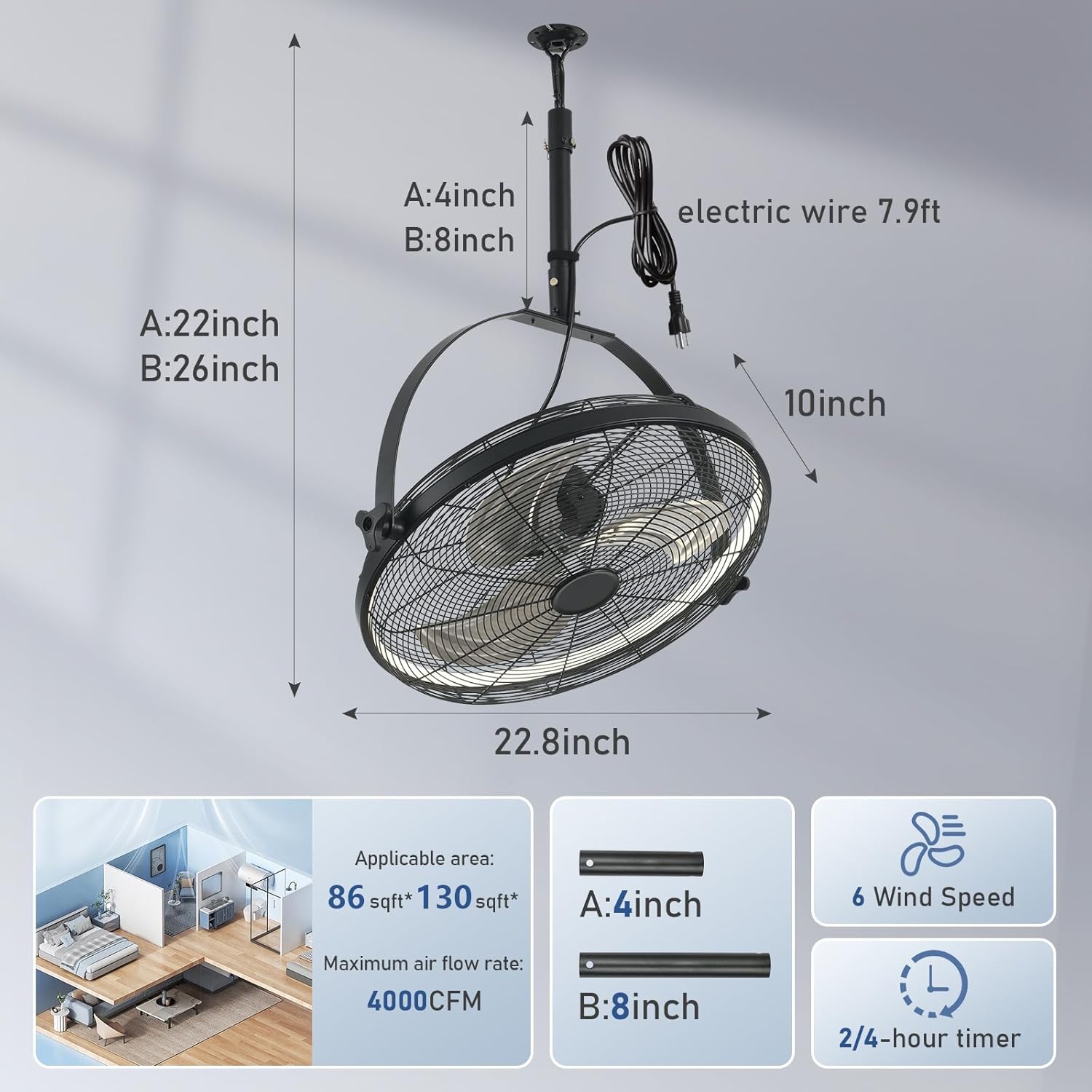
This diagram provides key specifications including the fan's dimensions (22.8 inches diameter, 22-26 inches height), an applicable area of 86-130 square feet, a maximum airflow of 4000 CFM, 6 wind speed settings, and a 2/4-hour timer function.
| Feature | Detail |
|---|---|
| Brand | AHAWILL |
| Model Number | 755793901491 |
| Product Dimensions | 23"D x 23"W x 26"H |
| Electric Fan Design | Ceiling Fan (2-in-1 Hanging/Standing) |
| Power Source | DC, Plug-in |
| Number of Speeds | 6 |
| Lighting | 3 CCT Dimmable (Warm/Neutral/Cool Light) |
| Special Features | Remote Controlled, Timer (2/4 hours), Reversible Airflow, 360° Rotatable |
| Indoor/Outdoor Usage | Outdoor (suitable for Gazebos, Patios, Garages, Tool Rooms) |
| Material | Metal |
| Wattage | 55 watts |
| Control Method | Remote, App |
Warranty and Support
For any after-sales issues, questions, or support needs, please contact the seller directly through the Amazon platform. Follow these steps:
- Sign in to your Amazon account.
- Navigate to your orders and locate the AHAWILL 22.8-inch Outdoor Hanging Ceiling Fan with Light.
- Click on the 'Ask a question' button for the seller (GESEW).
- Start a conversation to describe your issue or question.
The seller provides 24-hour question service to assist you.

For after-sales support, sign in to your Amazon account, navigate to the product page, click 'Ask a question' for the seller (GESEW), and initiate a conversation. 24-hour question service is available.