
1. Product Overview
The GREVA 8K Android TV Box 13.0 is a high-performance streaming media player designed to deliver an ultimate HD video experience. Equipped with the latest Android 13.0 operating system and a powerful Rockchip quad-core Cortex-A53 CPU, it ensures stable and smooth operation for all your entertainment needs. With 4GB RAM and 64GB ROM, you can download numerous applications without concerns about buffering or storage limitations. It supports 8K and 3D video decoding, H.265 & HDR10 for enhanced colors, and features 2.4G/5.0G WiFi 6 and Bluetooth 5.0 for versatile connectivity.
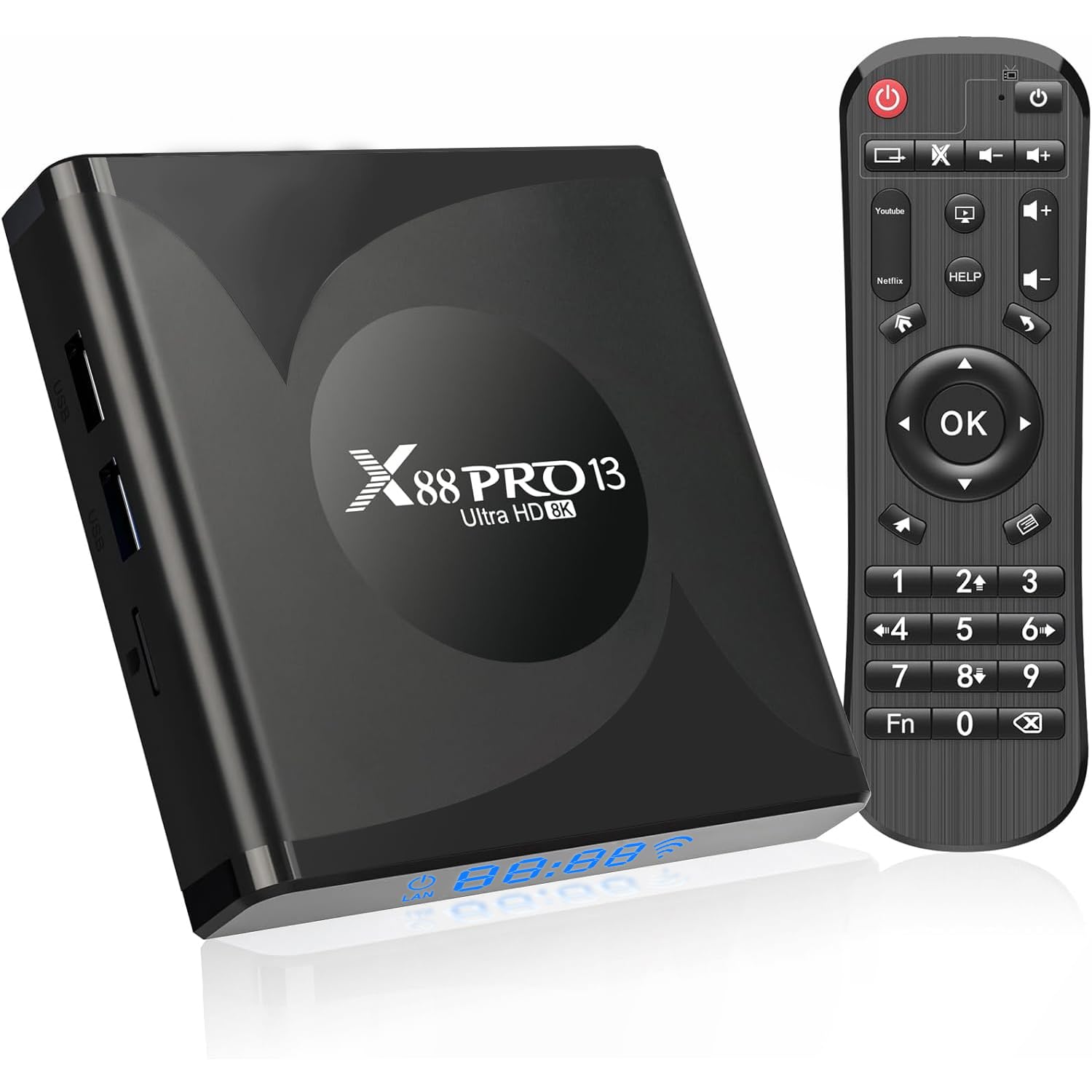
Image 1: The GREVA 8K Android TV Box 13.0, a compact streaming media player.
2. What's in the Box
- GREVA 8K Android TV Box
- Remote Control
- HDMI Cable
- AC Power Adapter
Video 1: An unboxing video demonstrating the contents of the GREVA 8K Android TV Box package, including the device, remote, HDMI cable, and power adapter.
3. Setup Instructions
- Connect HDMI Cable: Insert one end of the HDMI cable into the HDMI port on the GREVA TV Box and the other end into an available HDMI input on your television.
- Connect Power Adapter: Plug the AC power adapter into the DC port on the TV Box and then into a power outlet. The device will automatically power on and begin loading.
- Initial Setup Wizard: Once powered on, your TV will display the initial setup wizard. Follow the on-screen prompts to:
- Select your preferred language (e.g., English).
- Adjust the screen zoom to fit your TV display.
- Connect to your Wi-Fi network (2.4G/5.0G WiFi 6 supported) or use an Ethernet cable for a wired connection.
- Select your region (e.g., North America).
- Remote Control Setup: Insert batteries into the remote control. The remote is pre-paired and ready for use.

Image 2: Rear view of the GREVA TV Box showing DC power input, SPDIF, HDMI, LAN, and AV ports.

Image 3: Side view of the GREVA TV Box showing USB 2.0, USB 3.0 ports, and a Micro SD card slot.
4. Operating Instructions
The GREVA TV Box features an intuitive Android TV 13.0 interface, similar to many smart TVs. Navigate using the provided remote control.
- Home Screen: The home screen provides quick access to movies, TV shows, and installed applications.
- App Store: Access the integrated App Store to download and install your favorite streaming services like YouTube, Netflix, Amazon Prime Video, Disney+, Hulu, and more.
- Media Playback: Utilize the USB 3.0 port or Micro SD card slot to play local media files (videos, images, audio) directly from external storage devices.
- Bluetooth Connectivity: Connect Bluetooth devices such as speakers, headphones, or game controllers via Bluetooth 5.0 for an enhanced experience.
- Screen Mirroring: Use the AirScreen feature to mirror content from your phone, tablet, or laptop to your TV via AirPlay, Cast, Miracast, and DLNA.
- Web Browsing: The device includes a Chrome browser, allowing you to access any website directly on your TV. The remote control features a mouse cursor mode for easier navigation.

Image 4: Collage showing various applications of the GREVA TV Box, including watching 4K movies, educational content, work conferences, and gaming.
Video 2: A detailed demonstration of the GREVA 8K Android TV Box's user interface, app store, settings, and media playback capabilities, highlighting its smart TV functionalities.
5. Features and Specifications
Key Features:
- Operating System: Android 13.0 for stable and smooth performance.
- Processor: Powerful Rockchip RK3528 quad-core Cortex-A53 CPU for fast application loading.
- Memory & Storage: 4GB DDR3 RAM and 64GB eMMC ROM, providing ample space for apps and media without buffering.
- Video Decoding: H.265 & HDR10 10-bit decoding for enhanced colors and efficient streaming of online videos.
- Resolution Support: Adaptive screen resolution supporting 8K, 4K, 2K, and 1080P Ultra HD video playback, including 3D content.
- Connectivity: Gigabit Ethernet, 2.4G/5G Dual-Band WiFi 6, Bluetooth 5.0, HDMI, USB 3.0.
- Special Features: Built-in browser, DLNA, Parental Controls, Sleep Timer.
Technical Specifications:
| Specification | Value |
|---|---|
| Brand | GREVA |
| Connectivity Technology | Ethernet |
| Connector Type | HDMI, USB 3.0 |
| Resolution | 8K |
| Supported Internet Services | Netflix, Google TV, Prime Video, Disney+, Hulu |
| RAM Memory Installed | 4 GB |
| Memory Storage Capacity | 64 GB |
| Video Output Resolution | 7680x4320, 3840x2160 pixels |
| Video Codec | H.265, HDR10 |
| Item Weight | 4.23 Ounces |
| Item Dimensions L x W x H | 4.05"L x 4.05"W x 0.98"H |

Image 5: The GREVA TV Box highlighting its RK3528 Quad-Core Cortex-A53 CPU, Android OS 13.0, HD2.0, and WiFi 6 capabilities.
6. Troubleshooting
- No Power: Ensure the AC power adapter is securely connected to both the TV Box and a working power outlet.
- No Display: Verify the HDMI cable is firmly connected to both the TV Box and your television. Check that your TV is set to the correct HDMI input source.
- Wi-Fi Connectivity Issues: Go to Settings > Network & Internet to re-scan for networks and ensure the correct password is entered. Try restarting your router.
- App Performance: If an app is slow or crashing, try clearing its cache in Settings > Apps. If issues persist, consider uninstalling and reinstalling the app.
- Remote Control Not Responding: Check the batteries in the remote control. Ensure there are no obstructions between the remote and the TV Box.
- Factory Reset: As a last resort for persistent software issues, you can perform a factory reset via Settings > Device Preferences > Reset. This will erase all data and restore the device to its original factory settings.
7. Maintenance
- Keep the device in a well-ventilated area to prevent overheating.
- Avoid exposing the device to direct sunlight, high temperatures, or humidity.
- Clean the device with a soft, dry cloth. Do not use liquid cleaners or aerosols.
- Regularly clear app caches and unused applications to maintain optimal performance.
8. Warranty and Support
This product does not include a manufacturer's warranty as per the provided information. For further assistance or support, please refer to the GREVA brand store on Amazon or contact their customer service directly.
Visit the GREVA Store for more information.