
Product Overview
The SANSCO 4G LTE Cellular Solar Security Camera (Model S52-4G-3MP) provides advanced surveillance without the need for WiFi or external power. This wireless outdoor camera is powered by an integrated solar panel and a rechargeable battery, making it ideal for remote locations. It features 2K Ultra HD resolution, Pan-Tilt-Zoom (PTZ) functionality for a 360-degree view, and both color and infrared night vision. Equipped with AI motion detection and two-way audio, it offers real-time monitoring and communication. The camera includes a built-in SIM card with lifetime free unlimited data, ensuring continuous connectivity and recording capabilities with the included 64GB TF card.
Getting Started (Setup)
What's in the Box
- Security Camera
- Solar Panel
- 64GB TF card (pre-installed or included separately)
- Charging Cable
- Adjustable Strap
- Mounting Screws and Anchors
- User Manual
Camera Components
Familiarize yourself with the camera's physical features:
- Camera Lens: Captures video footage.
- Solar Panel: Charges the internal battery.
- Antennas: For 4G LTE cellular connectivity.
- Microphone: For audio input during two-way communication.
- Speaker: For audio output during two-way communication and alarms.
- PIR Sensor: Detects motion.
- LED Spotlights/IR LEDs: Provide illumination for night vision.
- SD Card Slot: For inserting the TF (MicroSD) card.
- Reset Button: Used for resetting the camera.
- USB-C Charging Port: For initial charging or supplemental power.
- ON/OFF Switch: Powers the camera on or off.
Initial Setup
- Charge the Camera: Before first use, fully charge the camera using the provided USB-C cable and a 5V power adapter (not included).
- Insert TF Card: Ensure the included 64GB TF card is properly inserted into the SD card slot. The camera supports up to 128GB.
- Download App: Download the 'Tuya' or 'Smart Life' app from the Google Play Store or Apple App Store.
- Power On: Flip the ON/OFF switch to the 'ON' position.
- Pair with App: Open the app, create an account if you don't have one, and follow the in-app instructions to add a new device. Scan the QR code located on the camera body when prompted to pair.
Installation
The camera is designed for flexible installation in various outdoor environments. It is IP65 rated for water resistance, suitable for all weather conditions.

Image: The SANSCO camera can be easily installed on poles or other structures using the adjustable strap, offering versatile placement options.

Image: Mounting tips illustrating recommended height (8-10 ft) and distance (up to 30 ft), along with proper angling to avoid blind spots for effective motion detection.
- Mounting Options: The camera can be mounted on walls, ceilings, or poles using the provided screws/anchors or adjustable strap.
- Recommended Height: Install the camera at a height of 8-10 feet (2.5-3 meters) for optimal coverage.
- Monitoring Distance: The effective monitoring distance is up to 30 feet (9 meters).
- Avoid Direct Facing: Do not install the camera directly facing the monitoring area to prevent potential blind spots. Maintain an angle for better detection.
- Solar Panel Placement: Select an optimal location for the solar panel that receives sufficient direct sunlight, ideally pointing directly at the sun during midday in summer. The solar panel cable provides flexibility for placement within a 6.6 ft (2 m) radius of the camera.

Image: The camera and solar panel installed on a building, demonstrating its wireless operation and remote viewing capability via a smartphone app.
Operation
Power Management
- The camera is equipped with a 5W solar panel and a 7800mAh rechargeable battery.
- Under normal conditions with adequate sunlight, the solar panel continuously charges the battery, ensuring 24/7 operation without manual charging.
- Even with just 2 hours of daily sunlight, the camera can maintain operation, and the 7800mAh battery provides significant reserve power.
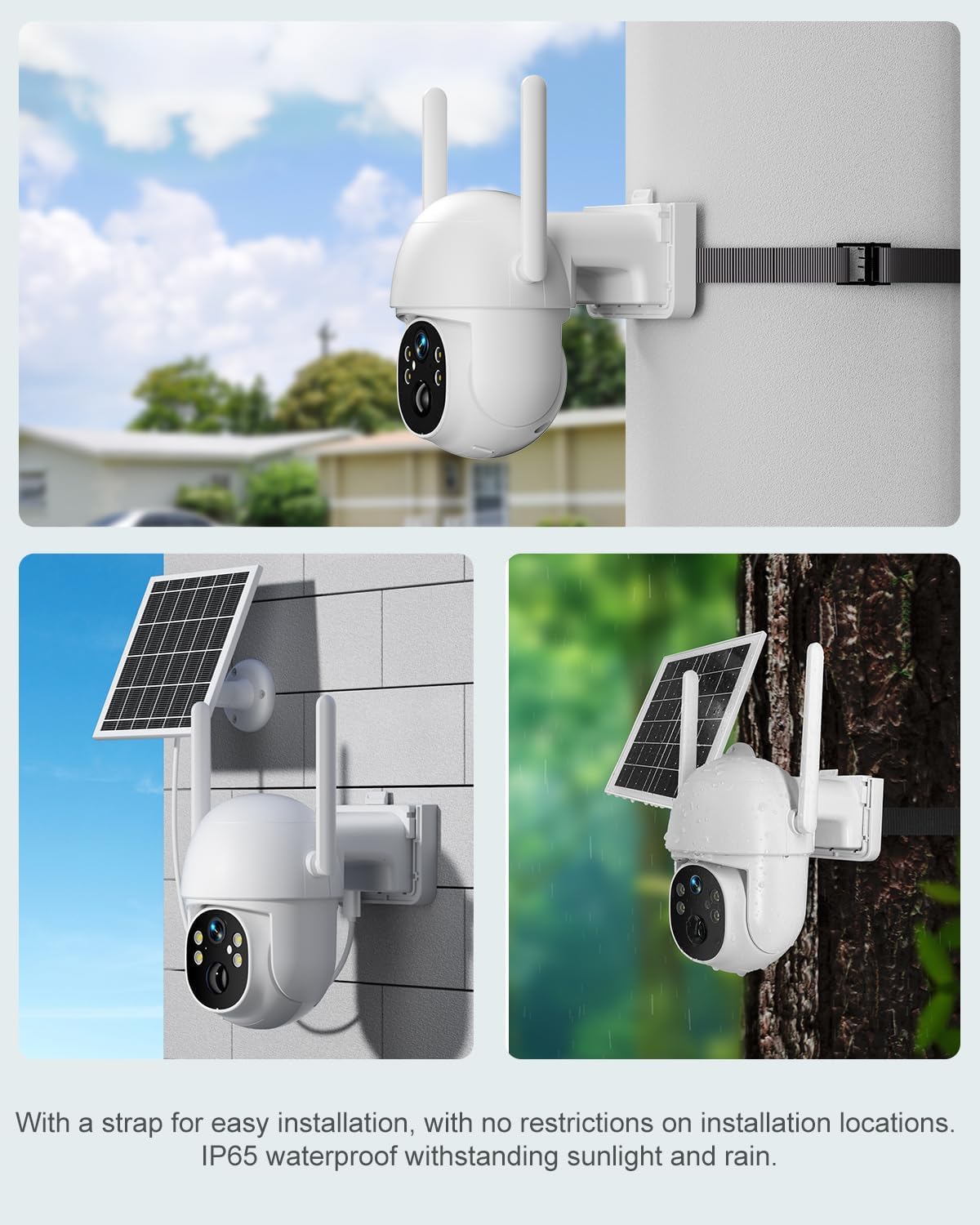
Image: The camera's solar panel and battery specifications, emphasizing its self-sustaining power system.
Connectivity
- The camera operates on 4G LTE cellular networks, eliminating the need for WiFi.
- It includes a built-in SIM card that provides lifetime free unlimited data.
- Compatible with major US networks: AT&T, T-Mobile, and Verizon.
- The embedded SIM card is exclusively for this camera and cannot be used with other IoT devices.

Image: Details on the camera's 4G LTE cellular network compatibility, including supported bands and carriers.
Video Monitoring
- Resolution: Experience clear 2K Ultra HD (1296p) video quality.
- PTZ Functionality: Control the camera's pan (270° horizontal) and tilt (90° vertical) movements remotely via the app to cover a wide area without blind spots.
- Night Vision: The camera offers two night vision modes:
- Color Night Vision (2K/3MP Spotlight): Utilizes built-in spotlights to provide full-color video even in low-light conditions, identifying details up to 49ft (15m).
- IR Night Vision (2K/3MP IR): Standard infrared night vision for clear black and white footage in complete darkness.
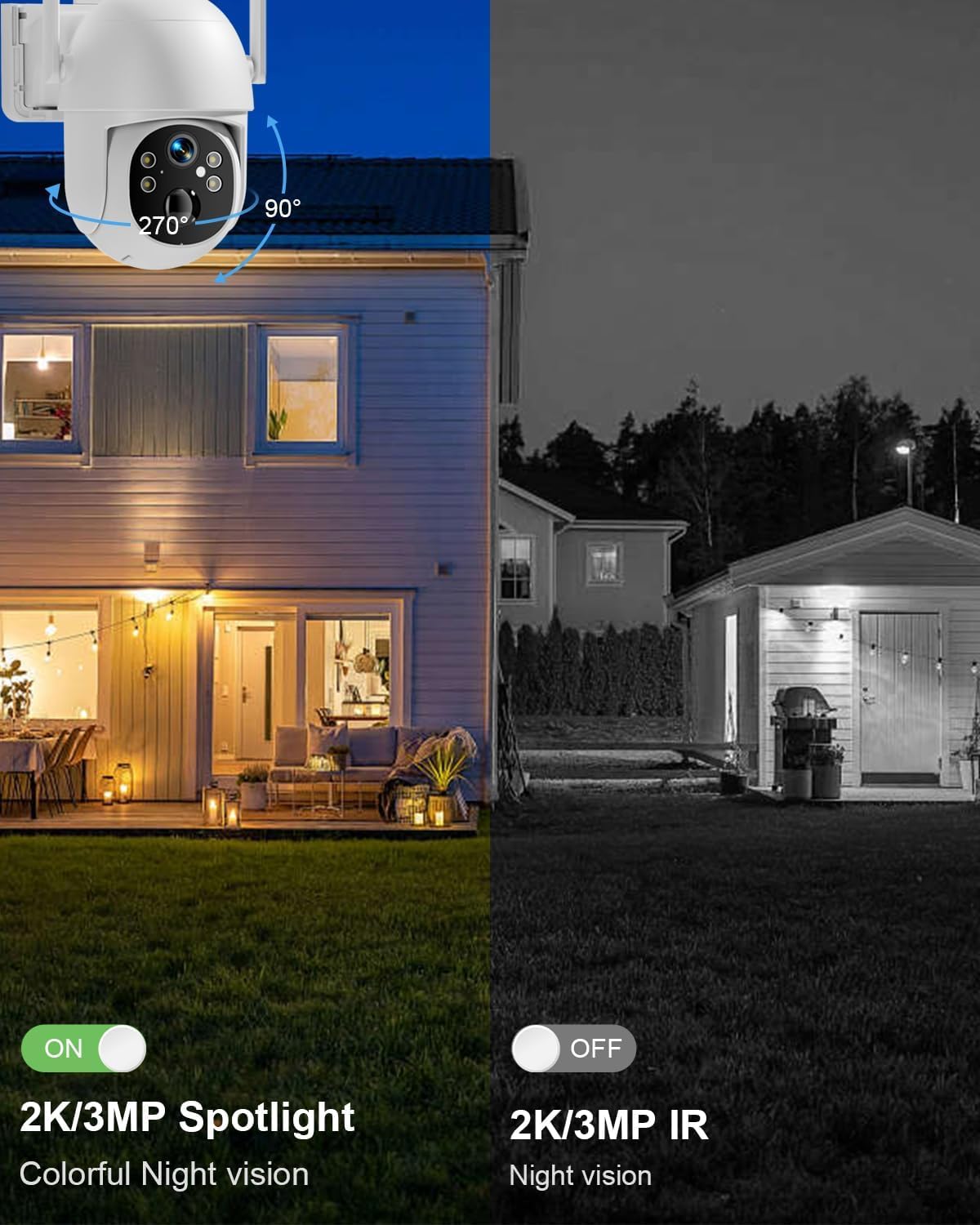
Image: A visual comparison of the camera's color night vision (with spotlight) and standard IR night vision capabilities.
Smart Features
- AI Motion Detection: The camera can quickly and accurately detect the movement of people or animals.
- Instant Alerts: Upon detection, the camera immediately sends an alarm notification to your phone via the 'Tuya' app. Motion sensitivity can be adjusted within the app.
- Two-Way Audio: Use the built-in speaker and microphone to engage in real-time dialogue with anyone within the camera's field of view.
- Alexa Compatibility: The camera is compatible with Alexa for voice control and integration into smart home systems.

Image: The camera's AI motion detection and two-way audio features in action, showing an alert on a smartphone and the camera's spotlight deterring an intruder.
Storage
- A 64GB TF card is included, capable of storing up to 120 days of video content (based on 0.5GB/day storage).
- The camera supports TF cards up to 128GB for extended storage.
Maintenance
- Solar Panel Cleaning: Regularly clean the surface of the solar panel to ensure maximum sunlight absorption and efficient battery charging. Dust, dirt, or debris can reduce charging effectiveness.
- Lens Cleaning: Gently wipe the camera lens with a soft, clean cloth to remove any smudges or dirt that might affect video clarity.
- Battery Care: While the solar panel provides continuous power, ensure the camera is installed in a location that receives sufficient sunlight, especially during winter months or periods of low light, to maintain optimal battery health and performance.
- Storage Management: Periodically review recorded footage on the TF card. If the card becomes full, older recordings will be overwritten. Consider backing up important footage or upgrading to a larger TF card (up to 128GB) if needed.
- Firmware Updates: Check the 'Tuya' or 'Smart Life' app regularly for any available firmware updates for your camera. Keeping the firmware updated ensures optimal performance and access to new features.
Troubleshooting
- No Power or Charging Issues:
- Ensure the solar panel is clean and positioned to receive direct sunlight.
- Verify the USB-C charging cable is securely connected to both the camera and a power source (for initial charge).
- Check that the ON/OFF switch is in the 'ON' position.
- No Cellular Connection:
- Confirm the camera is located in an area with strong 4G LTE coverage from AT&T, T-Mobile, or Verizon.
- Restart the camera by turning it off and then on again.
- Check the signal strength indicator within the 'Tuya' app.
- App Connectivity Problems:
- Ensure your 'Tuya' or 'Smart Life' app is updated to the latest version.
- Close and reopen the app, or restart your smartphone.
- If issues persist, try re-pairing the camera with the app.
- Motion Detection Not Working:
- Review motion detection settings in the app, including sensitivity levels and detection zones.
- Ensure the PIR sensor on the camera is not obstructed.
- Poor Video Quality:
- Clean the camera lens gently with a soft cloth.
- For night vision, ensure there is adequate ambient light for color night vision or that IR LEDs are not obstructed for IR night vision.
- Check the cellular signal strength, as a weak signal can affect streaming quality.
- Two-Way Audio Issues:
- Ensure the microphone and speaker on the camera are not obstructed.
- Check audio settings within the app.
Specifications
| Feature | Detail |
|---|---|
| Model Name | S52-4G-3MP |
| Indoor/Outdoor Usage | Indoor, Outdoor |
| Power Source | Battery Powered, Solar Powered |
| Connectivity Protocol | Cellular |
| Controller Type | APP |
| Mounting Type | Ceiling Mount, Wall Mount |
| Video Capture Resolution | 1296p (2K Ultra HD) |
| Included Components | 64GB TF card, Adjustable Strap, Charging Cable, Security Camera, Solar Panel |
| Wireless Communication Technology | Cellular |
| Form Factor | Pan Tilt Zoom (PTZ) |
| Viewing Angle | 360 Degrees (via PTZ) |
| Night Vision Range | 49 Feet (15m) |
| Voltage | 5 Volts |
| Item Dimensions (L x W x H) | 10.16 x 7.68 x 10.87 inches |
| Batteries Required? | Yes (1 A battery included) |
| Low Light Technology | Night Color |
| Zoom Type | Digital Zoom |
| Video Capture Format | MPEG-4 |
| Control Method | App |
| Number of IR LEDs | 4 |
| Audio Visual Recording Capabilities | Two-way Audio With Color Night Vision |
| Item Weight | 5 pounds |
| Manufacturer | SANSCO |
| Recommended Uses For Product | Indoor Security, Outdoor Security |
| Special Feature | 2-Way Audio, 3MP Ultra HD, Lifetime Free Unlimited Data, Motion Sensor, No WiFi or Power Required |
Warranty and Support
- Quality Assurance: The SANSCO S52-4G-3MP camera comes with a 12-month quality assurance period.
- Customer Support: SANSCO provides lifetime continuous support and 24/7 live support to assist with any product-related inquiries or issues.
- Returns and Exchanges: Enjoy hassle-free returns and exchanges within 30 days of purchase.
- Contact: For technical assistance, warranty claims, or support, please refer to the contact information provided in your product packaging or visit the official SANSCO website.


