
Introduction
This manual provides essential information for the assembly, operation, maintenance, and troubleshooting of your Veratric 400LB Mesh Ergonomic Desk Chair. Please read these instructions carefully to ensure proper use and longevity of your product.
The Veratric ergonomic office chair is designed for comfort and support, featuring a robust frame, breathable mesh back, and adjustable components. Key features include:
- Enhanced Lumbar Support System: Provides dynamic back support for healthy spinal alignment.
- Extra-Thickened Seat Cushion: A 3.15-inch high-resiliency foam seat for extended sitting comfort.
- Fully Adjustable Comfort Settings: Includes 2D armrests with height adjustment and 90-degree pivot, and a 90-120 degree rocking function with a 90-degree locking position.
- Heavy Duty & Stable Frame: Supports up to 400LBS with an extra-wide seat and high-quality wheels.
- Breathable Mesh Back: Double-layer mesh promotes airflow for comfort.
Setup and Assembly
For detailed assembly instructions, please refer to the included PDF manual. Ensure all components are present before beginning assembly. It is recommended to have a clear workspace and, if possible, assistance for certain steps.
Assembly Video Guide:
Official Veratric video demonstrating the installation process for faster setup.
Official Veratric video showing how to detach the lumbar support and attach the armrests.
Visual Assembly Aid:

Image showing various chair components and dimensions, useful for identifying parts during assembly.

Image highlighting the breathable mesh backrest and the extended, thicker seat cushion for comfort.
Operating Instructions
Your Veratric office chair offers several adjustment features to customize your seating experience:
1. Lumbar Support Adjustment
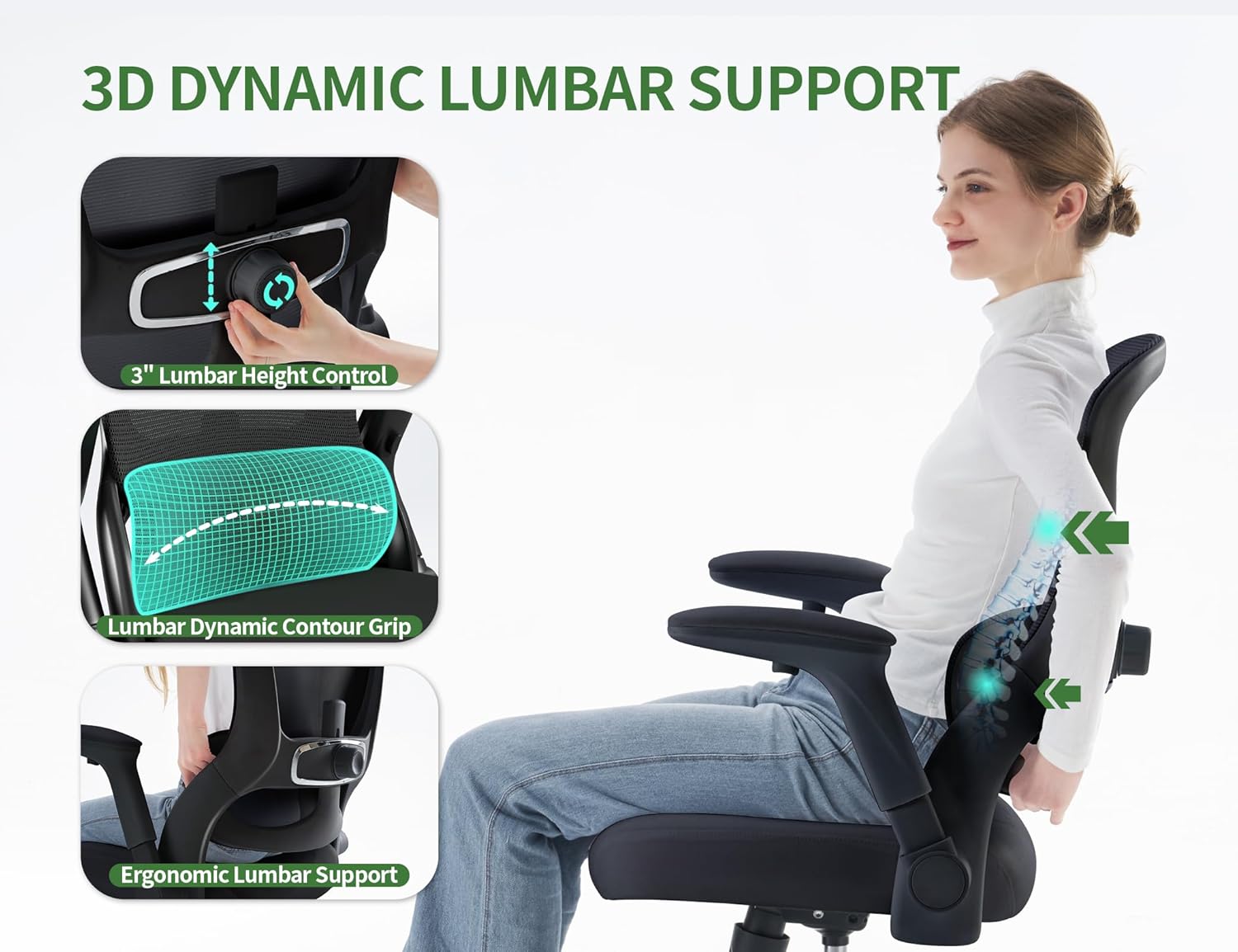
This image illustrates the 3D dynamic lumbar support system. Use the knob on the back of the chair to adjust the lumbar support's height and depth to fit your lower back curve.
2. Seat Height Adjustment

Locate the lever under the right side of the seat. Pull the lever up to raise the seat. While seated, pull the lever up to lower the seat. Release the lever to lock the height in place. The chair offers approximately 4 inches of height adjustment.
3. Armrest Adjustment
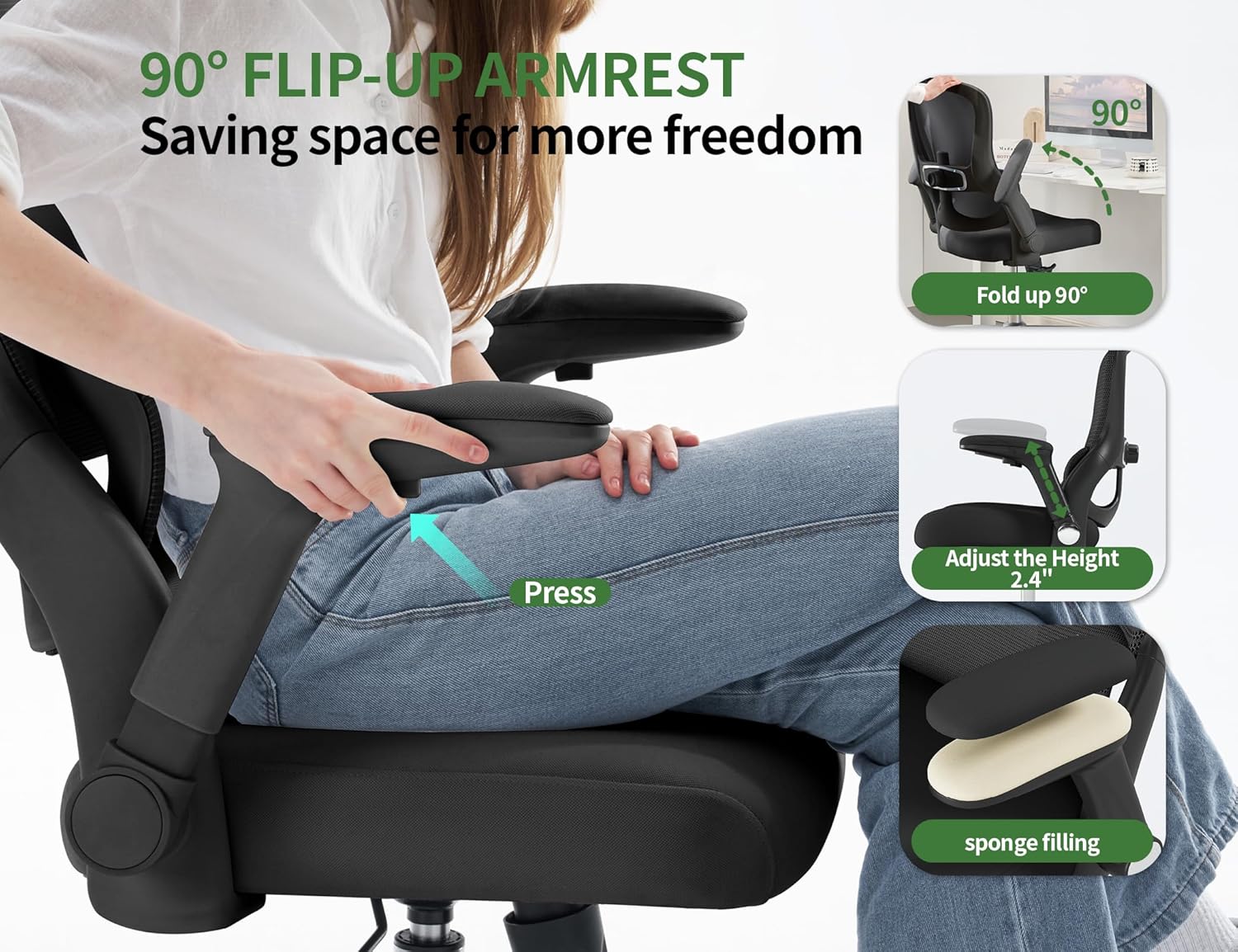
The armrests can be flipped up 90 degrees to allow the chair to be pushed closer to a desk or for easier movement. They also offer 2D adjustment for height and pivot. Press the button on the side of the armrest to adjust its height.
4. Recline and Tilt Function

The chair features a 90-120 degree rocking function. To engage or disengage the rocking motion, use the lever located under the seat. The chair can be locked in the upright (90-degree) position. The tilt tension knob, located under the seat, allows you to adjust the resistance of the rocking motion.
Maintenance
Regular maintenance helps prolong the life and appearance of your office chair:
- Cleaning: For the mesh backrest and fabric seat, use a soft cloth with mild soap and water. Avoid harsh chemicals or abrasive cleaners. Spot clean as needed.
- Casters: Periodically check the casters for hair or debris that may hinder smooth rolling. Clean as necessary.
- Fasteners: Every few months, check all screws and bolts to ensure they are tight. Re-tighten if any looseness is detected.
- Gas Lift: Do not attempt to disassemble the gas lift cylinder. If it malfunctions, contact customer support.
Troubleshooting
If you encounter issues with your chair, refer to the following common problems and solutions:
| Problem | Possible Cause | Solution |
|---|---|---|
| Chair does not rock or recline smoothly. | Tilt tension is too tight or too loose. | Adjust the tilt tension knob located under the seat. Turn clockwise to increase tension, counter-clockwise to decrease. |
| Chair does not lock in a reclined position. | This model is designed to lock only in the upright (90-degree) position. | This is normal operation for this chair model. The recline function is a rocking motion, not a lockable recline. |
| Seat height adjustment is not working. | Gas lift malfunction or lever mechanism issue. | Ensure the lever is fully engaged. If the issue persists, contact customer support for assistance. Do not attempt to repair the gas lift yourself. |
| Chair is wobbly or makes noise. | Loose fasteners or uneven assembly. | Check all screws and bolts, especially those connecting the seat to the backrest and the base. Re-tighten as needed. Ensure the chair is assembled on a flat surface. |
| Armrests feel thin or uncomfortable. | Personal preference for padding. | Consider adding aftermarket armrest pads for additional cushioning. |
Specifications
Below are the technical specifications for the Veratric 400LB Mesh Ergonomic Desk Chair (Model L6):
- Model Name: L6
- Model Number: 006
- Brand: Veratric
- Color: Black
- Material: Metal (Frame), High-density sponge (Seat Fill), Mesh (Upholstery)
- Product Dimensions (D x W x H): 28.4" x 28.4" x 40"
- Item Weight: 13.4 kg (approximately 29.5 lbs)
- Maximum Weight Recommendation: 400 pounds
- Seat Height: Adjustable (approx. 3.15 inches range)
- Seat Depth: 20 inches
- Seat Length: 20 inches
- Chair Backrest Width: 28.4 inches
- Arm Style: Flip-up Armrests
- Reclining Position Count: 3 (90-120 degree rocking, locks upright)
- Additional Features: Adjustable Lumbar, Big and Tall design, Ergonomic
- Certifications: BIFMA-Certified Gas Lift

This image highlights the rigorous testing undergone by the chair, including backrest pressure, casters rolling, armrest adjustment, gas lift, and load-bearing tests.

Comparison image emphasizing the robust 400lbs steel-reinforced base of the Veratric chair versus other designs.

Comparison image illustrating the wider and thicker seat cushion of the Veratric chair, providing 30% more sitting space.

Comparison image showcasing the BIFMA-Certified gas lift used in the Veratric chair for enhanced safety and durability.
Warranty Information
The Veratric 400LB Mesh Ergonomic Desk Chair comes with a 5-year warranty. This warranty covers manufacturing defects and significant malfunctions under normal use. Please retain your proof of purchase for warranty claims.
Customer Support
For any questions, concerns, or assistance with your Veratric office chair, please contact our customer support team. We are committed to addressing all inquiries within 24 hours.
Refer to your purchase documentation or the Veratric brand store on Amazon for contact details.
