
1. Introduction
This manual provides instructions for the Generic AKT-G1713 RGB Wired Semi-Mechanical Gaming Keyboard and Optical Mouse Kit. This kit is designed for gaming, study, and daily use, offering quick response, precision, and a modern design for an enhanced experience on your PC or notebook.
Key Features:
- Complete Gaming Kit: Includes a semi-mechanical ABNT2 keyboard and a wired USB 2.0 optical mouse.
- Vibrant RGB Lighting: Keyboard features colorful rainbow LED backlighting for a modern look and improved visibility in low-light conditions.
- Semi-Mechanical Keyboard: QWERTY ABNT2 layout with membrane keys providing a soft, ergonomic touch for comfortable extended use.
- Optical Mouse with LED: Optical detection technology with blue LED illumination, ergonomic design, and wired connection for precise, lag-free response.
- Wired Connectivity: Reliable and stable USB 2.0 connection, compatible with personal computers running Windows 11 and other operating systems.
2. Setup Instructions
Follow these steps to set up your Generic AKT-G1713 Gaming Kit:
- Unpack the Kit: Carefully remove the keyboard and mouse from their packaging.
- Connect the Keyboard: Locate an available USB port on your computer. Plug the USB cable from the keyboard into the USB port.
- Connect the Mouse: Locate another available USB port on your computer. Plug the USB cable from the mouse into the USB port.
- System Recognition: Your computer should automatically detect and install the necessary drivers (Plug and Play). This may take a few moments.
- Verify Functionality: Once installed, the keyboard and mouse LEDs should illuminate. Test both devices to ensure they are working correctly.

Image: The Generic AKT-G1713 gaming keyboard and mouse kit, showing both devices connected via USB cables.
3. Operating Instructions
3.1 Keyboard Operation
The keyboard features a standard ABNT2 layout with semi-mechanical membrane keys designed for comfortable and responsive typing and gaming.
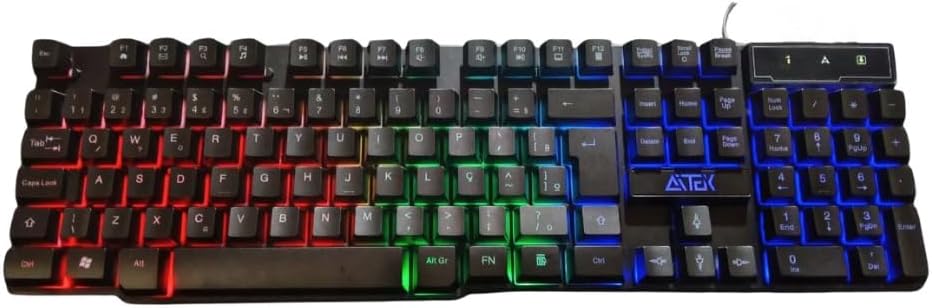
Image: Top view of the AKT-G1713 keyboard, highlighting the ABNT2 layout and multi-color LED backlighting.
RGB Backlighting: The keyboard features a rainbow LED backlight. This lighting is typically static or cycles automatically. There are no specific controls mentioned for changing patterns or colors. The lighting enhances the aesthetic and visibility in dim environments.

Image: Angled view of the AKT-G1713 keyboard, showcasing the vibrant RGB backlighting across the keys.

Image: Side profile of the AKT-G1713 keyboard, illustrating the ergonomic key height and design.
3.2 Mouse Operation
The optical mouse provides high precision for gaming and navigation. Its ergonomic design ensures comfort during extended use.

Image: Top view of the AKT-G1713 gaming mouse, featuring its ergonomic shape and blue LED illumination.
Buttons: The mouse typically includes left-click, right-click, scroll wheel, and potentially side buttons for enhanced functionality in games or applications. These buttons are responsive for quick actions.
LED Lighting: The mouse features blue LED lighting, which is usually static and integrated into the design.
4. Maintenance
Proper maintenance ensures the longevity and optimal performance of your gaming kit.
- Cleaning: Use a soft, dry cloth to wipe down the keyboard and mouse regularly. For stubborn dirt, slightly dampen the cloth with water or a mild cleaning solution. Avoid excessive moisture.
- Spill Resistance: The keyboard is designed with some resistance to water spills. In case of a spill, immediately disconnect the keyboard from your computer, wipe off any liquid, and allow it to dry completely before reconnecting.

Image: The AKT-G1713 keyboard on a desk, demonstrating its water-resistant design with a spilled drink nearby.
- Cable Care: Avoid bending or twisting the USB cables excessively to prevent internal damage.
- Storage: When not in use for extended periods, store the kit in a clean, dry place away from direct sunlight and extreme temperatures.
5. Troubleshooting
If you encounter issues with your gaming kit, refer to the following common solutions:
- Keyboard/Mouse Not Responding:
- Ensure both USB cables are securely plugged into your computer's USB ports.
- Try plugging the devices into different USB ports.
- Restart your computer.
- Test the devices on another computer to determine if the issue is with the kit or your computer.
- LED Lights Not Working:
- Verify the devices are properly connected and recognized by the system.
- Some keyboards have a dedicated key (e.g., Scroll Lock or a function key combination) to toggle backlighting. Check your keyboard for such a key.
- Mouse Cursor Jumps or is Erratic:
- Ensure the mouse sensor is clean and free of dust or debris.
- Use the mouse on a clean, uniform surface or a mouse pad.
6. Specifications
| Feature | Detail |
|---|---|
| Brand | Generic |
| Model | AKT-G1713 |
| Manufacturer | China |
| Connectivity Technology | Wired USB 2.0 |
| Compatible Devices | Personal Computer, Game Console, Laptop, Smartphone, Tablet |
| Special Features | Ergonomic Design, RGB Lighting (Keyboard), Blue LED Lighting (Mouse) |
| Keyboard Type | Semi-Mechanical (Membrane) |
| Keyboard Layout | ABNT2 (QWERTY) |
| Mouse Detection Technology | Optical |
| Color | Black |
| Product Weight | 630 g |
| Package Dimensions | 45 x 12 x 5 cm |
7. Warranty and Support
Warranty: This product comes with a 1-month seller warranty from the date of purchase. Please retain your proof of purchase for any warranty claims.
Support: For technical assistance, troubleshooting beyond this manual, or warranty inquiries, please contact your retailer or the point of purchase. Provide your product model (AKT-G1713) and a detailed description of the issue.