
1. Introduction
The Fienzio SK-705S Solar MPPT Power Tester is a specialized instrument designed for evaluating the performance of photovoltaic (PV) modules. It accurately measures key parameters such as maximum power (Pmax), maximum power point voltage (Vmp), maximum power point current (Imp), open-circuit voltage (Voc), and short-circuit current (Isc). This device is essential for commissioning, maintenance, and troubleshooting of solar panel installations, ensuring optimal system performance.
This manual provides detailed instructions for the safe and effective use of your SK-705S tester. Please read it thoroughly before operation.
2. Safety Information
Always observe the following safety precautions to prevent injury and damage to the device:
- Do not exceed the maximum input voltage of 150V DC or maximum current of 45A.
- Ensure all connections are secure before powering on the device.
- Wear appropriate personal protective equipment (PPE), such as insulated gloves and safety glasses, when working with live electrical circuits.
- Do not operate the tester in wet conditions or in environments with explosive gases or dust.
- Never attempt to disassemble or modify the device. Refer all servicing to qualified personnel.
- Keep the device away from children.
3. Product Overview
The Fienzio SK-705S is a compact and portable device designed for ease of use in the field. It features a clear LCD display and intuitive controls.
3.1. Device Components

Figure 1: Front view of the Fienzio SK-705S Solar MPPT Power Tester, showing the main display and control buttons.
The tester features a 3.2-inch LCD display with backlight for clear readability in various lighting conditions. Control buttons are located below the display for mode selection, data hold, backlight activation, and power.
3.2. Display Indicators

Figure 2: Detailed view of the SK-705S display, indicating measurement parameters.
- Pmax: Maximum Power (W)
- Amp: Current at Maximum Power (A)
- Vmp: Voltage at Maximum Power (V)
- Voc: Open Circuit Voltage (V)
- Isc: Short-Circuit Current (A)
3.3. Control Buttons

Figure 3: Close-up of the SK-705S control buttons.
- MANUAL Button: Initiates a single manual measurement.
- AUTO Button: Activates continuous automatic measurements (approximately every 10 seconds).
- Hold / Backlight Button: Short press to hold data on the display. Long press to activate or deactivate the backlight.
- Power Button: Turns the device on or off.
3.4. Back Hanging Hook

Figure 4: Rear view of the SK-705S, highlighting the integrated hanging hook for convenient use.
The device includes a back hanging hook, allowing for hands-free operation during testing.
4. Setup
Before using the Fienzio SK-705S, ensure it is properly prepared:
- Battery Installation: The device is powered by 1.5V*3 AAA batteries. Open the battery compartment on the back of the tester and insert the batteries, observing correct polarity.
- Connect Test Leads: Connect the red (positive) and black (negative) test leads to the corresponding input terminals on the bottom of the tester.
- Connect to PV Module: Connect the test leads to the positive and negative terminals of the photovoltaic module or array you wish to test. Ensure a secure connection.
- Power On: Press the Power button to turn on the device. The display will illuminate.
5. Operating Instructions
The SK-705S offers both automatic and manual measurement modes.
5.1. Automatic Measurement Mode
- Ensure the tester is connected to the PV module.
- Press the AUTO button. The device will begin continuous measurements, updating the display approximately every 10 seconds.
- The display will show Pmax, Vmp, Imp, Voc, and Isc values.
- To stop automatic measurements, press the AUTO button again or the MANUAL button.
5.2. Manual Measurement Mode
- Ensure the tester is connected to the PV module.
- Press the MANUAL button. The device will perform a single measurement and display the results.
- To take another manual measurement, press the MANUAL button again.
5.3. Data Hold Function
During any measurement mode, a short press of the Hold / Backlight button will freeze the current readings on the display. Press it again to release the hold and resume live readings.
5.4. Backlight Control
A long press (approximately 2 seconds) of the Hold / Backlight button will toggle the display backlight on or off, improving visibility in low-light conditions.
5.5. Power Off
Press the Power button to turn off the device. The SK-705S also features an auto-power-off function to conserve battery life if inactive for a period.
6. Maintenance
Proper maintenance ensures the longevity and accuracy of your Fienzio SK-705S tester.
- Cleaning: Wipe the device with a soft, dry cloth. Do not use abrasive cleaners or solvents.
- Storage: When not in use, store the tester in its protective pouch in a cool, dry place, away from direct sunlight and extreme temperatures. Remove batteries if storing for extended periods to prevent leakage.
- Battery Replacement: Replace batteries when the low battery alert is displayed to ensure accurate readings.
- Calibration: Regular calibration by qualified service personnel is recommended to maintain measurement accuracy.
7. Troubleshooting
If you encounter issues with your SK-705S, refer to the following common problems and solutions:
- Device does not power on:
- Check battery installation and ensure batteries are not depleted. Replace if necessary.
- Ensure the power button is pressed firmly.
- No readings or incorrect readings:
- Verify that test leads are securely connected to both the tester and the PV module.
- Ensure the PV module is receiving sufficient sunlight.
- Check if the PV module is within the tester's specified voltage and current ranges (Max 150V DC, Max 45A).
- Ensure the correct measurement mode (AUTO or MANUAL) is selected.
- Display is dim or unreadable:
- Activate the backlight by long-pressing the Hold / Backlight button.
- Replace batteries if the low battery alert is active.
If the problem persists, contact Fienzio customer support for assistance.
8. Specifications
The following table outlines the technical specifications for the Fienzio SK-705S Solar MPPT Power Tester:

Figure 5: Comparative specifications for SK-705 series models.
| Feature | Specification (SK-705S) |
|---|---|
| Maximum Power | 2000W |
| Maximum Voltage | 12-150V |
| Maximum Current | 45A |
| Open-Circuit Voltage | 12-150V |
| Short-Circuit Current | 45A |
| Display | 3.2-inch LCD |
| Measurement Range | Auto/Manual |
| Beeper Alert | Yes |
| Screen Backlight | Yes |
| Auto Power Off | Yes |
| Data Hold | Yes |
| Low Battery Alert | Yes |
| Reverse Input Protection | Yes |
| Power Supply | 1.5V*3 AAA |
| Weight | 7oz (approximately 200g) |
| Dimensions | 5.6 x 3 x 1.3 inches (142.5 x 76 x 32 mm) |
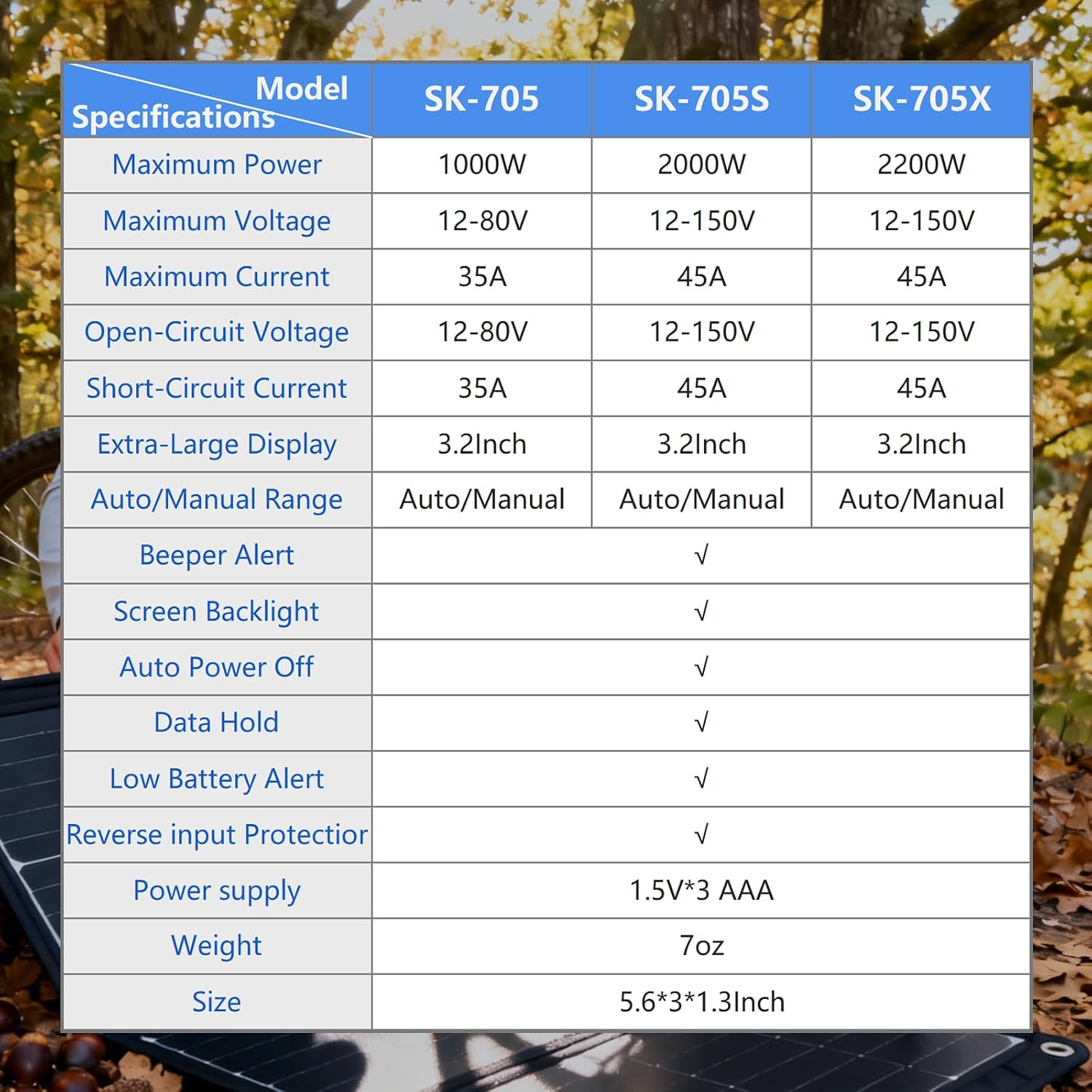
Figure 6: Physical dimensions of the Fienzio SK-705S.
9. Warranty and Support
For warranty information, technical support, or service inquiries, please contact Fienzio customer service directly. Refer to the product packaging or the official Fienzio website for the most current contact details.