
1. Introduction
Thank you for choosing the YOURLITE Tilt Out Trash Can Cabinet. This freestanding cabinet is designed to conceal two 10-gallon trash cans, offering a clean and organized appearance for your kitchen, laundry room, or living area. It features a hideaway drawer and a durable top surface for additional storage or display. This manual provides essential information for safe assembly, operation, and maintenance of your new cabinet.
2. Safety Information
- Weight Capacity: The cabinet top supports up to 100 lbs (45 kg). Do not exceed this weight limit to prevent damage or instability.
- Overloading: Avoid overloading the tilt-out compartments with trash or other items, as this may damage the cabinet doors or hinges.
- Stability: Ensure the cabinet is placed on a flat, stable surface. For added safety, especially in homes with children or pets, consider securing the cabinet to a wall using appropriate anti-tip hardware (not included).
- Cleaning: Regularly clean the interior and exterior of the cabinet to maintain hygiene and prevent odors. Refer to the 'Care and Maintenance' section for detailed cleaning instructions.
- Assembly: This product requires assembly. Follow all assembly instructions carefully. Do not use power tools for assembly unless specifically instructed, as overtightening screws can damage the wood.
3. Package Contents
Before beginning assembly, verify that all parts and hardware are present and undamaged. If any components are missing or damaged, please contact customer support.
- Cabinet Panels (Top, Side, Bottom, Back, Drawer Fronts, Tilt-Out Door Panels)
- Hardware Pack (Screws, Dowels, Cam Locks, Hinges, Drawer Slides, Handles)
- Instruction Manual
Note: Trash cans are not included with this cabinet.
4. Assembly Instructions
Assembly typically requires two adults. Please follow the steps below carefully. A Phillips head screwdriver and a hammer (for dowels) are generally needed.
4.1. Overview and Dimensions

Image Description: This image displays the overall dimensions of the YOURLITE Tilt Out Trash Can Cabinet, measuring 36 inches in height, 39.4 inches in length, and 13.5 inches in width. It also shows the dimensions of a compatible 10-gallon trash bin (not included) and highlights the internal shelf for the drawer.
4.2. Detailed Components
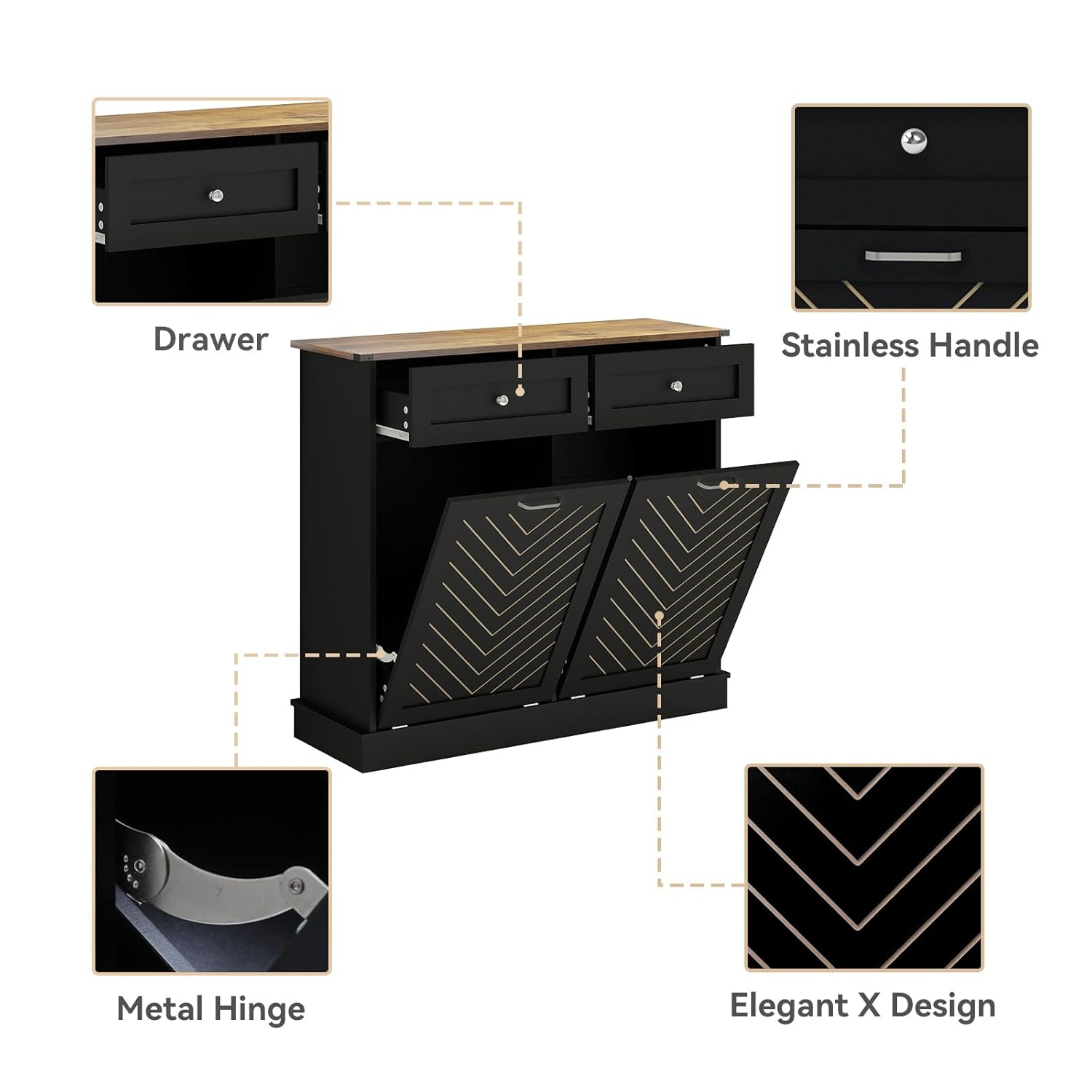
Image Description: An exploded diagram illustrating the various components of the cabinet, including the top panel, side panels, bottom panel, back panel, drawer components, and the two tilt-out door assemblies. This view helps identify each part for assembly.
4.3. Key Features and Hardware

Image Description: This image provides close-up views of key features: a convenient handle on the drawer, smooth metal slides for the drawer, durable spring hinges for the tilt-out doors, and the decorative herringbone panel design on the doors.
Assembly Steps:
- Prepare Components: Unpack all parts and lay them out on a clean, soft surface to prevent scratches. Identify each component using the provided diagrams.
- Assemble Side Panels: Attach the bottom and middle support panels to the side panels using dowels and cam locks/screws as indicated in the instructions.
- Install Drawer Slides: Secure the drawer slides to the inner side panels of the cabinet frame. Ensure they are level and aligned.
- Assemble Drawer: Construct the drawer box by attaching the side, front, and back panels. Insert the bottom panel into the grooves. Attach the drawer slides to the assembled drawer box. Install the handle on the drawer front.
- Attach Top Panel: Secure the top panel to the assembled frame using screws or cam locks.
- Assemble Tilt-Out Doors: Attach the spring hinges to the bottom of the tilt-out door panels. Ensure the herringbone design faces outwards.
- Install Tilt-Out Doors: Mount the tilt-out doors to the cabinet frame using the pre-drilled holes for the hinges. Test the tilting mechanism to ensure smooth operation.
- Install Back Panel: Fasten the back panel to the rear of the cabinet using small nails or screws.
- Final Checks: Ensure all screws are tightened and the cabinet is stable. Place the cabinet in its desired location.
5. Operating Instructions
5.1. Using the Tilt-Out Compartments
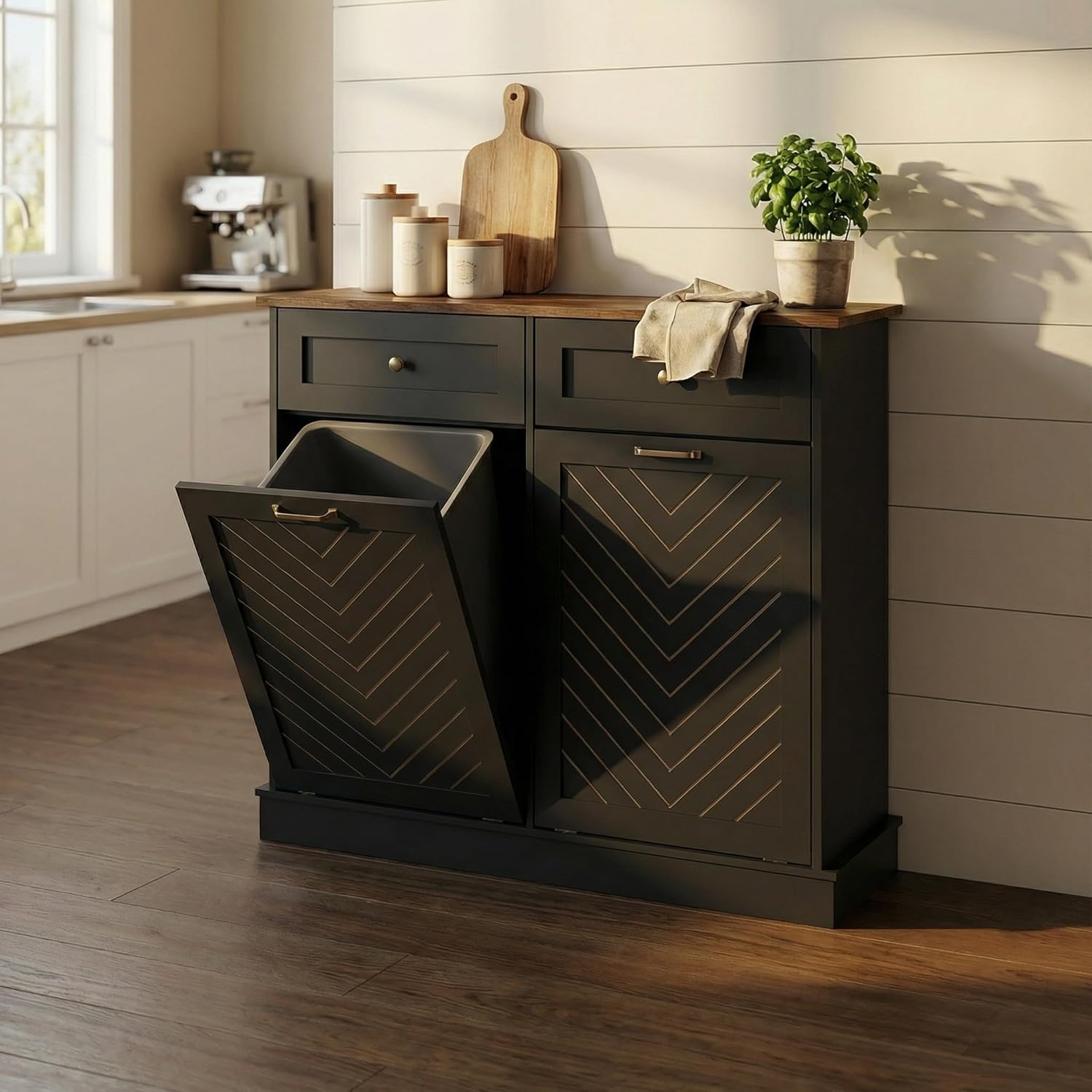
Image Description: The cabinet is shown in a kitchen setting with one of its tilt-out doors open, revealing a trash can inside. This demonstrates the primary function of the cabinet to conceal waste bins.
- Opening: Gently pull the handle on the top edge of the tilt-out door. The door will pivot forward and down, allowing access to the trash can inside.
- Inserting Trash Cans: Place standard 10-gallon trash cans into the compartments. Ensure the cans fit snugly and do not obstruct the door mechanism.
- Closing: Push the tilt-out door upwards until it clicks securely into the closed position. The spring hinges are designed for a soft and silent closing.
5.2. Using the Hideaway Drawer
The top drawer provides convenient storage for small items.
- Opening: Pull the handle on the drawer front to open. The smooth metal slides ensure easy operation.
- Storage: Use the drawer to store utensils, small kitchen gadgets, or other odds and ends.
- Closing: Gently push the drawer back into the cabinet until it is fully closed.
5.3. Utilizing the Top Surface
The sturdy top surface can be used for various purposes.
- Place small appliances such as a coffee maker or microwave.
- Display decorative items, plants, or serve as an additional countertop space.
- Ensure the weight on the top surface does not exceed 100 lbs (45 kg).
6. Care and Maintenance
- Cleaning: Wipe the cabinet surfaces with a soft, damp cloth. For stubborn stains, a mild, non-abrasive cleaner can be used. Avoid harsh chemicals or abrasive cleaning pads, which can damage the finish.
- Spills: Immediately wipe up any spills, especially on the top surface, to prevent water damage or staining.
- Dusting: Regularly dust the cabinet with a dry, soft cloth.
- Hinge and Slide Maintenance: Periodically check the hinges and drawer slides for smooth operation. If they become stiff, a small amount of silicone-based lubricant can be applied.
- Avoid Direct Sunlight: Prolonged exposure to direct sunlight can cause fading or discoloration of the wood finish.
- Temperature and Humidity: Maintain a stable room temperature and humidity level to prevent warping or cracking of the wood.
7. Troubleshooting
- Tilt-Out Door Not Closing Smoothly:
- Check for any obstructions inside the compartment.
- Ensure the trash can is properly seated and not interfering with the door.
- Inspect hinges for damage or misalignment. Tighten any loose screws on the hinges. - Drawer Sticks or Is Hard to Open/Close:
- Verify that the drawer slides are clean and free of debris.
- Check if the drawer is overloaded or unevenly weighted.
- Ensure the drawer slides are properly aligned and securely fastened. - Cabinet Wobbles:
- Confirm that the cabinet is on a level surface. Adjust furniture glides if necessary.
- Retighten all assembly screws. - Unpleasant Odors:
- Ensure trash cans are regularly emptied and cleaned.
- Clean the interior of the cabinet thoroughly with a mild disinfectant.
8. Specifications
| Feature | Detail |
|---|---|
| Brand | YOURLITE |
| Model Number | US-KS8001-BK-KT |
| Color | Black |
| Material | Wood |
| Overall Dimensions (H x L x W) | 36" x 39.4" x 13.5" (91.4 cm x 100 cm x 34.3 cm) |
| Compatible Trash Can Size | 2 x 10 Gallon (Trash cans not included) |
| Weight Capacity (Top Surface) | 100 lbs (45 kg) |
| Number of Drawers | 1 |
| Mounting Type | Freestanding |
| Assembly Required | Yes |
9. Customer Support
If you encounter any issues regarding the product, shipping, or assembly, please do not hesitate to contact YOURLITE customer service. Your satisfaction is our top priority.
For assistance, please refer to the contact information provided at the point of purchase or visit the official YOURLITE website.