
1. Introduction
This manual provides essential information for the safe and efficient operation of your SEGUMA Level 2 EV Charger, Model EV-ACS4003U. Please read this manual thoroughly before installation and use to ensure proper functionality and to prevent damage or injury.
2. Safety Information
The SEGUMA Level 2 EV Charger is designed with multiple safety features and holds authoritative certifications to ensure reliable operation. Adhere to all safety guidelines to protect yourself, your vehicle, and the charging equipment.
2.1 Certifications
This EV charger is ETL and FCC certified, meeting safety criteria defined by UL 2594, UL 2231-2, and CSA C22.2. These certifications guarantee the product's compliance with stringent safety standards.
2.2 Built-in Protections
The charger features a built-in advanced chipset that provides multi-layered protection against:
- Leakage
- Grounding issues
- Overvoltage/Undervoltage
- Overcurrent
- Overcharging
- Overheating
- Short circuit
The charger automatically shuts off once your vehicle is fully charged, enhancing overall safety.

Image: Overview of the 12 intelligent safety protections integrated into the SEGUMA EV Charger.
3. Package Contents
Verify that all items listed below are included in your package:
- SEGUMA 40Amp EV Charger
- Charger Cable Holder
- Control Box Holder
- Portable Bag
- User Manual (this document)

Image: Contents of the SEGUMA EV Charger package.
4. Product Overview
The SEGUMA Level 2 EV Charger offers efficient and flexible charging for your electric vehicle.
4.1 Key Features
- High-Speed Charging: Up to 9.6kW charging power (40Amp, 240V).
- Adjustable Current: Selectable current settings from 10A to 40A.
- Timing Delay: Schedule charging for 1-12 hours delay.
- Smart WIFI & App Control: Remote monitoring and control via the "SEGUMA" app.
- Intelligent 2.4" TFT Display: Real-time charging data and status indicators.
- Universal Compatibility: Standard J1772 connector for most EVs (Tesla requires adapter).
- Durable Design: IP66 waterproof rating and wide operating temperature range (-22°F to +122°F).
- Portable and Convenient: 25ft cable, includes charger and control box holders, and a carry bag.
4.2 Display and Indicators
The 2.4-inch TFT screen provides real-time charging information. LED indicators on the control box show the current status of the charger.

Image: Detailed view of the smart screen display and LED indicators.
The display shows:
- WiFi/Bluetooth status
- Work status (e.g., Charging, Standby)
- Real-time Current (Amperage)
- Charging time
- Electricity Consumption (kWh)
- Temperature
- Real-time Voltage
- Real-time Power (kW)
LED indicators provide visual cues for:
- Standing by (Blue)
- EV Connected (Blue)
- Charging (Green)
- Fully charged (Green)
- Ground fault (Red)
- General fault (Red)
5. Setup
5.1 Installation
The SEGUMA EV Charger can be used as a wall-mounted unit or as a portable charger. Use the provided charger cable holder and control box holder for wall-mounted installation.
- Mark the desired position for the control box holder and charger cable holder on the wall.
- Install anchors if necessary, then fix the holders securely with screws.
- Place the control box and charger on their respective holders.
Image: Easy installation steps for wall-mounting the charger.
5.2 Outlet Type
This charger is equipped with a NEMA 14-50 plug. Ensure your home has a compatible NEMA 14-50 outlet for proper operation. If your outlet type is different, an adapter may be required, or professional electrical installation may be necessary.

Image: Guide to checking your home's electrical outlet type for compatibility.
6. Operating Instructions
The SEGUMA EV Charger offers both manual button control and smart app control for flexible charging management.
6.1 Manual Operation (Plug-and-Play)
You can adjust charging current and set a delay time directly using the buttons on the control unit without the app.
- Insert the NEMA 14-50 plug into your compatible wall outlet.
- To set the adjustable current (10A-40A), long press the 'A' button for 3 seconds. The display will show available current options. Press 'A' repeatedly to cycle through options (10A, 16A, 20A, 24A, 32A, 40A).
- To set a delayed start time (1-12 hours), long press the 'L' button for 3 seconds. Press 'L' repeatedly to select the desired delay.
- After completing settings, wait for 5 seconds for the settings to confirm and exit.
- Connect the J1772 charging connector to your electric vehicle. The car's flashing light indicates charging is in progress.
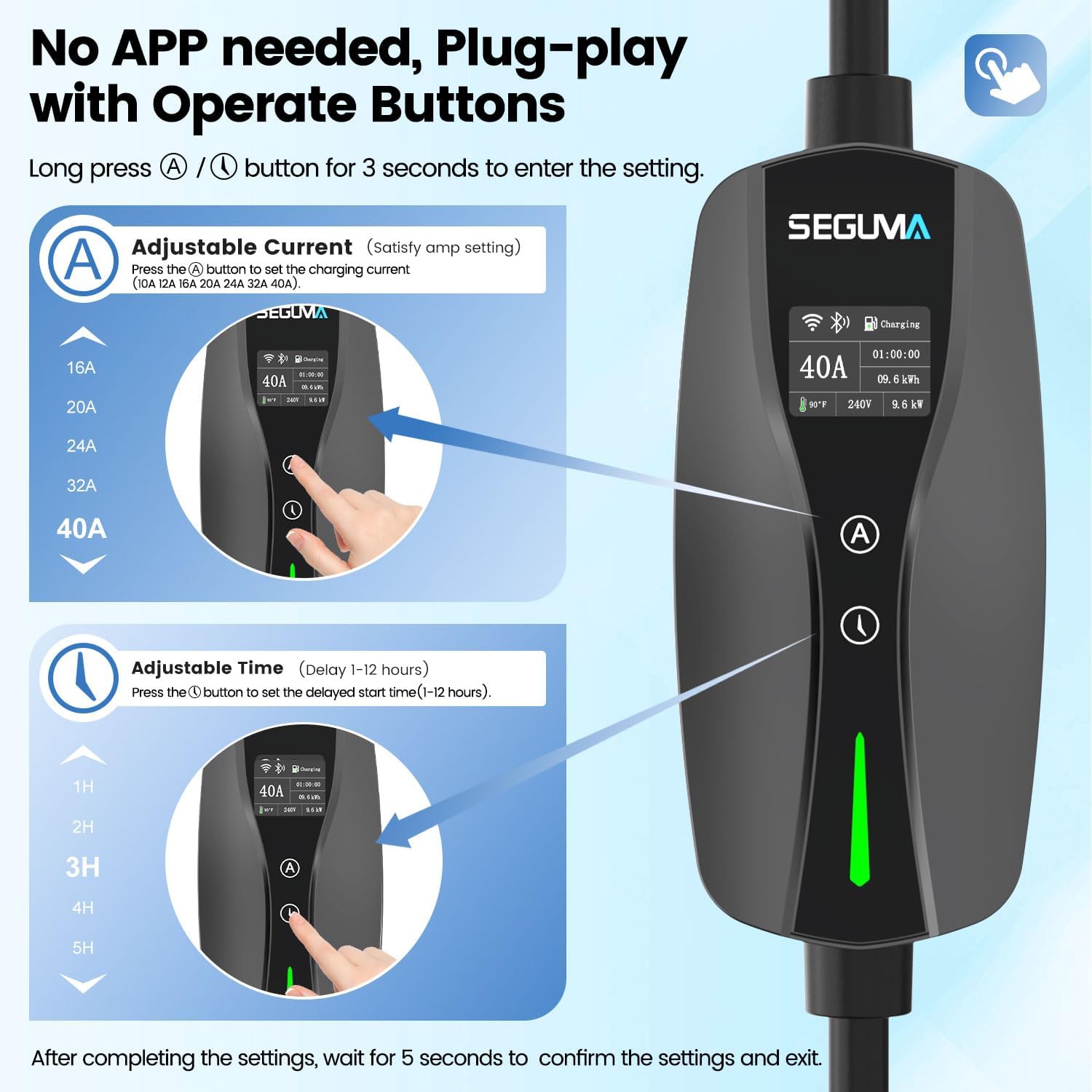
Image: Manual operation of the charger using the 'A' and 'L' buttons.
6.2 App Control (Smart Features)
For advanced control and monitoring, use the "SEGUMA" smartphone application.
- Download and install the "SEGUMA" app on your smartphone.
- Register your SEGUMA account via email or phone number.
- Add your charger to the app by scanning the SN code on the side of the charger control box. Connect via Bluetooth and then configure Wi-Fi.
- Once connected, you can remotely control and monitor the charging status.
- Adjust current (10A-40A), customize charging schedules, and set delayed charging times (1-12 hours) to take advantage of off-peak electricity rates.
- The app also allows setting target charge quantity, maximum current, electricity price, and sharing control with family members.

Image: SEGUMA app interface for managing charging settings and schedules.
6.3 Vehicle Compatibility
The SEGUMA Level 2 EV Charger is equipped with a standard J1772 connector, making it compatible with most electric vehicles and plug-in hybrids. For Tesla vehicles, a J1772 to NACS adapter is required (not included).
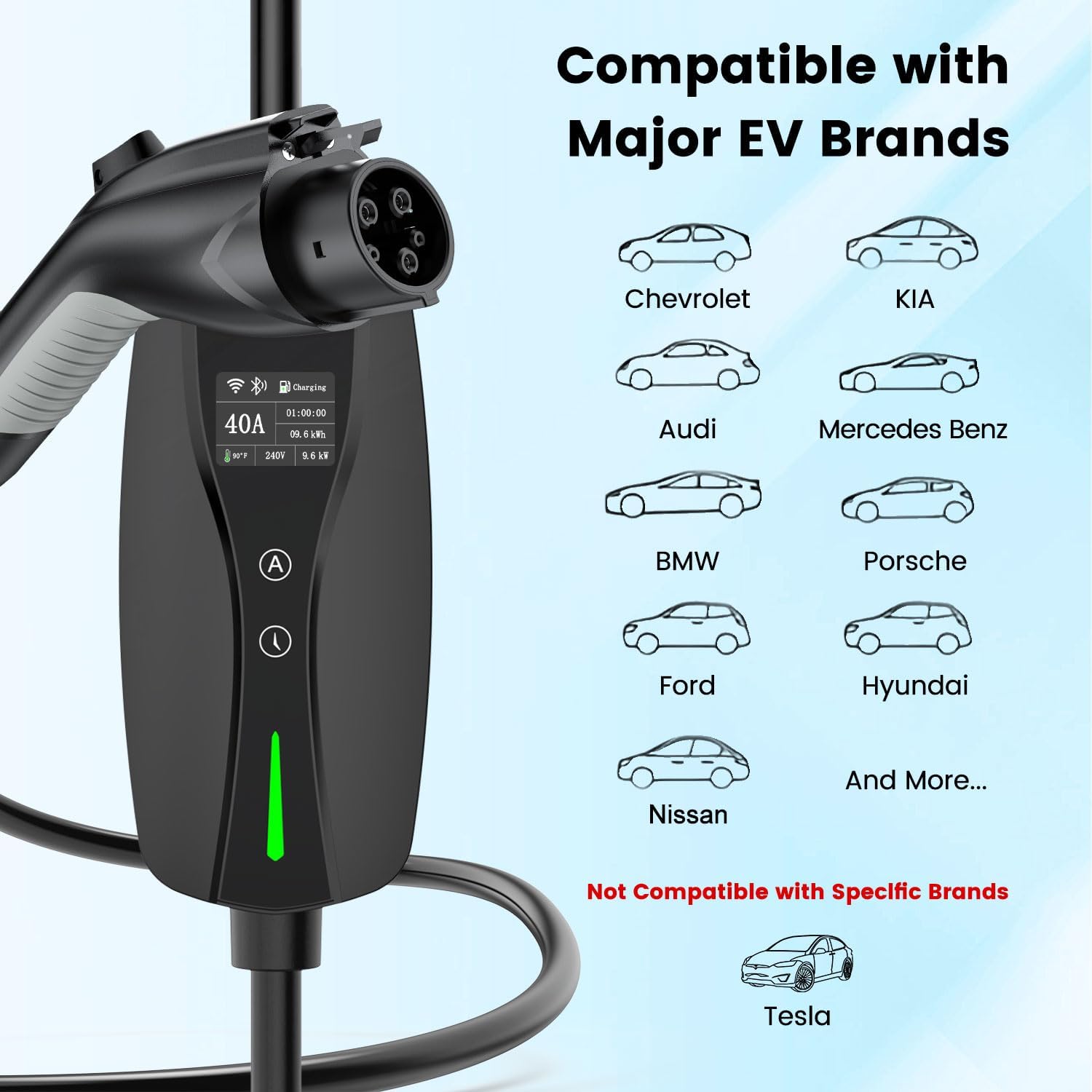
Image: Universal compatibility with major EV brands using the J1772 connector.

Image: Information regarding the need for a J1772 to NACS adapter for Tesla owners.
7. Maintenance
The SEGUMA EV Charger is designed for durability and minimal maintenance.
- Cleaning: Wipe the exterior of the charger with a soft, damp cloth. Do not use harsh chemicals or abrasive cleaners.
- Environmental Protection: With an IP66 waterproof rating and an operating temperature range of -22°F to +122°F, the charger is built to withstand various weather conditions, including sun, rain, and snow.
- Cable Care: Avoid kinking or crushing the charging cable. Store the cable properly using the provided holder when not in use to prevent damage.
- Inspection: Periodically inspect the charger, cable, and plug for any signs of damage, wear, or corrosion. If any damage is found, discontinue use and contact support.

Image: Durability and testing of the SEGUMA EV Charger, highlighting IP66 rating and temperature resistance.
8. Troubleshooting
If you encounter issues with your SEGUMA EV Charger, refer to the following common troubleshooting steps:
- Charger Not Powering On: Ensure the NEMA 14-50 plug is fully inserted into the wall outlet. Check your home's circuit breaker to ensure it hasn't tripped.
- Charging Not Initiating: Verify that the J1772 connector is securely plugged into your vehicle's charging port. Check the charger's display for any error messages or fault indicators.
- Slow Charging: Confirm the current setting on the charger or via the app. Ensure it is set to the desired amperage (e.g., 40A for maximum speed). Check your vehicle's charging settings.
- App Connectivity Issues: Ensure your smartphone's Bluetooth and Wi-Fi are enabled. Restart the app and try reconnecting. Check your home Wi-Fi network status.
- Fault Indicator (Red LED): If a red LED is illuminated, it indicates a ground fault or general fault. Disconnect the charger from the vehicle and the power outlet, wait a few minutes, then reconnect. If the fault persists, contact customer support.
For persistent issues or error codes not listed, please refer to the support section.
9. Specifications
| Feature | Specification |
|---|---|
| Brand | SEGUMA |
| Model Number | EV-ACS4003U |
| Input/Output Voltage | 240 Volts |
| Current Rating | 40 Amps (Adjustable: 10A/16A/20A/24A/32A/40A) |
| Maximum Charging Power | 9.6 kW |
| Connector Type (Wall) | NEMA 14-50 Plug |
| Connector Type (Vehicle) | J1772 |
| Cable Length | 25 Feet |
| Number of Ports | 1 |
| Product Dimensions (D x W x H) | 17" x 13" x 5" |
| Color | Black |
| Certifications | ETL, FCC |
| Waterproof Rating | IP66 |
| Operating Temperature | -22°F to +122°F (-30°C to +50°C) |
10. Warranty and Support
10.1 Warranty Information
The SEGUMA Level 2 EV Charger (Model EV-ACS4003U) comes with a 1-Year Warranty from the date of purchase. This warranty covers manufacturing defects under normal use. Please retain your proof of purchase for warranty claims.
10.2 Customer Support
For technical assistance, warranty claims, or any questions regarding your SEGUMA EV Charger, please contact SEGUMA customer support. Refer to the contact information provided with your product packaging or visit the official SEGUMA website for support details.