
Introduction
This manual provides instructions for the Hotsmtbang replacement remote control, designed for use with the Intertronic ITR MS580 DAB+ BLT Internet DAB CD Player. This remote control is pre-programmed and requires no additional setup or programming. Simply install batteries to begin operation.
Setup: Battery Installation
The remote control requires two AAA batteries (not included). Follow these steps to install the batteries:
- Locate the battery compartment on the back of the remote control.
- Slide the battery compartment cover downwards or press the latch and lift to open.
- Insert two AAA batteries, ensuring the positive (+) and negative (-) terminals align correctly with the markings inside the compartment.
- Replace the battery compartment cover by sliding it back into place until it clicks securely.

Image: Back view of the remote control, showing the closed battery compartment.
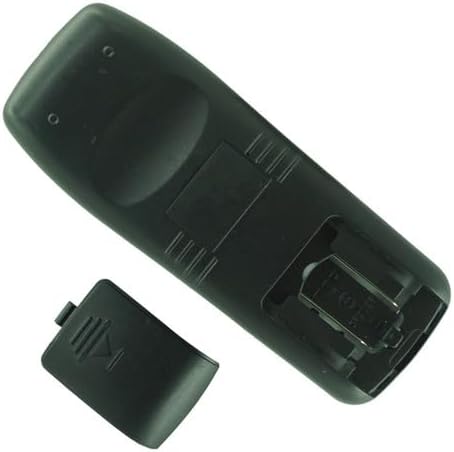
Image: Back view of the remote control with the battery compartment open, illustrating the battery insertion area.
Once batteries are installed, the remote is ready for immediate use with your Intertronic ITR MS580 DAB+ BLT player.
Operating Instructions
This remote control operates using infrared (IR) technology and requires no programming. To use the remote:
- Ensure your Intertronic ITR MS580 DAB+ BLT player is powered on.
- Point the remote control directly towards the IR receiver on your player.
- Press the desired function button (e.g., Power, Volume, Channel, Play/Pause) to control your device.
The maximum effective range for this remote control is approximately 8 miles, though optimal performance is typically achieved within closer distances and without obstructions between the remote and the player.
Maintenance
Battery Replacement
Replace batteries when the remote control's response becomes inconsistent or stops working. Always replace both AAA batteries simultaneously with new ones. Do not mix old and new batteries, or different types of batteries.
Cleaning
To clean the remote control, gently wipe its surface with a soft, dry cloth. For stubborn dirt, slightly dampen the cloth with water. Avoid using harsh chemicals, abrasive cleaners, or excessive moisture, as these can damage the remote.
Storage
When not in use for extended periods, it is recommended to remove the batteries to prevent leakage and potential damage to the remote control.
Troubleshooting
- Remote not responding:
- Check if the batteries are installed correctly with the correct polarity (+/-).
- Replace old batteries with new AAA batteries.
- Ensure there are no obstructions between the remote control and the player's IR receiver.
- Verify that the player is powered on.
- Intermittent response:
- This often indicates low battery power. Replace the batteries.
- Ensure you are within the effective operating range and pointing directly at the player.
If the issue persists after following these steps, or if you are unsure about device compatibility, please refer to the Support section for further assistance.
Specifications
| Brand | Hotsmtbang |
| Model Compatibility | Intertronic ITR MS580 DAB+ BLT Internet DAB CD Player |
| Special Feature | No Programming Required |
| Connectivity Technology | Infrared (IR) |
| Maximum Number of Supported Devices | 1 |
| Compatible Devices | Player |
| Power Source | 2 x AAA batteries (not included) |
| Maximum Range | Approximately 8 miles (optimal performance at closer distances) |
Warranty Information
Specific warranty details for this replacement remote control are not provided in this manual. For information regarding warranty coverage, terms, and conditions, please refer to the original purchase documentation or contact the seller directly. Keep your proof of purchase for any warranty claims.
Support
If you encounter issues not covered in the troubleshooting section, or if you have questions regarding the compatibility of this remote control with your specific device, please contact the seller or manufacturer for assistance.
When contacting support, please provide the following information:
- Product Name: Hotsmtbang Replacement Remote Control
- ASIN: B0G8DTTGRV
- Your Intertronic Player Model: ITR MS580 DAB+ BLT
- A detailed description of the issue you are experiencing.