1. Introduction
This manual provides essential information for the installation, operation, and maintenance of your Niceminiwall HH-670K-2.4G 12V/6V Receiver and Remote Control system. This product is designed as a replacement or upgrade component for children's electric ride-on vehicles. Please read this manual thoroughly before use to ensure proper function and safety.
2. Safety Information
- Always ensure the power to the vehicle is disconnected before installing or removing the receiver or remote control components.
- This product is intended for use with compatible children's electric ride-on vehicles. Verify compatibility before installation.
- Keep electronic components away from water, moisture, and extreme temperatures.
- Do not attempt to modify or disassemble the receiver or remote control. This may void the warranty and create safety hazards.
- Ensure all connections are secure and correctly polarized to prevent damage to the unit or the vehicle.
- Adult supervision is required when children operate vehicles equipped with this system.
3. Package Contents
Depending on your purchase, your package may contain one of the following:
- Remote Control (standalone)
- HH-670K-2.4G 12V Receiver (standalone)
- HH-670K-2.4G 6V Receiver (standalone)
- HH-670K-2.4G 12V Full Set (Receiver + Remote Control)
- HH-670K-2.4G 6V Full Set (Receiver + Remote Control)
Please verify the contents against your order upon receipt.
4. Product Overview
The HH-670K-2.4G receiver is a crucial component for controlling children's electric ride-on vehicles. It facilitates communication between the remote control and the vehicle's motor system, enabling functions such as forward, reverse, steering, and speed control. The 2.4G technology ensures stable signal transmission and minimizes interference.
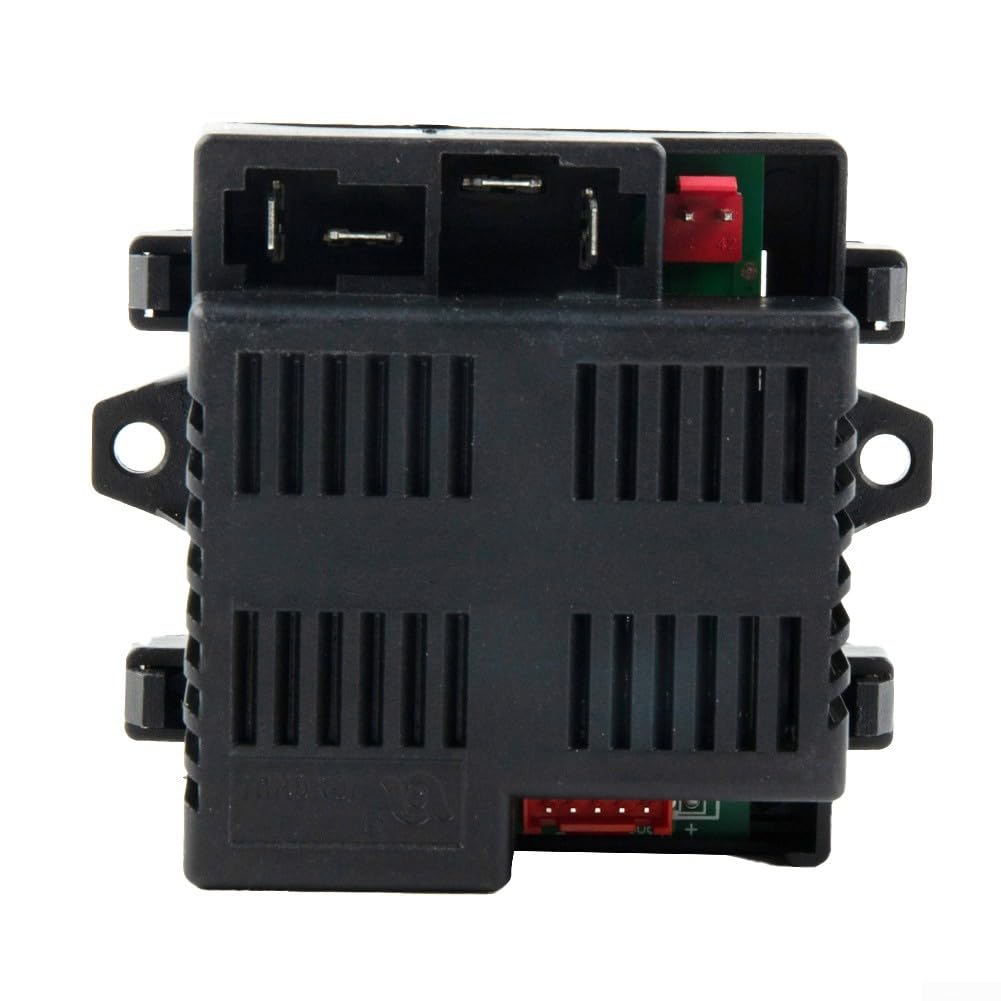
Figure 4.1: Angled view of the HH-670K-2.4G 12V Receiver. This image shows the overall compact design of the receiver unit with its various connection ports visible on the sides.
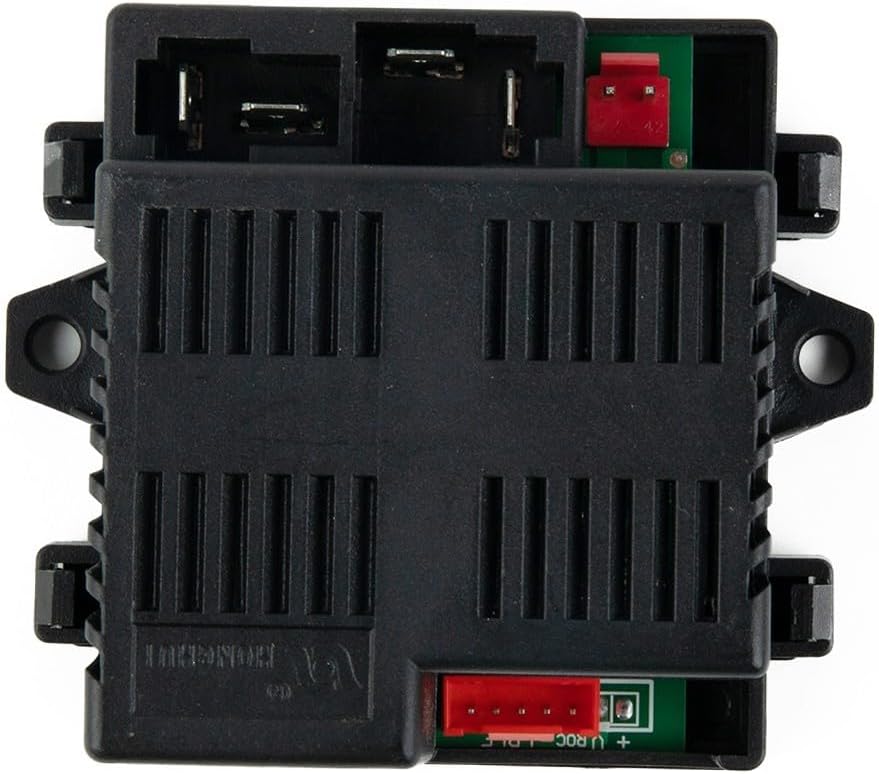
Figure 4.2: Top-down view of the HH-670K-2.4G 12V Receiver. This perspective highlights the ventilation grilles on the top casing and the layout of the connection terminals.

Figure 4.3: Side view of the HH-670K-2.4G 12V Receiver, showing a label with a QR code, voltage (DC12V), and maximum current (I(MAX): 20A). The QR code may link to additional product information or an app.
5. Setup and Installation
The HH-670K-2.4G receiver is designed for direct replacement in compatible children's electric vehicles. No complex wiring modifications are typically required if replacing an identical unit.
5.1. Receiver Installation
- Disconnect Power: Before beginning, ensure the vehicle's battery is disconnected to prevent electrical shock or damage.
- Locate Existing Receiver: Identify the location of the old receiver unit within the vehicle.
- Remove Old Receiver: Carefully disconnect all wires from the old receiver. Note the position and color coding of each wire for correct re-connection.
- Install New Receiver: Connect the wires from the vehicle to the corresponding ports on the new HH-670K-2.4G receiver. Ensure all connections are firm and correctly polarized. Refer to the vehicle's original wiring diagram if available.
- Secure Receiver: Mount the new receiver securely in the vehicle, ensuring it is protected from moisture and physical damage.
5.2. Pairing Remote Control (if applicable)
If you have purchased a full set or a new remote control, it may need to be paired with the receiver. Specific pairing instructions are usually provided with the remote control unit. Generally, the process involves:
- Turn off the vehicle's power.
- Press and hold the pairing button on the remote control (location varies by remote model).
- While holding the pairing button, turn on the vehicle's power.
- Release the pairing button once the remote's indicator light or vehicle's lights confirm successful pairing (e.g., flashing then solid light).
- Test all functions to ensure proper communication.
6. Operating Instructions
Once the receiver and remote control are installed and paired, you can operate the children's electric vehicle. The 2.4G system provides responsive and stable control.
6.1. Basic Controls (via Remote Control)
- Forward/Reverse: Use the designated joystick or buttons to move the vehicle forward or backward.
- Steering: Use the steering controls to turn the vehicle left or right.
- Speed Selection: Many remotes offer multiple speed settings (e.g., low, medium, high). Select the appropriate speed for the child's skill level and environment.
- Emergency Stop: Some remote controls feature an emergency stop button, allowing parents to immediately halt the vehicle's movement for safety.
The dual-channel control system allows parents to supervise movement effectively, preventing unintended acceleration and ensuring a safe play experience.
7. Maintenance
Proper maintenance ensures the longevity and reliable performance of your HH-670K-2.4G receiver and remote control.
- Cleaning: Use a soft, dry cloth to clean the exterior of the receiver and remote control. Do not use liquid cleaners or solvents.
- Storage: Store the components in a dry, cool place away from direct sunlight and extreme temperatures when not in use.
- Battery Care (Remote Control): Replace remote control batteries as needed. Use only the specified battery type. Remove batteries if the remote will not be used for an extended period.
- Connection Checks: Periodically inspect all wire connections to the receiver to ensure they remain secure and free from corrosion.
8. Troubleshooting
If you encounter issues with your HH-670K-2.4G system, refer to the following common problems and solutions:
| Problem | Possible Cause | Solution |
|---|---|---|
| Vehicle does not respond to remote control. | 1. Remote control batteries are low or dead. 2. Remote control and receiver are not paired. 3. Loose or incorrect wiring connection. | 1. Replace remote control batteries. 2. Re-pair the remote control and receiver (refer to Section 5.2). 3. Check all wiring connections to the receiver for security and correctness. |
| Vehicle moves erratically or intermittently. | 1. Weak signal due to interference. 2. Loose wiring. 3. Faulty receiver or remote. | 1. Ensure no other 2.4G devices are causing interference nearby. Try operating in a different location. 2. Inspect and secure all wiring connections. 3. If issues persist, contact support for further assistance. |
| Receiver unit shows no power. | 1. Vehicle battery is dead or disconnected. 2. Incorrect power connection to the receiver. 3. Blown fuse (if applicable in vehicle's circuit). | 1. Charge or reconnect the vehicle's battery. 2. Verify power input wiring to the receiver. 3. Check and replace any blown fuses in the vehicle's electrical system. |
9. Specifications
- Model: HH-670K-2.4G
- Voltage Options: 12V or 6V (depending on specific receiver model purchased)
- Maximum Current: 20A (for 12V receiver)
- Communication Frequency: 2.4G
- Dimensions: Approximately 10 x 2 x 2.7 inches
- Item Weight: Approximately 10.4 ounces
- Manufacturer: Niceminiwall
10. Warranty and Support
For technical support, warranty inquiries, or replacement parts, please contact Niceminiwall directly. Refer to the manufacturer's contact information provided with your purchase or visit their official website.
Additional resources may be available via the following link:
http://api.e-toys.cn/page/app/76
Please have your product model number (HH-670K-2.4G) and purchase details ready when contacting support.