
1. Introduction
Thank you for choosing the MARVO HG8959 RGB Wired Gaming Headset. This manual provides essential information for setting up, operating, and maintaining your headset to ensure optimal performance and longevity. Please read this manual thoroughly before use.
2. Product Overview
The MARVO HG8959 is designed for an immersive gaming experience, featuring virtual surround sound, a noise-canceling microphone, and vibrant RGB lighting. It offers comfort for extended use and broad compatibility across multiple gaming platforms and devices.
Key Features:
- Immersive Surround Sound: Delivers precise positional audio for enhanced in-game awareness.
- Vibrant RGB Lighting: Flowing RGB effects to complement your gaming setup.
- Comfortable Design: Protein skin ear pads, memory foam cushions, and an adjustable headband for extended wear.
- Clear Communication: Integrated noise-canceling microphone for effective voice chat.
- Extensive Compatibility: Connects via USB or 3.5mm jack to various devices.
Headset Components:
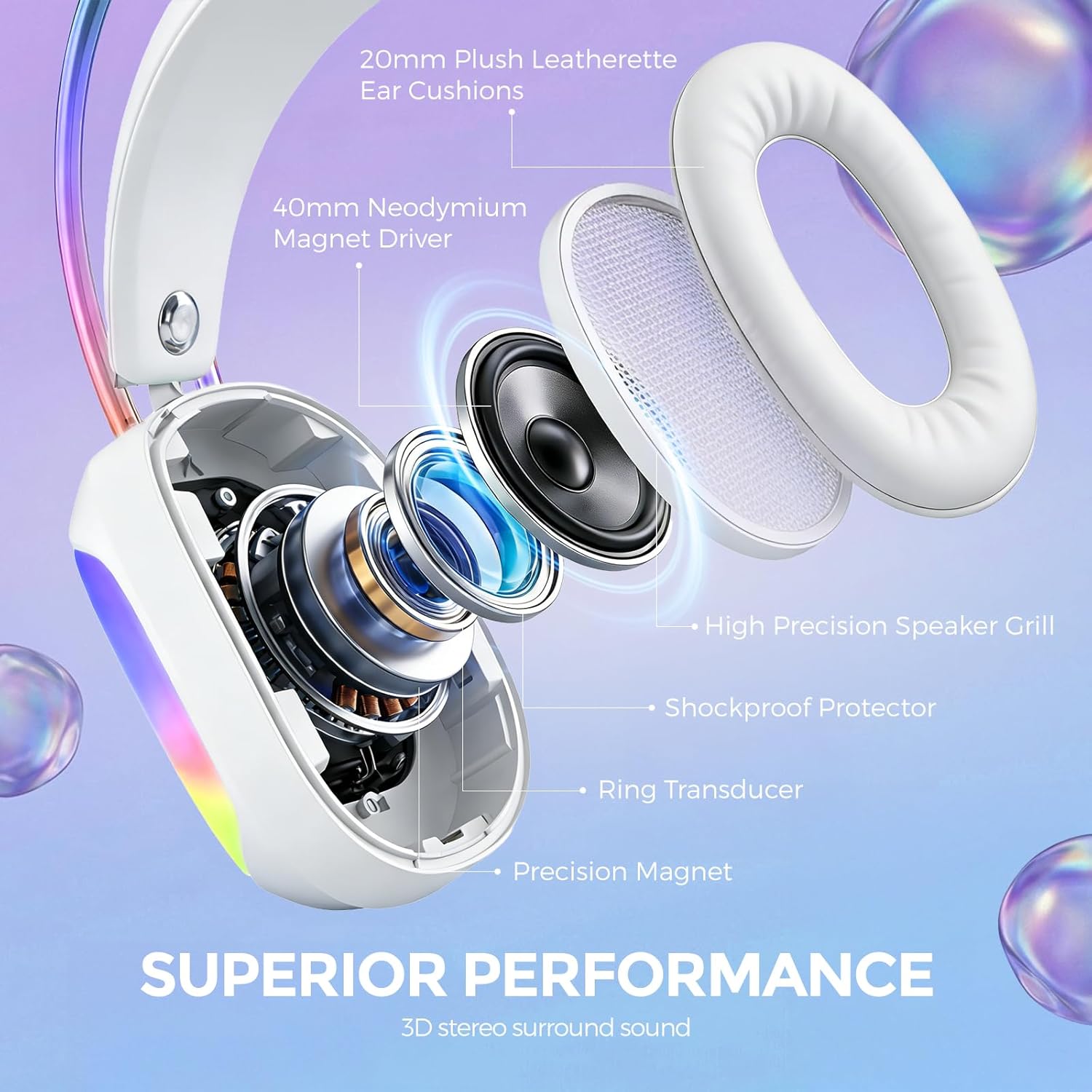
Figure 2.1: Exploded view illustrating the internal components of the MARVO HG8959 headset, including ear cushions, drivers, and protective elements.

Figure 2.2: The MARVO HG8959 headset highlighting its adjustable microphone and dynamic RGB LED lighting.

Figure 2.3: Detailed view of the headset's construction, emphasizing comfort features like the self-adjustable headband and soft earcups.
3. Setup Instructions
The MARVO HG8959 headset offers versatile connectivity options for various devices.
Connecting to Devices:
- For PC, PS4, PS5, Nintendo Switch:
Connect the USB plug directly into an available USB port on your device. The headset will be recognized automatically, and RGB lighting will activate. For audio and microphone functionality, ensure the headset is selected as the default input/output device in your system's sound settings. - For Xbox Controllers, PCs, Laptops, Mobile Devices:
Connect the 3.5mm audio jack into the corresponding audio port on your device. For devices requiring separate microphone and audio jacks (e.g., some older PCs), you may need a 3.5mm splitter (not included). The RGB lighting requires the USB connection to be active.

Figure 3.1: Connectivity options for the MARVO HG8959 headset across multiple platforms.
4. Operating Instructions
Volume Control:
The headset features an integrated volume control wheel or button on the earcup or inline cable. Rotate the wheel or press the buttons to adjust the audio output level to your preference.
Microphone Usage:
The flexible microphone can be adjusted to your desired position for clear voice capture. Ensure the microphone is positioned close to your mouth for optimal communication. If your headset has a mute button, press it to toggle the microphone on or off.
RGB Lighting:
The RGB lighting is automatically activated when the USB connector is plugged into a powered USB port. The lighting features a flowing effect and does not require additional software for operation.
5. Maintenance
Proper care will extend the life and performance of your MARVO HG8959 headset.
- Cleaning: Use a soft, dry cloth to wipe down the earcups and headband. For stubborn dirt, a slightly damp cloth can be used, but ensure no moisture enters the speaker grilles or microphone.
- Cable Care: The headset features a braided, tangle-free cable. Avoid sharp bends or excessive pulling on the cable to prevent internal damage.
- Storage: Store the headset in a cool, dry place away from direct sunlight and extreme temperatures.
6. Troubleshooting
If you encounter issues with your headset, refer to the following common solutions:
| Problem | Possible Solution |
|---|---|
| No sound from headset |
|
| Microphone not working |
|
| RGB lighting not working |
|
7. Specifications
Detailed technical specifications for the MARVO HG8959 Gaming Headset:
| Feature | Specification |
|---|---|
| Model Name | HG8959 |
| Brand | MARVO |
| Connectivity Technology | Wired |
| Headphones Jack | 3.5 mm Jack |
| Input Device Interface | USB |
| Audio Driver Size | 50 Millimeters |
| Frequency Response | 20 KHz |
| Sensitivity | 114 dB |
| Impedance | 30 Ohms |
| Noise Control | Active Noise Cancellation |
| Special Features | Adjustable Headband, Lightweight, Noise Cancellation, Surround Sound, Volume Control |
| Compatible Devices | Desktops, Gaming Consoles, Laptops |
| Material | Metal, Polyurethane (PU) |
| Item Weight | 1.08 pounds |
| Color | White |
8. Warranty and Support
MARVO is committed to providing high-quality products and customer satisfaction.
- Return Policy: If you are not satisfied with your purchase, a 60-day return service is available.
- Exchange Policy: In case of a defective item, you can enjoy a 2-year easy exchange policy.
For further assistance, technical support, or warranty claims, please contact MARVO customer service through the official website or your retailer's support channels. Please have your model number (HG8959) and proof of purchase ready.

Figure 8.1: MARVO's customer satisfaction and warranty information.


