
1. Introduction
This manual provides essential information for the safe and effective use of your THERUN W1 Link Under Desk Treadmill. Please read it thoroughly before initial operation and retain it for future reference. The THERUN W1 Link is a compact walking pad designed for home and office use, featuring a 2.5 HP motor, remote control, and app connectivity.

Image: The THERUN W1 Link Under Desk Treadmill positioned under a standing desk, demonstrating its primary use case. A remote control is also visible, highlighting ease of operation.
2. Safety Information
To ensure safe operation and prevent injury, observe the following safety precautions:
- Always place the treadmill on a flat, stable surface.
- Ensure adequate clear space around the treadmill (at least 2 feet on sides and rear).
- Do not allow children or pets near the treadmill during operation.
- Wear appropriate athletic footwear.
- Do not step on or off the treadmill while the belt is moving.
- If you feel dizzy, nauseous, or experience pain, stop exercising immediately.
- Keep hands and feet clear of moving parts.
- Unplug the treadmill when not in use or before cleaning/maintenance.
- The maximum user weight for this model is 265 lbs (120 kg).
3. Package Contents
Verify that all components are present in the package:
- THERUN W1 Link Under Desk Treadmill Unit
- Remote Control
- Power Cord
- User Manual (this document)
- Fitness Guide (optional, may be included)

Image: A visual representation of the remote control, a fitness guide booklet, and an unpacking instruction sheet, which are typically included with the treadmill.
4. Setup
The THERUN W1 Link treadmill requires no assembly and is ready for use directly out of the box.
- Unpack: Carefully remove the treadmill from its packaging.
- Position: Place the treadmill on a firm, level surface. Ensure there is sufficient space around the unit for safe operation. For under-desk use, slide it beneath your standing desk.
- Connect Power: Plug the power cord into the treadmill's power port, then into a standard electrical outlet.
- Initial Check: Before stepping on, ensure the treadmill is stable and the power indicator light is on.

Image: A composite image showing the THERUN W1 Link treadmill in use under a standing desk, its compact folded state for storage, and the remote control, illustrating its versatility and ease of setup.
5. Operating Instructions
5.1 Power On/Off
- To power on, press the power button on the treadmill's console or the remote control. The LED display will illuminate.
- To power off, press and hold the power button on the remote control or console until the display turns off.
5.2 Using the Remote Control
The remote control allows for convenient adjustment of speed and starting/stopping the treadmill.
- Start/Stop Button: Press to begin or end a workout.
- Speed Up (+): Increases the walking belt speed.
- Speed Down (-): Decreases the walking belt speed.
5.3 Speed Adjustment
The treadmill offers a speed range of 0.6 to 3.8 miles per hour (MPH).
- Use the '+' and '-' buttons on the remote control to adjust the speed incrementally.
- Start at a low speed and gradually increase to a comfortable pace.

Image: A user operating the THERUN W1 Link treadmill, demonstrating the use of the remote control to manage speed and workout settings.

Image: A visual guide illustrating the treadmill's speed capabilities, showing a user walking at 0.8 MPH, 2.0 MPH, and 3.8 MPH, along with estimated calorie expenditure for each speed.
6. App Connectivity
The THERUN W1 Link treadmill supports connectivity with various fitness applications to enhance your workout experience and track progress.
- Download App: Download a compatible fitness app (e.g., Kinomap, Zwift) from your device's app store.
- Enable Bluetooth: Ensure Bluetooth is enabled on your smartphone or tablet.
- Pair Device: Open the fitness app and follow the in-app instructions to search for and pair with your THERUN W1 Link treadmill.
- Start Workout: Once paired, you can control the treadmill and record your exercise data through the app.

Image: A user engaging with the THERUN W1 Link treadmill, with a large screen displaying a virtual outdoor workout from a fitness app, alongside icons representing compatible applications like Kinomap and Zwift.
7. Maintenance
Regular maintenance ensures the longevity and optimal performance of your treadmill.
7.1 Cleaning
- Always unplug the treadmill before cleaning.
- Wipe down the console and exterior surfaces with a soft, damp cloth. Avoid abrasive cleaners.
- Periodically vacuum dust from around the motor cover.
7.2 Belt Lubrication
The walking belt requires periodic lubrication to reduce friction and extend its lifespan. Refer to the fitness guide for specific lubrication instructions and recommended lubricant type.
- Frequency: Lubricate every 3-6 months, or after approximately 100 hours of use.
- Procedure: Lift the edge of the walking belt and apply a small amount of silicone lubricant to the center of the deck. Run the treadmill at a low speed for a few minutes to distribute the lubricant.
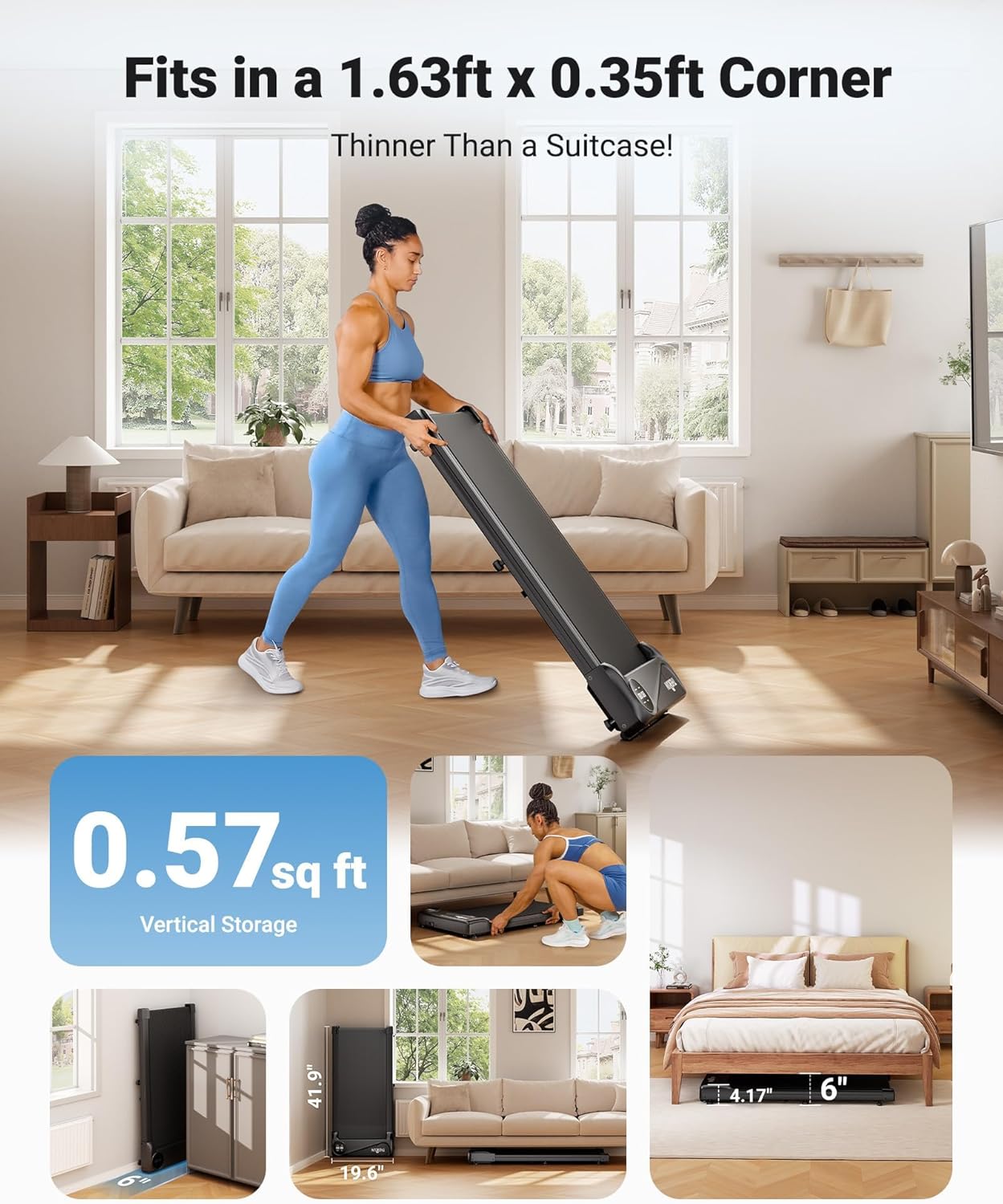
Image: The THERUN W1 Link Under Desk Treadmill shown in its folded position, illustrating its compact design for storage and ease of access for maintenance tasks like belt lubrication.
8. Storage
The THERUN W1 Link treadmill is designed for compact storage, featuring built-in transport wheels.
- Moving: Tilt the treadmill slightly and use the transport wheels to move it to your desired storage location.
- Storage Positions: The treadmill can be stored flat under furniture (e.g., a bed or sofa) or vertically against a wall to save space.

Image: A user lifting one end of the THERUN W1 Link treadmill, showcasing its portability and the function of its transport wheels for easy relocation.

Image: The THERUN W1 Link treadmill stored horizontally underneath a bed, demonstrating its low profile for discreet storage.

Image: The THERUN W1 Link treadmill stored vertically against a wall, highlighting its space-saving design for upright storage.
9. Troubleshooting
Refer to the table below for common issues and their solutions.
| Problem | Possible Cause | Solution |
|---|---|---|
| Treadmill does not power on. | Power cord not connected; power outlet issue. | Ensure power cord is securely plugged in. Check power outlet with another device. |
| Walking belt stops or slips. | Belt requires lubrication; belt tension is loose. | Lubricate the walking belt (refer to Maintenance section). Adjust belt tension as per fitness guide. |
| Unusual noise during operation. | Loose components; foreign object; motor issue. | Check for loose screws. Inspect for foreign objects under the belt. If noise persists, contact customer support. |
| Remote control not responding. | Low battery; remote not paired. | Replace remote control battery. Refer to fitness guide for remote pairing instructions. |
10. Specifications
Detailed technical specifications for the THERUN W1 Link Under Desk Treadmill:
| Feature | Detail |
|---|---|
| Brand | THERUN |
| Model Name | YT05-CP (W1 Link) |
| Product Dimensions (LxWxH) | 41.9" x 19.6" x 4.5" |
| Item Weight | 34.39 Pounds |
| Material | Alloy Steel |
| Motor Horsepower | 2.5 HP |
| Speed Range | 0.6 - 3.8 MPH |
| Maximum Weight Recommendation | 265 Pounds |
| Display Type | LED |
| Special Feature | App Connectivity |
| Assembly Required | No |
| UPC | 840452648074 |

Image: A visual representation of the THERUN W1 Link treadmill in operation, highlighting its quiet 45 dB motor, comparable to library noise levels.
11. Warranty and Support
Your THERUN W1 Link Under Desk Treadmill comes with a 1-year protection plan from the date of purchase.
For any questions, technical assistance, or warranty claims, please contact THERUN customer support. Our professional team is available to provide assistance, including product guides and documents via email.
- Customer Support: Refer to the contact information provided in your purchase documentation or visit the official THERUN website.
- Accessories: Extra accessories or replacement parts, including motor and electronic control components, may be available for purchase.

Image: A display of additional items such as a treadmill mat, a remote control, and a charging cable, indicating available accessories and the scope of product support.


