
1. Introduction
Thank you for choosing the Invengo MeowServe S100 Automatic Wet Food Cat Feeder. This device is designed to provide fresh, temperature-controlled meals for your cat with advanced features such as a 3MP night vision camera, app control, dual semiconductor cooling, and gentle heating. Please read this manual thoroughly before use to ensure proper operation and maintenance.
2. Safety Guidelines
- Ensure the feeder is placed on a stable, level surface.
- Do not immerse the main unit in water or any other liquid. The main unit is not washable.
- Only use the provided power adapter.
- Keep out of reach of children and pets when not in use or during cleaning.
- Regularly inspect the power cord for damage. Discontinue use if damaged.
- Ensure side air vents remain unobstructed for optimal operation.
- The AI anti-pinch safety feature is designed to prevent accidents, but always supervise initial use.
3. Product Overview
The Invengo MeowServe S100 features a robust design with multiple functionalities to ensure your pet's meals are served fresh and at the optimal temperature.
Key Components:
- Main Unit: Houses the cooling/heating system, motor, and electronics.
- Lid: Covers the food trays, includes the camera and touchscreen controls.
- 3MP HD Camera: Rotates 300 degrees, with night vision for remote monitoring.
- 5 Food-Grade 304 Stainless Steel Trays: Removable and dishwasher-safe for various meal types.
- Touchscreen Control Panel: For manual operation and settings.
- Power Adapter: For connecting the feeder to an electrical outlet.
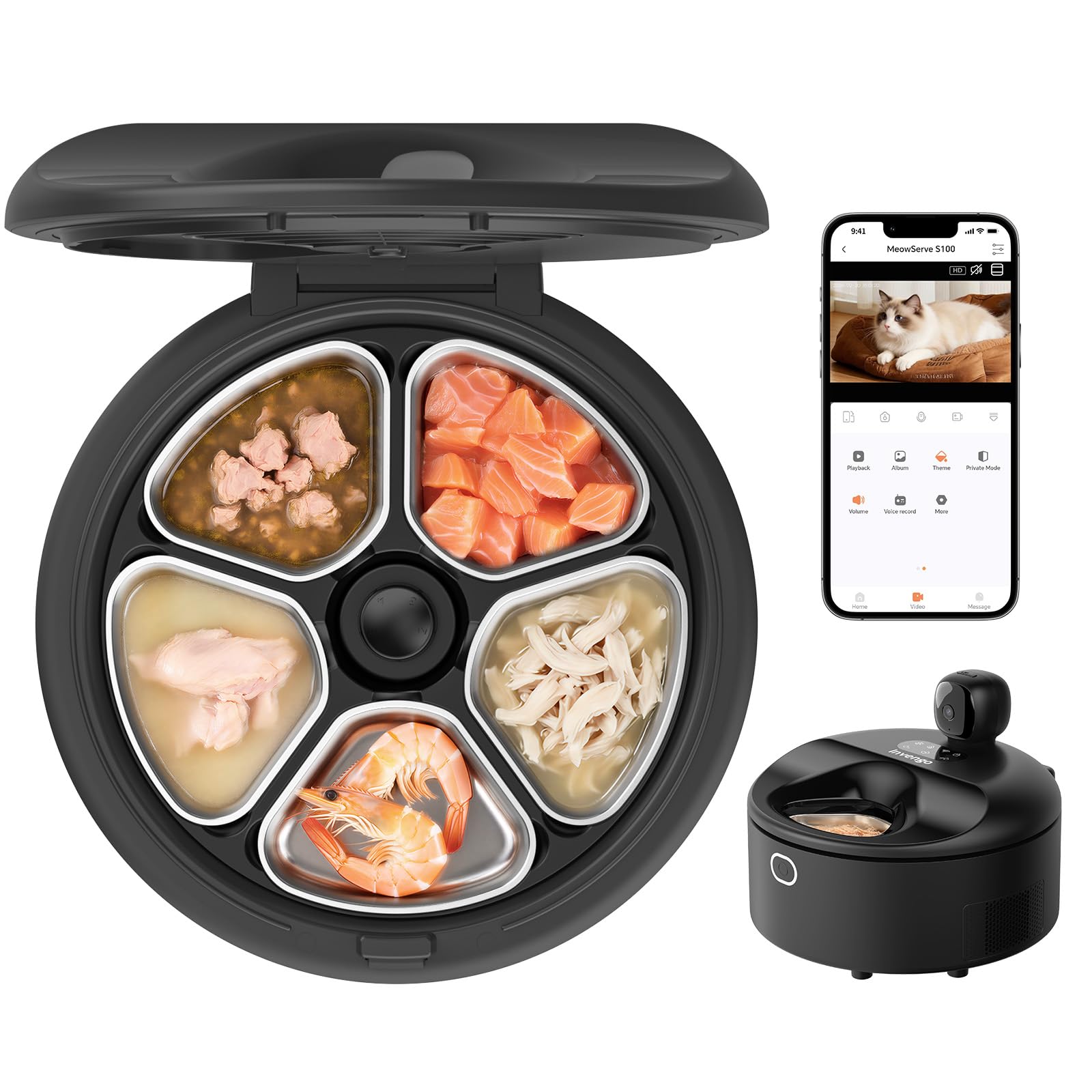
Figure 1: Invengo MeowServe S100 Automatic Wet Food Cat Feeder (Black)
4. Setup Guide
4.1 Unpacking and Placement
- Carefully remove all components from the packaging.
- Place the feeder on a flat, stable surface in a location accessible to your pet and near a power outlet.
- Ensure there is at least 14 inches of clear space around the side air vents for proper ventilation.

Figure 2: Recommended Feeder Placement with Clearance
4.2 Power Connection
- Connect the power adapter to the feeder's power input port.
- Plug the adapter into a standard electrical outlet. The feeder will power on and emit a beeping sound.
4.3 App Download and Pairing
To utilize the smart features, download the Invengo app and pair your device.
- Scan the QR code on the feeder's lid or search for "Invengo" in your device's app store (App Store for iOS, Google Play for Android).
- Download and install the Invengo app.
- Register or log in to your account.
- On the app's homepage, tap the "+" icon and select "Add Device." The app will automatically search for nearby devices.
- Follow the in-app instructions to complete the pairing process. Ensure your Wi-Fi and Bluetooth are enabled on your phone.
Video 1: App Setup and Control Demonstration. This video illustrates how to download the Invengo app, pair it with the feeder, and use the manual and smart feeding modes, including controlling the camera remotely.
4.4 Filling the Trays
- Press the lid release button on the side of the feeder to open the lid.
- Remove the stainless steel trays. You can remove them individually or all at once.
- Fill each tray with your desired wet or dry food portions.
- Place the filled trays back into the feeder.
- Close the lid securely.
5. Operating the Feeder
5.1 Touchscreen Controls
The feeder features a touchscreen control panel on the lid for direct operation.
- Unlock Screen: Press and hold the lock button for 4 seconds to unlock the touchscreen.
- Tray Rotation: Use the arrow buttons to manually rotate the trays to dispense food.
- Cooling/Heating: Activate cooling or heating functions directly from the panel.

Figure 3: Touchscreen Control Panel
5.2 App Controls
The Invengo app provides comprehensive control over your feeder from anywhere.
- Manual Feed: Dispense food instantly or open the lid to avoid food waste.
- Smart Feed: Set personalized feeding schedules (daily or weekly) with specific tray selections and duration.
- Auto Heating: Configure pre-meal warming to 86–100°F (30–38°C) for 5 minutes before serving.
- Camera Monitoring: View live 3MP HD footage with 300° horizontal rotation and night vision.
- Two-Way Audio: Talk to your pet remotely.
- Video Playback: Supports TF card (not included) for video storage and playback.
- Device Sharing: Share control with multiple family members.

Figure 4: Invengo App Interface for Remote Control
5.3 Advanced Cooling System
The dual semiconductor cooling system maintains food freshness at 32–39°F (0–4°C) for up to 5 days, inhibiting bacterial growth and preserving nutrients.

Figure 5: Dual Semiconductor Cooling System
5.4 Gentle Warming Feature
Before serving, the feeder gently warms refrigerated meals to 86–100°F (30–38°C) and allows them to rest for 5 minutes to reach approximately 85°F. This makes food more appealing and easier to digest for sensitive pets.

Figure 6: Gentle Warming Feature
5.5 AI Anti-Pinch Safety
The feeder incorporates AI detection technology to prevent pinching during lid opening/closing and tray rotation. It senses your pet in the feeding area and delays closing to avoid accidents, ensuring safe meal delivery.
6. Maintenance and Cleaning
Regular cleaning ensures hygiene and extends the life of your feeder.
6.1 Cleaning the Trays
- Remove the 5 food-grade 304 stainless steel trays from the feeder.
- Wash the trays with warm water and dish soap, or place them in the dishwasher. The stainless steel material is corrosion-resistant and odor-resistant.
- Ensure trays are completely dry before placing them back into the feeder.
6.2 Cleaning the Main Unit
- Wipe the exterior of the main unit with a soft, damp cloth.
- Do not use abrasive cleaners or immerse the main unit in water.
- Clean the camera lens gently with a soft, dry cloth.

Figure 7: Hassle-Free Cleaning of Stainless Steel Trays
7. Troubleshooting
| Problem | Possible Cause | Solution |
|---|---|---|
| Feeder not powering on | Power adapter not connected or faulty outlet. | Ensure the power adapter is securely plugged into the feeder and a working electrical outlet. |
| App cannot connect to feeder | Wi-Fi or Bluetooth issues, incorrect pairing. | Ensure your phone's Wi-Fi (2.4G/5G) and Bluetooth are on. Restart the feeder and try pairing again. Check router settings. |
| Food not dispensing or trays not rotating | Obstruction, motor issue, or lid not closed properly. | Check for any obstructions in the tray area. Ensure the lid is fully closed. If using manual control, unlock the touchscreen first. |
| Camera not working or poor image quality | Poor Wi-Fi signal, dirty lens, or app settings. | Ensure strong Wi-Fi signal. Clean the camera lens. Check app settings for resolution and night vision. |
| Cooling/Heating not functioning | Feeder not powered, or function not activated. | Ensure the feeder is powered on. Activate cooling/heating via the app or touchscreen. Check for unobstructed air vents. |
8. Product Specifications
- Model Number: MeowServe S100
- Brand: Invengo
- Product Dimensions: 11.81 x 11.81 x 9.05 inches
- Item Weight: 11.2 Pounds
- Material: Stainless Steel (trays), other materials for main unit
- Color: Black
- Target Species: Cat
- Operation Mode: Automatic
- Capacity: 750 Grams (total food capacity)
- Special Features: Smart App Control, 3MP HD Camera with Night Vision, Dual Semiconductor Cooling, Heating Feeding Area, AI Anti-Pinch Safety, 5 Food-Grade Stainless Steel Trays
- Connectivity: 2.4G/5G Wi-Fi
- Cooling Temperature: 32-39°F (0-4°C)
- Heating Temperature: 86-100°F (30-38°C)
- Included Components: Feeder unit, Lid, 5 Stainless Steel Trays, Power Adapter
- Batteries Required: No