1. Introduction
The Generic OBDII V519 Car Diagnostic Tool is designed to provide quick and accurate diagnostics for your vehicle. This manual will guide you through the setup, operation, and maintenance of your V519 scanner, ensuring you can effectively monitor your vehicle's health and performance.
1.1 Package Contents
Please check the package contents carefully. If any items are missing or damaged, contact your retailer.
- Diagnostic Tool (V519 Scanner)
- User Manual
- 9V Battery (if applicable, for memory backup)
2. Safety Information
Always observe safety precautions when working on a vehicle. Improper use of diagnostic tools can lead to injury or damage to the vehicle.
- Ensure the vehicle is parked on a level surface with the parking brake engaged.
- Wear appropriate eye protection.
- Keep clothing, hair, and tools away from moving engine parts.
- Do not connect or disconnect the diagnostic tool while the ignition is on or the engine is running, unless specifically instructed.
- The exhaust fumes contain carbon monoxide, a poisonous gas. Ensure adequate ventilation when working in an enclosed area.
- Refer to the vehicle's service manual for specific safety procedures.
3. Product Overview
The V519 diagnostic tool features a user-friendly interface with a color display and ergonomic buttons for easy navigation.
3.1 Device Layout
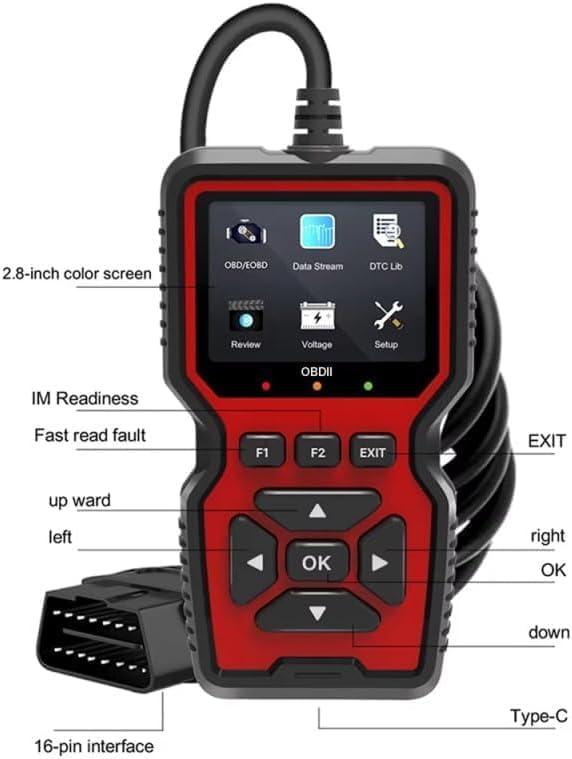
Figure 3.1: Front view of the V519 scanner with key components labeled. This image highlights the 2.8-inch color screen, function buttons (F1, F2, EXIT), directional navigation buttons (up, down, left, right, OK), and the integrated 16-pin OBD2 interface cable.
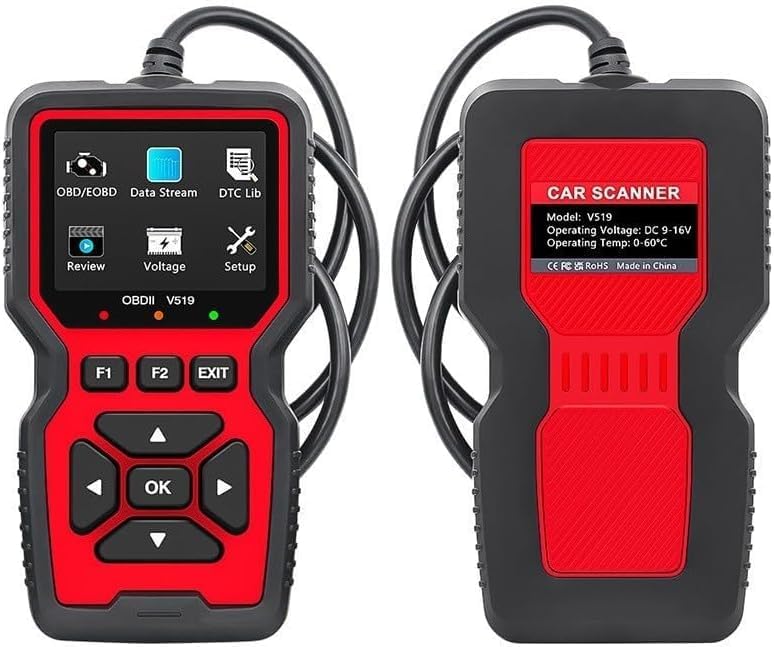
Figure 3.2: Front and back views of the V519 diagnostic tool. The front shows the display and control buttons, while the back displays model information, operating voltage, and temperature range.
3.2 Button Functions
- OK Button: Confirms a selection or enters a menu.
- Up/Down Arrows: Navigates through menu options or adjusts values.
- Left/Right Arrows: Moves cursor, changes pages, or navigates horizontally.
- EXIT Button: Returns to the previous menu or exits a function.
- F1/F2 Buttons: Function keys, their purpose may vary depending on the current screen.
4. Setup and Connection
The V519 scanner is designed for plug-and-play operation, requiring no external power source or batteries for basic functionality as it draws power directly from the vehicle's OBD2 port.
- Locate the OBD2 Port: The 16-pin Data Link Connector (DLC) is typically located under the dashboard on the driver's side. Refer to your vehicle's manual if you cannot find it.
- Turn Off Ignition: Ensure the vehicle's ignition is in the OFF position before connecting the scanner.
- Connect the Scanner: Plug the V519 scanner's integrated 16-pin cable firmly into the vehicle's OBD2 port.
- Turn On Ignition: Turn the vehicle's ignition to the ON position (engine off). The scanner will power on automatically.
- Initial Scan: The scanner will automatically establish communication with the vehicle's ECU. This may take a few moments.
5. Operating Instructions
The V519 scanner offers six main functions accessible from the main menu:
5.1 OBD/EOBD Diagnostics
This function allows you to read and clear Diagnostic Trouble Codes (DTCs) and view various vehicle status information.
- Read Codes: Displays current, pending, and permanent DTCs.
- Erase Codes: Clears DTCs from the vehicle's computer and turns off the Check Engine Light (MIL). Note: Clearing codes does not fix the underlying problem. Address the issue before clearing codes.
- I/M Readiness: Checks if the various emissions-related systems are operating correctly and are ready for inspection and maintenance testing.
- View Freeze Frame: Displays a snapshot of operating conditions at the time an emission-related fault occurred.
- O2 Sensor Test: Retrieves O2 sensor monitor test results for the most recently completed tests from the vehicle's on-board computer.
- On-Board Monitor Test: Retrieves results for emission-related powertrain components and systems that are not continuously monitored.
- Vehicle Information: Displays the Vehicle Identification Number (VIN), Calibration ID (CALID), and Calibration Verification Number (CVN).
5.2 Data Stream
View real-time vehicle sensor data and parameters. This function is crucial for monitoring engine performance, fuel system status, and emission readiness. Data can be displayed in text or graph format.
5.3 DTC Library
Access a comprehensive library of Diagnostic Trouble Codes (DTCs) and their definitions. Enter a code to get a detailed explanation, helping you understand the meaning of specific fault codes.
5.4 Review
Allows you to review previously stored diagnostic data, including DTCs and freeze frame data. This is useful for comparing diagnostic results over time.
5.5 Voltage Test
Monitors the vehicle's battery voltage in real-time. This can help identify potential issues with the vehicle's charging system.
5.6 Setup
Customize scanner settings such as language, unit of measure (metric/imperial), and display brightness.
6. Maintenance
6.1 Cleaning
Clean the scanner's casing with a soft, damp cloth. Do not use abrasive cleaners or solvents. Keep the screen free of dust and smudges for optimal visibility.
6.2 Storage
When not in use, store the V519 diagnostic tool in a dry, cool place, away from direct sunlight and extreme temperatures. Keep the cable neatly coiled to prevent damage.
7. Troubleshooting
| Problem | Possible Cause | Solution |
|---|---|---|
| Scanner does not power on. | Loose connection to OBD2 port; Vehicle ignition not ON; Vehicle battery low. | Ensure cable is securely connected. Turn ignition to ON position. Check vehicle battery voltage. |
| "Link Error" or "Communication Error" message. | OBD2 port faulty; Incorrect protocol detected; Vehicle ECU issue. | Verify OBD2 port is functional. Ensure vehicle is OBD2 compliant. Try connecting to another OBD2 compliant vehicle. |
| Screen is blank or frozen. | Software glitch; Power interruption. | Disconnect and reconnect the scanner. If issue persists, contact support. |
8. Specifications
| Feature | Detail |
|---|---|
| Model | V519 |
| Display | 2.4-inch Color Screen |
| Operating Voltage | DC 9-16V (from vehicle OBD2 port) |
| Operating Temperature | 0°C to 60°C (32°F to 140°F) |
| Storage Temperature | -20°C to 70°C (-4°F to 158°F) |
| Supported Protocols | OBDII/EOBD compliant protocols |
| Dimensions | 1"L x 3.1"W x 1"H (2.5 x 7.9 x 2.5 cm) |
| Power Source | Vehicle OBD2 port, 9V Battery (for memory backup) |
9. Warranty and Support
For warranty information or technical support, please refer to the documentation provided with your purchase or contact the retailer. Keep your purchase receipt as proof of purchase.


