
1. Introduction
This manual provides detailed instructions for the installation, operation, and maintenance of your EKAT Android Car Stereo. This advanced head unit is designed as a direct-fit replacement upgrade for Chrysler Town & Country and Dodge Grand Caravan models from 2000 to 2007. It integrates a large touchscreen display, Android operating system, and full multimedia capabilities into your vehicle's dashboard.
2. What's in the Box
Please verify that all components are present before proceeding with installation:
- Android Car Radio Unit
- Power Cable with CANBUS Decoder
- AHD Backup Camera
- User Manual and Installation Tools
- Assorted Parts (e.g., mounting brackets, screws)
3. Vehicle Compatibility
This EKAT Android Car Stereo is specifically designed for:
- Chrysler Town & Country (2000-2007)
- Dodge Grand Caravan (2000-2007)
It ensures a seamless fit and factory-style appearance within these vehicle models.
4. Setup and Installation
The EKAT Android Car Stereo features a plug-and-play design for simplified installation. It comes with three sets of wiring harnesses and a CANBUS decoder to match various model years, eliminating the need for wire cutting.
4.1. Installation Overview
The unit is engineered to replace your vehicle's original radio. The process typically involves removing the existing head unit, connecting the provided wiring harnesses, and securing the new Android Car Stereo into the dashboard.
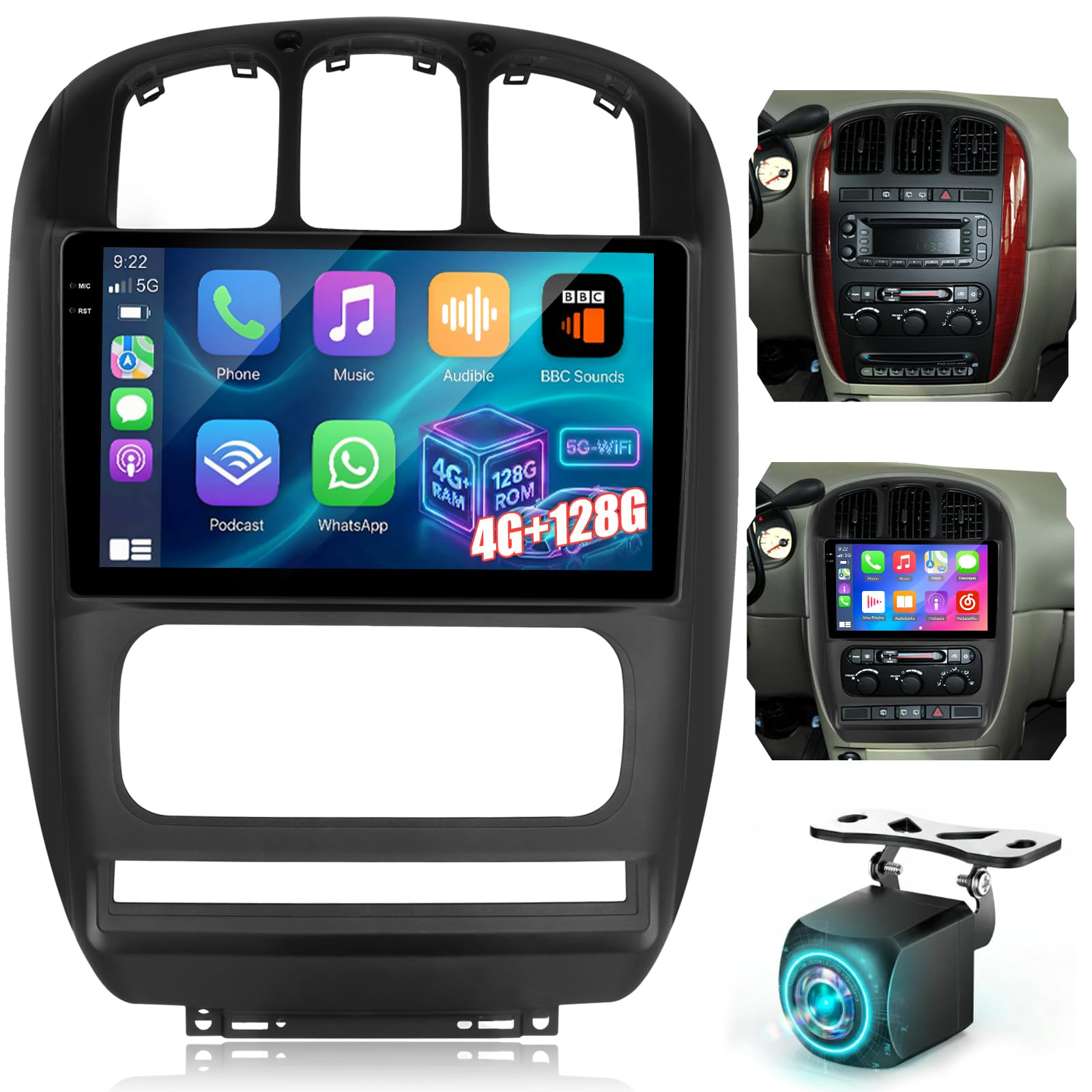
Image: Comparison of a vehicle dashboard before and after the installation of the EKAT Android Car Stereo. The 'Before' image shows the original factory radio, while the 'After' image displays the new 10-inch touchscreen unit seamlessly integrated into the dashboard.
4.2. Wiring Connections
Utilize the provided plug-and-play wiring harnesses. Ensure all connections are secure. The CANBUS decoder facilitates communication between the stereo and your vehicle's systems, such as steering wheel controls.
4.3. Backup Camera Installation
The included AHD backup camera should be mounted at the rear of the vehicle. Connect its video output to the designated input on the Android Car Stereo. Ensure the power wire for the camera is connected to the vehicle's reverse light circuit for automatic activation when shifting into reverse.
5. Operating Instructions
5.1. Android Operating System and Display
The unit runs on an Android OS with 4GB RAM and 64GB ROM, providing smooth performance and ample storage. The 10-inch touchscreen display features a 2.5D curved design and 1280×720 resolution for clear visuals and responsive touch control.

Image: A close-up of the 10-inch Android touchscreen display, showcasing its interface and sleek design.
5.2. Wireless CarPlay & Android Auto
Built-in wireless CarPlay and Android Auto allow seamless smartphone integration. The system automatically connects to your smartphone, enabling access to navigation, calls, messages, and music apps via voice commands. Mirror Link functionality is also supported for extended compatibility.

Image: The car stereo display showing the interfaces for Wireless CarPlay and Android Auto, with various app icons visible.
5.3. GPS Navigation & Online Entertainment
The unit supports multi-satellite GPS (GPS/Beidou/Galileo/Glonass) for accurate navigation. Connect to WiFi or a mobile hotspot to access online maps, stream content, and download apps. The split-screen feature allows simultaneous use of navigation and other applications.

Image: The car stereo screen displaying both online content streaming via 5GHz WiFi and a GPS navigation map interface.
5.4. Audio Experience
The head unit includes advanced EQ settings and subwoofer support for enhanced audio output. Bluetooth connectivity enables stable music streaming and hands-free calling.

Image: The car stereo display showing the graphical equalizer (EQ) adjustment interface, allowing users to fine-tune audio settings.
5.5. Backup Camera Display
When the vehicle is shifted into reverse, the display automatically switches to the AHD backup camera feed, providing a clear view of the area behind your vehicle. The camera offers night vision, is waterproof, and provides a wide viewing angle.

Image: The car stereo screen displaying the high-definition reverse camera view with parking guidelines, alongside an illustration of steering wheel control functionality.
5.6. Steering Wheel Controls
The unit supports existing steering wheel controls, allowing you to manage audio playback, volume, and other functions without taking your hands off the wheel. Refer to the on-screen interface for learning and customizing these controls.
6. Maintenance
To ensure the longevity and optimal performance of your EKAT Android Car Stereo, follow these maintenance guidelines:
- Cleaning the Screen: Use a soft, lint-free cloth to gently wipe the touchscreen. For stubborn smudges, slightly dampen the cloth with water or a screen-safe cleaner. Avoid abrasive materials or harsh chemicals.
- Software Updates: Periodically check for available software updates through the unit's settings menu. Keeping the software updated ensures access to the latest features and performance improvements.
- Environmental Conditions: Avoid exposing the unit to extreme temperatures, direct sunlight for prolonged periods, or excessive moisture.
- Cable Connections: Occasionally check all cable connections to ensure they are secure and free from damage.
7. Troubleshooting
If you encounter issues with your EKAT Android Car Stereo, refer to the following common troubleshooting steps:
- No Power: Check all power cable connections. Ensure the vehicle's ignition is on. Verify the fuse in the power cable.
- No Sound: Check speaker connections. Ensure the volume is not muted or set to zero. Verify audio settings in the system.
- Touchscreen Unresponsive: Try restarting the unit. If the issue persists, a factory reset might be necessary (note: this will erase user data).
- GPS Signal Lost: Ensure the GPS antenna is properly installed and has a clear view of the sky. Check GPS settings within the navigation application.
- CarPlay/Android Auto Not Connecting: Ensure Bluetooth and Wi-Fi are enabled on both the stereo and your smartphone. Verify that your phone is compatible and that the connection method is correctly selected.
- Backup Camera Not Displaying: Check the camera's video input connection to the stereo and its power connection to the reverse light circuit. Ensure the camera is not obstructed.
For persistent issues, please contact EKAT customer support.
8. Specifications
| Brand | EKAT |
| Model | 4GB+64GB |
| Operating System | Android |
| Memory Storage Capacity | 64 GB |
| Screen Size | 10 Inches |
| Display Type | Touchscreen (Capacitive) |
| Connectivity Technology | Bluetooth, USB, Wi-Fi |
| Special Features | Android OS with 4GB RAM and 64GB ROM, Plug-and-Play Upgrade, Wireless CarPlay & Android Auto |
| Supported Satellite Navigation System | BeiDou, GLONASS, GPS, Galileo |
| Included Components | Android Car Radio, Power Cable with Canbus, AHD Backup Camera, Manual and tools, Parts |
| Control Method | App, Touch, Voice |
| Compatible Devices | Smartphone |
9. Warranty Information
The EKAT Android Car Stereo comes with a 2-year warranty from the date of purchase. This warranty covers manufacturing defects and malfunctions under normal use. Please retain your proof of purchase for warranty claims. The warranty does not cover damage caused by improper installation, misuse, accidents, or unauthorized modifications.
10. Customer Support
For technical assistance, troubleshooting, or warranty inquiries, please contact EKAT customer support through the retailer where the product was purchased or visit the official EKAT store online.
Online Store: EKAT Store on Amazon