
1. Introduction
Thank you for choosing the Lysole P3 Max Walking Pad Treadmill. This manual provides essential information for the safe and effective use of your new fitness equipment. Please read it thoroughly before assembly, operation, or maintenance. Keep this manual for future reference.
2. Safety Instructions
- Always consult with a physician before starting any new exercise program.
- Place the walking pad on a firm, level surface. Ensure there is at least 0.6 meters (2 feet) of clear space around the unit.
- Important: Do not use the walking pad on carpets or soft flooring. Using it on such surfaces can impede heat dissipation from the motor, potentially causing overheating and reducing the product's lifespan. It can also lead to belt slippage and instability.
- Keep children and pets away from the walking pad during operation.
- Ensure the power cord is not pinched or damaged. Do not use if the cord is damaged.
- Do not attempt to disassemble or repair the walking pad yourself. Contact customer support for assistance.
- The maximum user weight for this device is 120 kg (265 lbs).
- Wear appropriate athletic footwear during use.

3. Package Contents
Please check the package for the following items:
- Lysole P3 Max Walking Pad Treadmill (Main Unit)
- Remote Control
- Power Cable
- User Manual (This document)
- Lubricant (if included)
4. Product Features
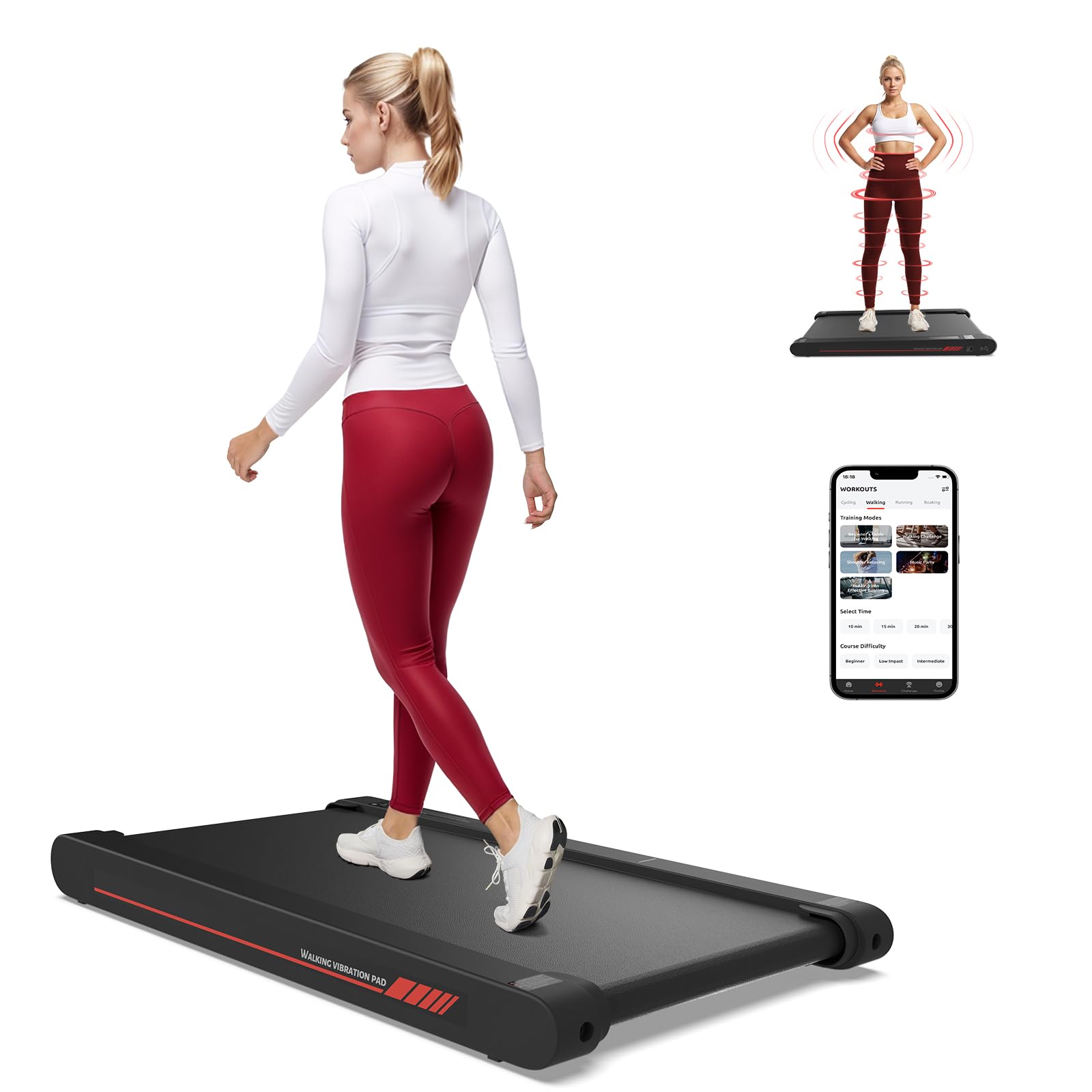
The Lysole P3 Max Walking Pad Treadmill is a versatile fitness solution designed for home and office use. Key features include:
- 4-in-1 Functionality: Combines walking, jogging, and 4 vibration modes for a comprehensive workout.
- Adjustable Speed: Speed range from 0.3 km/h to 6 km/h, suitable for slow walking to brisk jogging.
- Powerful Servo Motor: Provides consistent and reliable performance.
- Integrated LED Display: Shows essential workout data.
- Remote Control: Conveniently adjust settings during your workout.
- Mobile App Connectivity: Control the walking pad and access guided workouts via the Sperax Fitness app.
- Compact and Lightweight Design: Weighs only 10 kg and has a slim profile (8.9 cm thickness) for easy storage under furniture.

5. Setup Guide
5.1 Unpacking
Carefully remove the walking pad from its packaging. Retain all packaging materials for potential future transport or storage.
5.2 Placement
Place the walking pad on a hard, flat, and stable surface. Ensure adequate clearance around the unit for safety and proper ventilation. Avoid placing it on carpets or soft mats, as this can hinder motor cooling and affect performance.
5.3 Power Connection
Connect the power cable to the walking pad's power input port and then plug it into a standard electrical outlet. Ensure the power switch is in the OFF position before plugging in.
6. Operation Instructions
6.1 Powering On/Off
- To Power On: Flip the main power switch located on the unit to the 'ON' position. The LED display will illuminate.
- To Power Off: Press the power button on the remote control or flip the main power switch to 'OFF'.
6.2 Using the Remote Control
The remote control allows you to easily manage the walking pad's functions:
- Start/Stop: Press to begin or end a workout.
- Speed Adjustment: Use the '+' and '-' buttons to increase or decrease the speed.
- Mode Selection: Switch between walking/running modes and vibration modes.
6.3 Speed Adjustment (Walking & Running Modes)
The walking pad offers a flexible speed range:
- Slow Walking: 0.3 - 4 km/h. Ideal for light activity or under-desk use.
- Fast Walking/Jogging: 4 - 6 km/h. Suitable for more intense cardio.

6.4 Vibration Modes
The walking pad includes 4 adjustable vibration modes to enhance your workout or aid in recovery:
- Light Vibration Mode: Perfect for meditation and body stretching.
- Strong Vibration Mode: Designed to activate muscles throughout the body.
- Light Superposition Mode: Helps relax your hands and legs.
- Strong Superposition Mode: Aims to improve reflexive reactions, burn calories, and soothe post-workout fatigue.

6.5 Using the Mobile App (Sperax Fitness)
For enhanced control and guided workouts, download the Sperax Fitness app:
- Download the "Sperax Fitness" app from your device's app store.
- Follow the in-app instructions to pair your walking pad via Bluetooth.
- Once connected, you can control speed, mode, and access various exercise tutorials and personalized plans.

7. Maintenance
7.1 Cleaning
Regularly wipe down the walking pad with a damp cloth. Do not use abrasive cleaners or solvents. Ensure the unit is unplugged before cleaning.
7.2 Belt Lubrication
The walking belt requires periodic lubrication to ensure smooth operation and extend its lifespan. Refer to the lubricant instructions provided with your unit. Typically, apply lubricant every 3-6 months depending on usage.
7.3 Belt Adjustment
If the walking belt starts to slip or drift to one side, it may need adjustment. Use the provided hex key to make small adjustments to the tension bolts at the rear of the unit. Turn clockwise to tighten, counter-clockwise to loosen. Adjust incrementally and test after each adjustment.
8. Troubleshooting
| Problem | Possible Cause | Solution |
|---|---|---|
| Walking pad does not power on. | Power cable not connected; Main switch off; Power outlet issue. | Ensure power cable is securely plugged in. Check main power switch. Test outlet with another device. |
| Belt slips during use. | Belt too loose; Insufficient lubrication; Used on soft surface. | Adjust belt tension (see 7.3). Apply lubricant (see 7.2). Ensure use on hard, flat surface. |
| Remote control not responding. | Low battery; Remote not paired. | Replace remote control battery. Refer to pairing instructions (if applicable, usually automatic). |
| Unusual noise from the unit. | Loose components; Belt misalignment; Lack of lubrication. | Check for loose screws. Adjust belt alignment. Lubricate the belt. If noise persists, contact support. |
9. Specifications
| Brand | Lysole |
| Model Number | P3 max |
| Color | Grey |
| Product Dimensions (L x W x H) | 98.8 cm x 52.8 cm x 8.9 cm |
| Material | Acrylonitrile Butadiene Styrene (ABS) |
| Speed Range | 0.3 - 6 km/h |
| Maximum Power | 400 Watt |
| Recommended Maximum Load | 120 kg |
| Power Source | Electric Cable |
| Assembly Required | No |
| Special Feature | Lightweight, 4-in-1 functionality, App Control |
10. Warranty and Support
Lysole products are manufactured to high-quality standards. For warranty information, technical support, or service inquiries, please refer to the warranty card included with your purchase or contact Lysole customer service through the retailer where the product was purchased. Please have your model number (P3 Max) and purchase date available when contacting support.